Introduction
A new Android malware strain known as Crocodilus has rapidly evolved into a global threat, targeting users of banking apps, digital wallets, and cryptocurrency exchanges. This malware operates silently, hijacking critical permissions and mimicking financial applications to steal credentials, intercept OTPs, and exfiltrate funds — often without victims realizing they were compromised until it’s too late.
How Does Crocodilus Work? A Technical Breakdown
1. Infection via Trojanized or Phishing Apps
Crocodilus often disguises itself as:
- QR code scanners
- Crypto portfolio trackers
- Phone boosters or cleaner apps
- Financial management tools
Once installed, it requests Accessibility Services and Device Administrator rights. These permissions give it full control of the device, including UI interactions, SMS reading, and app overlays.
2. Fake Login Overlays
When a user launches a real banking or wallet app, Crocodilus detects the package and displays a pixel-perfect overlay — a fake login screen that captures credentials. The overlay disappears after submission, allowing the real app to load, making the attack virtually invisible.
3. Contact Spoofing and Social Engineering
Crocodilus adds fake entries into the contact list, impersonating:
- Bank helplines
- Crypto support desks
- Wallet recovery services
These contacts are then used for phishing or vishing (voice phishing) to collect OTPs, PINs, or verification links.
4. Remote Access and Fund Theft
Once credentials and OTPs are harvested, attackers issue commands to:
- Log in to banking apps
- Transfer funds
- Delete transaction alerts and call logs
- Mute notifications and hide SMS
Some versions of Crocodilus even disable security apps and prevent the user from uninstalling it by leveraging Device Admin permissions.
What Are Signs You May Be Infected?
- Unusual permission prompts from unknown apps
- OTPs received without initiating any transaction
- Missing SMS or bank alerts
- New unknown contacts labeled as “Support” or “Helpdesk”
- App uninstallation restrictions
- Unauthorized logins or withdrawals
Who Are High-risk Groups?
Anyone using Android — especially those who:
- Install apps outside of official app stores
- Click unknown SMS, WhatsApp, or Telegram links
- Do not review app permissions
- Rely solely on SMS-based 2FA
- Use financial apps on the go without secondary authentication
High-risk groups include:
- Mobile banking users
- Crypto investors
- Freelancers using wallet apps
- Elderly users unfamiliar with mobile permissions
How Can You Protect Yourself?
Do This
- Use apps only from Google Play Store
- Check and review app permissions regularly
- Lock banking apps with biometric or app lock
- Enable Google Play Protect
- Use mobile antivirus software
- Revoke Device Admin from suspicious apps
Avoid This
- Downloading APKs from unknown sources
- Granting Accessibility blindly
- Using only SMS OTP as 2FA
- Disabling security settings
- Keeping apps permanently with elevated rights
What Do You Do if You Are Infected?
Immediate Response Plan:
- Turn on Airplane Mode
- Boot into Safe Mode
- Uninstall suspicious apps
- Run antivirus/malware scan
- Change passwords from a clean device
- Contact your bank or exchange immediately
How Do You Report Financial Malware or Fraud?
If you suspect your financial credentials or funds were compromised:
- Report to your Financial Service Provider
- Report to your Mobile Service Provider
- Contact your Device Manufacturer Support
- File a complaint with Law Enforcement Cybercrime Division
- Report to your national CERT team
Keep records: screenshots, app names, URLs, phone numbers, and financial transaction IDs.
Conclusion
Crocodilus is a new breed of Android malware that combines social engineering, technical evasion, and UI deception to target users globally. Its silent, layered attack strategy makes it one of the most dangerous threats to mobile banking today.
By staying vigilant, avoiding suspicious apps, and understanding how permission abuse works, users can protect their devices, credentials, and funds.
Security Is Not an Option — It’s a Habit.
Technical Malicious APK Analysis Report
1. APK Overview
- APK Hash Details:
- MD5: f6f589d1a0a189aded4d008b671be0db
- SHA1: f425a592df7fe61a03673a48fda56e55f9d6165c
- SHA256: 6d55d90d021b0980528f56d040e78fa7b85a96f5c244e23f330f24c8e80c1cb2
- Package Name: nuttiness.pamperer.cosmetics
- App Name (Label): IKO
- Android Minimum SDK Version: 26
- Android Target SDK Version: 35
- Main Component: nuttiness.pamperer.cosmetics.uFAWABASFEFwvh
2. Permissions Overview
The APK requests a wide range of dangerous and intrusive permissions, indicating its intent to perform surveillance, phishing, and control of the device:
| Permission | Description |
| READ_SMS, RECEIVE_SMS, WRITE_SMS | Steal, intercept, and send SMS messages |
| READ_CONTACTS, WRITE_CONTACTS | Steal or tamper contact list |
| CALL_PHONE | Silent dialing of premium numbers |
| READ_PHONE_STATE | Collect IMEI/IMSI/device info |
| CAMERA | Capture photos/videos silently |
| INTERNET, ACCESS_NETWORK_STATE | Connect to C2 server or exfiltrate data |
| RECEIVE_BOOT_COMPLETED | Ensure execution after reboot |
| BIND_ACCESSIBILITY_SERVICE | Complete UI hijacking |
| BIND_DEVICE_ADMIN | Lock, wipe, or take full control |
| REQUEST_DELETE_PACKAGES | Silently uninstall apps |
| QUERY_ALL_PACKAGES | Identify installed banking/OTP apps |
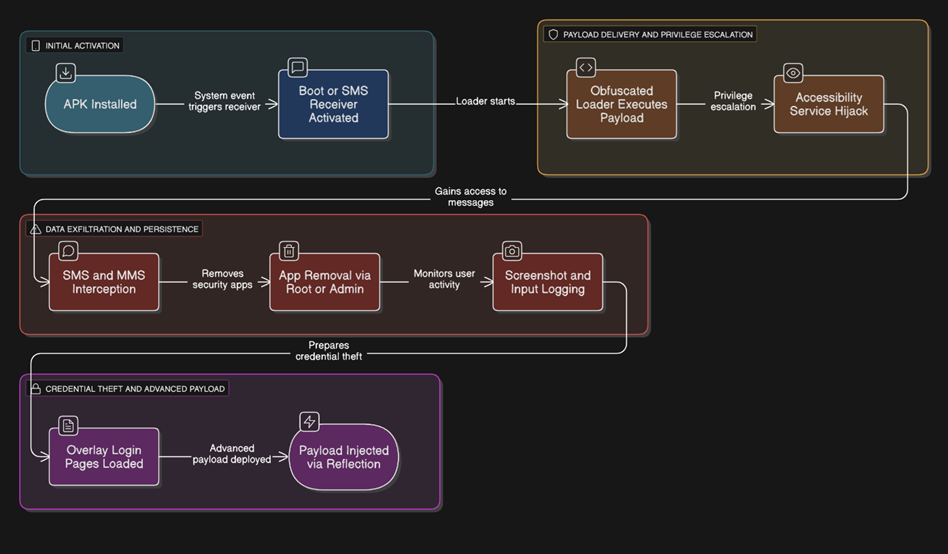
3. Execution Flow
Stage 1: Obfuscated Loader – Payload Preparation
- File: Monopolyhamstring.java
- Package: armydecrease.radiobagful
- Method Chain:
public static void violateuntagged(Context context, String str, byte[] bArr) {
improviseunderwear(context, str, bArr);
}
…
private static void unadornedhandclasp(Context context, String str, byte[] bArr) {
// No implementation – likely runtime payload injection
}
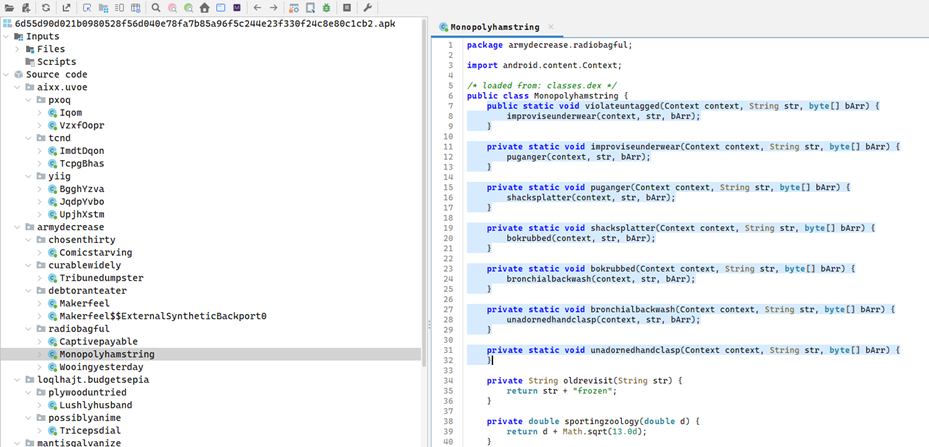
- Multi-layer method redirection likely decrypts and writes a hidden payload (.dex/.so) for runtime execution.
Stage 2: Persistence and Boot Execution
- Receiver: nuttiness.pamperer.cosmetics.qrNsfPHktbXX.JvwhVMVjSgK
- Intents: BOOT_COMPLETED, SMS_RECEIVED, PACKAGE_ADDED
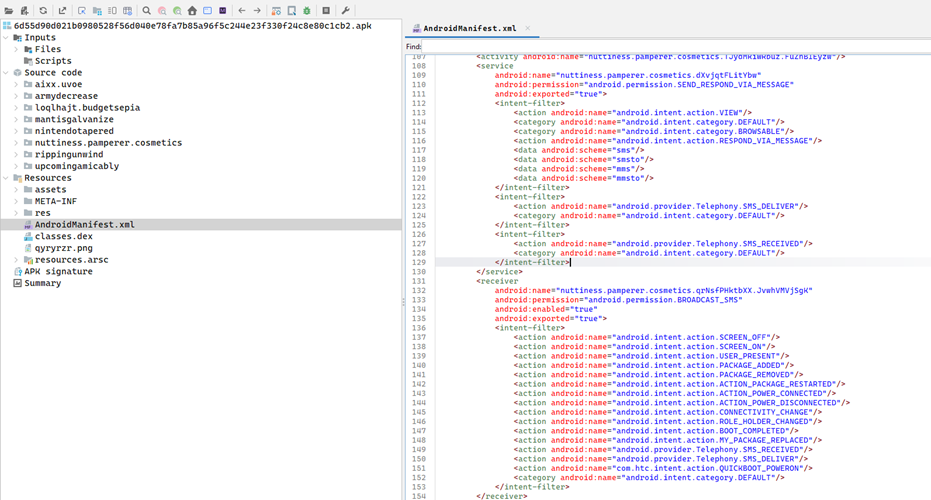
- Ensures the malware starts automatically on reboot or upon new SMS.
Stage 3: Accessibility and Admin Exploitation
- Service: iRhkqgbpsuK.dNCGxurzQUjoF
- Permissions: BIND_ACCESSIBILITY_SERVICE, BIND_DEVICE_ADMIN
- Component: NJWLtIfaF.qZNjmvvzOlM, NJWLtIfaF.nTsZKYXKEBeFL
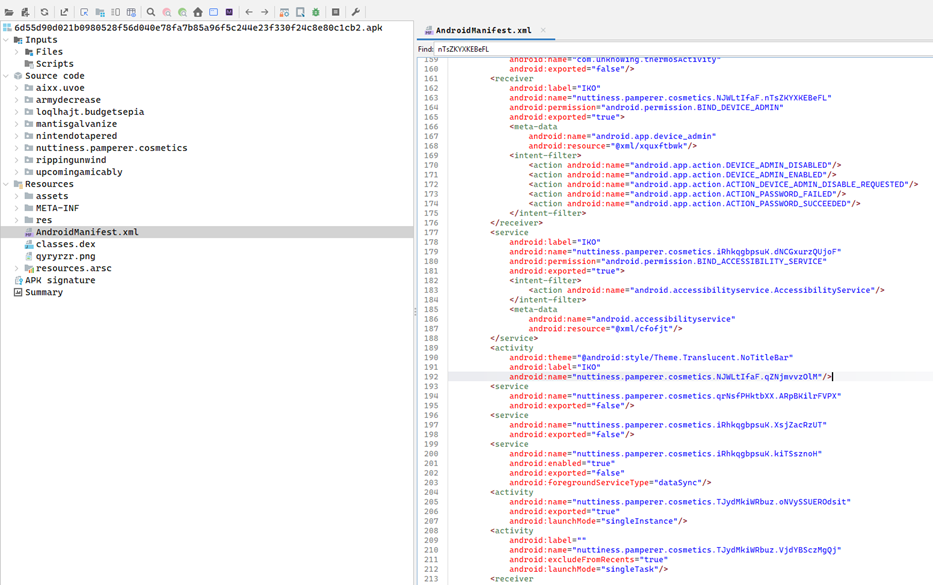
- Full control over UI, user interaction hijacking, possible keylogging or auto-permission granting.
Stage 4: SMS and MMS Interception
- Receiver: XFCcaJxgsv.GqDpxLfoTDmtcd, com.skewer.stormReceiver
- Intent Filters: SMS_RECEIVED, SENDTO, mms, smsto
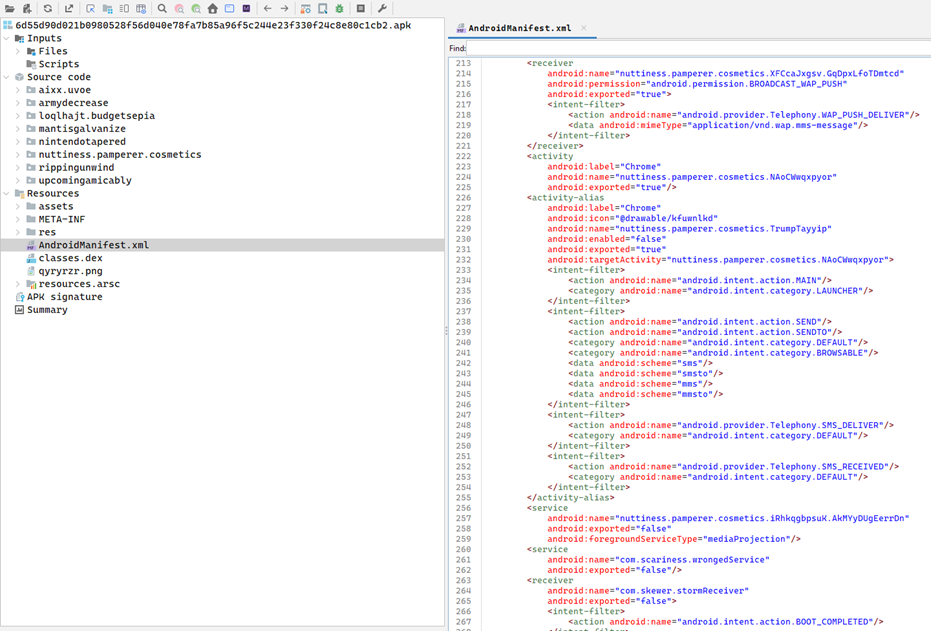
- Intercepts SMS/OTP, forward messages to C2 server.
Stage 5: Hidden App Removal Logic
- Class: mantisgalvanize.grudgewince.Camcorderthrill
- Method: Chains to Undertowtilt.snowdroprisk(context) which likely deletes selected packages
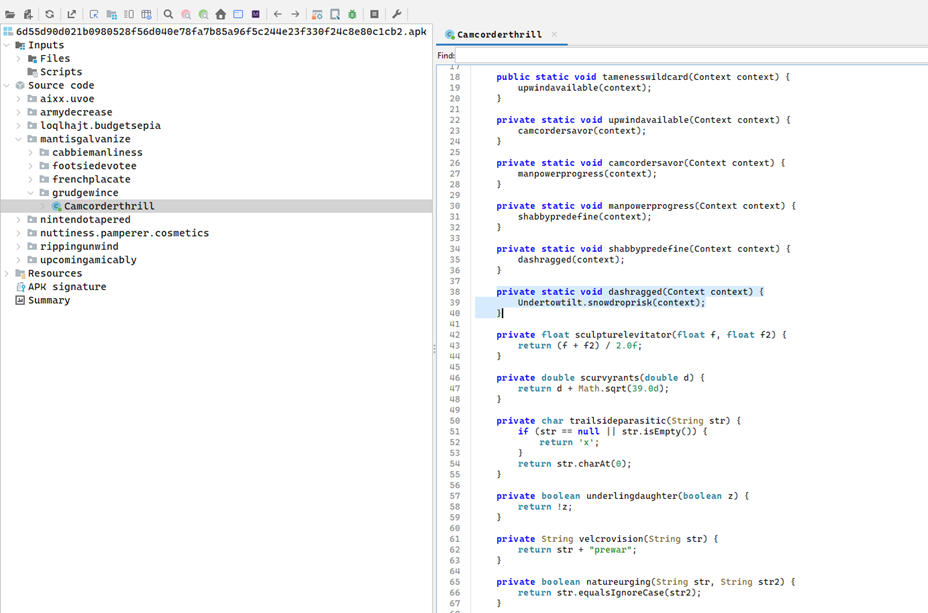
- Silently removes security tools or banking apps to evade detection.
Stage 6: Screenshot Capture and Keylogging
- Class: rippingunwind.backachemoistness.Penalizeunvalued
- Logic: Passes data to Groupedpecan.showcaseabrasive(context, byte[]) which is suspected to capture screen/input
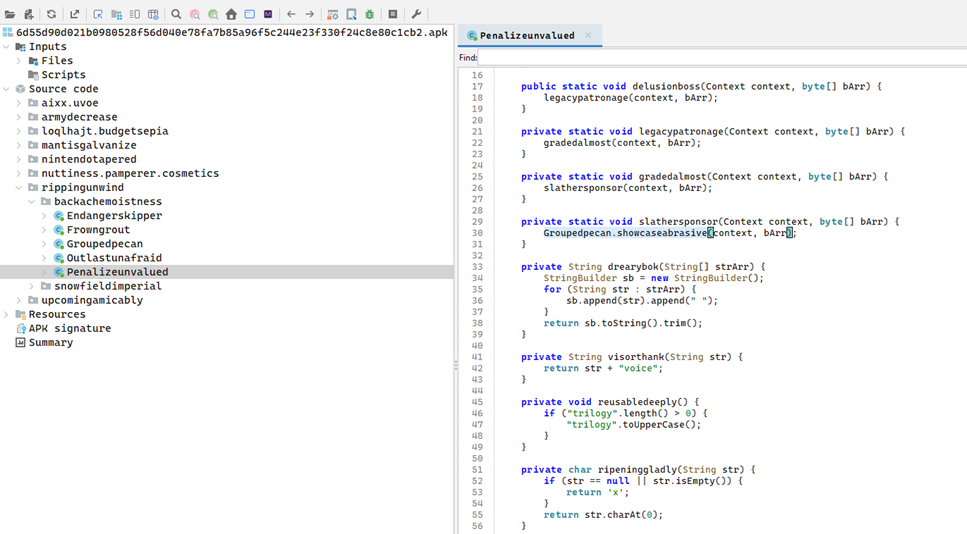
- Can log user credentials or sensitive data during transactions.
Stage 7: Overlay Attack for Credential Harvesting
- Class: upcomingamicably.pyromaniadiabetic.Claviclewashout
- Method: baggyvagrantly(Context, String) reads asset file dynamically
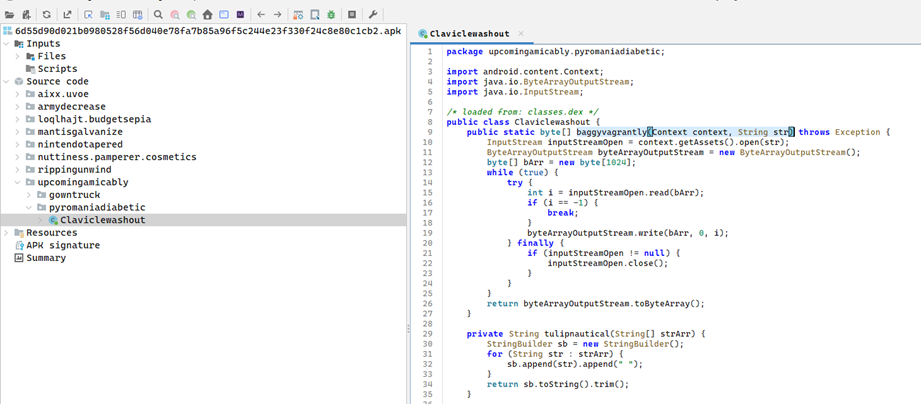
- Used to load phishing overlay templates that mimic login pages.
Stage 8: Dynamic Payload Injection via Reflection
- Class: nintendotapered.saidgoofiness.Unpaidpopsicle
- Method: herbalblot(Application, ClassLoader)
- Logic: Replaces internal class loader (mBase, mClassLoader) using reflection and XOR-decryption

- Hijacks runtime loader to inject and activate hidden payloads.
4. Summary of Malicious Activity
| Activity | Description |
| Payload Loader | Uses obfuscated method chaining to execute hidden payload at runtime |
| Persistence | Registers boot and SMS receivers to stay active |
| Admin & Accessibility Exploitation | Gains full control of UI and device management features |
| Surveillance | Hooks to camera/mic APIs and reads all messages silently |
| Communication Hijack | Auto-responds or forwards intercepted messages |
| Uninstallation Prevention | Uses admin privileges and root access to delete competitor apps |
| Screen Capture/Keylogging | Hooks screen APIs and captures touch/input events |
| Overlay Phishing | Loads HTML templates mimicking banking UIs via asset files |
| Dynamic Payload Injection | Uses reflection to change classloader at runtime |
5. Indicators of Compromise (IOCs) Summary
| Type | IOC / Artifact | Description |
| APK Hash | 6d55d90d021b0980528f56d040e78fa7b | File fingerprint (MD5) |
| Package Name | nuttiness.pamperer.cosmetics | Malicious package |
| Main Class | uFAWABASFEFwvh | Main execution entry |
| Permissions | READ_SMS, CAMERA, BIND_ACCESSIBILITY_SERVICE, etc. | Dangerous runtime access |
| Command & Control (C2) | Obfuscated – likely embedded in asset and decrypted at runtime | Dynamic communication endpoint |
| Receiver Components | JvwhVMVjSgK, GqDpxLfoTDmtcd, stormReceiver | Boot and SMS interceptors |
| Reflection Loader Class | Unpaidpopsicle.java | Runtime payload injection using reflection |
| Overlay Loader | Claviclewashout.java | Reads phishing UIs from assets |
| App Deletion Logic | Undertowtilt.snowdroprisk() | Possibly deletes security/banking apps |
| Runtime Hook | Groupedpecan.showcaseabrasive() | Captures screen or logs input |
6. Full Behavioral Map Flow Diagram
7. Recommendations
- Block and delete the APK from any endpoint immediately.
- Review logs and SMS activity on affected devices.
- Remove Device Admin access manually before uninstalling.
- Perform a factory reset on infected devices if full compromise is suspected.